
Contents 12 sections
- What Is an Internal Link?
- Why Are Internal Links Important?
- What Is Anchor Text and How Do You Choose It?
- Where Are Internal Links Built on an E-Commerce Site?
- What Is Click Depth and Why Does It Matter?
- What Is an Orphan Page and How Do You Find One?
- What Are a Broken Link and a Redirect Chain?
- How Do You Link from the Blog to Products and Categories?
- What Are Common Internal Linking Mistakes?
- Internal Link Checklist
- Internal Link Management with Faprika
- Frequently Asked Questions
Your store may have hundreds of products, dozens of categories and plenty of blog posts; but search engines and visitors find all of them only through the links between them. If no link points to a page, however well prepared it is, it stays like an island inside the site. Conversely, a few links placed in the right spots can make a product, a category or a guide visible at once.
In this guide we answer the question what is an internal link in plain language: the definition of internal linking, why it matters, how to choose anchor text, how to build menu, category, product and blog links in e-commerce, orphan page, broken link and redirect chain problems, click depth, common mistakes and a checklist. At the end you will find internal link management with Faprika and a six-question FAQ.
What Is an Internal Link?
An internal link (site link, internal link) is a link from a page within a domain to another page on the same site. A category link in the main menu, a “similar products” box on a product page and a sentence in a blog post that leads to a product are each an internal link.
The opposite of an internal link is an external link: a link to a page on another site. Think of an external link as one that takes the visitor out of your site, and an internal link as one that keeps and guides them inside it. In its simplest form it is this HTML line:
<a href="/kategori/spor-ayakkabi">spor ayakkabı modellerimiz</a>This line has two parts: the address the visitor will go to (href) and the clickable text shown on screen. This second part is called anchor text, and we cover it separately below. A person who clicks a link sees a new page; the search engine follows the link, discovers the new page and establishes a relationship between the two pages.
| Link type | Where does it go? | Example from e-commerce |
|---|---|---|
| Internal link | Another page on the same site | From a blog post to a category page |
| External link | A page on another site | An external page cited as a source |
| Incoming (back) link | From another site to your page | A link a publication gives to your store |
This article covers only the first row, that is, the links inside your own site. The good news is that internal links are entirely in your hands. Without waiting for links from outside sites, you can tidy up the path between your own pages today.
Why Are Internal Links Important?
Internal links do three jobs: they let the search engine find your pages, they distribute the importance signal pages pass to one another, and they help visitors move easily through the site. All three directly affect visibility and sales.
1. Crawlability: pages get found
The search engine’s crawler moves by following links from one page to another. If no link goes to a page, the crawler can reach it only through the sitemap or an external link, which means delay and uncertainty. In stores with many products, linking a newly added product from a category page on day one is the most natural way to speed up discovery. We covered the role of the sitemap in the what is a sitemap article; the map is a helper and does not replace internal links.
2. Distribution of page value
The more internal links go to a page, and the more important the pages these links come from, the more important that page looks within the site. The home page is usually the page that receives the most outside attention; a link given directly from the home page carries part of that attention to the target page. That is why it makes sense to link the category you want to promote not only from the menu but also from home page showcases and related articles. You can think of it as a water distribution network: links are the pipes, and important pages are the points where you want the water to arrive.
3. Navigation and conversion
If a visitor looking at a product can reach another related product, the size chart or the shipping information with one click, they stay longer on the site and are more likely to complete the decision process. Internal links are thus not just an SEO tool but part of the user experience. A dead-end page pushes the visitor to the back button or to another site.
| Area | Without internal links | With internal links built correctly |
|---|---|---|
| Discovery | The page is found late or never | A new page is discovered within a few hops |
| Importance signal | An important page gets lost in the crowd | The featured page receives more links |
| Topic relationship | The search engine cannot infer how pages relate | Anchor text conveys the topic and the relationship |
| Visitor | Dead-end page, early exit | The next step is always visible |
What Is Anchor Text and How Do You Choose It?
Anchor text is the clickable text of a link shown on screen. It tells both the visitor and the search engine in advance what the target page is about; that is why, instead of empty phrases like “click here”, you should choose short, natural phrases that state the topic of the target.
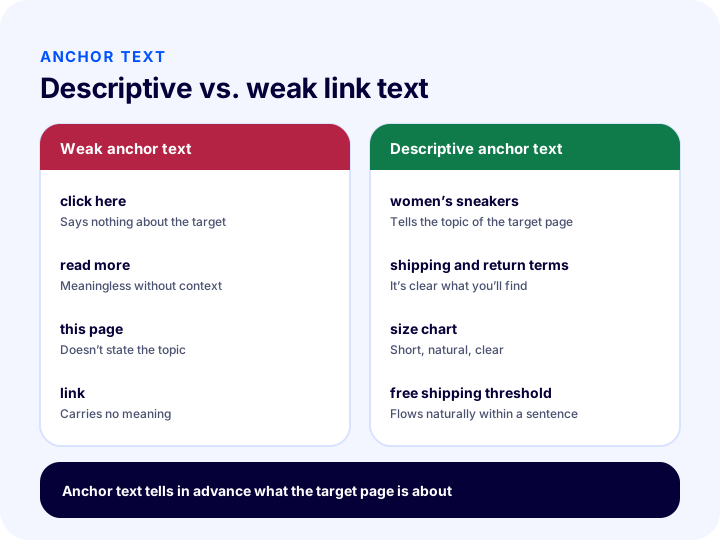
In the illustration, the left shows examples that say nothing about the target, and the right shows examples that state the topic clearly. Let’s also summarize the same information in text:
| Anchor text type | Example | Review |
|---|---|---|
| Empty phrase | click here, read more, link | Doesn’t describe the target; avoid |
| Bare address | the address itself is shown | Hard to read; only if necessary |
| Exact match | women’s sneakers | Clear and useful; don’t repeat it in the same form everywhere |
| Natural in-sentence | you can browse sneaker options for women | Fluent and varied; usually the preferred choice |
| Image link | the image’s alt text serves as the anchor | Write alt text that describes the subject |
Five rules for writing anchor text
- Name the topic. Someone clicking the link should be able to tell from the text where it leads.
- Keep it short. Two to five words are usually enough; do not turn a whole sentence into a link.
- Vary it. Linking to the same target with the exact same wording every time looks artificial; use natural variations such as “sneakers”, “sneaker models” and “everyday sneakers”.
- Don’t overdo it. Instead of stuffing keywords into the anchor text, write a readable phrase.
- Match the target. Writing “return policy” and sending people to a product page misleads both the visitor and the search engine.
Where Are Internal Links Built on an E-Commerce Site?
In e-commerce, internal links gather in six main areas: the main menu, category listings, related-product blocks on product pages, blog posts, the footer and in-page boxes. Each area does a different job; knowing what each one is for makes it easier to put a link in the right place.
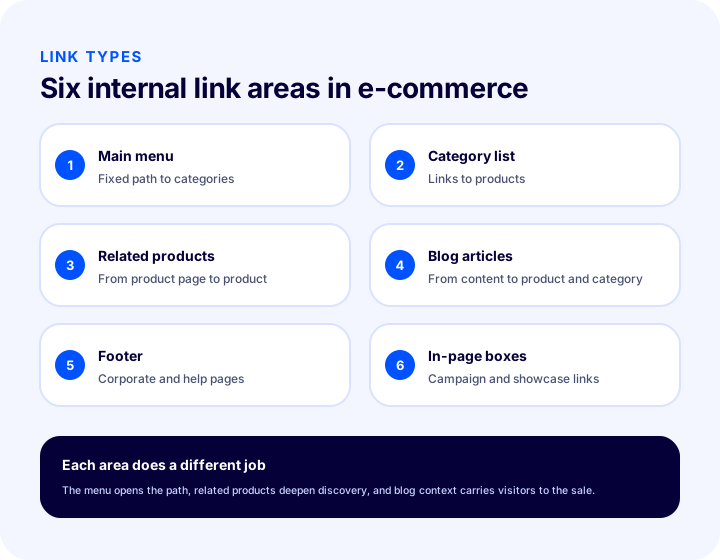
1. Main menu
The main menu is the most powerful set of links, visible on every page of the site. Because a category you put here is linked from every page, the site as a whole treats it as important. Overcrowding the menu dilutes that power; pick the most important categories and give the links clear titles. You can find the menu design in detail in the post how an e-commerce menu structure should be.
2. Category listing
A category page carries the links to the products in that category. Even if there are pagination, filter and sorting URLs, links to the products themselves must be easy to follow from the category page. We covered the search visibility of the category page in our category page SEO guide.
3. Related products
On the product page, “similar products”, “frequently bought together” or “complementary products” blocks keep generating new links between products. While offering the visitor options, these blocks also show the search engine how products relate to each other. It is important to link products that are genuinely related; random suggestions weaken both the visitor’s experience and the relationships you want to establish.
4. Blog posts
A blog post is the most natural gateway that brings someone searching for information to your store. A link inside the post carries the reader to a related category, product group or another guide. Linking from the blog to products and categories is covered under a separate heading.
5. Footer
The footer is an area repeated on every page. Supporting and corporate pages such as return policy, delivery information, about us and contact live here. Putting such pages in the footer, instead of piling in products or categories, lets visitors find the information they need from anywhere.
6. In-page boxes
Showcases on the home page, campaign strips and “best sellers” boxes give direct, broad access to the products and categories you want to feature. Links in these areas can change over time; think of them as a complement to the permanent menu links, in a way that does not disturb the underlying structure.
| Field | Main role | Point to watch |
|---|---|---|
| Main menu | Opens a fixed path to categories | Don’t add too many headings |
| Category list | Leads to products | Keep product links easy to follow |
| Related products | Deepens discovery | Link genuinely related products |
| Blog articles | Brings information seekers to the store | Choose categories and products that fit the topic |
| Footer | Leads to help and corporate pages | Don’t turn it into a product list |
| In-page boxes | Quickly shows what stands out | It should not replace the permanent structure |
What Is Click Depth and Why Does It Matter?
Click depth is the minimum number of clicks needed to reach a page from the home page. Important pages should be as close to the home page as possible, because the farther a page is from the home page, the later both visitors and search engines reach it.
Let’s think of a concrete example: the home page (click 0), the “Women” category (click 1), the “Shoes” subcategory (click 2) and a product (click 3). The product is reachable in three clicks. If the same product is reachable only from a list on the second pagination page, the depth can rise to five or six and the product may lose visibility.
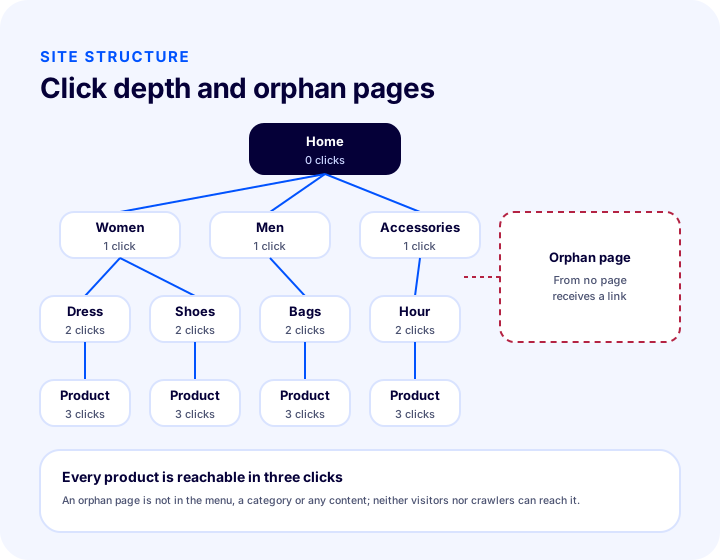
The illustration shows a tidy four-level structure and, beside it, an “orphan page” that receives a link from no page. The orphan page is the subject of the next section.
Ways to reduce depth
- Don’t make the category tree needlessly deep. Build a logical, flat structure instead of a category tree with four or five layers.
- Move important products to upper pages. Link best-selling or priority products from the home page showcase and the top-level category page.
- Use related-product boxes. Making a product reachable by more than one path effectively reduces its depth.
- Link directly from blog posts. A post opens a shortcut to a deep product or category.
What Is an Orphan Page and How Do You Find One?
An orphan page is a page that receives a link from no other page on your site. It opens if the address is typed directly and may even appear in the sitemap, but there is no way to reach it by browsing; so visitors cannot find it, and the search engine treats it as unimportant.
In e-commerce, orphan pages mostly arise for innocent reasons:
- A product was removed from its category but its page was left open.
- A campaign page was published, but its links were removed after the campaign ended.
- A blog post was published but never linked from any post, category or menu.
- The menu changed during a migration or redesign, and some pages were left without links.
Finding an orphan page
The basic way to find an orphan page is to compare two lists: the list of all pages you know exist on your site (for example the addresses in the sitemap) and the list of pages reachable by following links within the site. A page that is in the first list but not in the second is an orphan. Site audit tools that crawl links can do this comparison for you.
Fixing an orphan page
- If the page is still valuable, link to it from the relevant category, the menu or a related post.
- If the page is no longer needed, remove it and permanently redirect its address to a related page; for redirects, see the post what is a 301 redirect.
- If the page is not wanted in search results, prevent it from being indexed; to see which tool does what, take a look at the guide what is robots.txt.
What Are a Broken Link and a Redirect Chain?
A broken link is an internal link that points to a page that does not exist or returns an error; a redirect chain is a link that passes through more than one redirect before reaching its target. Both slow the visitor down and send the search engine an untrustworthy signal.
Broken link
When you delete a product, change a category’s address or remove a page, internal links pointing to that page can be left broken. The visitor clicks the link and sees a “page not found” error, an experience that shakes trust. The search engine also sees this error while crawling and wastes time. There are two ways to fix a broken link: point the link to the correct address, or permanently redirect the removed page’s address to the new page.
Redirect chain
If an address is redirected from A to B and from B to C, and internal links still point to A, the visitor and the browser make two hops. Each hop takes a little time. The right fix is to change the internal link to point directly to the final address (C).
| Problem | What happens? | Solution |
|---|---|---|
| Broken internal link | The visitor sees an error page | Point the link to the correct address or redirect the old address |
| Redirect chain | The page opens slowly because of needless hops | Link directly to the final address |
| Link to a redirected address | An extra redirect runs on every click | Update the link to the redirect’s target |
| Link to a parameterized address | The duplicate address is strengthened instead of the main address | Link to the main address without parameters |
The last row is an important detail: internal links should always point to the page’s main address. Linking to an address that carries a sorting or tracking parameter strengthens the duplicate address. We explained the concept of the main address in detail in the post what is the canonical tag.
We recommend readingWhat Is a 301 Redirect? Recommended readingWhat Is a Canonical Tag?How to Link from the Blog to Products and Categories?
A link in a blog post is a link that carries a reader looking for information, in a natural flow, to a related category or product. When the topic of the post and the topic of the target page overlap, a meaningful path is opened for both the reader and the search engine.
For example, a post on “how to choose winter boots” can link to the boots category in your store, and a post on “shoe care” to the care products category. The link should be placed in the natural flow of the post, in the relevant sentence; a list of links added at the end is clicked less and carries less meaning.
Characteristics of a good blog link
- It matches the topic. Whatever the post explains, the page it links to is related to it.
- The anchor text is descriptive. Phrases that describe the target, such as “winter boot models”, are used.
- It is reasonable in number. Instead of adding a link to every paragraph, pick the few most relevant points in the post.
- It works both ways. A link from the category or product page to a related guide ties information and product together.
- It is kept up to date. If a link in a post points to a removed page, it should be fixed.
You can find the relationship between product search and filtering experience in e-commerce and the internal structure in the post e-commerce product filtering and search bar optimization.
What Are Common Mistakes in Internal Linking?
The most common internal linking mistakes are not adding links at all, using empty anchor text, linking to parameterized addresses, not fixing broken and redirected addresses, and overshadowing what matters by adding too many links. Most mistakes are easily fixed once noticed.
| Mistake | Why is it a problem? | The right approach |
|---|---|---|
| Not linking to a new page at all | The page becomes an orphan | Link from a category, menu or post when publishing |
| Using “click here” | It doesn’t describe the target | Write anchor text that names the topic |
| The same anchor text everywhere | It looks artificial and helps the visitor little | Use natural variations |
| Linking to a parameterized address | The duplicate address is strengthened | Link to the main address |
| Leaving broken and redirected addresses | Loss of speed and trust | Update the link to the final address |
| Piling everything into the menu | The important category gets lost in the crowd | Choose the most important categories |
| Giving the link only through an image | If the alt text is weak, the target isn’t understood | Write the image’s alt text correctly |
| Linking to an unrelated page | Misleads the visitor and the relationship | Link to a page that genuinely matches the topic |
Many links don’t mean good links
When you put many links on a page, the weight of each link decreases and the visitor is unsure where to click. Each link in the menu, the showcase and the footer should serve a purpose. Links added just because “it won’t hurt” can overshadow the important ones. Judge a link not by number but by the benefit it brings to the visitor and the topic.
Internal Link Checklist
The internal link checklist lets you audit, in eight items, whether the link structure of a page or the whole site is healthy. It is enough to go through these items when you publish a new page and after a major change.
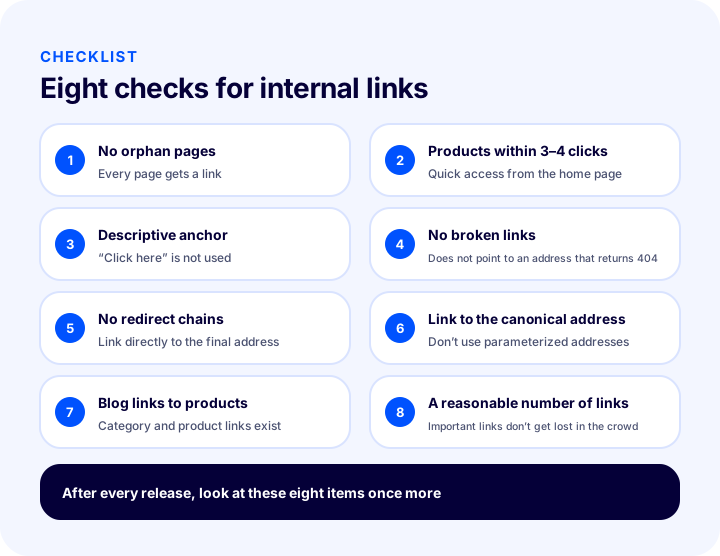
| # | Check | Question |
|---|---|---|
| 1 | No orphan pages | Does at least one internal link go to every page? |
| 2 | Products in three or four clicks | Are important products reached quickly from the home page? |
| 3 | Descriptive anchor text | Does the link text describe the target? |
| 4 | No broken links | Does any link go to an error page? |
| 5 | No redirect chains | Do links go directly to the final address? |
| 6 | Link to the main address | Is the main address without parameters used? |
| 7 | Blog links to products | Do posts have links to the relevant category and product? |
| 8 | Reasonable number of links | Do the important links get lost in the crowd? |
The most solid way to use the list is to run a quick pre-check for every new page: before publishing the page, decide which pages will link to it, which pages it will link to and what the anchor text will be. This habit is far cheaper than hunting orphan pages later.
Internal Link Management with Faprika
The Faprika e-commerce infrastructure has several areas that feed internal linking: menu and category management, showcase management, product relationship settings and the store’s blog feature. Each of these areas corresponds to one of the link points we described earlier.
According to the Menu Management training in the Help Center, the site’s menus are edited in the control panel under Content Management, in the Menu Management area; you can list and sort menu headings and add new ones. If “Main Menu” is chosen as the parent menu, the added heading appears in the home page’s menu area. The category structure is built under Catalog, in the Category Management area; according to the Help Center, you can add, edit and delete categories there. Building the category tree logically and flat is the first step in reducing click depth.
The Showcase Management tutorial explains how to use showcases on the home page and category pages to highlight priority products and place campaign visuals. These showcases are a practical way to link directly to key categories and products from the home page. The plan feature comparison also includes the “Showcase / Banner Management (Mobile / Tablet / Desktop)” and “Blog” rows.
The “Related / Cross-sell / Complementary / Checkout Offer Product Settings” row, which powers the links between products, appears in the plan comparison and varies by plan; you can see the current scope on the e-commerce plans page. The same comparison also includes the “Taxonomy / Rich Snippets / Breadcrumb” row, which is marked as optional. For fixing broken URLs with permanent redirects there is the “301 / 302 / 410 Panel / Managing URL Records” row, and for general search visibility settings the “Canonical / H Tag Management / Robots / Sitemap” row; their scope may also vary by plan.
To set up the title, description and URL settings for your whole store together, the guide how to set up e-commerce SEO settings will help. For describing your pages to search engines in a structured way, see the article what is structured data, and for click-through in search results, the guide how to write a meta description.
Frequently Asked Questions
What is an internal link?
An internal link is a link from one page on a site to another page on the same site. Menu links, related product boxes on a product page and links from a blog post to a category are all internal links. They move the visitor through the site and show the search engine how pages relate to each other.
Why are internal links important for SEO?
Internal links help the search engine find your pages, understand which pages matter, and infer the topic of pages from the anchor text. A page that receives no links is discovered late or looks unimportant. They also help visitors browse the site easily.
What is anchor text and how do you write it?
Anchor text is the clickable text of a link that appears on screen. It should be a short, natural phrase describing the topic of the target page. Instead of empty phrases like “click here” or “read more”, phrases that name the target, such as “women’s sneakers” or “return terms”, are preferred; you can link to the same target with different but natural variations.
What is an orphan page?
An orphan page is a page that receives a link from no other page on the site. It opens if the address is known but cannot be reached by browsing, so visitors and the search engine struggle to find it. The fix is to link to it from relevant pages if it is valuable, or to remove it and redirect if it is not.
How many internal links should a page have?
There is no fixed number. Important pages should receive links from the menu, categories, related products and related articles; but what matters is not the number of links but their relevance to the topic and the value they give the visitor. Piling unnecessary links onto a page can overshadow the ones that really matter.
How do you fix a broken internal link?
First check the address the link points to. If the page has moved, update the link to the new address; if the page has been removed, permanently redirect (301) the old address to a relevant page and update the link to point directly to the final address. This way visitors see no error and no unnecessary redirect hop occurs.