

Contents 12 sections
- What Is a Breadcrumb?
- Why Does a Breadcrumb Matter?
- What Are the Types of Breadcrumbs?
- How Do You Build the Right Breadcrumb Trail in E-Commerce?
- If a Product Is in Several Categories, Which Trail Is Shown?
- How Is BreadcrumbList Structured Data Written?
- How Should a Breadcrumb Be Displayed on Mobile?
- Breadcrumb Clickability and Accessibility
- What Are Common Breadcrumb Mistakes?
- Breadcrumb Checklist
- Breadcrumbs and Site Structure with Faprika
- Frequently Asked Questions
A visitor lands on a product page in your store from search results, an ad or a link a friend sent. They haven't seen the home page or browsed the categories; they look on the page for the answer to “Where is this product on the site, and how do I reach similar ones?” If there is no answer, they either press the back button or get lost in the menu. The search engine crawling the page asks the same question: where does this page fit in the site's structure?
In this guide we answer the question what is a breadcrumb in plain language: the definition of the content path, also known as breadcrumb navigation, its three types, how to build the right trail on product and category pages, how to choose a single trail if a product is in several categories, a short code example of BreadcrumbList structured data, mobile display, clickability, common mistakes and a checklist. At the end you will find information about Faprika and a six-question FAQ.
What Is a Breadcrumb?
A breadcrumb is a navigation element at the top of a page that shows the visitor's position in the site's hierarchy through ordered links such as “Home › Women › Shoes”. It is also called a breadcrumb trail or content path.
The origin of the name is clear: in the fairy tale, children leave breadcrumbs behind them so they can find their way in the forest. A breadcrumb likewise makes the path the visitor took and the points they can return to visible on the page. Each level is a link; the visitor can go up to a parent category or the home page with one click.
In e-commerce a breadcrumb is usually placed at the very top of the page, just above the heading. Its simplest form is a single line showing the hierarchy from left to right: first the home page, then the main category, the subcategory and, last, the current page. The last item, that is, the name of the product or category, is not a clickable link because you are already on its page; it is written as plain text.
A breadcrumb does not replace the main menu; it complements it. The main menu answers “where can I go?”, while the breadcrumb answers “where am I and how do I go back?” When the two work together, the visitor feels secure on the site. To plan the menu structure itself, see the post how should an e-commerce menu structure be.
Why Does a Breadcrumb Matter?
A breadcrumb does three jobs: it helps the visitor find their bearings, lets them go up to parent categories with one click and explains the site's hierarchy to the search engine clearly. All three benefits serve the conversion and visibility goals of an e-commerce site.
For the visitor: finds their bearings and can go back
A significant share of visitors arriving from outside land directly on a product page. For this person the product page is the front door of the site. The breadcrumb shows which category the product belongs to and how to reach similar products. A visitor who doesn't like the product can go up to a parent category and look at alternatives instead of pressing the back button and leaving your store.
For the search engine: understands the hierarchy
The search engine reads the relationships between pages from links. A breadcrumb builds an orderly chain of links from every product page to its category, then to the parent category and the home page. This chain describes the site's structure consistently; when it is also supported by structured data, the address line in search results may be shown as a readable path instead of a long URL. Keep in mind that display is not always granted; it is the search engine's decision.
For internal linking: constant links to categories
The breadcrumb on every product page adds a natural internal link to category pages. In a store with thousands of products, this means category pages are continuously supported across pages. A breadcrumb does this work again and again on every page without extra effort.
| Who benefits? | What does a breadcrumb provide? | Result |
|---|---|---|
| Visitor | Shows their location and the points to go back to | Looks at alternatives without leaving the site |
| Search engine | Reports the page's place in the hierarchy | The site structure is understood more clearly |
| Category pages | Receives a link from every product page | The internal link network gets stronger |
| Store manager | Requires no extra menu or page | Constant benefit for little effort |
What Are the Types of Breadcrumbs?
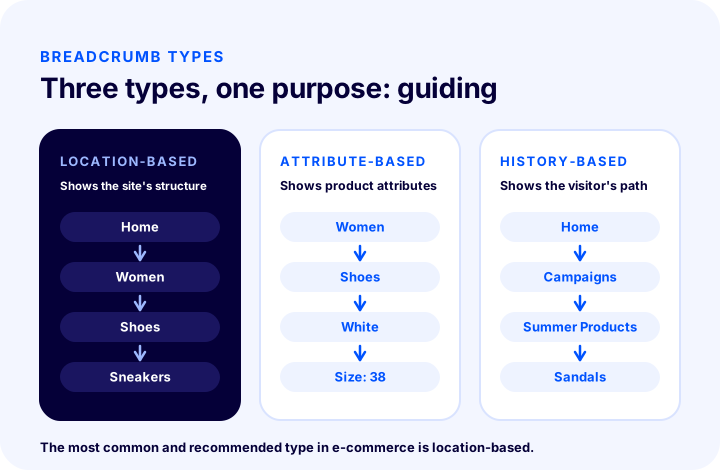
Breadcrumbs fall into three types: location-based (shows the site's structure), attribute-based (shows the product's attributes) and history-based (shows the pages the visitor has browsed). In e-commerce the most common and safest option is the location-based one.
1. Location-based breadcrumb
It shows the site's category hierarchy: Home › Women › Shoes › Sneakers. The trail does not depend on where the visitor came from; the same trail appears every time the product is opened. This consistency is the easiest form to understand for both the visitor and the search engine. For e-commerce sites, choosing this one by default is recommended.
2. Attribute-based breadcrumb
It lists the attributes a product has: for example Women › Shoes › White › Size 38. Because a product can have more than one attribute, this type can blur the hierarchy. Even on sites with heavy use of filter pages, it is safer to prefer the location-based trail on the product page.
3. History-based breadcrumb
Shows the pages the visitor browsed during that session. It works like the browser’s back button, but the same product appears with a different path for each visitor. Because the content and structure of the page change from visitor to visitor, it creates uncertainty for search engines and is not recommended in e-commerce.
| Type | What does it show? | Consistent on the product page? | E-commerce recommendation |
|---|---|---|---|
| Location-based | Category hierarchy | Yes, always the same path | Default choice |
| Attribute-based | Product features | Limited, attributes can multiply | Avoid on the product page |
| History-based | Pages the visitor browsed | No, it varies from person to person | Not recommended |
How to Set Up the Right Breadcrumb Path in E-Commerce
The right breadcrumb path starts at the home page, follows the category hierarchy the product belongs to in order, and shows the current page as the last item in plain text. Every upper level must link to a real, working category URL.
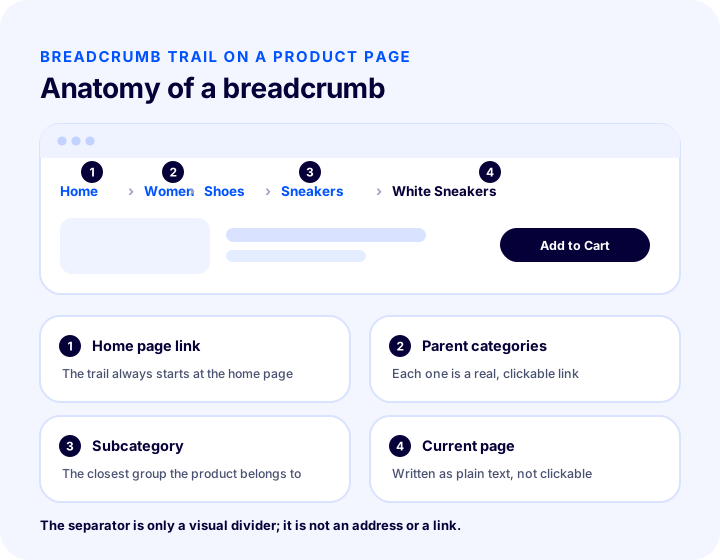
Here is what each of the four parts in the illustration does:
- Home page link. The path always starts at the home page. This lets visitors return to the start in one click and also defines the root of the hierarchy.
- Parent categories. The main category the product belongs to, and any intermediate levels, are real links. Clicking one should open that category’s product list.
- Subcategory. The closest group the product belongs to, that is, the category nearest to the product. For the visitor, this is often the most useful link; it leads to similar products.
- Current page. The name of the product or category comes last, as plain text. Linking to its own page makes no sense and misleads the visitor.
Breadcrumb on the product page
On the product page, the path shows the chain of categories the product belongs to and, at the very end, the product name: Home › Women › Shoes › Sneakers › White Sneakers. Keep the product name short; very long names overflow the line. If necessary, the product name can be shortened, but it must not contradict the heading on the page. You can find the remaining elements of a product page in the article how should an e-commerce product page be.
Breadcrumb on the category page
On the category page, the path shows the category’s upper levels and gives the category name as the last item in plain text: Home › Women › Shoes. Because the category page matters for SEO, a correct and consistent path makes the category page’s place in the hierarchy clearer. You can read the other steps for strengthening category pages in the article category page SEO.
Breadcrumb on filter and sort pages
When a visitor filters a category by color, size or price, the breadcrumb should not change; it should keep showing the category path. Adding filter selections to the path makes each combination look like a new hierarchy level and lengthens and breaks the path. Filter and sort selections should be shown in a separate area of the page; the breadcrumb should carry the category’s own path. For how to design the filters themselves, see the article product filtering and search bar optimization.
Pagination and search results
On the second and later pages of a category, the path is the category’s path; the page number is not added to the path as a new level. On on-site search result pages, there is no hierarchy, because results do not belong to a single category. There, it is more correct not to show a breadcrumb, or to use a simple path that links only to the home page.
| Page type | Breadcrumb path | Last item |
|---|---|---|
| Product page | Home › Category chain › Product | Product name, plain text |
| Category page | Home › Parent categories › Category | Category name, plain text |
| Filtered category | The category’s own path; no filters added | Category name |
| Pagination | The category’s path; no page number added | Category name |
| On-site search result | No hierarchy; do not show, or show the home page only | Search result heading |
Which Path Is Shown If a Product Is in Multiple Categories?
If a product is in more than one category, the breadcrumb should always show a single path: the path of the product’s main (primary) category. The product can also be listed in other categories, but the path at the top of the page does not change.
In e-commerce, it is very common for a product to appear in several categories: a sneaker can be under “Women › Shoes”, “Sports” and “New Arrivals” at the same time. The problem starts if the product page’s path changes depending on which of these categories the visitor came from. When the same product page shows a different path on every visit, the page’s place in the hierarchy becomes unclear.
How is the primary category chosen?
- Choose the most specific and deepest category. Instead of temporary or campaign-type groups such as “New Arrivals”, the product’s permanent category (“Women › Shoes › Sneakers”) should be the primary one.
- Consider the visitor’s expectation. The path should follow whichever category most people think of when looking for the product.
- Be consistent. Choose with the same logic for products of the same type; a product’s primary category should not be one thing one day and another the next.
- Do not lose the other categories. The product continues to appear in the lists of the other categories; only the breadcrumb carries a single path.
The primary category choice should also be consistent with the product page’s canonical address. When a product opens from more than one address, the canonical tag is used to indicate which address is the main one; the path in the breadcrumb and the hierarchy described by the canonical address should support each other.
How Is BreadcrumbList Structured Data Written?
BreadcrumbList is a structured data type that writes the breadcrumb path into the page as a code block in a form search engines can read directly. It is a machine-readable copy of the path visible on the page.
The breadcrumb shown on screen is for the visitor; structured data gives the same information to the search engine in a standard format. The most common way to write it is a JSON-LD code block added to the page. An example for a four-level path looks like this:
<script type="application/ld+json">
{
  "@context": "https://schema.org",
  "@type": "BreadcrumbList",
  "itemListElement": [
    { "@type": "ListItem", "position": 1, "name": "Ana Sayfa",
      "item": "https://magazaadresiniz/" },
    { "@type": "ListItem", "position": 2, "name": "Kadın",
      "item": "https://magazaadresiniz/kadin" },
    { "@type": "ListItem", "position": 3, "name": "Ayakkabı",
      "item": "https://magazaadresiniz/kadin/ayakkabi" },
    { "@type": "ListItem", "position": 4, "name": "Spor Ayakkabı" }
  ]
}
</script>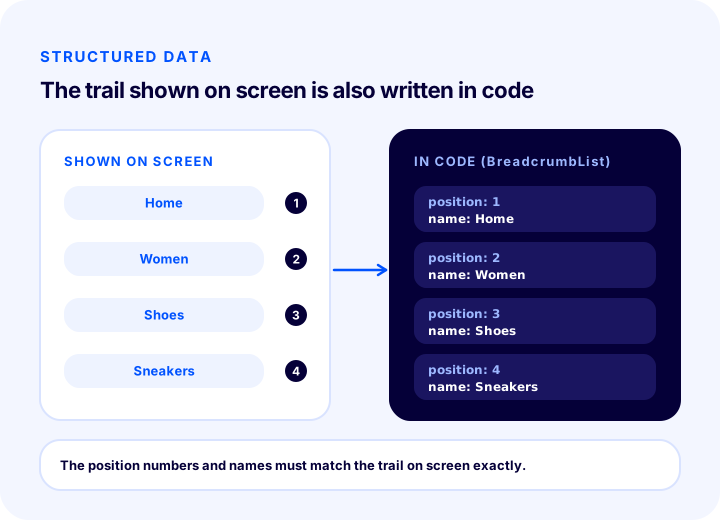
The parts of the code are as follows:
| Field | What to write? | Point to watch |
|---|---|---|
| @type: BreadcrumbList | The type of the list | Must be spelled exactly; case matters |
| itemListElement | Each level of the path, in order | The order must be the same as on screen |
| position | The sequence number of the level, starting from 1 | There must be no skips or repeats |
| name | The displayed name of the level | Must match the text on screen |
| item | The full address of the level | Use an absolute address; it can be omitted on the last item |
The essence of the rule is consistency: the path in the code and the path visible on the page must be the same. Writing one path in the code and another on screen breaks the search engine’s trust and makes the structured data useless. You can find the general logic of structured data and its other types in the article what is structured data.
How do you know the structured data is correct?
- There should be a single BreadcrumbList block in the page source; two separate lists on the same page create a conflict.
- Every level in the list should correspond to the path visible on screen.
- Every address should open; an address that redirects or returns an error should not be put in the list.
- If the data is generated from the page template, the data of a product whose category changes should change automatically.
How Should a Breadcrumb Be Shown on Mobile?
On mobile, the breadcrumb should stay on one line, should not overflow the screen and should be easy to tap with a finger. Because a long path does not fit on a narrow screen, solutions such as shortening or scrolling are needed.
The phone screen is narrow, and most visitors enter your store from it. A path with four or five levels, together with the product name, may not fit on one line. The approaches that can be applied in this case are:
- Show only one upper level. A single link such as “‹ Shoes” usually meets the need to go back and takes little space.
- Allow horizontal scrolling. The path stays on one line and the overflowing part is scrolled sideways. A hint such as a fade toward the end of the line shows that it can be scrolled.
- Shorten the middle levels. The first and last levels stay visible, and the ones in between are hidden with an ellipsis; they open when tapped.
- Truncate a long product name. If the last item is too long, an ellipsis can be added at the end; the full title is already on the page.
Whichever approach you choose, the tap area of the links should be large enough to select comfortably with a finger, and there should be enough space between two adjacent links to prevent mis-taps. If a shortened path is shown on mobile, the structured data should still carry the full path.
| Approach | Advantage | Watch out |
|---|---|---|
| Single upper level | Takes very little space, allows going back | Does not show the whole hierarchy |
| Horizontal scrolling | The whole path stays accessible | It must be made clear that it can be scrolled |
| Shortening the middle | First and last levels visible | Access to hidden levels should be easy |
| Truncating the product name | The line does not overflow | Must not contradict the heading |
Breadcrumb Clickability and Accessibility
Every upper level of the breadcrumb should be a real link (an a tag), the last item should be written as plain text, and the element should be announced to screen readers as a navigation area. These three principles serve both usability and accessibility.
- Use a real link. Elements that look like links but work only through script make it harder for the search engine to follow the path. A simple link is both fast and reliable.
- Do not make the last item a link. A link to the page you are already on is unnecessary. Plain text, ideally marked as the “current page”, is enough.
- Mark it as a navigation area. The path should sit inside a navigation section and carry an understandable label such as “breadcrumb”. This way, a visitor using a screen reader hears what the section is.
- Hide the separator. Visual separators such as “›” should be marked as decorative so that a screen reader does not read something unnecessary between each level.
- Maintain contrast. The link color should stand out enough from the background, and small text should be readable.
What Are the Common Breadcrumb Mistakes?
The most common breadcrumb mistakes are a path that does not follow the real hierarchy, a product’s path changing from visitor to visitor, the last item being made a link, structured data differing from the path on screen, and the path overflowing on mobile.
1. Not following the real hierarchy
The path should reflect the actual category structure of the site. A path that lumps everything together, such as “Home › Products › Product”, gives no information to the visitor or the search engine. Writing category names into the path makes sense when there is a category page the visitor can actually go to.
2. The product’s path changing
If the same product page shows a different path depending on which category or search result you came from, the page looks inconsistent. Choose a single primary path and show the same path every time the product is opened.
3. Making the last item a link
Linking the current page’s name to its own page gains the visitor nothing; it leads to mis-clicks and page reloads. The last item should be plain text.
4. Levels with broken or redirecting links
If a category in the path has been deleted or moved to another address, the breadcrumb link may return an error or redirect. When category addresses change, make sure the path is updated too; setting up a 301 redirect for moved addresses sends the visitor and the search engine to the right place. The article what is a 404 page is also useful for broken links and error pages.
5. The screen and the structured data being different
Having one path on the page and another in the code both devalues the data and breaks the search engine’s trust. The two should be generated from the same source or checked together.
6. Adding filters and page numbers to the path
Adding every filter selection to the path as a new level lengthens it and breaks the hierarchy. Filter selections are shown separately; the path stays as the category’s path.
7. A path that overflows on mobile and is hard to tap
When a long line pushes the screen sideways on a phone, the whole page becomes scrollable and the experience is poor. Apply shortening or controlled scrolling, and keep tap areas wide.
8. A path without the home page
A path that does not start from the home page leaves the root of the hierarchy unclear. Every path should begin with the home page and give the visitor the chance to browse the site from the start.
| Mistake | Consequence | Solution |
|---|---|---|
| Not following the real hierarchy | The path gives no information | Reflect the category structure |
| The product’s path changes | The page looks inconsistent | Choose a single primary category |
| Last item is a link | Mis-clicks, reloads | Make it plain text |
| Broken or redirecting level | The visitor lands on an error page | Update addresses, set up 301s |
| Screen and code differ | Trust in the data is lost | Generate from the same source |
| Filter added to the path | The hierarchy breaks | Keep the category path |
| Overflows on mobile | The page shifts sideways | Shorten or scroll |
Breadcrumb Checklist
Running an eight-item check before publishing the breadcrumb catches most problems early. In the list below, each item is reduced to a yes-or-no question.
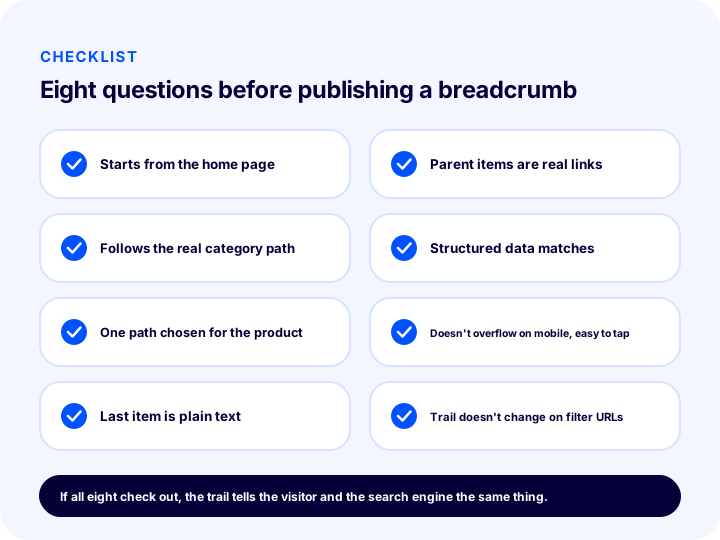
The eight items in the illustration are also included in a table so that you can keep them at hand during the detailed check:
| # | Check | What happens if it’s wrong? |
|---|---|---|
| 1 | The path starts at the home page | The root of the hierarchy stays unclear |
| 2 | The path follows the real category structure | The path carries no information |
| 3 | A single primary path is chosen for the product | The page looks inconsistent |
| 4 | Last item is plain text | It becomes an unnecessary, misleading link |
| 5 | Parent items are real, working links | Visitors and search engines cannot follow the path |
| 6 | Structured data matches the path shown on screen | The data loses its reliability |
| 7 | Does not overflow on mobile, easy to tap | Poor experience, mis-taps |
| 8 | Filters and page numbers are not added to the path | The hierarchy breaks |
Do not expect the result to show up immediately after making the fixes: until search engines re-crawl your pages and re-evaluate the markup, the old state may remain in the results. Monitoring your search reports for a few weeks after the change is a normal part of the process.
Breadcrumbs and Site Structure with Faprika
Faprika’s plan feature comparison includes a “Taxonomy / Rich Snippets / Breadcrumb” row; category structure, rich result data and the content path are covered under this heading. Which plan covers which scope of these features can vary by plan; for the current scope, see the e-commerce plans page. The same comparison also contains other rows related to describing your site structure correctly to search engines, such as “Canonical / H Tag Management / Robots / Sitemap” and “Bulk Automatic SEO/Meta Information Update”.
On Faprika’s own site, blog posts are also presented with a content path and BreadcrumbList structured data; in other words, the approach described here is not just theory but one that is put into practice. You can review with the Faprika team on which pages the breadcrumb appears in your store and how, and whether it is set up correctly for your category structure.
To set up title, description and URL settings together across the store, the guide how to configure e-commerce SEO settings will help; for the other elements on the product page, the article what an e-commerce product page should look like is useful.
Frequently Asked Questions
What is a breadcrumb?
A breadcrumb (also called a breadcrumb trail or content path) is a navigation element at the top of a page that shows the visitor's position on the site through ordered links such as “Home › Category › Product”. Each level links to a parent page; the last item is the current page and is written as plain text.
Does a breadcrumb help SEO?
Yes, indirectly. It explains the site's hierarchy to the search engine clearly, adds an internal link to category pages from every product page and, when supported by structured data, may allow a readable path to be shown in search results instead of the URL. Display is the search engine's decision and is not guaranteed.
What are the types of breadcrumbs?
There are three types: location-based, which shows the site’s category structure; attribute-based, which shows the product’s attributes; and history-based, which shows the pages the visitor has browsed. For a product page in e-commerce, the safest and most consistent option is the location-based one.
If a product is in several categories, which trail should the breadcrumb show?
A single trail should be shown: the path of the product's primary category. The product can also be listed in other categories, but the trail at the top of the page should not change depending on which category the visitor came from. Choose the permanent and most specific category as primary, not temporary groups such as campaigns.
What is BreadcrumbList and is it mandatory?
BreadcrumbList is a type of structured data that writes the breadcrumb trail into the page in a form search engines can read; it is usually added as JSON-LD. It is not mandatory, but it is useful as a machine-readable copy of the trail shown on the page. The trail in the code must match the trail on screen exactly.
How should a breadcrumb be displayed on mobile?
It should stay on a single line and not overflow the screen. Common solutions are showing only one level up, allowing horizontal scrolling, or shortening the middle levels. The tap area of the links should be large; the structured data should carry the full trail, not the shortened one.