Contents 14 sections
- What Are Checkout Offers?
- Are Checkout Offers, Cross-Selling and Bundle Sales the Same Thing?
- Why Do Checkout Offers Work?
- Which Products Are Chosen as Offers in the Cart?
- How to Set Up the Discount for a Checkout Offer
- What Does a Checkout Offer Earn You? Calculator
- How to Define Checkout Offers in Faprika
- How Should the Offer Be Presented on the Cart Page?
- Checkout Offer Examples by Store Type
- What Are Common Mistakes with Checkout Offers?
- How to Measure a Checkout Offer
- Checkout Offer Checklist
- Managing Checkout Offers with Faprika
- Frequently Asked Questions
The customer has chosen their product, added it to the cart and is ready to pay. For most stores, the job seems done at this point: the order is taken and the thank-you page appears. Yet this moment, when the purchase decision is made, is when a small extra offer meets the least resistance. Showing a product that goes with the item in the cart at that moment can grow the sale without making the customer search again.
This guide covers checkout offers from start to finish: what they are, how they differ from cross-selling and bundle sales, which products are chosen as offers, how to set up the discount, which mistakes spoil the cart and how to measure the result. It also explains step by step how this feature is defined in the Faprika panel. Two small tools come with it: a checkout offer profit calculator and a checkout offer checklist.
What Are Checkout Offers?
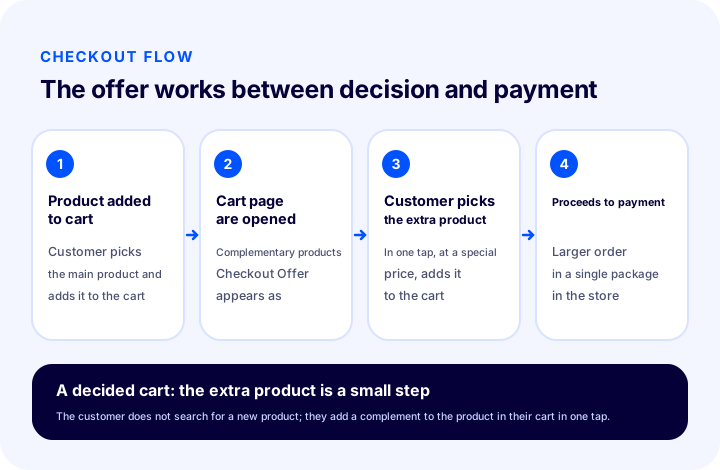
Checkout offers are complementary products that match the product in the customer's cart, shown with a special offer while the customer is in the cart. Before proceeding to payment, the customer can add these products to the cart in a single step.
The name comes from the shelves beside the checkout in physical stores: on your way to the till you see small, cheap products you had not thought of. In an online store, the shelf is the suggestion area on the cart page. The difference is that in a physical store everyone is shown the same products, whereas in e-commerce they are determined by the product in the cart. If a dress is in the cart, the suggestion is shoes or a belt; if a phone is added, it is a case or a screen protector.
In Faprika, this structure is set up from the Complementary Products section. You select the related products on the product edit page; when the main product enters the customer's cart, these products appear in the cart as Checkout Opportunities. You make the selection yourself; which product matches which depends entirely on your store's knowledge.
Are Checkout Offers, Cross-Selling and Bundle Sales the Same Thing?
No. Cross-selling is the general term for offering another product that goes with one; a checkout offer is the form of it made in the cart before payment; bundle sales mean selling products as a single package. The three are close, but the moment they are used and the customer's experience differ.
| Method | Where does it appear? | What does it ask of the customer? | Typical product |
|---|---|---|---|
| Cross-selling (general) | Product page, cart, post-order email | Discovery, sometimes comparison | Compatible products |
| Checkout offer | Cart, right before payment | One tap, a very short decision | Small, cheap complements that need no explanation |
| Bundle sale | Product page and cart | Accepting a ready-made package | A set designed together |
This post focuses only on the second row. For all the points of cross-selling (product page, post-order, email) see What Is Cross-Selling?, and for building bundle products see How to Do Bundle Sales; here we zoom in on the cart moment without repeating them.
We recommend readingWhat Is Cross-Selling? Examples and How to Do ItWhy Do Checkout Offers Work?
Checkout offers work because they present a small extra offer at the moment the customer has made the purchase decision and is in the habit of paying. At this point the customer is not searching or comparing; they are just completing.
A few simple principles lie behind the effect:
- The decision is already made: There is no long road to persuade the customer; the extra product looks like a small addition.
- The need depends on the product in the cart: Shoes for a dress or a case for a phone is a product the customer would think of anyway, but would have to make a separate effort to find. The offer removes that effort.
- Shipping and time advantage: The extra product arrives with the same order, in the same package; the customer does not have to place a separate order later.
- A sense of special discount: An offer made specifically in the cart looks more attractive than buying the same product later at full price.
As a result, the number of items per order and the cart value can increase. How much depends on your product selection, your discount setup and your audience; so instead of writing a target percentage, you need to measure with your own data (details are in the measurement section). To evaluate it together with other methods that raise cart value, see How to Increase Average Cart Value?.
Which Products Are Chosen as Offers in the Cart?
The products that work best as checkout offers are complements that are used directly with the main product, are cheaper than it and need no explanation. The customer should be able to understand a product at first glance and add it with one tap.
These six criteria help when choosing:
- Direct fit: Is the product used together with the main product? An unrelated product is not a suggestion, it is noise.
- Price ratio: The offer product should be clearly cheaper than the main product. An expensive extra product brings a new decision burden.
- Clear at a glance: Products that need a size, a measurement or a long choice struggle at checkout; single-option products are added more easily.
- Stock safety: Suggesting an out-of-stock product damages both trust and sales.
- Profit margin: Choose products that still leave a profit even after the discount; an extra product sold at a loss through the discount does not turn increased revenue into profit.
- Return risk: Products that are often returned are not a first choice at checkout; returns of the extra product eat away the gain.
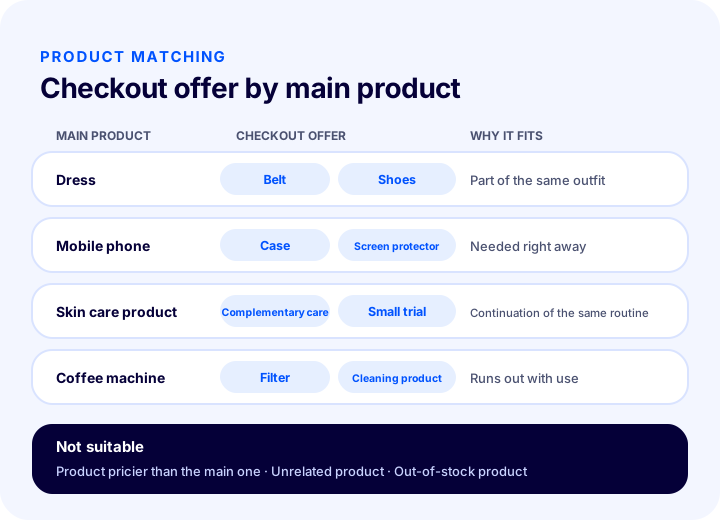
Which offer product for which main product?
The table below gives general examples of how to think about matching; the product names are examples and will vary with your own catalog.
| Main product | Good offer product | Why does it fit? | Suggestion to avoid |
|---|---|---|---|
| Dress | Belt, shoes | Part of the same outfit | Accessory pricier than the main product |
| Mobile phone | Case, screen protector | Needed right away | Another phone |
| Skin care product | Complementary care product | Belongs to the same routine | Unrelated category |
| Coffee machine | Filter, cleaning product | Product that runs out with use | Out-of-stock consumable |
How to Set Up a Discount for a Checkout Offer
A checkout discount should be high enough to make the extra product attractive and low enough not to hurt your margin. The goal is to sell the extra product without putting the profitability of the main order at risk.
Faprika’s checkout offers feature is designed to show customers extra products with special discounts in the cart. The amount and type of the discount is your business’s decision; this article gives the questions to ask when deciding:
- How much margin does the extra product have? The discount should not eat up the entire margin.
- Does the discount apply to the main order or only to the extra product? At checkout, the aim is only to make the extra product attractive.
- Does the customer see the discount? The struck-through list price and the cart-specific price should appear side by side.
- Does it conflict with a campaign or coupon? Stacking two discounts can erode your margin unexpectedly. For how coupons work, see the discount coupon article.
| Discount approach | When is it suitable? | Point to watch |
|---|---|---|
| Low, fixed discount | For low-margin, high-volume products | The customer may not notice the difference |
| Noticeable discount | For high-margin, overstock products | Do not apply without calculating the margin |
| Offer without discount | For products that are already low-priced or urgently needed | The offer feels less like a “deal” |
To see in advance how the discount will affect extra product sales, use the calculator below.
What Does a Checkout Offer Earn You? Calculator
You can calculate the extra revenue from a checkout offer using monthly cart count, offer acceptance rate, offer product price and discount rate. The tool below multiplies these and subtracts the discount.
Example reading with the default values: if 8 percent of 1.000 monthly carts accept the offer, 80 extra products are sold. If the product is 120 units and the discount is 10 percent, extra revenue is 9.600 units, 960 units go to the discount and 8.640 units remain as net extra revenue. These numbers only show how the calculation works; your acceptance rate may turn out very different.
The lesson from the tool is direction rather than numbers: even if the acceptance rate looks small, the effect grows as cart count rises; as the discount rate rises, net revenue falls quickly. Before increasing the discount, improving the offer product or its placement is usually the cheaper route.
How Are Checkout Offers Defined in Faprika?
In Faprika, checkout offers are defined in the Complementary Products section of the product edit page, under Product Management in the Catalog section. The path is: Catalog > Product Management > Product Links > Complementary Products.
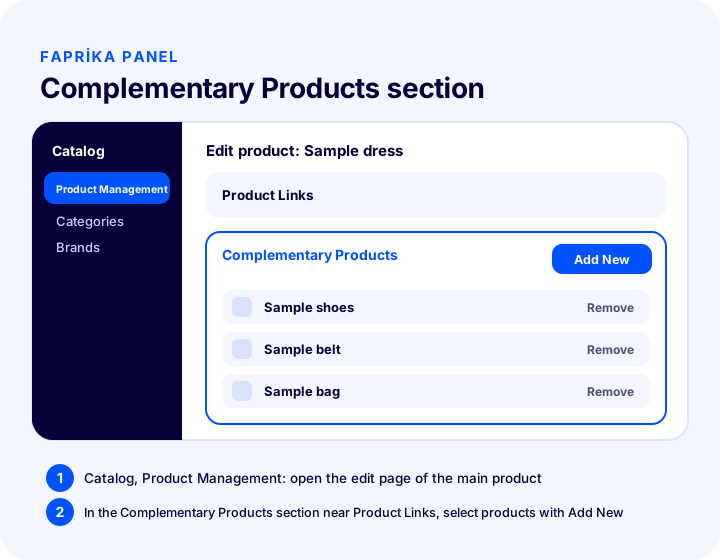
- Open the product. Go to Product Management in the Catalog section and open the edit page of the main product for which you want to define a checkout offer.
- Go to the Complementary Products section. You will find it near Product Links.
- Click Add New. From the selection that opens, choose the product you want to recommend to your customer and save.
- Add several products if needed. The products you select appear in the customer’s cart as a Checkout Offer.
- Link the complementary products to each other. There is an option to link the complementary products you added to one another, so these products come together in the cart.
- Check it in the cart. Add the main product to the cart and see whether the Checkout Offers section appears and the products are correct.
For the steps with screenshots, see the How to use Checkout Offers? tutorial; for a short introduction to the feature, see the Checkout Offers add-on page. For availability by plan, review the comparison on the e-commerce plans page.
Recommended readingHow to Use Checkout Offers: Step-by-Step TutorialHow Many Products Should You Define?
For a checkout offer, defining a few right products works better than defining many. If the customer is lost in a sea of options in the cart, the burden of decision returns; the aim is to show a short list that can be read at a glance.
The practical way is to start with your best sellers. Define one or two strong complementary products for each best seller. Expand the rest of the catalog later, based on the acceptance rate you see. If your store has many products, grouping them into categories and thinking through the same complementary logic once per category saves time.
How Should the Offer Be Presented on the Cart Page?
A checkout offer should be short, visual and addable with one click: product image, short name, price and discount information are enough. Long descriptions or multi-step selection are the offer’s biggest enemy.
- Make the heading clear: A short heading such as “Special offers for your cart” that explains why the customer sees this is enough.
- Let the image stand out: Customers recognize a product by its image; a small, clear image is read faster than text.
- Show the discount clearly: Give the list price and the cart-specific price side by side.
- Do not overshadow the checkout button: The offer area should not push down the payment step; the main path must stay clearly “proceed to checkout.”
- Make it fit on a phone: In most stores the cart is also opened on a phone. Offer cards should be readable on a narrow screen without scrolling or in a single column, with comfortable tap areas.
To avoid losing customers in the cart and at payment, also look at the reasons for cart abandonment; a checkout offer should not become a barrier that makes people leave the cart. The What Is an Abandoned Cart? article is a useful complement on the topic.
Recommended readingWhat Is an Abandoned Cart? Causes and SolutionsCheckout Offer Examples by Store Type
The logic of a checkout offer is the same in every sector, but the right product varies by sector. The examples below are only meant to give ideas; derive the real pairings from your customers’ questions and order history.
- Fashion and accessories: Small pieces such as a belt, socks or a scarf that match a dress or trousers. Avoid moving size-dependent products to checkout; one-size accessories are easier to add.
- Electronics: Products needed together with the device, such as cables, cases and protectors. Compatibility matters; an extra product for the wrong model causes returns and loss of trust, so set up pairings by device model.
- Cosmetics and personal care: Products that continue the same routine, or small trial sizes. If the customer has chosen the main product, a product that completes the routine is a natural step.
- Home and living: Consumables, care products or spare parts used with the main product. Complementary items that run out with use also create repeat-order opportunities.
- Gifts and special-occasion products: A card, packaging or a small extra gift. If the customer is already buying a gift, a complementary product looks like a natural part of the offer.
Checkout Offers During Campaign Periods
During busy campaign periods, cart count rises, so even a small acceptance rate can have a larger effect. If the discount is already high in the same period, giving a separate checkout discount can squeeze your margin; so recalculate the margin of offer products before the campaign. For seasonal planning, the e-commerce campaign calendar article can guide you.
What Are Common Mistakes with Checkout Offers?
The most common mistakes in checkout offers are recommending an unrelated product, highlighting an expensive product, showing an out-of-stock product, offering too many options and not measuring the result. All of them increase the burden of decision in the cart.
| Mistake | Why does it hurt? | Fix |
|---|---|---|
| Recommending an unrelated product | Reduces trust, the offer turns into noise | Choose only directly complementary products |
| Recommending a product more expensive than the main one | Adds decision burden, the cart may be abandoned | Prefer small, inexpensive products |
| Showing an out-of-stock product | The customer is disappointed | Check stock status regularly |
| Showing too many offers | Causes choice fatigue | Limit to the few strongest products |
| Giving a discount without calculating the margin | Revenue grows, profit shrinks | Calculate the margin in advance |
| Not measuring | You do not know what works | Track the acceptance rate and cart value |
| Forgetting it after setup | Products change, the pairing gets outdated | Review at regular intervals |
How Is a Checkout Offer Measured?
A checkout offer is measured by the offer acceptance rate, the value of carts that proceed to checkout with the offer, and the return status of the extra product. You need to look at these three together, not at a single number.
| Indicator | What does it tell you? | How to interpret it? |
|---|---|---|
| Acceptance rate | In how many carts that saw the offer was the extra product bought? | If it is low, review product selection and placement |
| Cart value | How much larger are carts with the offer than others? | If there is no increase, the offer product may be too cheap or wrong |
| Extra product return status | Does the product bought through the offer come back? | If returns are high, rebuild the pairing |
| Checkout abandonment rate | Does the offer area slow the move to checkout? | If it increases, simplify the presentation |
For measurement, you can look at order data to see which products are bought together. To read general indicators, the e-commerce metrics article is useful. The key is to change one thing at a time: if you adjust the product one week and the discount the next, you can see what works.
A Simple Four-Week Test Plan
- Week 1: Define one strong complementary product for each of your ten best sellers, and note the current acceptance rate.
- Week 2: Check stock and price; replace pairings that remain weak.
- Week 3: Change the discount rate by one step and see its effect on the acceptance rate.
- Week 4: Look at return and cart value data; extend the pairings that work to other products.
Checkout Offer Checklist
This eight-item list lets you quickly check whether the basic setup of your checkout offers is in place. The items are the same in the image and in the tool below.
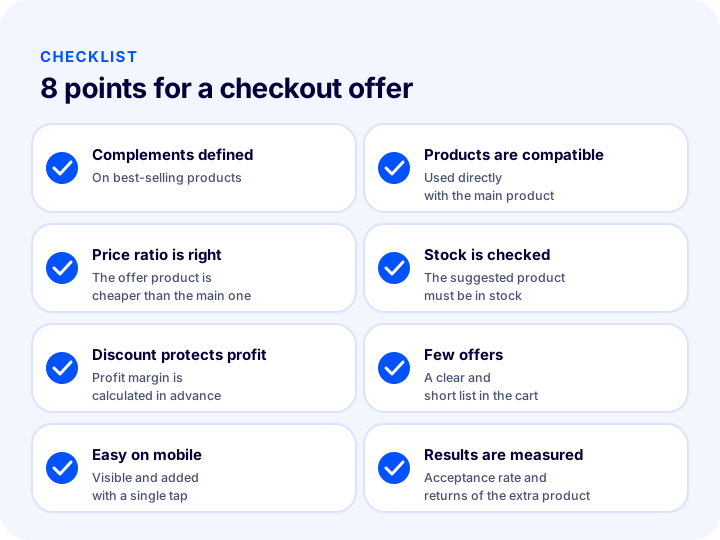
- Complementary products for best sellers are defined.
- Complementary products are directly compatible with the main product.
- Offer products are cheaper than the main product.
- I check that recommended products are in stock.
- The discount protects the margin.
- A few clear offers are shown in the cart.
- Offers display and can be added comfortably on a phone.
- I measure the acceptance rate and returns of extra products.
Managing Checkout Offers with Faprika
In Faprika, checkout offers are defined from the product edit page, in the Complementary Products section, and appear in the customer’s cart as Checkout Offers. Because you choose the products yourself, which product pairs with which depends on your store’s knowledge.
The flow in this article has a counterpart in the panel: you identify best sellers, choose complementary products, check the cart view and track the acceptance rate. For product bundles and custom sets, the bundle sales method is also managed from the same panel. You can see availability by plan on the e-commerce plans page, and plan with our team how to adapt it to your own catalog structure.
Frequently Asked Questions
What are checkout offers?
Checkout offers are complementary products that match the product in the customer's cart, shown with a special offer while the customer is still in the cart. The customer can add them to the cart in a single step before proceeding to payment. In Faprika, they are defined from the Complementary Products section.
Are a checkout offer and cross-selling the same thing?
No. Cross-selling is the general term for recommending compatible products and can happen on the product page, in the cart or after the order. A checkout offer is the form of it shown in the cart, right before payment, and added with one tap.
How is a checkout offer defined in Faprika?
Go from the Catalog section to Product Management, and on the product's edit page, in the Complementary Products section near Product Links, select the related products with Add New and save. The selected products appear in the customer's cart as a Checkout Offer.
Which products should be chosen for a checkout offer?
Choose products that are used directly with the main product, are cheaper than it, need no explanation and are in stock. The profit margin should be kept after the discount, and products that are often returned should be avoided.
How much discount should a checkout offer have?
There is no single right rate; it depends on the profit margin of the extra product, the acceptance rate and overlapping campaigns. The discount should be high enough to feel attractive and low enough not to eat the margin; starting with a low rate and adjusting it to the acceptance rate is a safe approach.
How can I tell whether a checkout offer is working?
Look together at the offer acceptance rate, the value of carts in which the offer was taken, the return rate of the extra product and the checkout abandonment rate. Changing only one thing at a time (product, discount or placement) makes it clear what worked.