Contents 10 sections
- What Are E-Commerce Campaign Types?
- What Is Each Campaign Type For and When Should It Be Chosen?
- How Do You Choose a Campaign Type by Profit Margin?
- How Is the Profit Impact of a Discount Campaign Calculated?
- Can Multiple Campaigns Apply at the Same Time?
- How Do You Design a Campaign Step by Step?
- Common Mistakes When Choosing a Campaign Type
- Campaign Readiness Checklist
- How Are Campaign Types Managed in Faprika?
- Frequently Asked Questions
Most stores start a campaign with the question “what discount should we run this week?”. Yet a discount is only one of the campaign types, and it is often the most expensive one. You can reach the same goal with a cart threshold, free shipping, a bundle, or an offer open only to a specific customer group; what decides which one fits is the product's profit margin.
This guide gathers e-commerce campaign types on a single map: how each type works, what purpose it is chosen for and its impact on profit. It also includes a framework for choosing the campaign type by your margin, a tool that calculates a discount's impact on profit, a campaign readiness check and how campaigns are defined in Faprika. We link to the relevant guides for the details of each topic; rather than repeating them here, we show which to choose and when.
What Are E-Commerce Campaign Types?
An e-commerce campaign is a practice that speeds up the purchase decision by offering the customer an advantage such as a price, shipping, a gift or an extra right for a certain period or under a certain condition. Campaign types are divided by what the advantage applies to and what condition it is tied to: the product, the cart, shipping, the customer group, the payment method or time.
The map below shows eleven basic types. Every campaign consists of one of these types or a combination of several; for example, “free shipping on orders over 500 units, members only” combines a cart threshold, shipping and a customer group.
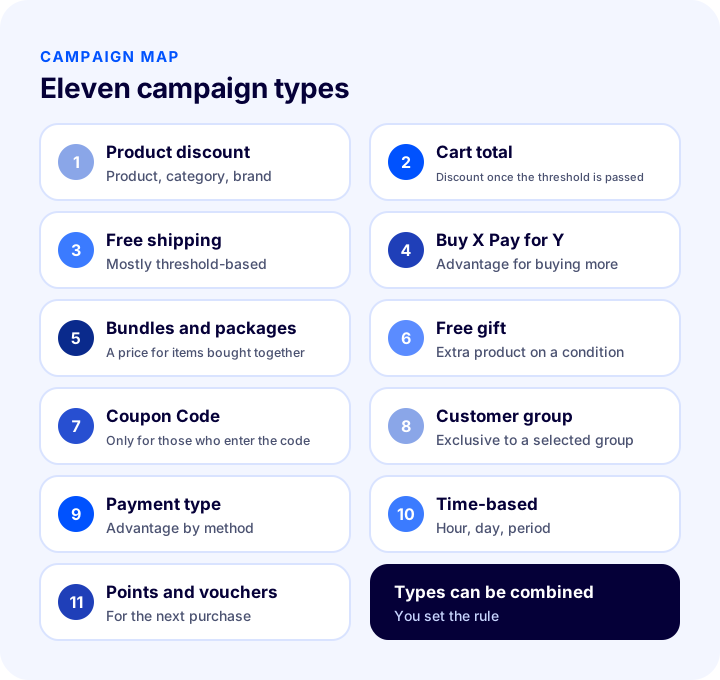
| Campaign type | How does it work? | What is it most often chosen for? | Impact on margin |
|---|---|---|---|
| Product, category or brand discount | The price of selected products drops by a percentage or an amount | Clearing stock, introducing a new product | Direct and high |
| Discount by cart total | A discount applies once the cart passes a certain amount | Increasing the average cart | Medium, depends on the threshold |
| Free shipping | The shipping fee is waived, mostly with a threshold condition | Completing the cart, winning the first order | As much as the shipping cost |
| Buy X Pay for Y | The price of a certain quantity is deducted for those who buy several items | Increasing quantity, speeding up stock turnover | Medium to high |
| Bundles and packages | Products bought together are sold at a single price or at a discount | Increasing cart value | Low to medium |
| Free gift | An extra product is given to those who meet the condition | Clearing slow-moving stock, perceived value | As much as the gift's cost |
| Coupon Code | The discount applies only to those who enter the code | Targeted offer, win-back | Depends on usage |
| Customer-group specific | The offer is open only to the selected customer group | Loyal, wholesale or corporate customers | Goal-driven, controlled |
| By payment type | An advantage is given to those who choose a specific payment method | Lowering payment cost | Balanced against payment cost |
| Time-based | The campaign is valid at certain hours, days or periods | Creating urgency, making the most of a period | Depends on the type |
| Points and gift vouchers | Points or vouchers are earned from a purchase, then spent | Encouraging repeat purchases | Deferred, low |
What Is Each Campaign Type For and When Should It Be Chosen?
Each type has a strength and a point to watch. Below we cover the eleven types in the same order under the headings “what it does, when to choose it, what to watch for”.
1. When to Choose a Product, Category or Brand Discount?
A product discount lowers the price of selected products, categories or brands by a percentage or a fixed amount. It is suitable when you need to clear stock quickly, make room for a new season or get a new product tried.
It is the most direct and most expensive type, because the whole discount comes out of the margin. So first look at the required sales increase with the calculator later in this article. A discount on selected products protects the margin better than a discount on the entire catalog. Always keep the duration clear; an open-ended discount quickly becomes the “normal price”.
2. When to Choose a Discount by Cart Total?
This type gives a discount or advantage once the cart passes a set amount. Its goal is for the customer to add one more product to their cart; so it is one of the first types to look at when you want to increase the average cart.
The threshold should be set slightly above the average cart: if it is too close, everyone passes it anyway and the discount is wasted; if it is too far, no one tries to reach it. Detailed ways to set the threshold and grow the cart are explained in the average cart guide.
3. When to Choose a Free Shipping Campaign?
Free shipping is a campaign that waives the shipping fee. Because an unexpected shipping fee is among the top reasons customers abandon their carts, in most stores it is a stronger trigger than a discount.
Making shipping free for everyone or tying it to a certain cart amount are two separate decisions. When tied to a threshold, the campaign also grows the cart. How to calculate the threshold is explained in detail in the free shipping limit guide; here just note this: the shipping cost is covered from the margin, so on low-margin products keep the threshold high.
4. When to Choose Buy X Pay for Y and a Discount on the Second Item?
Campaigns such as “buy three, pay for two” or “discount on the second item” give a price advantage when the customer buys more than one product. They suit cases where you want to increase quantity and sell several of the same product.
It has the same margin impact as a discount on a single product; the difference is that the discount is given only to those who buy more. That is why it is strong for consumables, accessories and repeat-purchase products, and pointless for one-off, expensive products. Be sure to limit which product the campaign applies to and the maximum quantity; a “discount on the second item” left unlimited can lead to an unexpected pile-up of discounts in the cart.
5. When to Choose a Bundle and Package Campaign?
A bundle campaign offers complementary products at a single price or as a discounted package. While buying one product, the customer easily adds its complements to the cart; cart value grows in both product count and amount.
Because the discount applies only to the bundle, not the whole cart, its impact on margin is limited. It works well in categories with products “bought together”, such as fashion, home, accessories and cosmetics. How to set up a bundle is explained in the bundle sales guide, and the logic of recommending complementary products in the cross-selling guide.
Recommended readingHow to Sell Bundles? Increase Cart Value with Product Sets6. When to Choose a Gift Product Campaign?
In a gift product campaign, an extra product is added to the cart when the customer meets the condition. It is suitable when you want to create a sense of value without disturbing price perception, by giving a gift instead of a discount.
The gift's cost comes out of the margin, but customers often perceive it as more valuable than a discount. Choosing a slow-moving product, one waiting in the store or one you want to introduce as the gift does both the stock and the promotion job. Clearly separate the gift's value from the main product's price; otherwise the customer may read the gift as a hidden price increase on the product.
7. When to Choose a Coupon-Code Campaign?
A coupon code makes the discount apply only to the customer who knows the code or has it assigned to their account. It is suitable when you want to control who gets a discount and when, as in targeted offers, win-back and first orders.
A coupon is actually not a separate type but a condition that restricts other types: you can tie a percentage discount, shipping or a gift to a code. This way, instead of a public campaign, you reach only the people you target. For coupon types, writing codes and preventing abuse, see the discount coupon guide.
8. When to Choose a Customer-Group Campaign?
In this campaign type, the offer is opened only to the customer group you select: loyal customers, wholesale buyers, corporate customers or new members, for example. Unlike a discount given to everyone, you decide who benefits from the advantage.
It is one of the types that protects the margin best, because the discount goes only to the group you find valuable. You can include a group in the campaign or exclude groups such as dealers and suppliers from it. Groups are used not only for discounts but also for advantages such as shipping and tax. You can find how to group customers in the user groups guide and the logic of segmentation in the customer segmentation guide.
9. When to Choose a Payment-Type Campaign?
A payment-type campaign gives an advantage to the customer who chooses a specific payment method. When some payment methods cost less than others, you can steer customers by passing part of the difference on to them.
For this type to work well, you first need to know the real cost of each payment method to you; if you push the advantage above the cost difference, the campaign makes a loss. Show the customer the advantage clearly: information at the payment step such as “you save this much with this method” increases conversion.
10. When to Choose a Time-Based Campaign?
A time-based campaign is an offer valid at certain hours, days, weeks or periods: a weekend discount, a time-slot deal during the day, a seasonal campaign. It is suitable when you want to create urgency and concentrate demand at a certain time.
Time is not a discount type on its own but a limit that can be added to any type; you apply it by defining the campaign's start and end dates. The end time should be clear, and the campaign should really end at that time; “last day” offers that continue after the period is over damage trust. You can see which campaign is right at which time of year in the campaign calendar and how to prepare for big discount periods in the preparation guide.
11. When to Choose a Points and Gift Voucher Campaign?
Points and gift vouchers return part of the purchase as a deferred advantage for the next purchase. It is the campaign type that makes customers buy again, not just once.
The cost of the discount is not paid right away but when the customer comes back; the profit comes from a new order on top of an order that has already generated profit. That makes it one of the safest types for stores with thin margins. For setup details, see the loyalty program guide.
How Do You Choose a Campaign Type Based on Profit Margin?
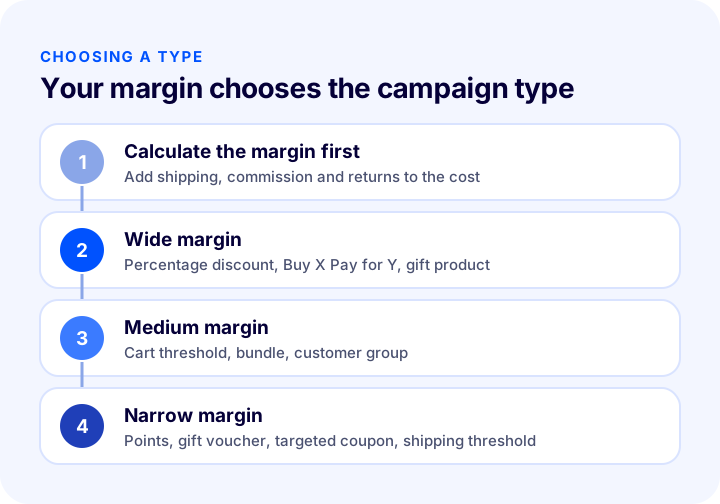
The campaign type is chosen based on the product's profit margin: if the margin is wide, price-driven types such as percentage discounts and Buy X Pay for Y; if the margin is thin, types that grow the cart and give the benefit later or in a targeted way. Choosing a campaign type without knowing the margin first is the shortest way to generate sales volume that leaves no profit.
| Margin status | Recommended types | Avoid or use with care |
|---|---|---|
| Wide margin | Percentage discount, Buy X Pay for Y, free gift product, time-limited deal | Open-ended discount, blanket discount on the whole catalog |
| Medium margin | Cart total threshold, bundle and package, customer group offer, free shipping threshold | Setting the threshold too close to the average cart |
| Narrow margin | Points and gift voucher, targeted coupon, customer group offer, free shipping with a high threshold | Deep percentage discount, unlimited “discount on the second product” |
In a store where the margin differs from product to product, you need to set rules by product group instead of a single rule: you can give a deep discount on a high-margin accessory while applying only a cart threshold to a thin-margin main product. See the profit margin calculation guide for how to calculate the margin; use the margin left after the campaign as your yardstick.
How Do You Calculate the Profit Impact of a Discount Campaign?
A discount lowers the unit profit; for the campaign to leave a profit, this drop must be offset by a sales increase. The break-even point is the sales increase needed for total profit after the campaign to equal profit before the campaign.
The formula is simple: campaign price = list price × (1 − discount rate); unit profit after campaign = campaign price − cost; required sales multiplier = old unit profit ÷ new unit profit. The tool below does this calculation. “Currency” is written instead of a currency symbol; read it in your own currency.
In the default example, the list price is 1.000, the cost is 600 and the discount is 15 percent. The profit margin drops from 40 percent to about 29 percent, and sales need to rise 60 percent to break even. With the same margin, the required increase climbs quickly as the discount rate grows:
| Discount rate | Unit profit (list 1.000, cost 600) | Sales increase required to break even |
|---|---|---|
| %10 | 300 | %33,3 |
| %15 | 250 | %60 |
| %20 | 200 | %100 |
| %25 | 150 | %166,7 |
| %30 | 100 | %300 |
| %40 | 0 | No break-even |
The numbers in the table are an example calculation; they will differ with your own margin. The lesson is this: the discount grows linearly, while the required sales increase rises at an accelerating rate. That is why taking small steps on discounts is often safer than taking big ones. Types that grow the total order without lowering the unit price (cart threshold, bundle, points) get out of this equation more easily.
Recommended readingProfit Margin Calculation: How to Calculate Profit Margin in E-Commerce (Calculator and Examples)Can Multiple Campaigns Apply at the Same Time?
The store decides whether campaigns apply together on the same order; the safest approach is to make campaigns non-combinable by default and make only deliberately chosen campaigns combinable. Overlapping campaigns can turn discounts that each look reasonable on their own into a total discount that loses money at the order level.
For example, if a product discount, a cart threshold discount and a coupon code are combined in the same cart, the customer can get several times the discount you planned for a single campaign. In Faprika, the “can be combined with other discounts” option is separate for each discount; when it is not checked, a customer who benefits from the discount cannot benefit from another discount. Plan which campaign can combine with which as a table, not one by one.
| Combination | General approach | Why? |
|---|---|---|
| Product discount + coupon code | Generally do not combine | The discount stacks and leaks to coupon sites |
| Cart threshold + free shipping | Can be combined | Both aim to grow the cart |
| Customer group + coupon code | Can be combined, single use | Clear target, cost under control |
| Buy X Pay for Y + product discount | Do not combine | Gives a double price advantage on the same product |
| Using points + campaign price | Combine with a lower limit | The margin must not fall below the floor price |
How Do You Design a Campaign Step by Step?
A good campaign answers six questions: what is the goal, which type, for whom, for how long, with what limit and how will it be measured. If the answers to these questions are not written down, it is impossible to decide after the campaign whether it was successful.
- Write the goal in one sentence: such as “increase the average cart”, “clear stock” or “win the first order”. If you set more than one goal, you cannot measure any of them.
- Choose the type based on your margin: Use the table above and check the break-even increase with the calculator.
- Define the target audience: Everyone, members only, or a specific customer group?
- Set a duration and a limit: Start and end date, total usage limit and per-customer limit.
- Set the combination rule: Can it be combined with other discounts?
- Test before launch, then measure: Log in as a customer and see the discount in the cart; when it ends, evaluate it by number of orders, cart value and profit.
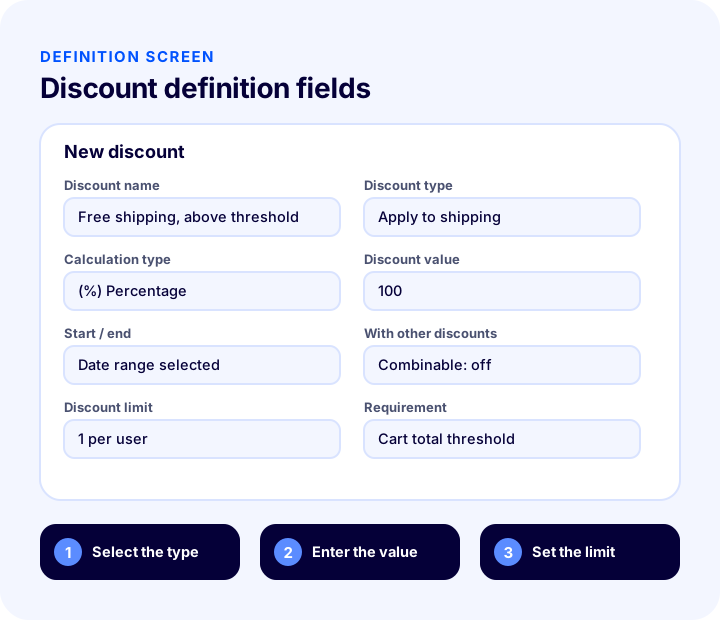
The main fields of the setup screen are similar in most e-commerce software: the name of the discount, what it applies to, the calculation method, the value, the date range, the limit and the conditions. The illustration below shows the discount setup fields in Faprika with sample values.
Common Mistakes When Choosing a Campaign Type
Campaign mistakes usually show up not in the sales figures but in the profit statement at the end of the month. The most common ones are:
- Discounting without calculating the margin: Sales go up but profit goes down; the difference is only noticed at the end of the month.
- Turning every campaign into a percentage discount: Yet a cart threshold, bundle or points often serve the same goal while protecting the margin.
- Not setting a duration and limit: An open-ended or unlimited campaign trains customers into a habit of never seeing the undiscounted price.
- Leaving campaigns combinable: An unexpectedly deep discount appears at checkout.
- Setting the threshold too close to the average cart: Since everyone passes the threshold anyway, the cart does not grow; only the discount cost is incurred.
- Not testing it as a customer: If the campaign is not applied in the cart as expected, you only find out through a complaint.
- Not measuring the result: Looking at the number of orders but not at profit when the campaign ends means setting up the next campaign blind as well.
Campaign Readiness Checklist
Go through the list below before launching a campaign. When every item is “yes”, the campaign has been set up to leave a profit.
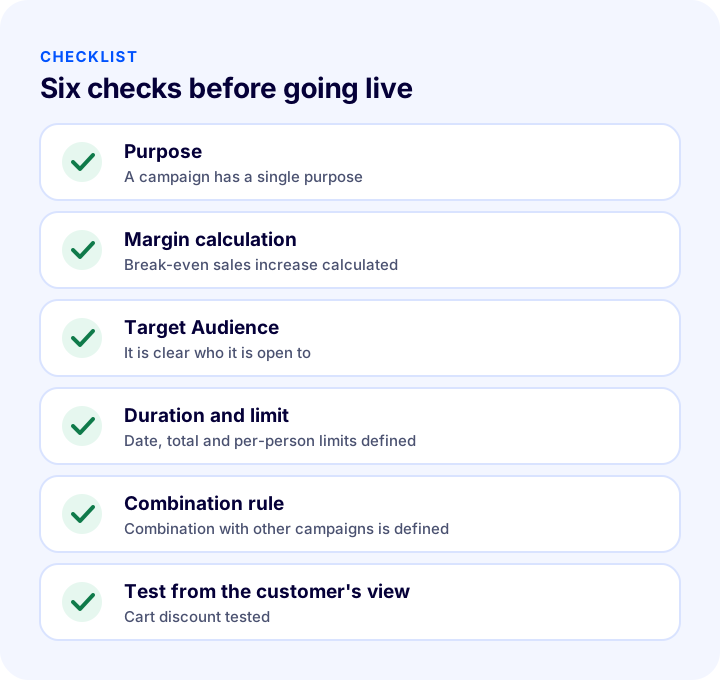
| Stage | Check | Done? |
|---|---|---|
| Purpose | A single goal for the campaign is written down | Yes / No |
| Type and margin | The type was chosen based on profit margin, the break-even increase was calculated | Yes / No |
| Target Audience | It is clear whether it is for everyone, members or a specific group | Yes / No |
| Duration and limit | Start, end, total and per-customer limits are defined | Yes / No |
| Stacking | The combination rule with other campaigns is defined | Yes / No |
| Test | Tested in the cart as a customer | Yes / No |
| Measurement | Orders, cart value and profit will be tracked | Yes / No |
How Do You Manage Campaign Types in Faprika?
In Faprika, campaigns are defined in the panel under Discounts in Campaign Management. In Faprika's feature list, the campaign feature is described as “you can turn any scenario that comes to mind into a campaign”; each of the types above can be set up with this structure.
The discount definition includes the following fields:
- Discount type: You choose what the discount applies to: order total, selected products, categories, brands, suppliers, tags, shipping, payment type, order subtotal or all products.
- Calculation type: Amount, percentage or equalization. Equalization sets the selected products' price equal to the value you enter; for example, it is used to fix the second product at a certain amount.
- Coupon code: If you check the box, the discount applies only to the customer who enters the code.
- Start and end date: You set a duration for the discount; if you leave it empty, it is open-ended.
- Can be combined with other discounts: When not checked, a customer who benefits from the discount cannot benefit from another discount.
- Discount limit: Unlimited, X uses in total or X uses per user.
- Requirements: You define the scope and limit of the discount. Conditions such as cart total, a specific product or tag are added; a customer group is included or excluded.
With this structure, the types above are set up as follows:
| Campaign type | Setup logic in Faprika |
|---|---|
| Product, category or brand discount | The discount type applies to selected products, categories or brands; a percentage or an amount is entered |
| Discount by cart total | The discount type is order total or subtotal; the cart value is set in the requirements |
| Free shipping | The discount type is shipping, the calculation is percentage, the value is 100; the threshold is tied to the cart value through the requirements |
| Discount on the second product (Buy X Pay for Y logic) | The discount type is selected tags; the maximum number of discounted products is limited to one |
| Customer-group specific | A customer group is included or excluded in the requirements |
| By payment type | The discount type is payment type |
| Time-based | Start and end dates are defined |
| With a coupon code | The coupon code required box is checked and the code is entered |
The plan comparison also lists free gift product, Buy X Pay for Y, campaigns by payment type, hourly, monthly, weekly and daily custom campaigns, parapuan and gift voucher, the campaign discount report and the bundle sales module; you can see which one is included in which plan on the e-commerce plans page.
For a step-by-step screen walkthrough, see the Discounts training; for managing customer groups, see the User Groups training; for setting up bundle products, see the Buy the Whole Outfit training. For more campaign ideas, the e-ticaret kampanya örnekleri article will also be useful.
We recommend readingWhat Is a Discount Coupon? How to Create a Coupon Code and Use It Profitably in E-CommerceFrequently Asked Questions
What are the e-commerce campaign types?
The main e-commerce campaign types are product, category and brand discounts, cart total discounts, free shipping, Buy X Pay for Y, bundles and packages, free gift products, coupon code campaigns, customer group campaigns, campaigns by payment type, time-limited campaigns, and points and gift vouchers.
Which campaign type leaves the most profit?
No single type is the most profitable in every store; the product's profit margin determines the choice. When the margin is wide, percentage discounts and Buy X Pay for Y; at a medium margin, cart thresholds and bundles; at a narrow margin, points, gift vouchers and customer-group offers generally protect the margin better.
How does a discount campaign affect profit?
A discount lowers unit profit, and sales must rise for the campaign to leave a profit. The required increase grows faster than the discount rate: in an example product, a 15 percent discount requires a 60 percent increase in sales, and a 20 percent discount requires a 100 percent increase.
Can multiple campaigns be combined on the same order?
This depends on the rule the store defines. In Faprika, the “can be combined with other discounts” option is set separately for each discount; if it is not checked, a customer who benefits from one discount cannot benefit from another. The safe approach is to make only deliberately chosen campaigns combinable.
Can I open a campaign only to certain customers?
Yes. By adding a customer group requirement to the campaign, the offer is opened only to the selected group; you can also exclude a group from the campaign. A coupon code likewise limits the offer to customers who know the code.
How do I measure a campaign's success when it ends?
Look not only at the number of orders but at cart value and profit: compare orders, average cart and profit margin in the campaign period with the previous period. In Faprika, the campaign discount report helps you track the discounts applied; which plans include it is shown in the plan comparison.
You May Also Like
- E-Commerce Campaign Calendar: How to Prepare a Campaign Plan That Drives Sales All Year
- What Is a Discount Coupon? How Do You Create a Coupon Code in E-Commerce and Use It Profitably?
- How to Increase Average Cart Value? 12 Ways to Raise Revenue per Order in E-Commerce
- Profit Margin Calculation: How to Calculate Profit Margin in E-Commerce (Calculator and Examples)