
Contents 12 sections
- What Is an Abandoned Cart?
- How Is the Cart Abandonment Rate Calculated?
- Why Do Customers Abandon Their Carts?
- How Is the Value of Abandoned Carts Calculated?
- How Do You Win Back Abandoned Carts?
- How Do You Track Abandoned Carts in the Faprika Panel?
- How Do You Reduce Cart Abandonment on Mobile?
- How Do You Automate Cart Recovery with Roket?
- What Are Common Mistakes When Fighting Cart Abandonment?
- Cart Recovery Checklist
- How Do You Manage Abandoned Carts with Faprika?
- Frequently Asked Questions
The customer added products to the cart, looked at the shipping fee, got as far as the checkout page and closed the tab. You spent on ads, you prepared the product page, the customer even showed intent; but no order was created. An abandoned cart is when a visitor adds products to the cart but leaves the site without completing the purchase, and it is one of the most missed sales opportunities in e-commerce. The short answer: the way to reduce abandoned carts is first to find the cause, then to simplify the checkout steps and send reminders at the right time to those who leave.
In this guide we explain what an abandoned cart is, why it happens, how the abandonment rate is calculated, what information can be read from the cart list, how to set up an automatic cart reminder flow and how to track abandoned carts in the Faprika panel. Of the two tools in the article, one calculates the value of abandoned carts and an estimate of the revenue that can be recovered with reminders, and the other audits your cart recovery readiness with eight questions. The management of personal data and marketing consent depends on legislation; consult your legal advisor for exact practice. This article provides general information and is not legal advice.
What Is an Abandoned Cart?
An abandoned cart is an open cart record created when a visitor or member adds products to the cart and leaves the site without completing the order. The cart doesn't stay empty; the products, quantities and variations in it stay saved. This record is valuable data showing which product drew interest.
What Is the Difference Between an Abandoned Cart and Add to Cart?
Add to cart is the moment the product is placed in the cart. An abandoned cart is when that cart doesn't end in a purchase. Measuring the gap between them gives the abandonment rate.
| Concept | Meaning | What does it show? |
|---|---|---|
| Add to cart | Product is added to the cart | There is interest in the product |
| Starting checkout | The customer moves to the checkout step | Purchase intent is strong |
| Abandoned cart | Leaves before the order is completed | There is an obstacle or a change of mind |
| Completed order | Payment is made | Sale happens |
How Is the Cart Abandonment Rate Calculated?
The cart abandonment rate shows how much of the carts created did not turn into orders. The calculation is simple: you divide the number of uncompleted carts by the total number of carts created and multiply by one hundred. For example, if 300 of 1,000 carts turned into orders, 700 were abandoned and the abandonment rate is 70 percent.
This rate on its own is neither good nor bad; it varies with the store's product, price level and visitor type. What matters is to track your own rate regularly and tie changes to their causes. Breakdowns such as mobile and desktop, or new and returning customers, show where the rate rises.
Why Do Customers Abandon Their Carts?
Cart abandonment usually comes not from a single cause but from a combination of several frictions. The reasons below are the most common ones; confirm which one dominates in your store with data and customer feedback.
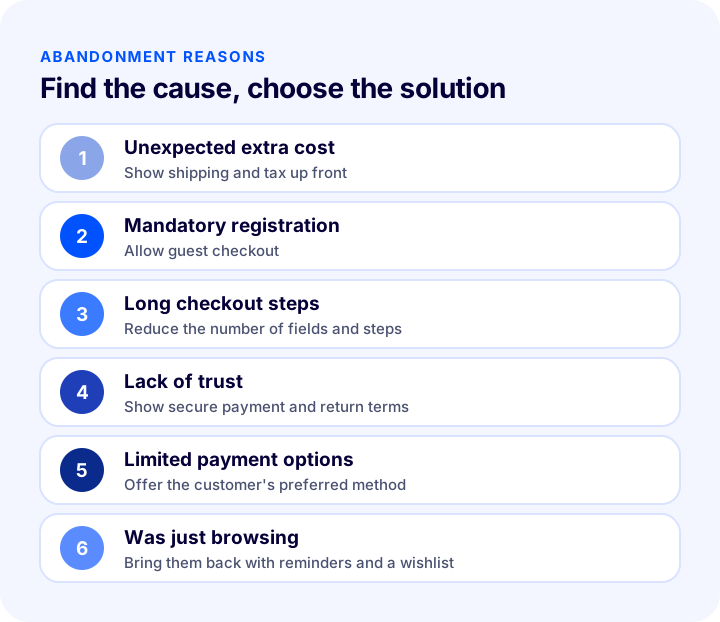
| Reason | What does the customer experience? | Solution |
|---|---|---|
| Unexpected extra cost | The shipping and tax total in the cart is a surprise | Show the total cost early on the product page and in the cart |
| Mandatory registration | Doesn't want to create an account | Allow guest checkout |
| Long checkout steps | Too many fields and pages tire them | Reduce the number of steps and form fields |
| Lack of trust | Isn't sure the payment is secure | Show secure payment badges, return terms and contact details |
| Limited payment options | Can't find their preferred method | Offer the common methods |
| Was just browsing | Purchase intent is not certain | Bring them back with a wishlist and cart reminders |
How Do Unexpected Costs Affect Cart Abandonment?
Customers don't like it when the price they saw on the product page differs from the total in the cart. When a shipping fee, tax or payment service fee appears at the last step, the feeling of “I didn't know I'd be paying this much” leads to giving up. Showing the shipping terms and tax display early and clearly removes this surprise.
Why Are Checkout Steps Critical?
The checkout page is the last obstacle to the sale. Unnecessary fields, mandatory registration, forms that throw errors and slow-loading pages lose even customers with strong intent. Keeping the checkout step as short as possible and writing error messages clearly are changes that directly affect the abandonment rate.
How Do Trust and Payment Options Matter?
Before entering their card details, the customer wants to be sure the site is trustworthy. Clearly written return and privacy terms, visible contact details and familiar payment methods support this trust. The absence of a method the customer is used to is also a reason for last-minute abandonment.
We recommend readingWhat Is Cash on Delivery? How to Manage Cash on Delivery in E-Commerce, Calculate Its Cost and Reduce Undelivered Orders: A Practical GuideHow Is the Value of Abandoned Carts Calculated?
The total value of abandoned carts shows the potential the store gained through marketing spend but couldn't turn into orders. Recovering even a small part of this value means revenue without additional ad spend. The tool below calculates the value of abandoned carts and the revenue that can be recovered with reminders, based on your monthly cart count, abandonment rate and average cart value. The recovery rate is your own assumption; measure the real rate with your own data.
The amount the tool gives is an estimate; not all abandoned carts turn into purchases, and not every customer responds to a reminder. Still, the size of the value shows why spending time on cart recovery is a good investment.
How Do You Win Back Abandoned Carts?
There are two ways to win back an abandoned cart: prevent abandonment from the start by reducing friction, and send a reminder to the customer who left at the right time. Applied together, they give the best result.
How Do You Set Up a Cart Reminder Flow?
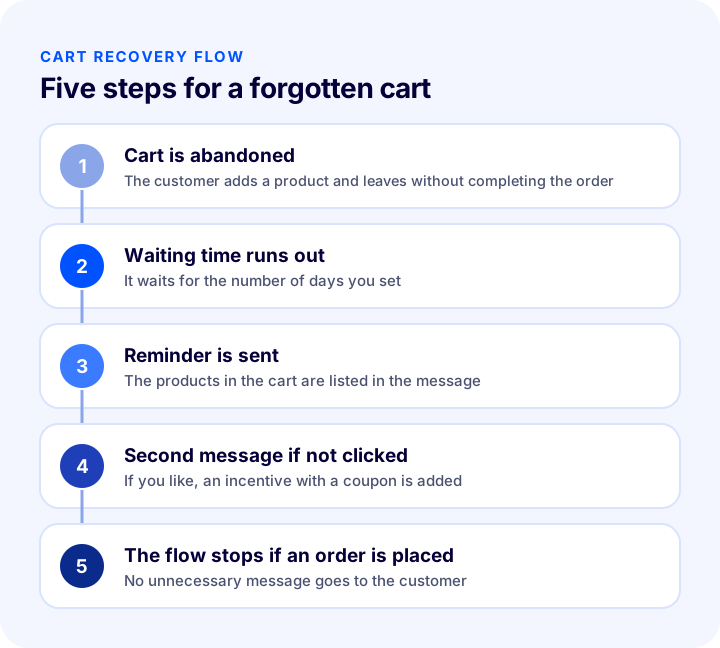
An effective cart recovery flow has a few steps: the customer leaves the cart, a set time is waited, a reminder showing the products in the cart is sent, if the customer doesn't click an optional second message with a coupon goes out, and if the customer places an order the flow stops by itself. Showing the products in the cart in the message and letting the customer return to checkout in one step supports conversion.
When and How Many Times Should You Send a Reminder?
A reminder sent too early annoys the customer, and one sent too late finds the interest gone. For most stores, a reasonable start is to hold the cart for about a day, send a single reminder, and write once more to those who didn't click. You should set a frequency limit, not message customers who placed an order, and exclude those without marketing consent. The best timing varies with your product and your customer; try different waiting times.
Is It Necessary to Offer a Coupon or Discount?
Giving every customer a discount erodes margin and can train customers to leave carts on purpose. A healthier approach is to send the first reminder without a discount and offer a time-limited, limited coupon in the second message to those who didn't click. The coupon's value should be set according to the cart's profit margin.
| Message | Time | Content | Purpose |
|---|---|---|---|
| First reminder | Some time after the cart is left | Products in the cart, link back to checkout | Bring back the one who forgot |
| Second message | A few days later if not clicked | Time-limited, limited coupon | Persuade the undecided |
| Stopping | When an order is placed | The flow ends | Prevent unnecessary messages |
How Do You Choose Between Email, SMS and Notification Channels?
A reminder can be sent by email; SMS and browser or mobile notifications are additional channels. Email can carry a detailed product list and images, SMS is short and urgent, and notifications are instant. To measure which channel works, try the channels in turn and check marketing consent in every channel.
We recommend readingHow to Do SMS Marketing in E-Commerce? Consent, Message Writing, Timing and Measurement GuideHow Do You Track Abandoned Carts in the Faprika Panel?
To track abandoned carts in Faprika, you use the cart list in the control panel. The list shows the carts of member and guest customers who left without completing their shopping.
How Do You Get to the Cart List?
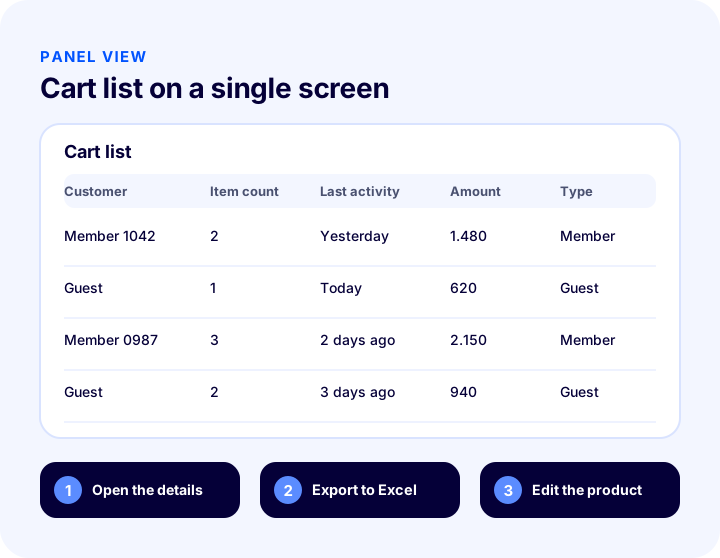
In the control panel, go to the Orders tab and select Cart List. The page that opens lists customers who added products to their cart and did not complete their shopping. You can use the “Export to Excel” button to review the data outside the panel.
What Information Appears in the List?
The “Total Quantity” column shows how many products are in the cart of a user or guest who added products to the cart but didn't complete their shopping. By clicking the plus icon next to the customer or guest information, you can quickly reach the details of the products added to the cart. The cart screen that opens when you click the user name shows when and how many products the customer added to the cart, plus the unit price and variations of the products. You can also go to the product's edit page by clicking the product name.
How Do You Use the Cart List Data?
The cart list shows which products were added to the cart but not purchased. This data makes it easier to act on products that attract interest but don't turn into sales: reviewing the price, updating the product description, checking stock and variation problems, or considering a special promotion.
| Data | What it teaches | Action you can take |
|---|---|---|
| Product added to the cart often | Interest is high | Review the product page and price |
| Single-product cart | Low cart value | Suggest a complementary product |
| Large cart with many products | High intent and value | Set up a priority reminder |
| Guest carts | There may be registration friction | Check guest checkout |
How Do You Reduce Cart Abandonment on Mobile?
A significant part of shopping is done on the phone, and the checkout step is the easiest place to break on a small screen. A small button, a keyboard that opens wrongly or a slow-loading page is enough to make a customer with a full cart give up. To reduce abandonment on mobile, test the checkout page many times with a real phone and a real connection.
- The right keyboard: A numeric keyboard should open in the phone field and an email keyboard in the email field.
- Large tap areas: Buttons and fields should be easy to select with a finger.
- Few fields: Typing on a phone is hard; ask only for the fields that are truly necessary.
- Fast loading: If the checkout page is slow, the customer won't wait and will close the page.
- Visible total: The product, shipping and tax total should be visible without scrolling.
- Return from a reminder: Email and SMS links should open directly to the cart and checkout on the phone.
Improving the mobile experience doesn't just lower the abandonment rate; it also lets a customer returning through a cart reminder complete the order smoothly on the phone. However good the reminder is, a broken checkout page ends the conversion.
How Do You Automate Cart Recovery with Roket?
The cart list lets you see abandoned carts; to send reminders automatically, Faprika's marketing automation is used. In Roket Marketing Automation, the cart recovery flow sends a reminder to a customer who left products in the cart, sends a second email with a coupon if they don't click, and stops the flow by itself when the customer places an order. In the “Left in the cart” setup, you choose how many days the cart waits and after how many days the same customer is contacted again. Frequency limits, quiet hours, marketing consent and stop conditions prevent too many messages from reaching the customer.
You can see which plans include the cart reminder feature in the e-commerce plans comparison, and review the details of the automation on the Roket Marketing Automation page.
What Priorities Should You Start Cart Recovery With?
Instead of doing everything at once, start with high-impact, low-effort work. First review the cart list and see which products are added to carts a lot but sell little. Then remove friction in the checkout steps: show the total cost early, allow guest checkout and remove unnecessary fields. In the third step, set up a single reminder email and measure the result. Once you see it works, add the second message, the coupon and other channels.
| Priority | Task | Effort | Expected impact |
|---|---|---|---|
| 1 | Review the cart list | Low | Shows which product has a problem |
| 2 | Remove checkout friction | Medium | Reduces abandonment from the start |
| 3 | Set up a single reminder | Medium | Brings back some of those who left |
| 4 | Add a second message and coupon | Medium | Persuades the undecided |
| 5 | Measure the result and improve | Ongoing | Keeps the flow efficient |
What Are Common Mistakes When Fighting Cart Abandonment?
- Giving a discount without investigating the cause: If the real problem is cost or the checkout step, a discount erodes margin without solving the problem.
- Reminding too early: The customer is disturbed before they have decided.
- Sending messages too often: Too many messages lead to unsubscribes and complaints.
- Messaging someone who placed an order: Without a stop condition for the flow, a reminder still goes to a customer who completed their purchase.
- Not checking consent: Messaging a customer without marketing consent carries legal and reputational risk.
- Not measuring the result: If you don't know how many orders each message brings, the flow can't be improved.
- Forgetting mobile: A customer coming from a reminder opens it on the phone; if the checkout page has problems on mobile, there is no conversion.
Cart Recovery Checklist
The list below summarizes the cornerstones of your cart recovery setup.
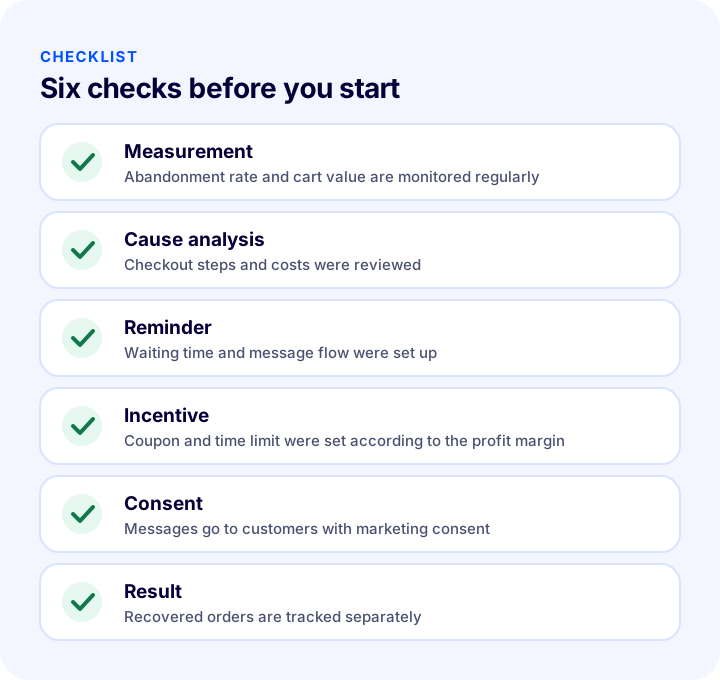
| Stage | Check | Done? |
|---|---|---|
| Measurement | Cart abandonment rate and average cart value are monitored | Yes / No |
| Analysis | Products in the cart list and the guest rate are reviewed | Yes / No |
| Friction | Checkout steps, cost display and guest checkout were reviewed | Yes / No |
| Reminder | Waiting time and message flow were set up | Yes / No |
| Incentive | Coupon value and duration were set according to the profit margin | Yes / No |
| Consent | Messages go to customers with marketing consent | Yes / No |
| Result | Recovered orders are tracked separately | Yes / No |
How Do You Manage Abandoned Carts with Faprika?
Faprika both makes abandoned carts visible and gives you tools to win them back: the cart list, cart reminders, coupons and marketing automation are all part of the same store management.
With Faprika, you can use the following options for cart recovery:
- Cart list: You see the carts of members and guests who didn't complete their shopping, with product, quantity, unit price and variation details.
- Export to Excel: You can review and report the list data outside the panel.
- Cart reminder: Automatic reminder emails are sent for abandoned carts.
- Coupons and campaigns: In the second message you can offer a time-limited coupon or a cart-specific campaign.
- Marketing automation: With Roket, waiting time, frequency limit and stop conditions are set.
- Guest checkout: By removing the registration requirement, you reduce checkout friction.
You can see which features are included in which plan in the e-commerce plans comparison. For step-by-step usage, see the cart list management training page, and for the reminder feature, see the cart reminder page.
Recommended readingWhat Is a Wishlist? How to Set Up a Wishlist in E-Commerce and Turn Favorites into Sales: ROI Calculator and Health CheckFrequently Asked Questions
What is an abandoned cart?
An abandoned cart is when a visitor adds products to the cart and leaves the site without completing the purchase. The cart's contents stay saved; this record shows which product the visitor was interested in and can be used to send a reminder.
How is the cart abandonment rate calculated?
You divide the number of uncompleted carts by the total number of carts created and multiply by one hundred. For example, if 300 of 1,000 carts turned into orders, 700 were abandoned and the rate is 70 percent. Tracking the rate by breakdowns such as mobile and desktop shows where the problem is.
Why do customers abandon their carts?
Common reasons are unexpected shipping and tax costs, mandatory registration, long checkout steps, lack of trust, the absence of a preferred payment method, and just browsing or comparing. Confirm the dominant reason with your own data and feedback.
How do you win back an abandoned cart?
First reduce friction in the checkout steps, show the shipping and tax total early and offer guest checkout. Then, for abandoned carts, send a reminder after the waiting time, and a second message with a time-limited coupon to those who didn't click; stop the flow for a customer who places an order.
Where do you see abandoned carts in Faprika?
In the Cart List under Orders in the control panel. The list shows the carts of members and guests who did not complete their shopping, with total quantity, time added, unit price and variation information; you can export the data to Excel.
When should a cart reminder email be sent?
A message sent too early is annoying, and one sent too late misses the interest. A reasonable start is to hold the cart for about a day and send a single reminder, then write once more to those who didn't click. Set a frequency limit and send only to customers with marketing consent.
You May Also Like
- What Is Guest Checkout? Mandatory Registration in E-Commerce, Guest Payment and Encouraging Registration: A Practical Guide
- How to Do SMS Marketing in E-Commerce? A Guide to Consent, Message Writing, Timing and Measurement
- What Is a Push Notification? How to Use Push Notifications in E-Commerce? Browser vs. Mobile App Notifications, Order Status, Shipping, Cart and Stock Notifications, Getting Consent, Frequency, Timing and Copywriting, Return Calculator and Setup Audit
- What Is a Newsletter? How to Set Up a Newsletter Subscription in E-Commerce? Subscriber Sign-Up Field and Consent, Content Types, Sending Frequency, Segments, Subject and Sender Name, Consent and Opt-Out, List Cleaning, Measurement, Common Mistakes, Subscriber Value Calculator and Setup Audit