
Contents 19 sections
- What Is Cross-Selling?
- Why Is Cross-Selling Important?
- Where and When to Cross-Sell
- Which Products Are Matched Together?
- How to Set Up Pricing and Offers in Cross-Selling
- How Do You Calculate Cross-Sell Revenue?
- Cross-Sell Examples by Industry
- What Should Cross-Selling Look Like on Mobile?
- Cross-Selling During Campaign Periods
- How to Address the Customer in Cross-Selling
- How to Prepare Your Catalog for Cross-Selling
- Why Shouldn't You Skip Post-Purchase Cross-Selling?
- How Is Cross-Selling Measured?
- Should I Make an Offer? Decision Flow
- Cross-Sell Setup Audit
- Common Mistakes in Cross-Selling
- Cross-Selling Checklist
- Cross-Selling with Faprika
- Frequently Asked Questions
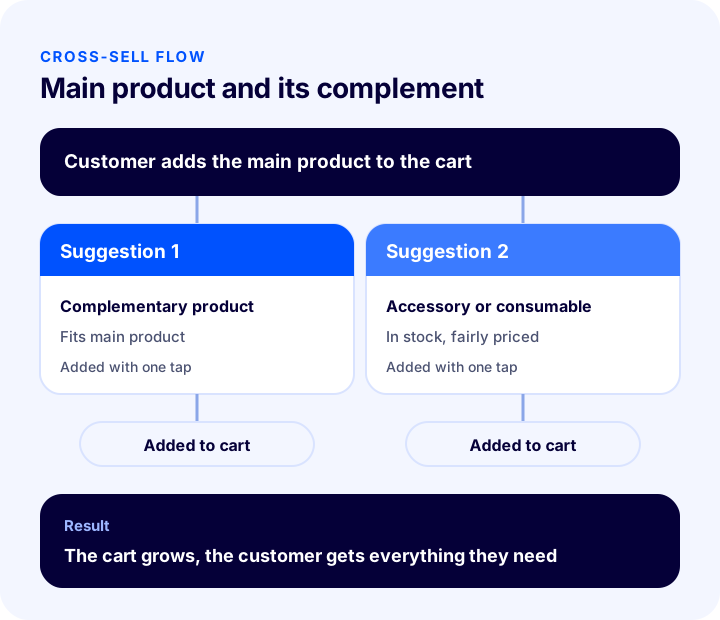
A customer has added a product to the cart and is about to pay. Another product that goes with it is sitting in your store, but the customer never saw it. The result: a single-item order, and when the product arrives the customer shops somewhere else because "I need this too." The short answer to what is cross-selling is this: recommending complementary products that will be useful together with the item the customer is buying or about to buy, and making it easy to add them to the cart.
In this guide we explain what cross-selling is, how it differs from upselling and bundling, how it is applied on the product page, in the cart and after the order, which products should be matched, and how to measure the result. Of the two tools in the article, one is for calculating the effect of cross-selling on monthly revenue, and the other is for auditing your current setup.
What Is Cross-Selling?
Cross-selling is offering the customer complementary products that are used together with the product they are interested in. Typical examples are recommending a case and charger to someone buying a phone, matching shoes and a bag to someone looking at a dress, and consumables to someone buying a machine.
The criterion here is that the products complete each other. Showing another product from the same category is not cross-selling but offering an alternative; in cross-selling, the customer has to buy both products together or will want to.
Are Cross-Selling, Upselling and Bundling the Same Thing?
All three methods increase cart value, but their logic differs. Mixing them up leads you to make the wrong offer in the wrong place.
| Method | What does it do? | Example |
|---|---|---|
| Cross-Selling | Recommends a complementary product in addition to the main product | A case and screen protector for a phone |
| Upselling | Recommends a higher model or larger size of the same product | 256 GB model instead of 128 GB |
| Bundle / outfit sale | Presents matching products as a single offer | An outfit made of a top, bottom and shoes |
Why Is Cross-Selling Important?
Finding new customers is costly; showing one more product to a customer who has already reached the cart usually requires no extra ad spend. Properly set up, cross-selling is one of the most direct ways to earn more revenue from the same traffic.
- Increases cart value: Extra products are sold within the same order; shipping and operating costs are shared per order.
- Benefits the customer: Seeing up front what will be needed with the product saves the customer from having to shop a second time.
- Uses shipping efficiently: Two products sent in one package cost less than two separate orders.
- Reduces return risk: A customer who cannot use the product because of a missing part returns it; a complementary product can prevent that.
- Helps stock management: Slow-moving products can be highlighted among the complementary products.
- Helps you know your customers: Which products are bought together becomes data for organizing your catalog.
Where and When to Cross-Sell
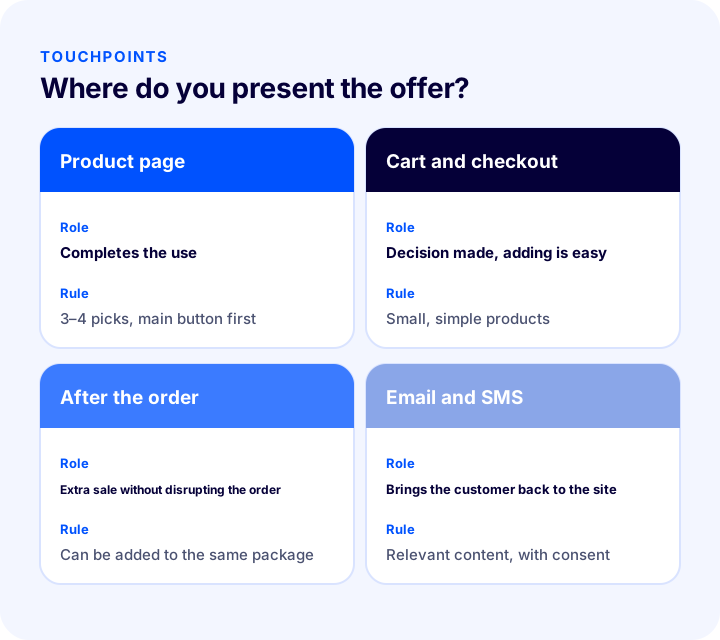
The same suggestion has different effects at different points. There are four points where you can make a suggestion without disrupting the customer's decision; each has its own rule.
1. On the Product Page
Offering a "bought together" or "complete it" area while the customer examines the product shows how the product will be used. Keep the number of suggestions low here; three or four products are enough. The main product's buy button should stay prominent.
2. In the Cart and at Checkout
Checkout is the most effective point for cross-selling, because the customer has made the purchase decision. Here, small, easy-to-add products directly tied to the main product (accessories, consumables, care products) are recommended. Expensive or complex products lengthen the decision process and can cause cart abandonment.
3. Right After the Order
Recommending extra products after the order is placed, while the customer is still in the store, is a way to make an additional sale without changing the order. If the order has not yet been shipped, the extra product can be added to the same package.
4. By Email and SMS
Showing complementary products suited to the purchased item in the order confirmation email or in a message sent after delivery brings the customer back to your site. These messages must comply with the customer's communication consent.
Recommended readingHow to Write an Order Confirmation Email? E-commerce Order, Shipping, Delivery and Return Transaction Emails: A Practical Guide with Examples and TemplatesWhich Products Are Matched Together?
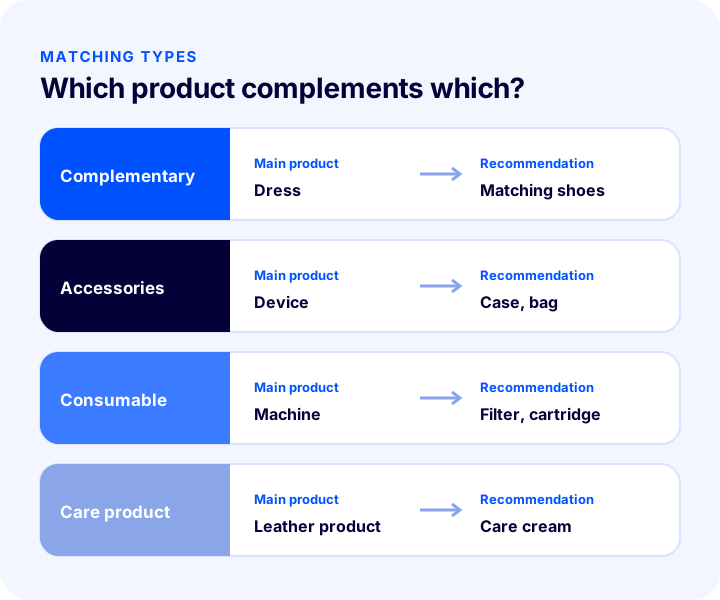
The success of cross-selling depends on how accurate the matching is. If the customer does not see the recommended product as "yes, I need this," the suggestion becomes noise. Splitting matching into four types makes the job easier.
| Type | What does it tell you? | Example |
|---|---|---|
| Complementary product | A product used with the main product that completes it | Matching shoes for a dress |
| Accessories | Protects the product, decorates it or extends its function | A case and carrying bag for a device |
| Consumable | A side product that runs out as the product is used | A filter, cartridge or battery for a machine |
| Care product | A cleaning and care product that extends the product's life | Care cream for a leather product |
Criteria for Matching Products
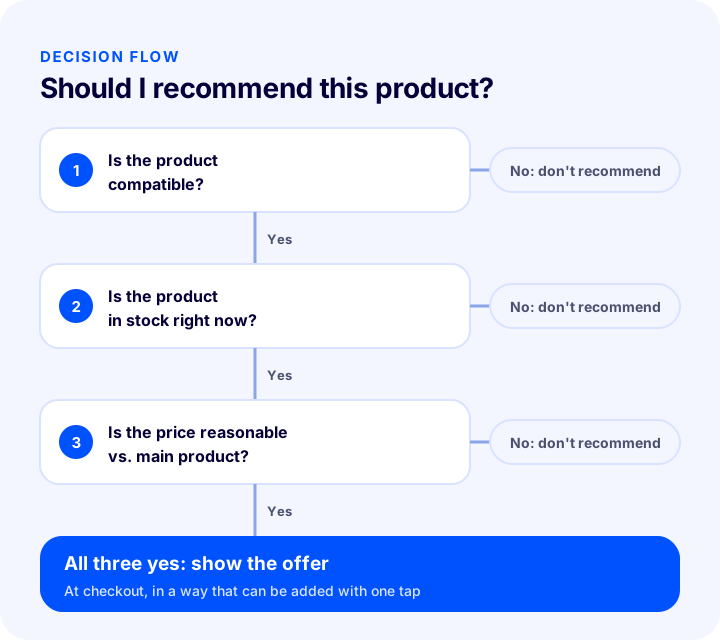
- Compatibility: The recommended product must be technically compatible with the main product; an incompatible suggestion leads to returns.
- Price balance: The complementary product should stay reasonable relative to the main product's price. A very expensive add-on stops being a suggestion and becomes a burden on the decision.
- Stock status: Recommending an out-of-stock product disappoints the customer; suggestions should come only from sellable products.
- Variant fit: Options such as size, color or model should match the main product.
- Margin: The complementary product's profit rate should make the suggestion commercially worthwhile too.
How to Set Up Pricing and Offers in Cross-Selling
The suggestion alone may not be enough; you need to give the customer a concrete reason to buy the extra product. That reason can be a price advantage, a free shipping threshold or convenience.
- Discount when bought together: Applying a small discount to the complementary product bought with the main product speeds up the decision.
- Free shipping threshold: If the cart total is slightly below the threshold, showing products that will reach it benefits both the customer and the store.
- Gift product: A small gift product above a certain amount encourages additional purchases.
- One-click add: If the extra product can be added to the cart without changing pages, conversion increases.
- A clear benefit sentence: Instead of "Those who bought this also chose that," say why the product is needed: "A case and screen protector keep your device protected."
How Do You Calculate Cross-Sell Revenue?
To see the value of cross-selling, you only need four values: monthly number of orders, the share of customers who accept the suggestion, the average price of the extra product and its profit rate. The tool below calculates the monthly extra revenue, the number of extra products and the extra gross profit from these values. The values are examples; enter your own store's figures.
What the tool shows is this: in cross-selling, even small changes in the rate make a noticeable difference by the end of the month. But a high acceptance rate comes from accurate matching, not from pushing the suggestion.
Cross-Sell Examples by Industry
The logic of cross-selling is the same in every industry, but matching varies by industry. The table below gives you ideas when matching products in your own catalog; organize your products according to your own customers' behavior.
| Industry | Main product | Complementary products you can recommend |
|---|---|---|
| Clothing | Dress, trousers | Shoes, bag, belt, matching top |
| Electronics | Phone, computer | Case, charger, headphones, protector |
| Home and living | Bedspread, furniture | Pillow, curtain, lighting, care product |
| Cosmetics | Skin care product | Complementary care line, accessory |
| Pets | Pet food | Bowl, treats, care product |
| Sports | Running shoes | Socks, bottle, sports bag |
What these examples have in common is that the recommended product is a need that would already occur to the customer while using the main product. Products that would never occur to the customer and are added just to pad the catalog are not cross-selling; they are clutter.
What Should Cross-Selling Look Like on Mobile?
Most shopping happens on the phone, and the narrow screen is where cross-selling breaks most easily. If the suggestion area lengthens the page or pushes the pay button down, it brings loss instead of gain.
- Scrollable strip: Suggestions should be laid out as small cards that scroll horizontally, not stacked one below the other.
- One-tap add: Adding the extra product to the cart should not require going to the product page.
- Clear buttons: The tap area should be large enough, and accidental taps should be prevented.
- Pay button stays visible: The suggestion area should not hide the move to payment.
- Fast loading: Suggestion images should not slow the page; they should be small and compressed.
Cross-Selling During Campaign Periods
Discount and campaign periods are when the cart is busiest. Because the customer is already ready to buy, cross-selling works better in these periods; but for the same reason, a wrong setup costs more.
- Stock discipline: Products that sell out quickly in a campaign should drop out of the suggestion list automatically.
- Clear offer: The discount on the product suggested in addition to the campaign product should not be confusing; the customer should see what they are buying at what price.
- Shipping threshold: If campaign carts already pass the threshold, small products that complete the threshold can be highlighted instead of recommending an extra product.
- Simple interface: Page load increases in busy periods; keep the suggestion area simple.
How to Address the Customer in Cross-Selling
When done in the wrong tone, cross-selling is perceived as sales pressure. Choosing language that reminds the customer of their need instead of pushing the product protects both conversion and the brand's stance.
- Focus on benefits: Prefer phrases like "Used together with this product" or "Protects your device" instead of "Buy this too."
- Don't force it: Dismissing or skipping the suggestion should be easy; don't keep the customer busy with suggestions.
- Be transparent: The price of the extra product and its effect on the cart should be clearly visible.
- Personalize: If possible, take the customer's past purchases into account; don't recommend a product they already bought.
How to Prepare Your Catalog for Cross-Selling
Cross-selling doesn't work in a disorganized catalog. If products are not defined in the right category, with the right attributes and clean stock information, both a recommendation engine and manual matching give wrong results. Preparation takes four steps.
- Group your products: Think of main products, accessories, consumables and care products as separate groups; make clear which group completes which.
- Enter attributes: Put compatibility information (model, size, brand fit) on the product card; this information prevents wrong matches.
- Keep stock accurate: If the recommended product's stock is not reflected in real time, the customer adds a product that cannot be sold.
- Prepare the images: Images used in suggestion cards should look sharp even at small sizes; a uniform background gives a tidy look.
Why Shouldn't You Skip Post-Purchase Cross-Selling?
Many stores think about cross-selling only before payment. Yet the period after the order is complete is valuable too; the customer still has you in mind, the product is on its way, and what will be needed with the product is becoming clear.
- On the thank-you page: A short suggestion shown after the order is complete offers an upsell opportunity without changing the order.
- A few days after delivery: Reminding a customer who has started using the product about a consumable or care product is natural timing.
- At renewal time: For products that run out, suggesting a refill before the customer's need arises increases repeat sales.
Don't overdo these messages. If a customer receives three messages in a row after every order, they withdraw their communication consent; reach out not often, but at the right time and with relevance.
We recommend readingHow to Do SMS Marketing in E-Commerce? Consent, Message Writing, Timing and Measurement GuideHow Is Cross-Selling Measured?
Cross-selling that isn't measured can't be managed. A few simple indicators tell you whether it works.
| Indicator | What does it tell you? |
|---|---|
| Suggestion acceptance rate | How many of the suggestions shown were added to the cart |
| Average Order Value | Amount per order after cross-selling |
| Items per order | Average products per order |
| Extra product return rate | Whether the matching is accurate |
| Cart abandonment rate | Whether the suggestion makes buying harder |
What matters is reading these indicators together. If the cart abandonment rate rises while the acceptance rate rises, the suggestion is overwhelming the customer.
We recommend readingE-Commerce Metrics: 15 KPIs You Need to Track and Their Calculation FormulasShould I Make an Offer? Decision Flow
Recommending every product to every customer is not cross-selling. Before making a suggestion, three questions are asked; if one is "no," the suggestion is not shown.
Cross-Sell Setup Audit
The tool below questions your store with eight questions. Check the items that apply to you; the tool tells you how well established your cross-sell setup is.
Common Mistakes in Cross-Selling
- Showing too many suggestions: Options are many, decisions get harder; three or four suggestions are enough.
- Recommending unrelated products: A suggestion with no link to the main product damages trust.
- Showing an out-of-stock product: The customer can't add it and stops trusting the suggestions.
- Recommending an expensive product at checkout: The decision burden grows and the cart is abandoned.
- Matching incompatible products: An accessory that doesn't fit the device leads to returns.
- Overshadowing the main product: If suggestions draw more attention than the buy button, the main sale suffers.
- Not measuring results: If you don't know which matching works, the setup won't improve.
Cross-Selling Checklist
| Title | To check |
|---|---|
| Matching | Are complements defined for every best-selling product? |
| Compatibility | Are the recommended products compatible with the main product? |
| Where | Is there a suggestion area on the product page and in the cart? |
| Number | Is the number of suggestions limited to three or four products? |
| Stock | Are only sellable products shown? |
| Price | Is the extra product reasonable relative to the main product? |
| Incentive | Is there a discount or shipping advantage when bought together? |
| Mobile | Can the suggestion be added with one tap on the phone? |
| Measurement | Are the acceptance rate and the average cart value tracked? |
| Returns | Are extra product returns read by matching? |
Cross-Selling with Faprika
In Faprika, cross-selling is set up with product links and campaign tools. Which feature is in which plan varies by plan; see the e-commerce plans page for details.
- Related, cross-sell, complementary and checkout offer product settings: You link your products together and define related and complementary products.
- Complementary products: In the Catalog section, under Product Management, Product Links, you select the related products in the Complementary Products field and save.
- Checkout Offers: The complementary products you select appear as Checkout Offers when the customer goes to the cart; the customer can add them easily. For a step-by-step explanation, see the page How to use Checkout Offers?
- Linking products together: You can link complementary products to each other so that they come together in the cart.
- Recently viewed and similar product settings: You arrange the suggestion areas according to the products the customer has browsed.
- Gift product campaign: You encourage extra purchases by offering a gift product under a certain condition.
- Outfit sales: You use the outfit setup to present matching products as a single offer.
For setting up a discount when bought together, see our post What Is a Discount Coupon? How to Create and Profitably Use Coupon Codes in E-commerce?; for getting customers to save a product and come back later, see our post What Is a Wishlist? How to Set Up a Wishlist in E-commerce, How Do Favorites Turn into Sales? Return Calculator and Health Audit.
Frequently Asked Questions
What Is Cross-Selling?
Cross-selling means recommending complementary products that go with the item a customer is buying or about to buy. The goal is to fully meet the customer's need while increasing the cart value.
What is the difference between cross-selling and upselling?
In cross-selling, a complementary product is recommended in addition to the main product; in upselling, a higher model or larger size of the same product is recommended. They do not exclude each other, but they are used in different places and for different products.
Where does cross-selling happen?
The most effective points are the product page, the cart and checkout, right after the order, and the post-purchase email or SMS. At checkout, small products directly tied to the main product are recommended.
How many products should I recommend?
Too many options make decisions harder. Three or four suggestions on the product page and in the cart are enough for most stores; adjust the number based on the results.
Does cross-selling increase cart abandonment?
It can if it is set up wrongly. Expensive, irrelevant or too many suggestions overwhelm the customer. Tracking the acceptance rate and the cart abandonment rate together helps you keep the balance.
How do you cross-sell in Faprika?
In the Catalog section, on the product edit page under Product Links, select the related products in the Complementary Products field. These products appear as Checkout Offers when the customer goes to the cart. Which feature is in which plan varies by plan.
You May Also Like
- How to Increase Average Cart Value? 12 Ways to Raise Revenue per Order in E-commerce
- How to Sell Bundles? Increase Cart Value with Product Sets
- What Is Customer Lifetime Value (CLV) and How Is It Calculated? (Calculator and Examples)
- How Should an E-Commerce Product Page Look? 15 Elements of a Product Page That Sells