Contents 12 sections
- What Is Live Visitor Tracking?
- Which Data Can You See in Live Visitor Tracking?
- What Is Live Visitor Tracking Used For?
- How Do You Read and Interpret Real-Time Traffic?
- How to Monitor Live Traffic During a Campaign
- How to See Online Users in Faprika
- What Happens If Real-Time Traffic Exceeds Your Site's Capacity?
- What to Watch for in Live Visitor Tracking: Privacy and KVKK
- Common Mistakes in Live Visitor Tracking
- How to Combine Live Visitor Tracking with Other Metrics
- Live Visitor Tracking Checklist
- Frequently Asked Questions
You sent a campaign email or raised your ad budget. If a few minutes later you do not know how many people actually reached your site, where they are looking and whether your pages can handle the load, you are making decisions on guesswork. Daily reports tell you what happened yesterday; yet a campaign's fate is often decided in the first half hour.
In this guide live visitor tracking is covered from start to finish: what it is, which data you see, how to interpret it, how to use it during a campaign, in spotting technical issues and in timing live chat, what to watch for on privacy, and the most common mistakes. There is also a capacity tool that tests your site's real-time load against assumptions, and a checklist you can use before a campaign. You can find ways to increase your conversion rate in the post E-Ticarette Ziyaretçi Dönüşümlerini Artırmak İçin Kanıtlanmış İpuçları ; here, without repeating that topic, we focus on reading real-time traffic and acting on it right away.
What Is Live Visitor Tracking?
Live visitor tracking means monitoring, in near real time, the number and behavior of visitors on your site at this very moment. The difference from historical reports is time: a report answers “what happened yesterday?”, live tracking answers “what is happening right now?”.
The two views do not replace each other, they complement each other. Historical reports are needed for trends, seasonality and campaign comparison; live tracking catches the moment when you can still intervene. If a page breaks, an ad points to the wrong address or more people arrive than expected, you only notice it in time in the live view.
| View | Question it answers | When to use it? | Example decision |
|---|---|---|---|
| Live tracking | Who is on the site right now, and what are they looking at? | Campaign moment, new release, technical suspicion | Stopping an ad, fixing a page, opening live chat |
| Daily report | What happened yesterday? | For a short summary every morning | Stock and budget adjustment |
| Weekly and monthly report | Where is the trend heading? | Planning and channel comparison | Campaign calendar and budget allocation |
Which Data Can You See in Live Visitor Tracking?
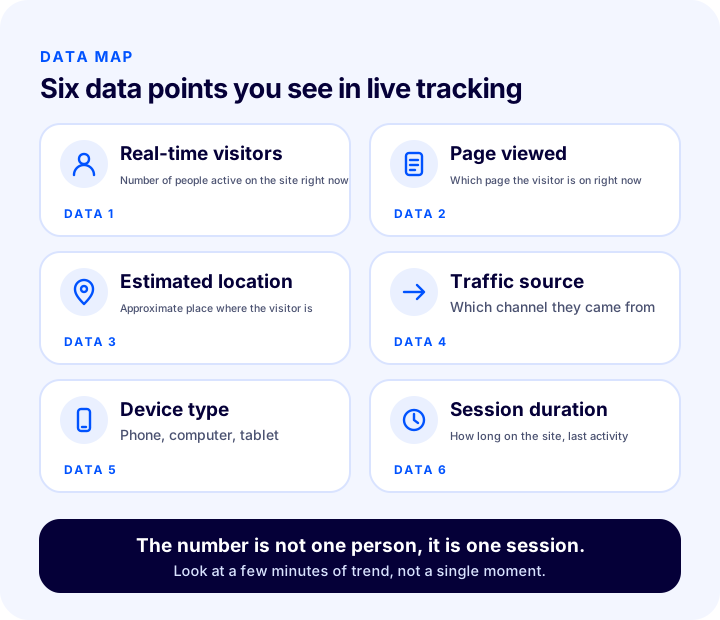
The data shown in live tracking tools varies by tool; the common ones are the number of visitors on the site, the page the visitor is on, estimated location, traffic source, device type and how long the session has lasted. Not every tool offers all of them; deciding up front which data you really need makes reading easier and avoids collecting unnecessary personal data.
| Data | What does it tell you? | How to use |
|---|---|---|
| Real-time visitor count | Number of people active on the site right now | See campaign impact and sudden rises or drops |
| Page viewed | Which page visitors are on right now | Understand which product or campaign page is drawing interest |
| Estimated location | Approximate place where the visitor is | Spot unexpected concentrations from a region or country |
| Traffic source | Which channel the visitor came from | Confirm that the email or ad you sent is actually bringing traffic |
| Device type | Phone, computer or tablet | Catch a flow that breaks on mobile |
| Session duration and last activity | How long the visitor has been there and when they were last active | Tell apart visitors who are stuck on a page from those about to leave |
There is an important distinction here: the real-time number counts a session, not a person. If the same person visits from their phone and computer, two visitors may appear; someone who forgets a tab open may still be counted for a while. That is why you do not look at a single moment, you look at a few minutes of trend.
What Is Live Visitor Tracking Used For?
Live visitor tracking pays off directly in four jobs: verifying traffic during a campaign, catching technical issues early, learning peak hours and opening live chat at the right time. The logic is the same in each: notice the deviation from normal, look for the cause, respond quickly.
1. Verifying Traffic During a Campaign
The moment you launch a campaign, you expect the visitor count to rise. If it does not, the link may be wrong, the email may not have arrived yet, or the ad may not be approved. If it rises but carts do not fill, the problem is not the traffic but the page or the offer. The live view tells you this within minutes; the next day's report tells you only after the campaign day is over.
For the full pre-campaign preparation Kampanya Yönetimi Nedir? see the post; what matters here is knowing up front what to watch in the first minutes of the campaign.
2. Catching Technical Issues Early
If the number of visitors suddenly drops, or visitors gather on a particular page and do not move forward, something may be going wrong. Visitors who pile up on the checkout page but do not turn into orders, a product page that does not open, a category that has slowed down or a design that breaks on mobile are common examples. Noticing this in the live view before customers complain directly reduces the number of lost sales. For the effect of speed on sales, the article Why Does Site Speed Matter in E-Commerce? is helpful.
3. Learning Your Peak Hours
If you observe for a few weeks when your site fills up during the day, you build your own busy-hours map. This map determines the send time for email and notifications, the distribution of your ad budget, the time for maintenance and updates, and your team's shifts. An update made when the site is quiet is far less risky than one made at the busiest hour.
4. Opening Live Chat at the Right Time
If the live chat team is too small when visitors peak, customers leave your site while waiting for an answer; in quiet hours the team sits idle. Real-time traffic is the most direct way to plan the support shift around actual load. You can read in detail about the effect of live chat on sales and satisfaction in the post What Is Live Chat in E-Commerce?.
We recommend readingE-Commerce Live Chat: What Is It? Its Effect on Sales and Customer SatisfactionHow Do You Read and Interpret Real-Time Traffic?
Reading real-time traffic means looking not at a single number but at how that number compares with normal. “There are 300 people right now” says nothing on its own; knowing that “there would usually be 100 at this hour” makes it meaningful. That is why knowing your own normal is the first requirement of live tracking.
When interpreting, ask these three questions in order:
- Is the number different from normal? Compare it with the usual level for the same day and hour.
- Where does the difference come from? Which source, which page and which device changed?
- Is it the result of something you did? Does a campaign, ad, email, notification or outside news item explain the rise?
| What you see | Likely meaning | What to check first |
|---|---|---|
| Visitor count rose after the campaign | The campaign message reached people | Traffic source and cart activity |
| Visitor count dropped suddenly | Access problem, broken link or an ad that stopped running | Whether the site loads, ad status |
| Many visitors waiting on a single page | The page is slow, throwing errors or attracting a lot of interest | How the page loads on phone and desktop |
| Heavy traffic from an unexpected region | A new area of interest or automated traffic | Traffic source and visit duration |
| Lots of visitors, no orders | A problem at the offer, price or payment step | Cart and checkout pages |
Automated traffic is a topic of its own: traffic that inflates the visitor count without buying anything distorts your analysis. For the signs of this problem and ways to protect yourself, see the article How to Block Bot Traffic.
How to Monitor Live Traffic During a Campaign
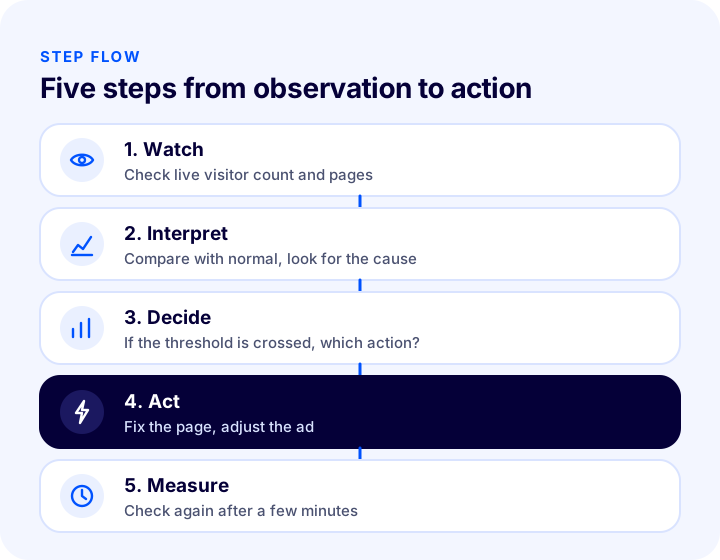
Monitoring during a campaign means deciding before it starts what to expect, watching a few indicators in the first minutes, and writing down in advance what you will do if something deviates. Monitoring only works when you have an “if this happens, I do that” plan; monitoring without a plan just adds worry.
Before the Campaign
- Write down your expectation: Note the usual level and the increase you expect from the campaign.
- Name an owner: Make clear who watches the live view and who has the authority to decide.
- Set thresholds: Write down in advance whom you will call at which drop or rise.
- Test the links: Check on a real device that the links in the emails, ads and notifications you will send actually open.
The Moment the Campaign Starts
- Check whether the visitor count is rising and how fast.
- See whether incoming visitors reach the intended page.
- Check whether either phone or desktop traffic is unexpectedly low.
- Watch whether visitors are piling up on the cart and checkout pages.
After the First Hour
Note the peak of activity and the hour it falls off. For the next campaign, you adjust send time, stock preparation and support shifts based on this data. Which margin to run each campaign type at is a separate question; for that, see the article E-Commerce Campaign Types.
We recommend readingWhat Is an Abandoned Cart? How to Reduce the Cart Abandonment Rate in E-CommerceHow to See Online Users in Faprika
In the Faprika admin panel, follow “Users >> Online Users” to see who is active on your site right now and the live traffic. This screen is Faprika’s built-in answer to live visitor tracking.
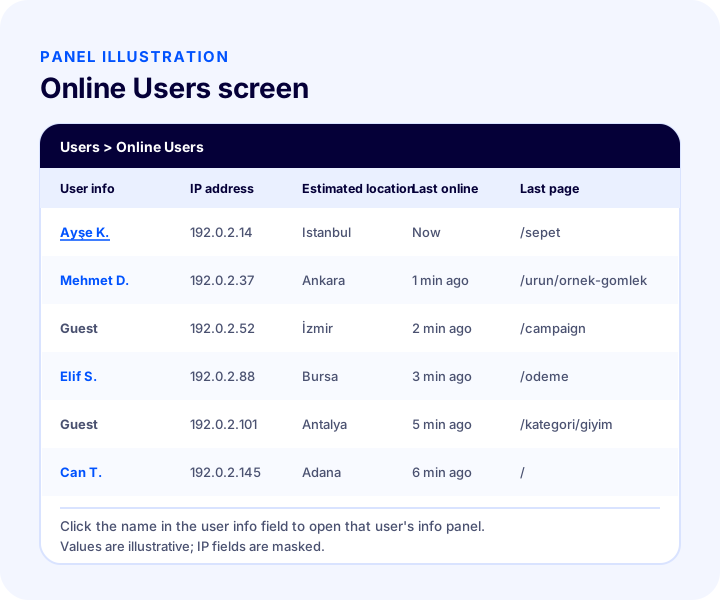
The screen gives you the following details about online users:
| Column | What does it show? | What is it for? |
|---|---|---|
| User info | Name of the online user; clicking the name opens the user information panel | Go to more detailed information about the user |
| IP address | The IP address the user connected from | Spot a concentration from the same source or unusual behavior |
| Estimated location | The user’s approximate location | See regional concentration |
| Last online date | When the user was last active | Tell apart whether they are on the site right now or were there a moment ago |
| Last viewed page | The page the user looked at most recently | Measure interest in a campaign or product page |
For a step-by-step walkthrough of how to use the screen, see the Online Users tutorial. Which screens are available in which plan varies by plan; for details, take a look at the e-commerce plans comparison.
During a campaign, the Faprika screen gives you the first answer to “who is on the site right now and which page are they looking at?” without leaving the panel. For broader behavior data such as traffic source, device or session length, analytics tools are used in addition; used together, the two views complete the picture. You can read about how conversion events are measured and why data can be lost in the article What Is Server-Side Conversion Tracking?.
We recommend readingWhat Is Server-Side Conversion Tracking?What Happens If Live Traffic Exceeds Your Site’s Capacity?
If live traffic exceeds the load your site can handle, pages slow down, return errors or fail to open at all; and the most expensive moment is exactly when the campaign is getting the most attention. A capacity problem is usually not “too many visitors came” but “we never calculated how many visitors would come.”
The tool below does a simple preliminary calculation: enter the number of visitors normally on the site, the increase multiplier you expect during the campaign, the average requests per second per visitor, and the requests per second your server can handle. The tool shows the expected peak load and how much of your capacity will be used. The values are assumptions; replace them with your own data and, if possible, with the capacity figure from your hosting provider.
Keep two points in mind when reading the result. First, a capacity problem arises not only from the number of visitors but also from how many requests each visitor generates; a page with heavy images that loads many external scripts generates far more requests for the same visitor. Second, when the usage rate comes out high, the fastest fix is often not enlarging the server but making the page lighter. For the relationship between speed and capacity, you can take another look at the site speed article.
What to Watch for in Live Visitor Tracking: Privacy and KVKK
In live visitor tracking, data such as IP address and location can count as personal data; so it is worth thinking through from the start which data is seen and why, how long it is kept, and who has access. If the purpose of tracking is “to improve the site and notice problems,” the basic principle is not to collect more than that purpose requires.
The general principles are:
- Stay within the purpose: Your purpose for live traffic monitoring is technical and operational; profiling visitors personally goes beyond that purpose.
- Collect only what is necessary: If you do not need data that identifies a person to understand the problem, settle for an aggregate, anonymous view.
- State it in your privacy notice: What tracking is done on the site and for what purpose must be clearly stated in the privacy notice and the cookie notice.
- Limit access: Let only the team members who genuinely need it see the online users screen; do not share panel accounts.
- Set a retention period: Records that have served their purpose in the live view should not be kept for an unnecessarily long time.
- Be ready for data subject requests: If a request comes in about the data on a user, you should have a process in place to respond.
These points are general principles, not legal advice; for your own business’s situation you need support from your legal counsel. A practical walkthrough of topics such as privacy notices, explicit consent, cookies and data subject requests is in the article How to Achieve KVKK Compliance for an E-Commerce Site.
Recommended readingHow to Achieve KVKK (Turkish Personal Data Protection Law) Compliance for an E-Commerce Site? A Practical Guide to the Privacy Notice, Explicit Consent, Cookies, İYS and Data Subject RequestsWhat Are the Common Mistakes in Live Visitor Tracking?
The most common mistake is to look at the live number and make decisions based on it without knowing what normal is. The table below summarizes common mistakes and the right approach.
| Mistake | Consequence | The right approach |
|---|---|---|
| Looking without knowing your normal | You cannot tell whether the number is high or low | Note the usual range by hour and day |
| Looking at a single moment | Instant fluctuations lead to wrong decisions | Watch the trend over a few minutes |
| Mistaking the number for people | Traffic looks higher or lower than it is | Remember that the number is sessions |
| Not separating sources | Automated traffic gets mixed up with real interest | Look at traffic source and behavior together |
| Only watching, without a decision rule | The problem is seen but nobody acts | Set thresholds and an owner |
| Not calculating capacity before the campaign | Success slows the site down | Estimate the peak load in advance |
| Making personal data needlessly visible | A privacy risk arises | Limit access and data to the purpose |
How Do You Combine Live Visitor Tracking with Other Metrics?
Live tracking alone is not enough; it becomes meaningful when read together with cart, order and conversion data. If visitor numbers rise while order numbers do not, the question is not about traffic but about something that stops the people visiting the site from buying.
It helps to read three layers together: live traffic (who is here right now), cart and checkout activity (who is getting close to buying) and orders (who bought). A break in the move from one to the next shows where the problem is. To turn visitors who arrive on blog or content pages into customers, see the article Blog Ziyaretçilerini Nasıl Müşterilere Dönüştürebilirsiniz? For abandoned carts, the article What Is an Abandoned Cart? and for managing visitor IDs and customer records, the article How to Manage the Member List is a useful complement.
If you see a difference between the behavior of a visitor from an ad in the live view and the conversion count on the ad platform, the cause is often the measurement method; this difference and its fix are a separate topic, covered in the article on server-side conversion tracking.
Checklist for Live Visitor Tracking
Before going into a campaign or preparing for a busy period, run through the list below. When every item is a “yes,” you are ready to read live traffic and, if needed, step in quickly.
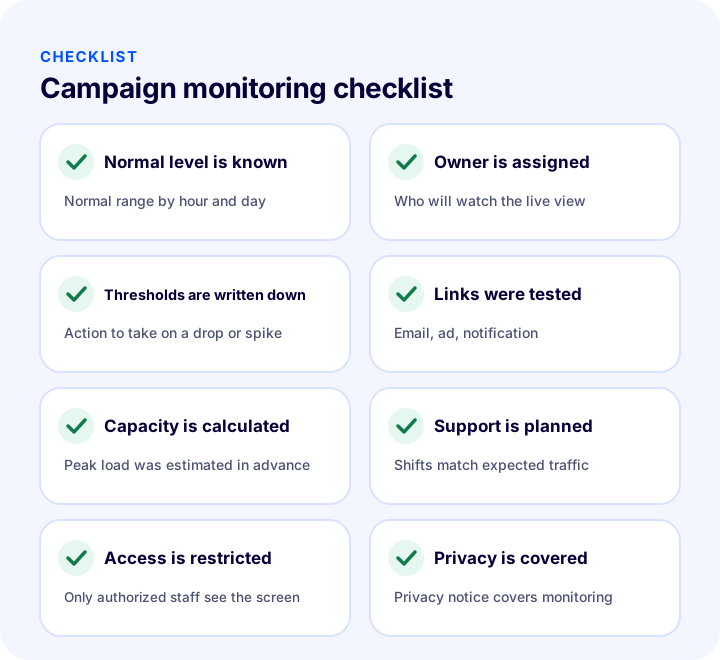
| Field | Check | Done? |
|---|---|---|
| Usual level | The normal range by hour and day is known | Yes / No |
| Owner | It is clear who will watch the live view | Yes / No |
| Thresholds | The action for drops and rises is written down | Yes / No |
| Links | Email, ad and notification links tested | Yes / No |
| Capacity | Expected peak load calculated in advance | Yes / No |
| Support | Live support shift planned for the volume | Yes / No |
| Access | Only authorized people access the online users screen | Yes / No |
| Confidentiality | Privacy notice and cookie notice cover the tracking | Yes / No |
Frequently Asked Questions
What is live visitor tracking?
Live visitor tracking means monitoring, in near real time, the number and behavior of visitors on your site at this very moment. Unlike historical reports, it answers “what is happening right now?” and catches the moment when you can still intervene.
Which data can you see in live visitor tracking?
You usually see the real-time visitor count, the page visitors are on, estimated location, traffic source, device type and session duration. Which data is shown depends on the tool you use.
Is the live visitor count the number of real people?
No, it is mostly the number of sessions. If the same person visits from two devices, two sessions may appear; someone who leaves a tab open may still be counted for a while. That is why you should watch a few minutes of trend rather than a single moment.
How do you monitor live traffic during a campaign?
Before the campaign, define the normal level, the expected increase, who will monitor and the thresholds. Once it starts, check whether the visitor count rises, whether visitors reach the target page, and whether visitors pile up at the cart and payment steps.
Is live visitor tracking a problem under KVKK (Turkish Personal Data Protection Law)?
Data such as IP address and location can count as personal data. The core principles are to stay within the purpose, collect no more than necessary, state it in your privacy notice and restrict access. For your business's specific situation, consult your legal advisor.
How do I see online users in Faprika?
In the admin panel, follow “Users >> Online Users.” The screen shows online users’ IP address, estimated location, last online date and last viewed page; by clicking the name in the user information field, you can open that user’s information panel.