Contents 17 sections
- What Is a Barcode?
- Why Is a Barcode So Important in E-Commerce?
- What Is Inside an EAN-13 Barcode? (Anatomy)
- What Are the Barcode Types? EAN-13, EAN-8, UPC, GTIN-14 and QR
- What Is a GTIN? How Does It Differ from an EAN?
- Are Barcode, SKU and Manufacturer Part Number the Same Thing?
- How Is the Barcode Check Digit Calculated? (Hands-On Lesson)
- How to Get a Product Barcode (Step by Step)
- Can I Create Barcodes for My Own Warehouse?
- How Do You Assign Barcodes to Products with Variants?
- How Is a Barcode Printed and Where Is It Applied?
- Where Is a Barcode Used in E-Commerce?
- What Are the Barcode Reader Options?
- 8 Common Mistakes with Barcodes
- Barcode Checklist
- Barcode and SKU Management with Faprika
- Frequently Asked Questions
The lines on a product's box and the 13-digit number beneath them are among the least visible yet hardest-working components of e-commerce. The short answer to what is a barcode? is that it turns a product into a code a machine can read; but in e-commerce a barcode is more than a label: product matching on marketplaces, picking the right product in the warehouse, stock counts, return acceptance and product data in search engines all rely on the same number.
This article is designed more like a lesson than a definition page. Step by step, you will learn what each digit in a barcode means, the difference between EAN-13, GTIN and SKU, how a barcode's check digit is calculated by hand (and verified with the tool below), how to obtain a barcode for your product, how to print the label and at which points of your e-commerce operation to use it. At the end you will have a checklist to catch your own mistakes.
What Is a Barcode?
A barcode is the form of a product's number shown as lines of varying thickness and spaces, which optical readers can decode quickly. The reader converts the lines into a number; this number is linked to a record on the computer that shows the product's name, price, stock status and more. In other words, the barcode itself does not carry product information; it is the key used to reach that information.
For this reason, when a product's name, price or color changes, its barcode does not change; when the product itself changes (a different size or a different package, for example), a new barcode is needed. A barcode is the product's identity, not its attributes.
We recommend readingWhat Is a Barcode System? (Glossary)Why Is a Barcode So Important in E-Commerce?
In e-commerce, a barcode is the global number that identifies a product on marketplaces and in product catalogs, the scan key that verifies the right product in the warehouse, and the outside-world counterpart of the record in the stock system. Without barcodes, matching, counting and picking products is done by hand and is prone to errors.
- Catalog and matching: Marketplaces and product search systems see products with the same barcode as the same product; the correct barcode ensures your product enters the correct catalog.
- Warehouse accuracy: Scanning the barcode during picking and packing prevents the wrong product from being shipped.
- Stock counting: A count done by scanning, rather than typing by hand, is both fast and error-free.
- Return acceptance: A returned product is scanned and taken back into the correct stock record.
- Speed: Scanning is many times faster than typing in the product code by hand and eliminates typing errors.
What Is Inside an EAN-13 Barcode? (Anatomy)
EAN-13, the most common barcode type on retail products in Türkiye and worldwide, is a 13-digit number, and each part has its own role: first the country or numbering organization prefix, then the company number, the product number and, at the end, the check digit that verifies the number's accuracy.
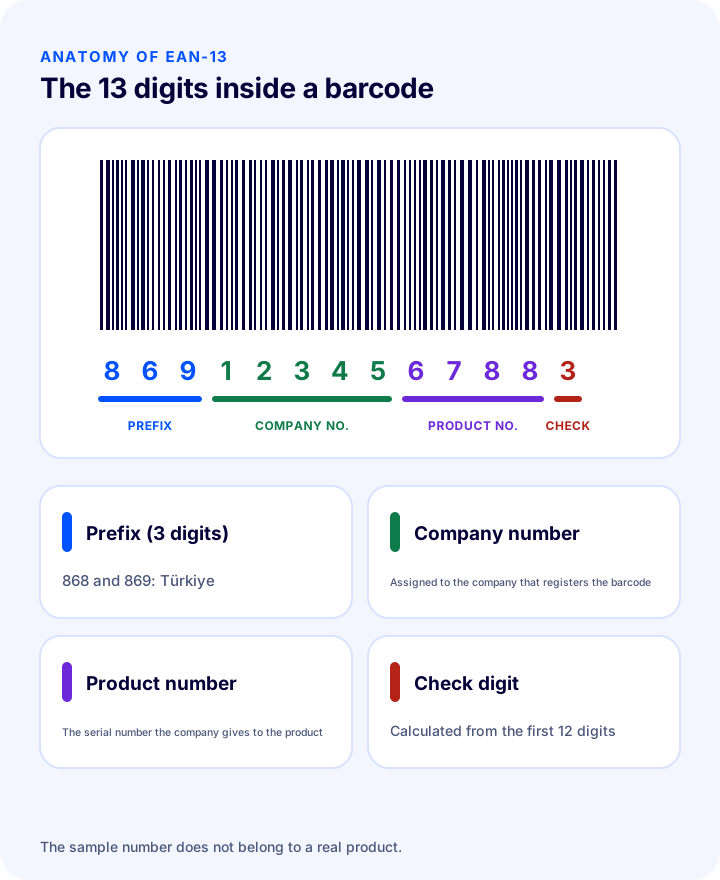
| Section | Number of digits | What does it mean? |
|---|---|---|
| Prefix | First 3 digits (868 and 869 are allocated to Türkiye) | Indicates the numbering organization that issued the number; it shows where the barcode was registered, not the country where the product was made |
| Company number | Variable | The number assigned to the company that registered the barcode |
| Product number | Variable | The serial number the company gives to its own products |
| Check digit | Last 1 digit | Calculated from the previous 12 digits; catches reading or typing errors |
The number of digits allocated to the company and product numbers varies with the size of the number block the company obtained; the total, however, is always 13 digits. Note that the prefix does not indicate that the product is "domestic": a barcode with a Türkiye prefix only shows that the number was registered by the organization in Türkiye.
What Are the Barcode Types? EAN-13, EAN-8, UPC, GTIN-14 and QR
Barcode types differ by the number of digits they can encode and their purpose. In e-commerce you most often encounter EAN-13; EAN-8 is used on small packages, GTIN-14 on cartons, UPC-A on products from abroad, and QR codes for labels or campaign links.
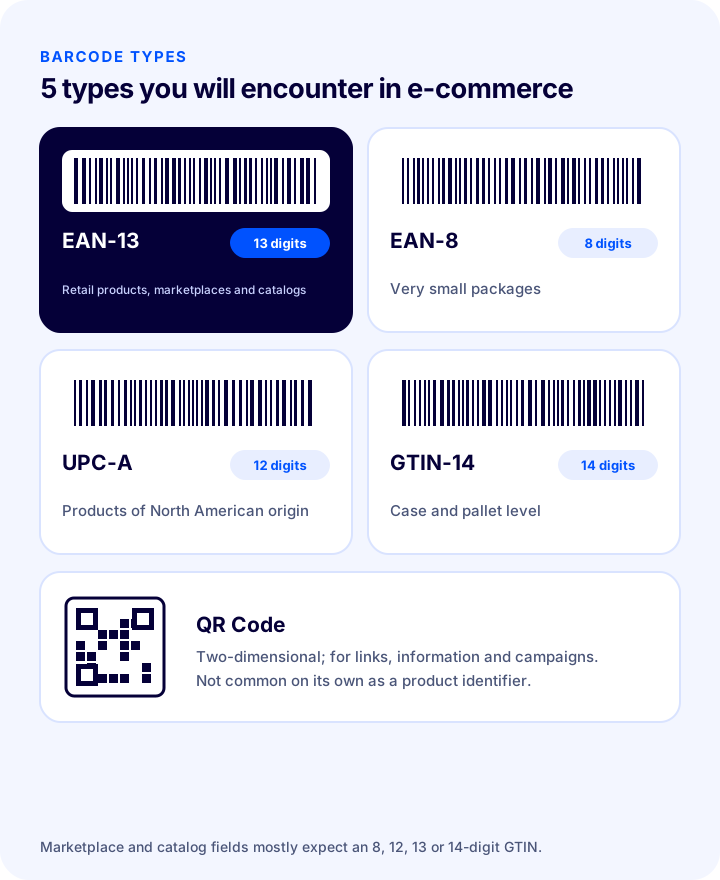
| Type | Digits | Where is it used? |
|---|---|---|
| EAN-13 | 13 | Retail products; product identification on marketplaces and in catalogs |
| EAN-8 | 8 | Very small packages where a 13-digit code will not fit |
| UPC-A | 12 | Products of North American origin |
| GTIN-14 | 14 | Bulk packaging levels such as cartons and pallets |
| QR Code | Variable (2D) | Link, information or campaign; not common on its own as a product identifier |
What Is a GTIN? How Does It Differ from an EAN?
GTIN (Global Trade Item Number) is the name of the numbering standard that identifies a trade item worldwide; EAN-13, EAN-8, UPC-A and GTIN-14 are the different-length forms of this standard. In other words, GTIN is the number, while EAN and UPC are the ways that number is shown as a barcode.
Marketplace forms and the product data fields of product search systems usually say "GTIN" or "barcode" and usually ask for an 8-, 12-, 13- or 14-digit number. If you have an EAN-13, you enter those 13 digits in the GTIN field.
Are Barcode, SKU and Manufacturer Part Number the Same Thing?
No. A barcode is the universally unique number that identifies a product to the world, usually issued by the manufacturer or brand owner; a SKU is a stock code used only within your own business; the manufacturer part number (MPN) is the manufacturer's own catalog code. All three can exist together and are not used in place of each other.
| Barcode (GTIN) | SKU (stock code) | Manufacturer part number (MPN) | |
|---|---|---|---|
| Who issues it? | The brand owner obtains it from the numbering organization | Your business | The manufacturer |
| Scope | Unique worldwide | Unique only in your catalog | Unique in the manufacturer's catalog |
| Format | 8, 12, 13 or 14 digits | Unlimited; letters and digits | Depends on the manufacturer |
| What is it for? | Scanning, matching, catalog | Internal stock tracking, reporting, orders | Identifying the manufacturer's product |
| Does it change? | Does not change as long as the product does not change | Can be changed according to your own system | The manufacturer can change it |
We have explained separately how to set up a SKU for internal organization; it is important not to confuse it with the barcode, because you can assign a SKU however you like, whereas the barcode is expected to be taken from a registered number as your product's real identity.
Okumanızı öneririzPazaryerleri ve E-Ticaret Siteleri İçin Stok Kodunun ÖnemiHow Is the Barcode Check Digit Calculated? (Hands-On Lesson)
The last digit of an EAN-13 barcode is found by calculating the first 12 digits according to a specific rule: counting from the left, digits in odd positions are multiplied by 1, digits in even positions by 3, the total is found, and the number that rounds the total up to the next multiple of ten becomes the check digit. The scanner performs this calculation on every read and treats the read as invalid if the result does not match the last digit.
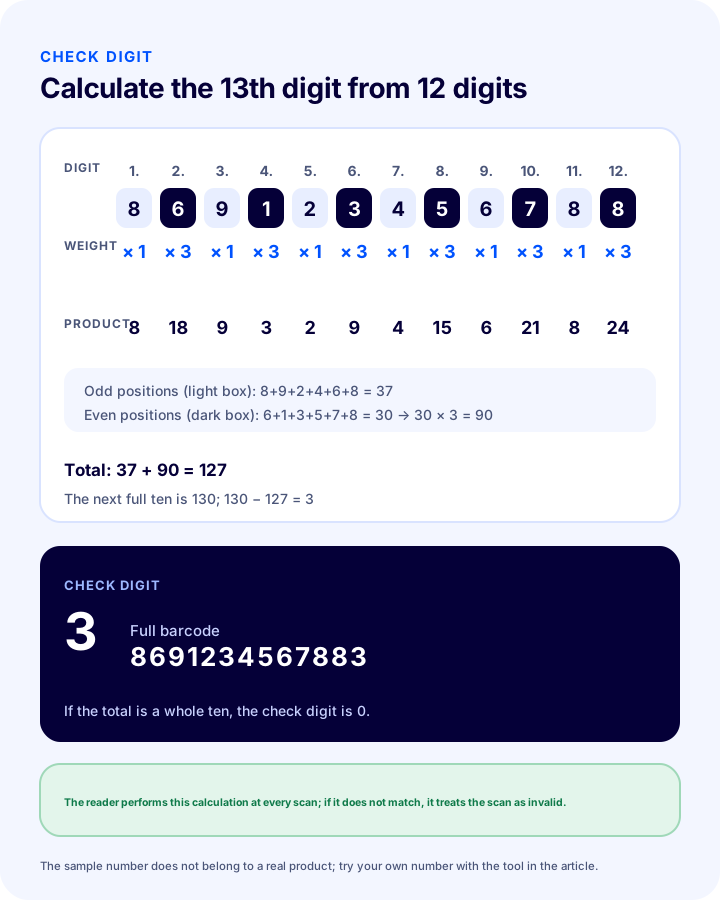
Let us calculate the following example number (it does not belong to a real product and is for the lesson only) step by step: 869123456788
- List the digits: 8 · 6 · 9 · 1 · 2 · 3 · 4 · 5 · 6 · 7 · 8 · 8
- Add the digits in odd positions (1st, 3rd, 5th, 7th, 9th, 11th): 8 + 9 + 2 + 4 + 6 + 8 = 37
- Add the digits in even positions (2nd, 4th, 6th, 8th, 10th, 12th): 6 + 1 + 3 + 5 + 7 + 8 = 30
- Multiply the even-position sum by 3: 30 × 3 = 90
- Add the two results: 37 + 90 = 127
- Round up to the next multiple of ten: 130 − 127 = 3
The check digit is 3, and the full barcode is 8691234567883. If the total already comes out as an exact multiple of ten, the check digit is 0. To try a barcode you have, you can use the tool below: if you enter 12 digits it finds the check digit, and if you enter 13 digits it tells you whether the barcode is valid.
How to Get a Product Barcode (Step by Step)
Barcode numbers for products under your own brand are obtained by becoming a member of the representative office in Türkiye of the organization that manages the numbering standard. The organization gives you a company number block; you assign numbers from this block to your products and generate the barcode for each product yourself.
- Determine who needs a barcode: If you produce, or have produced, goods under your own brand, you must obtain the number. If you sell another brand's product, the product already has a barcode and you use that.
- Submit your membership application: Apply to the numbering organization's representative office in Türkiye with your company details. Because fees and membership terms can change, ask the organization directly for the current conditions.
- Get your number block: The company number assigned to you determines how many products you can number. If you have many product variants, ask for a large block; expanding it later can be more expensive and complicated.
- Plan numbers for your products and variants: Each product, each variant (size, color, package size) and each multipack needs a separate number. Keep a table: product name, variant, SKU and barcode.
- Calculate the check digit: Add the check digit to the end of the 12-digit number you assigned (using the method above or barcode software).
- Generate the barcode image: Use barcode generation software or a label program to convert the number into a barcode image.
- Record and verify: Enter the number in your product records and scan the label to verify that it reads the correct number.
Can I Create Barcodes for My Own Warehouse?
Yes. For internal barcodes used only inside the warehouse and store, you do not need to obtain numbers from the numbering organization; your business can generate numbers according to its own system. These internal barcodes are useful for picking, counting and shelf addressing in the warehouse, but they do not replace a registered barcode when identifying products to marketplaces or external catalogs.
| Situation | Which barcode? | Note |
|---|---|---|
| Your own brand, marketplace or retail sales | Registered GTIN (EAN-13) | Obtained from the numbering organization |
| Another brand's product | The manufacturer's barcode | No new number is generated |
| Shelf, carton and pallet labels inside the warehouse | Internal barcode | Specific to your business; not used outside it |
| Order, return or shipping label | System barcode | Carries the order number or tracking number |
How Do You Assign Barcodes to Products with Variants?
The standard practice is for every sellable variant to carry its own barcode: the S, M and L sizes of the same T-shirt get three separate barcodes, and each color gets a different barcode as well. Otherwise the scanner cannot tell which size was scanned and the stock count comes out wrong.
- Size and color: Each combination gets its own barcode and its own SKU.
- Multipack: A pack of 3 and the single product have different barcodes, because the contents and price differ.
- Sets and bundles: If a set is sold as a whole, it gets its own barcode; if the parts are also sold separately, they have their own barcodes too.
- New packaging: A different package size of the same product (250 ml, 500 ml) means a different barcode.
How Is a Barcode Printed and Where Is It Applied?
Readability depends less on having the right barcode number than on printing it correctly: enough contrast, spacing and size are required. A correct barcode that is poorly printed will not scan either.
- Keep contrast high: Black bars on a white background are the safest; colored or glossy backgrounds make scanning harder.
- Leave margins on the sides: There must be a quiet zone to the left and right of the bars; text or border lines must not extend into it.
- Do not shrink the size: Do not go below the barcode's standard dimensions; shrinking distorts the bar thickness.
- Stick it on a flat surface: On a surface that folds, curves or wrinkles, the reader cannot resolve the bars.
- Print with a label printer: A thermal label printer produces sharp output; home inkjet printers may smudge.
- Test by scanning after printing: Before a bulk print run, test a few labels with the reader.
Where Are Barcodes Used in E-Commerce?
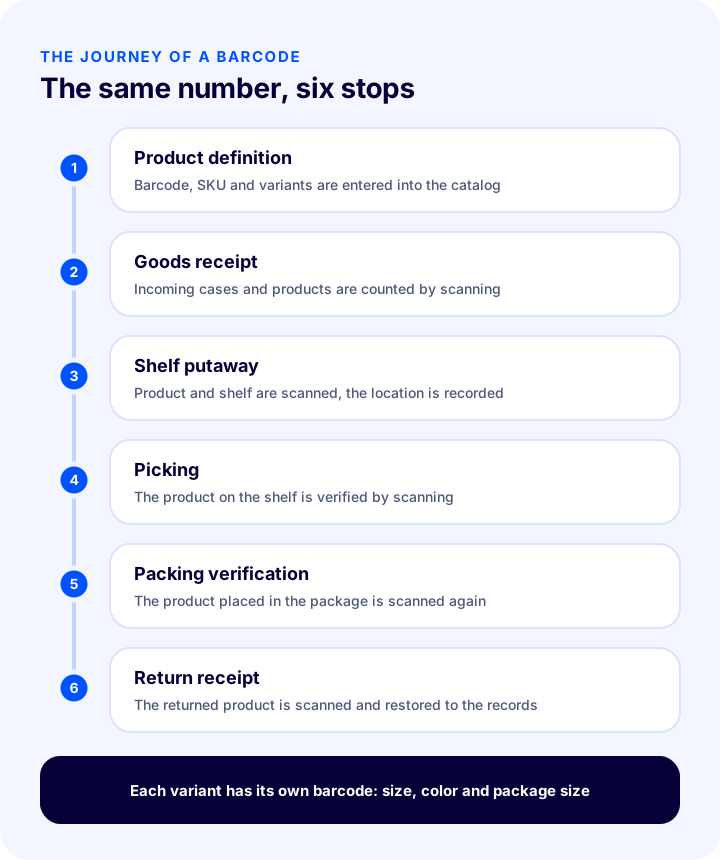
A barcode works with the same number at every stage, from the moment a product first enters the system until it reaches the customer and comes back as a return. That is why a barcode error turns into a separate error at every link of the chain.
- Product definition: When a product is entered into the catalog, its barcode is saved together with the SKU and variants.
- Goods receipt: Incoming boxes and products are scanned to compare what was ordered with what arrived.
- Shelf placement: By scanning the product and shelf barcodes, the shelf where the product is located is recorded.
- Picking: The picker scans the product on the shelf to confirm it is the right one.
- Packing verification: The product placed in the package is scanned again to check that it matches the order.
- Return receipt: The returned product is scanned and put back into the correct record.
What Are the Barcode Scanner Options?
Choosing a barcode scanner depends on your daily scanning volume and working environment; not every business needs the same device. For small volumes a phone camera is enough, while in a busy warehouse a handheld terminal or a desktop scanner is more efficient.
| Scanner | Advantage | Watch out | Best suited for |
|---|---|---|---|
| Phone camera | No extra device cost, start right away | Slow and tiring at very high scanning volumes | Small warehouse, low volume |
| Wired or wireless handheld scanner | Fast, inexpensive, durable; connects to the computer like a keyboard | Range of movement limited by the cable or wireless range | Packing table, stocktaking |
| Handheld terminal | Freedom of movement, own screen and software | High device cost | Large warehouse, heavy picking |
| Desktop scanner | Hands-free, scan by passing the product in front of it | Fixed position | Checkout, packing and verification point |
8 Common Barcode Mistakes
- Assigning the same barcode to more than one product: It becomes unclear which product was scanned, and stock gets mixed up.
- Not giving variants a barcode: Because sizes and colors cannot be told apart, counting and picking go wrong.
- Giving your own number to another brand's product: The product does not match correctly in the catalog, and the same product gets split in two.
- Entering an unregistered number on a marketplace: Using a number that belongs to someone else can lead to the product being mismatched or rejected.
- Not calculating the check digit: The scanner treats the number as invalid, and the barcode does not scan.
- Printing the barcode too small or with low contrast: It will not scan even if the number is correct.
- Confusing SKU with barcode: When a stock code is written in the barcode field, external systems cannot recognize the product.
- Not recording the numbering plan: When it is not known which number was given to which product, number collisions become inevitable.
Barcode Checklist
Before putting your products on sale, you should be able to answer "yes" to all of the items below.
- Does every sellable variant have its own unique barcode?
- Was the number for your own brand obtained from a numbering organization?
- Is the manufacturer's barcode used for other brands' products?
- Is the 13th digit of the barcode (the check digit) correct?
- Are the barcode and SKU kept in separate fields without being mixed up?
- Is the numbering plan (product, variant, SKU, barcode) recorded in a table?
- Are the label contrast, quiet zone and size suitable, and was it tested by scanning after printing?
- Was the barcode scanner in the warehouse chosen according to volume?
- Is the GTIN field filled in on marketplace and catalog product records?
- Are products scanned and recorded when returns are received?
Barcode and SKU Management with Faprika
Once you have set up your barcode and SKU system, processing it by hand item by item takes time. The Faprika e-commerce platform includes the following tools for this stage (you can see which feature starts in which plan on the e-commerce plans page):
- Automatic SKU and barcode generation: Under Catalog > Product Management, you generate the stock code and barcode with one click using the buttons on the product edit screen; a step-by-step guide is in the Automatic SKU and Barcode Generation tutorial. The barcode generated by the panel is a unique identifier within your own catalog; if a marketplace or search engines require a registered GTIN for a product of your own brand, enter the number you obtained from the numbering organization.
- Product variations: You can define options such as size and color as variants and enter separate stock and price for each variant; the steps are in the Adding a New Product tutorial.
- Bulk product update: To update the barcode, stock code or price of many products at once, you can watch the Bulk Product Update tutorial.
- Warehouse management and barcode scanning: To carry out goods receipt, shelf placement, picking and counting by scanning barcodes, use the WMS Warehouse Management System and order verification (scanning at packing) solutions; coverage varies by plan.
Frequently Asked Questions
What is a barcode?
A barcode is a form of a product's number shown with lines and spaces of varying thickness, which optical readers can decode quickly. The barcode itself carries no product information; the scanned number is linked to the product record in the system and displays its name, price and stock.
Are EAN-13 and GTIN the same thing?
GTIN is the name of the numbering standard that identifies trade items worldwide; EAN-13, EAN-8, UPC-A and GTIN-14 are different-length formats of this standard. In marketplace forms, the GTIN or barcode field is mostly filled with the EAN-13 number.
How do you get a product barcode?
Barcode numbers for products under your own brand are obtained by becoming a member of the Turkish representative office of the organization that manages the numbering standard. The organization assigns you a company number block; you assign numbers from this block to your products, add the check digit and generate the barcode image. For fees and terms, check the current conditions with the organization.
What is the difference between a barcode and a SKU?
A barcode is the unique GTIN that identifies a product worldwide and is usually obtained by the brand owner from a registered number. A SKU, on the other hand, is an internal code that only your business assigns for stock tracking. The two are kept in separate fields and are not used in place of each other.
Does every variant need its own barcode?
Yes. Each size, color or package size of the same product must receive its own barcode; otherwise the scanner cannot tell which variant was scanned and the stock count becomes wrong.
What is the last digit of a barcode for?
The last digit is the check digit, found by calculating the first 12 digits. The scanner performs this calculation on every read; if the result does not match the last digit, the read is treated as a typing or reading error and is invalid.