
Contents 15 sections
- What Is Automatic Carrier Assignment?
- Why Is Automatic Carrier Assignment Needed?
- Which Scenarios Does Automatic Carrier Assignment Work With?
- How Do You Set Up Carrier Assignment Rules Step by Step?
- How Is the Change Applied to the Marketplace and the Carrier?
- Automatic or Manual? You Stay in Control
- How Do You Calculate the Cost and Time Savings of Automatic Carrier Assignment?
- Automatic Carrier Assignment Needs Check
- How Do You Manage Carrier Assignment During Campaigns and Peak Periods?
- Which Criteria Matter When Choosing a Carrier?
- How Do You Measure Success in Carrier Assignment?
- Common Mistakes in Automatic Carrier Assignment
- Automatic Carrier Assignment Checklist
- Automatic Carrier Assignment with Faprika
- Frequently Asked Questions
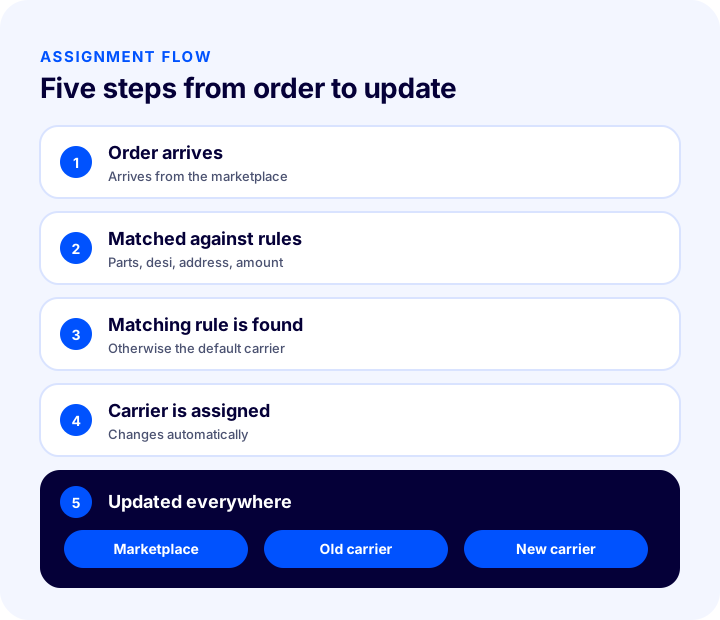
An order arrives from a marketplace, the product consists of two boxes, and the carrier assigned to the order doesn't accept multi-part shipments. The team preparing the package only notices when the carrier rejects it; the order goes back, the customer waits, and changing the carrier means logging in to both the marketplace and the carrier system one by one. The short answer to what is automatic carrier assignment is this: the most suitable carrier is assigned to an incoming order automatically, according to rules you set in advance, and the change is applied automatically to the marketplace and the carrier.
In this guide we explain step by step what automatic carrier assignment is, how it differs from changing carriers manually, which scenarios it works with, how to set up rules, how it affects cost and time, and when manual intervention is needed. Of the two tools in the article, one calculates your shipping cost and time savings, and the other shows how much your store needs automatic assignment.
What Is Automatic Carrier Assignment?
Automatic carrier assignment is a system that compares every incoming order with predefined rules and automatically selects and assigns the suitable carrier. A rule can be based on criteria such as the product's number of parts, desi, delivery address or order amount. If a rule matches, the order is moved to the relevant carrier; if not, it continues with the default carrier.
This ties the shipping decision to an operating rule instead of leaving it to people's day-to-day attention. By the time the team starts preparing the order, the carrier is already correct; there is no need for a separate review round to find and fix orders that landed with the wrong carrier.
The Difference Between Changing Carriers Manually and Automatic Carrier Assignment
| Topic | Manual change | Automatic carrier assignment |
|---|---|---|
| Spotting an unsuitable order | The team checks orders one by one | The rule runs the moment the order arrives |
| Multi-part product | Noticed when the carrier refuses | Transferred to the carrier that can carry them from the start |
| High-desi product | May go out with an expensive carrier | Moved to the cheaper carrier |
| Carrier by address | Depends on the team remembering | The rule is applied to every order |
| Breakdown or peak load | Orders are changed one by one | That day's orders are transferred in bulk |
| Marketplace and carrier update | Entered separately in each system | Applied automatically |
Why Is Automatic Carrier Assignment Needed?
Marketplace orders mostly arrive with the marketplace's default or contracted carrier. But not every product suits every carrier. Some carriers don't accept shipments made up of two or more parts; for high-desi products the price difference between carriers can be significant; some addresses are reached better by a particular carrier. Finding and changing these orders by hand takes time, and every order that slips through means a returned shipment, extra cost or late delivery.
- Reduces returned shipments: An order going to a carrier that can't take the product is routed to the right carrier from the start.
- Lowers shipping cost: High-desi shipments are moved to the carrier that carries them more cheaply.
- Shortens delivery time: The carrier that delivers better to certain regions is assigned to that region.
- Gives the team its time back: Checking orders one by one and logging in to two systems separately is no longer needed.
- Works consistently: The rule is applied to every order the same way; person-dependent errors decrease.
- Handles unexpected days: In a breakdown or peak load, that day's orders can be moved to another carrier in one go.
Which Scenarios Does Automatic Carrier Assignment Work With?
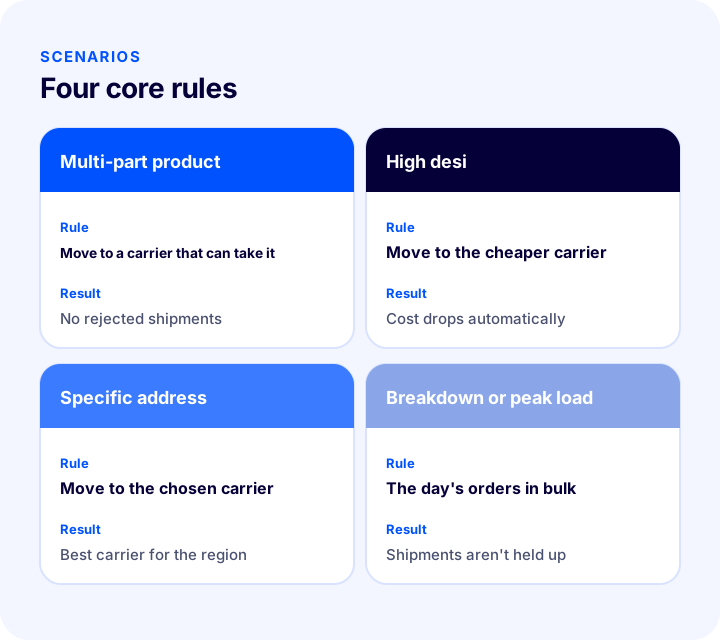
A scenario is a rule in the form "in this situation, this carrier". Four core scenarios cover the problems most operations run into most often; after that, criteria can be added as needed.
1. Multi-Part Products: Moving to a Carrier That Can Take Them
Some carriers don't carry products made up of two or more parts. If an order arrives with such a carrier, the system automatically moves the product to a carrier that can take it, according to the rule you defined. Your packing team never faces a carrier rejecting the shipment.
2. High-Desi Products: Moving to a Cheaper Carrier
For products with high desi, shipping fees differ significantly from carrier to carrier. Orders above the desi limit you set are moved to the carrier or logistics company that carries large shipments more economically. Your cost drops automatically on every large shipment.
3. Specific Addresses: Carrier by Address
You know which carrier delivers better in which region; you can define a different carrier for orders going to certain provinces or districts. The rule is applied to every order without error. If you want to set up region-based shipping rules for orders on your own website, also take a look at the Regional Shipping Management module.
4. Breakdown and Peak Load: Moving the Day's Orders in Bulk
Sometimes the problem is not the product but the carrier: its vehicle breaks down, or because of heavy load it won't be able to dispatch your shipments on time. In that case you select that day's orders in the panel and move them to another carrier in one go; your orders leave without being held up.
More Criteria: Amount, Desi Range, Region, Marketplace and Product
| Criterion | Example scenario |
|---|---|
| Order amount | Orders above an amount you set are shipped with the carrier you trust. |
| Volumetric weight range | Low-desi orders go to one carrier, mid-desi orders to another, and high-desi orders to the logistics company. |
| Province and district | Orders going to certain regions switch to the carrier that delivers faster there. |
| Marketplace and store | A different default carrier is used for each marketplace or store. |
| Product and category | Fragile products or those needing special packaging are moved to a carrier suited to handling them. |
How Do You Set Up Carrier Assignment Rules Step by Step?
A good rule set consists of a few clear rules. Many nested rules are both hard to manage and prone to conflict. The sequence below helps you build rules on a solid foundation.
- List the problems: Review returned, delayed and costly shipments and find the common causes.
- Learn each carrier's limits: Write down the product types each carrier can't carry, its desi limit and its service area.
- Choose the criterion: For each problem, decide which criterion will solve it: number of parts, desi, address, amount or product.
- Write the rule clearly: Define one-sentence rules such as "if desi is above this value, use this carrier".
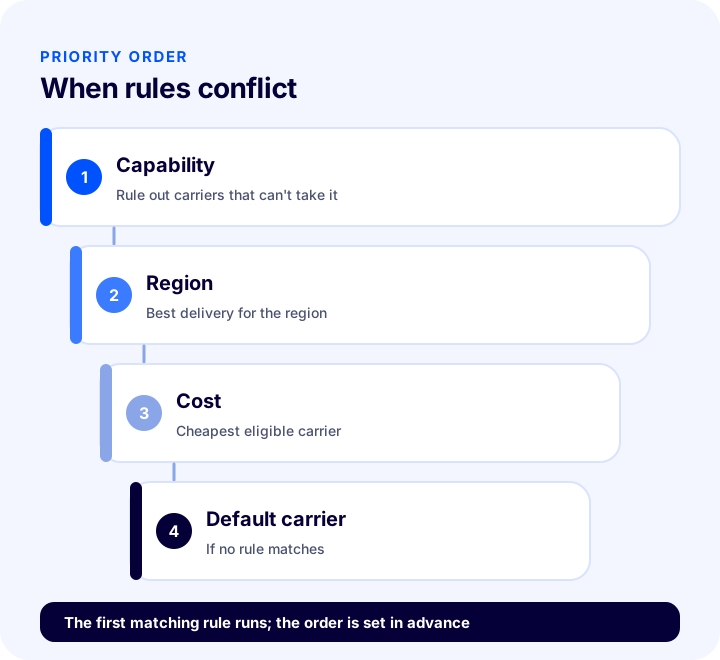
- Set the priority order: If more than one rule matches the same order, decide up front which one runs first.
- Define the default carrier: Make it clear which carrier an order that matches no rule will go with.
- Try it on a small number of orders first: Watch it for a few days before opening the rule to a wide set of orders.
- Monitor and improve: Review rules using returned shipments, delivery time and cost data.
What Happens If Multiple Rules Match the Same Order?
Conflict is unavoidable: an order that is both high-desi and multi-part can match both a desi rule and a parts rule. That is why rules need a priority order. The general principle is that "capability" rules (ruling out a carrier that can't carry the product at all) run before cost rules, because a low price is meaningless for a shipment the carrier can't accept.
How Is the Change Applied to the Marketplace and the Carrier?
The hard part of changing the carrier on a marketplace order is applying the change everywhere. Done by hand, the order information in the marketplace panel, the record at the old carrier and the shipment to be opened at the new carrier must each be updated separately. If one is forgotten, the customer sees the wrong tracking information or the shipment is opened twice.
- Notifying the marketplace: The order's carrier and tracking information are updated in the marketplace.
- Notifying the old carrier: The shipment record at the previous carrier is cancelled.
- Shipment at the new carrier: A shipment record is created at the assigned carrier.
- A single record: Your team doesn't have to log in to a second system.
The real job of automatic assignment is to make these three updates at the same time and consistently.
Automatic or Manual? You Stay in Control
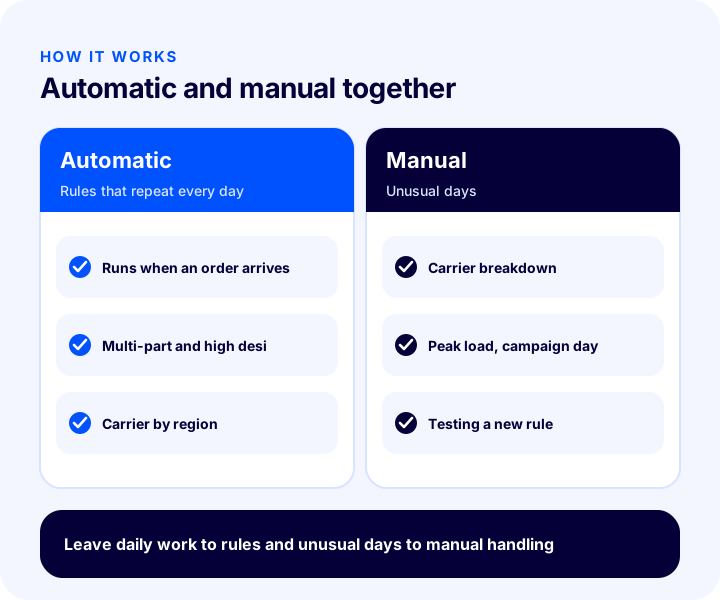
You can run rules in two ways. In automatic mode, the matching rule is applied the moment an order arrives. In manual mode, you select orders in the panel yourself and change the carrier one by one or in bulk. The most practical approach is to leave day-to-day work to automation and do manual transfers on unexpected days.
| Situation | Recommended way of working |
|---|---|
| Clear rules that repeat every day | Automatic |
| Breakdown or congestion at the carrier | Manual bulk transfer |
| Newly created rule, test period | Manual first, then automatic |
| Campaign-period peak load | Automatic rules + manual bulk transfer when needed |
How Do You Calculate the Cost and Time Savings of Automatic Carrier Assignment?
You see the gain in two items: the fee difference on high-desi shipments and the time spent changing carriers by hand. The tool below calculates your monthly savings and the time gained by entering your monthly number of high-desi orders, the average fee of the two carriers and how long it takes to change each order manually. The values are examples; enter your own figures.
What the tool shows is that even a small-looking fee difference becomes meaningful savings when multiplied by volume. The time gain is not visible in the savings: the minutes spent on manual changes are hours your team can spend on more valuable work.
Automatic Carrier Assignment Needs Check
The tool below checks your store with eight questions. Tick the items that apply to you; the tool tells you how much you need automatic assignment.
How Do You Manage Carrier Assignment During Campaigns and Peak Periods?
In campaign weeks order volume multiplies and carrier capacity is tested. Depending on a single carrier in these periods is one of the most common causes of delays. Reviewing your rules before a campaign lets you act with a plan, not in a panic, on peak days.
- Talk to carriers before the campaign: Share the expected volume and clarify daily capacity and delivery times.
- Decide the backup carrier: Make it clear in advance which carrier orders will be moved to when the primary carrier hits heavy load.
- Simplify the rules: Check your rules before the campaign so that many nested rules don't raise the risk of errors on a busy day.
- Monitor during the day: Keep track of the number of shipments awaiting pickup and delayed orders during the day; if needed, move that day's orders in bulk.
- Keep the customer informed: If delivery will take longer, share the order status in advance with notifications.
Which Criteria Matter When Choosing a Carrier?
Carrier assignment rules rely on knowing the strengths and weaknesses of the carriers. Evaluating each carrier on the criteria below before writing rules brings the rules closer to reality.
| Criterion | What to look at? | How does it affect the rule? |
|---|---|---|
| Carrying limits | Number of parts, desi and size limits | Products it can't carry are ruled out for that carrier |
| Fee structure | Price difference by desi range | The cheapest carrier is chosen for each desi range |
| Regional performance | Delivery time and success rate | The carrier that delivers best to certain regions is assigned |
| Delivery time | Time from dispatch to delivery | Priority is given for orders that need fast delivery |
| Returns and damage | Share of damaged or returned shipments | Fragile products are moved to the reliable carrier |
| Capacity | Daily shipment volume it can take | A backup carrier is set for busy days |
To consider these criteria together when making a shipping agreement, see our article Shipping Agreements in E-Commerce.
How Do You Measure Success in Carrier Assignment?
Once the rules are set up, track their effect with a few indicators. All of them can be derived from existing order and shipping data.
- Returned shipment rate: Have orders returned because they were rejected or went to an unsuitable carrier decreased?
- Average shipping cost: Has the cost per order dropped on high-desi shipments?
- Delivery time: Has delivery time improved in the regions where you set rules?
- Number of manual changes: Is the number of orders your team intervenes in by hand going down?
- Rule hit rate: Can you see how many orders each rule matched and what the results were?
- Customer complaints: Have shipping-related support requests decreased?
Common Mistakes in Automatic Carrier Assignment
- Writing too many rules: Excess rules conflict and become unmanageable; start with few, clear rules.
- Not setting a priority order: Two rules that match the same order give unexpected results.
- Not knowing carrier limits: Writing a rule from guesses rather than the carrier's real desi, parts and region limits produces wrong assignments.
- Skipping the default carrier: Where an order that matches no rule will go is left unclear.
- Rolling out without testing: If a rule is applied to all orders from day one, a mistake has a wide impact.
- Not monitoring results: A rule is set and forgotten; when a carrier's price or service changes, the old rule does harm.
- Closing the manual route: There must be a way to transfer orders in bulk by hand on breakdown and peak-load days.
- Looking only at cost: The cheapest carrier is not always the best; delivery time and reliability must be measured as well.
Automatic Carrier Assignment Checklist
| Title | To check |
|---|---|
| Problem | Have the causes of returned, delayed and expensive shipments been listed? |
| Carrier limits | Are each carrier's parts, desi and region limits written down? |
| Rule | Is each rule defined in a single sentence with a clear criterion? |
| Priority | Has an order been set for conflicting rules? |
| Default | Is a carrier defined for orders that match no rule? |
| Test | Was the rule tried on a small number of orders first? |
| Update | Is the change applied automatically to the marketplace and the carrier? |
| Manual route | Is bulk transfer possible during a breakdown or peak load? |
| Measurement | Are returned shipments, cost and delivery time being monitored? |
Automatic Carrier Assignment with Faprika
In Faprika this is done with the Automatic Carrier Assignment System. It works with orders coming from your marketplace stores connected to Faprika. Which plan includes it varies by plan; see the e-commerce plans and Automatic Carrier Assignment pages for details.
- Scenario-based assignment: You define once in the panel which carrier to use in which situation; the moment an order arrives, it is compared against the rules.
- Four core scenarios: Moving multi-part products to a carrier that can take them, high-desi products to a cheaper carrier, specified addresses to the carrier you choose, and moving the day's orders in bulk during a breakdown or peak load.
- Additional criteria: Rules can also be built by order amount, desi range, province and district, marketplace and store, and product and category.
- Automatic or manual: Rules can be applied automatically the moment an order arrives; if you prefer, you select orders in the panel and change the carrier one by one or in bulk.
- Updated everywhere: When the carrier changes, the information is passed automatically to the marketplace and to the old and new carriers; no manual work is needed.
- Together with Order Splitting: If you need to ship several products in separate packages, you can split the order with the Order Splitting System and send each package with the suitable carrier.
- Regional rule: If you want to set up region-based shipping rules for orders on your own website, there is the Regional Shipping Management module.
You can see all of Faprika's shipping and logistics integrations on the Logistics Add-ons page.
Frequently Asked Questions
What is automatic carrier assignment?
Automatic carrier assignment is a system that automatically assigns the most suitable carrier to incoming orders based on rules you define in advance. A rule can be based on the number of parts, the desi (volumetric weight unit), the delivery address or the order amount of the product. The change is also applied automatically to the marketplace and the carrier.
In which situations does the carrier change automatically?
It changes according to the rules you set: if a product consists of several parts, it is moved to a carrier that can take it; if its desi is high, to a cheaper carrier; if the address is in a region you defined, to the carrier you chose. Rules can also be built by order amount, desi range, marketplace and product.
Do I need to notify the marketplace separately when the carrier changes?
No. In an automatic carrier assignment system, when the carrier changes, this information is passed automatically to the marketplace and to the old and new carriers; you don't need to do anything manually in the marketplace panel or the carrier system.
Is automatic or manual assignment better?
The two complement each other. The most practical approach is to leave clear rules that repeat every day to automation, and on unexpected days such as breakdowns and peak load, to transfer orders manually and in bulk from the panel.
What do you do if a carrier has a breakdown?
That day's orders can be selected in the panel and moved to another carrier in one go. The same route is used on days when a carrier can't dispatch shipments on time because of heavy load. The change is applied automatically to the marketplace and the carriers.
What happens if rules conflict?
More than one rule can match the same order, so rules need a priority order. The general principle is that capability rules, which rule out carriers that can't take the product at all, run before cost rules, and a default carrier is set for orders that match no rule.