Users
User Groups
On the Faprika User Groups management page, you will find detailed information on dividing the users who sign up to your e-commerce site into different groups and defining privileges specific to each group. These features, which let you offer personalized experiences in shipping, tax, payment, permissions, discounts and many other areas, will take your business a step further.
How Are User Groups Used?
Faprika offers a range of features to help you make your work in the e-commerce world faster, more effective and scalable. One of these features is "User Groups" management. When you want to offer campaigns, discounts and experiences tailored to different customer segments, user groups can make your job much easier.
On this training page, we will explain step by step how to use Faprika's user groups feature, how to distinguish between different groups and how to build strategies around these groups. Whether you are a new user or an experienced e-commerce expert, this guide provides the essential information you need to use user groups effectively.
User groups are an excellent tool for dividing the customers on your e-commerce site into specific classes. These classifications let you offer customized offers, shipping benefits and tax exemptions to each user group. On Faprika's user panel, managing user groups is quite easy and effective.
When you enter user groups in the panel, you can see the user groups you created earlier. This lets you easily view and manage the benefits defined for each group (for example, free shipping or tax exemption). This is a great opportunity to increase customer loyalty and create promotions tailored to specific target audiences.
This section explains what user groups are and what they look like in the panel. Here you can learn what user groups are for and what kinds of opportunities you can create with them. In the following sections, you will find more detailed information on how to create and manage these groups.
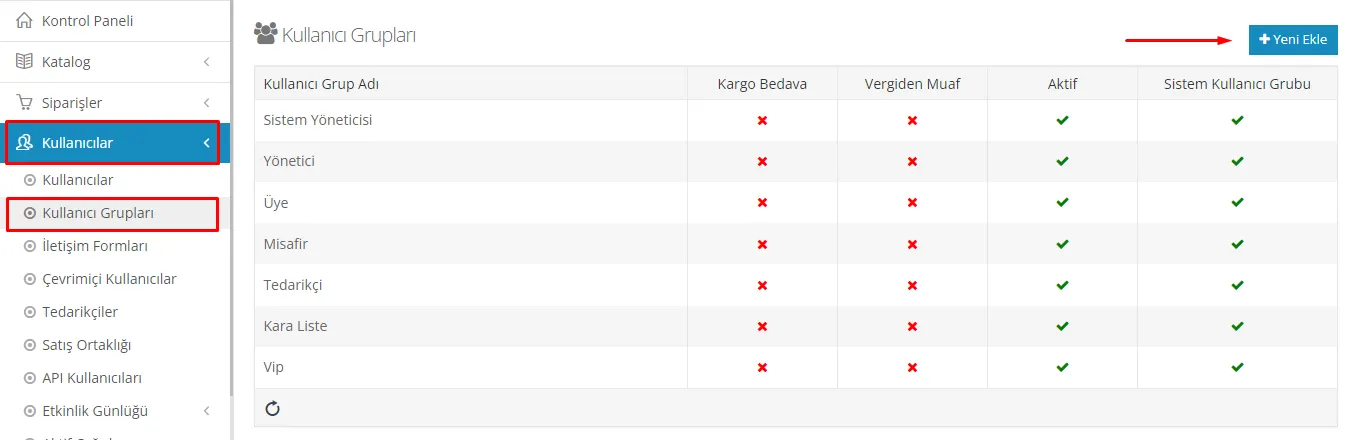
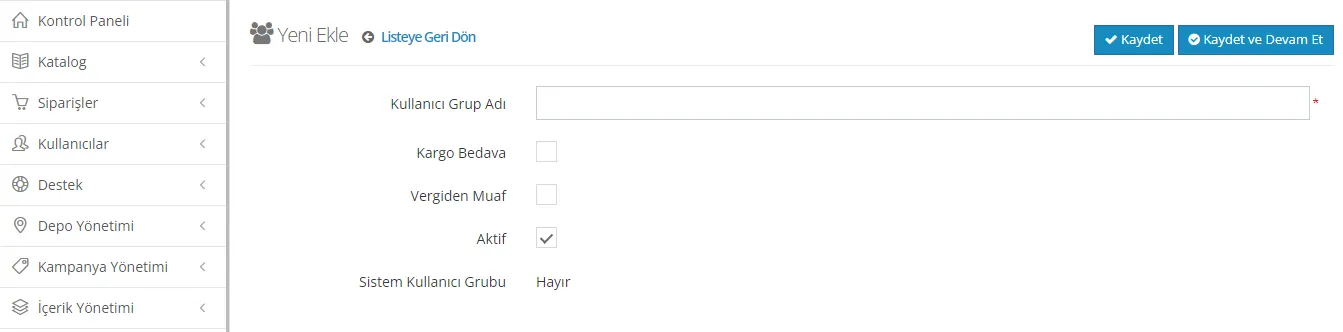
To create a new user group, simply click the "Add New" button. At this stage, you will need to set the name of the user group. After setting the name, you can choose which benefits you want to offer to the users of this group. In particular, options such as free shipping or tax exemption are available.
For example, when you create a user group for which you want to activate the "Free Shipping" option, the members of this group will not pay a shipping fee when they shop on your site. This can be an excellent strategy for increasing customer satisfaction and making more sales.
This feature lets you create marketing strategies specific to each user group and offer more tailored offers to your customers. When creating a user group, carefully considering who the group addresses and which benefits it should offer can help you deliver a more effective customer experience.
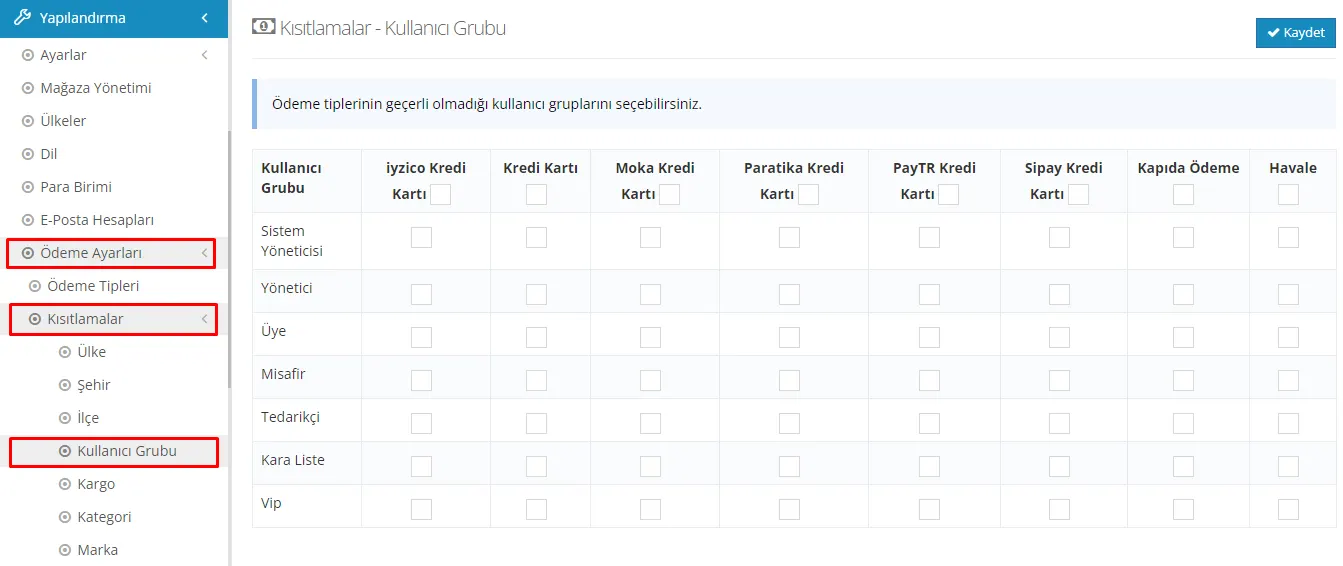
You can reach the "User Group" section by going to the "Restrictions" tab under "Payment Settings" in the Configuration menu. Here, you can set special payment restrictions according to user groups.
For example, if you want to restrict the "Cash on Delivery" option for the "Administrator" user group, the members of this group will no longer be able to shop with the cash on delivery payment type. This way, by creating payment strategies specific to certain user groups, you can manage the sales process in a more controlled way.
This customization makes it easier to offer a payment experience that fits the specific requirements of your business. Restrictions specific to different user groups make the customer experience more tailored while also helping you keep control of payment transactions.
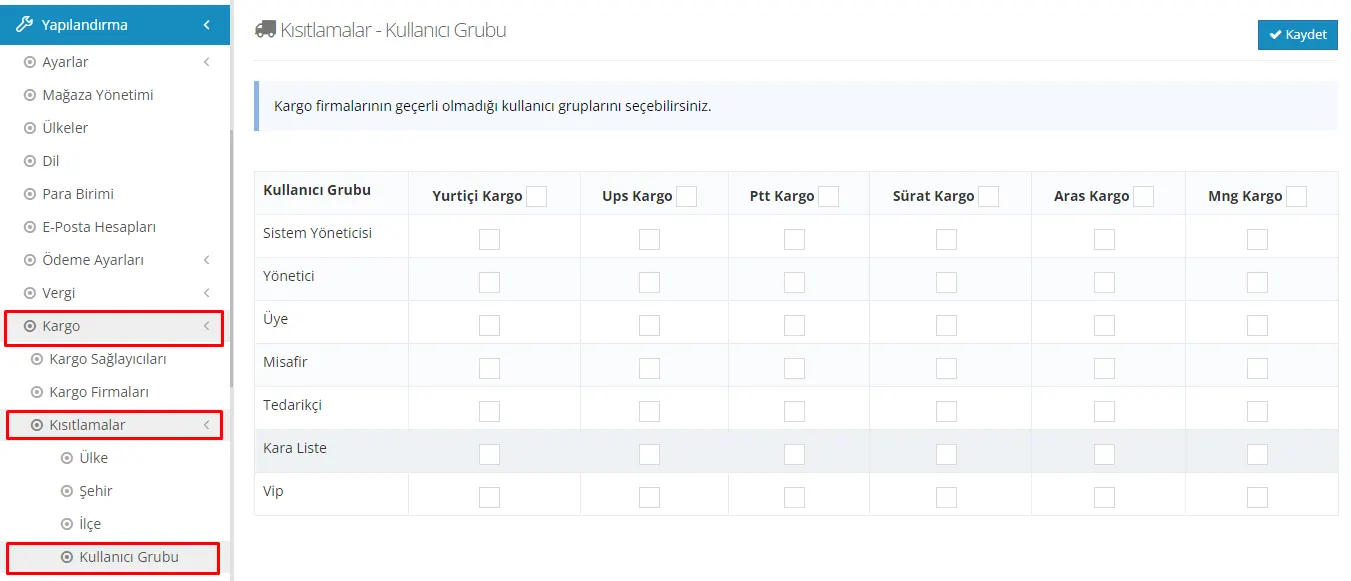
From the Configuration menu, go to the Shipping tab and use the User Group option under Restrictions to create shipping carrier restrictions for specific user groups. It is quite easy to set special restrictions using this feature.
For example, if you want to select the "Yurtiçi Kargo" option for the "Supplier" user group, you can restrict this carrier for that user group only. When the restriction is applied, users in the supplier group will not have the option to select "Yurtiçi Kargo" when they place an order. This ensures that the shipping process is managed the way you determine and makes operations more effective. You can quickly apply your changes by clicking the save button at the top right.
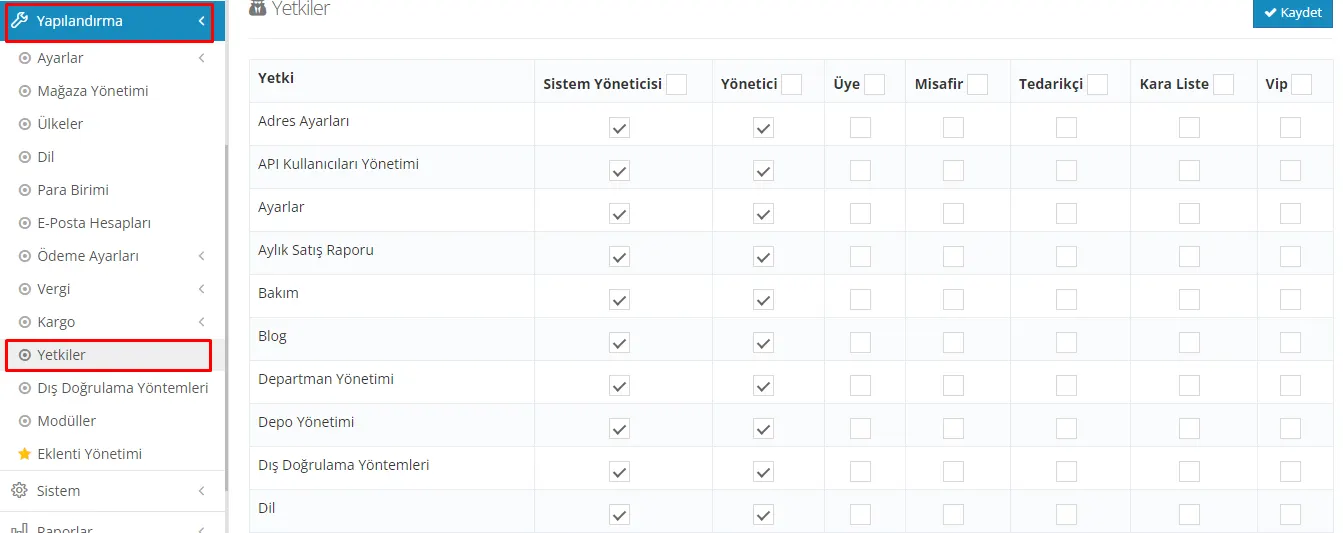
When you reach the "Permissions" tab from the "Configuration" menu, you can determine how much access user groups have to the control panel. This is quite useful when you want your staff to access certain areas, such as order management or product management, while preventing them from changing other settings.
Using this feature, you can create a new user group and assign only specific permissions to the members of this group. This way, you can manage your team's work in a more organized and effective way.
For example, if you want your staff group to have access only to order and product management, you can create this group and assign, from the "Permissions" area, only the permissions that give access to these areas. This helps you maintain order in your business while also letting you provide suitable access levels to employees in different departments or roles.
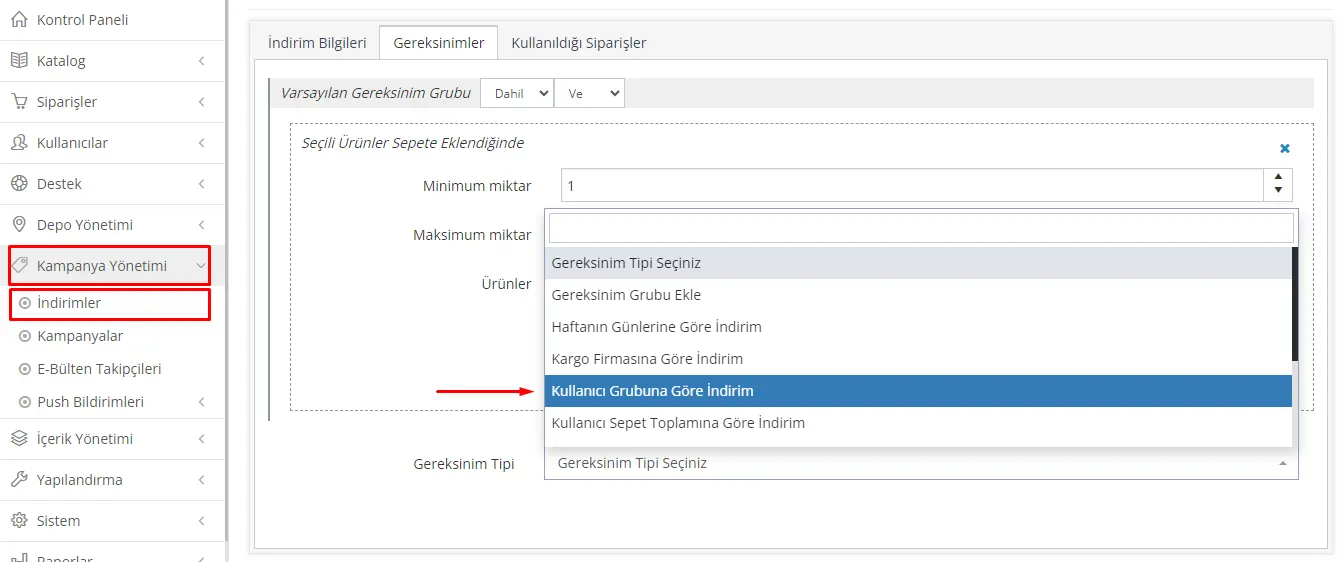
On your e-commerce site, offering discounts specific to user groups can be an excellent way to increase customer loyalty and encourage sales. In Faprika's "Campaign Management >> Discounts" section, you can customize your discounts for specific user groups.
To learn how to make this customization, you can review the detailed steps and examples on the Faprika Discounts Training Page.
Using this feature, you can:
- offer special discounts for VIP customers,
- create discounts for a specific product category,
- apply seasonal or event-based discounts.
This way, with campaigns tailored to different user groups, you can offer a more personalized shopping experience and increase customer satisfaction.
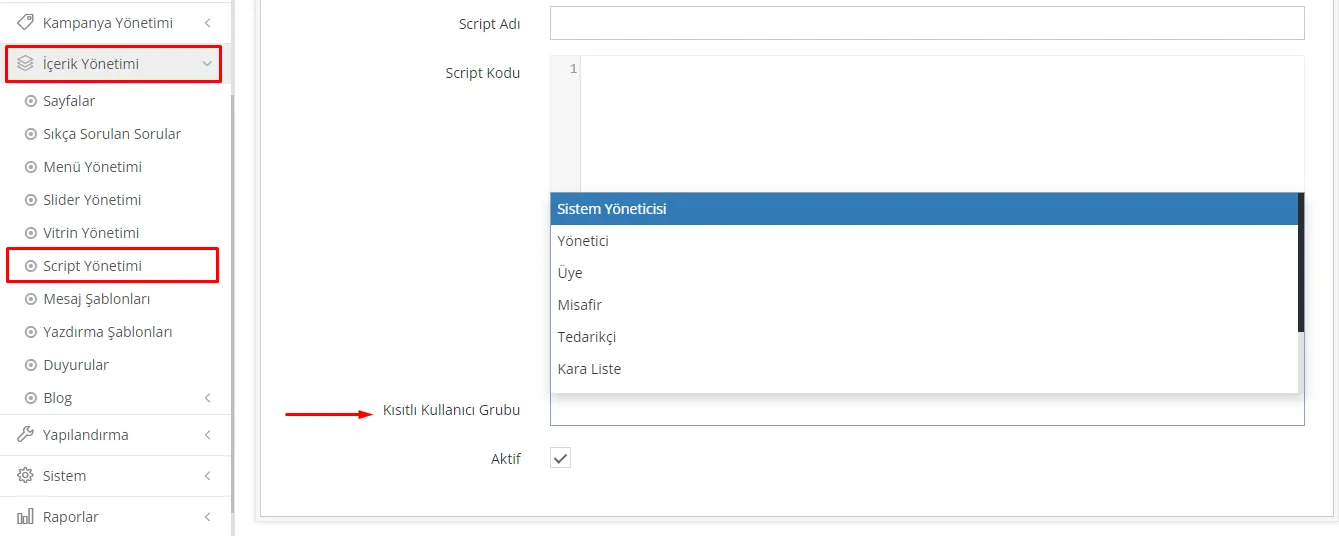
The "Content Management >> Script Management" feature, offered in a way customized for Faprika's user groups, lets you enable or disable certain scripts on your website for different user groups. This allows you to deliver customized content to site visitors or specific customer groups.
With this feature, you can:
- offer special ads or recommendations to different customer groups,
- announce new features or campaigns aimed at specific user groups,
- make the user experience more effective and personalized.
For example, you can enable a certain script for wholesale buyers and a different script for retail customers. This ensures that both user groups see the content best suited to their needs.
Faprika's Script Management page helps you target your user groups and customize the content, campaigns or recommendations on your site according to specific user profiles. It is a valuable tool for e-commerce businesses that want to adopt a customer-focused approach and enrich the user experience.
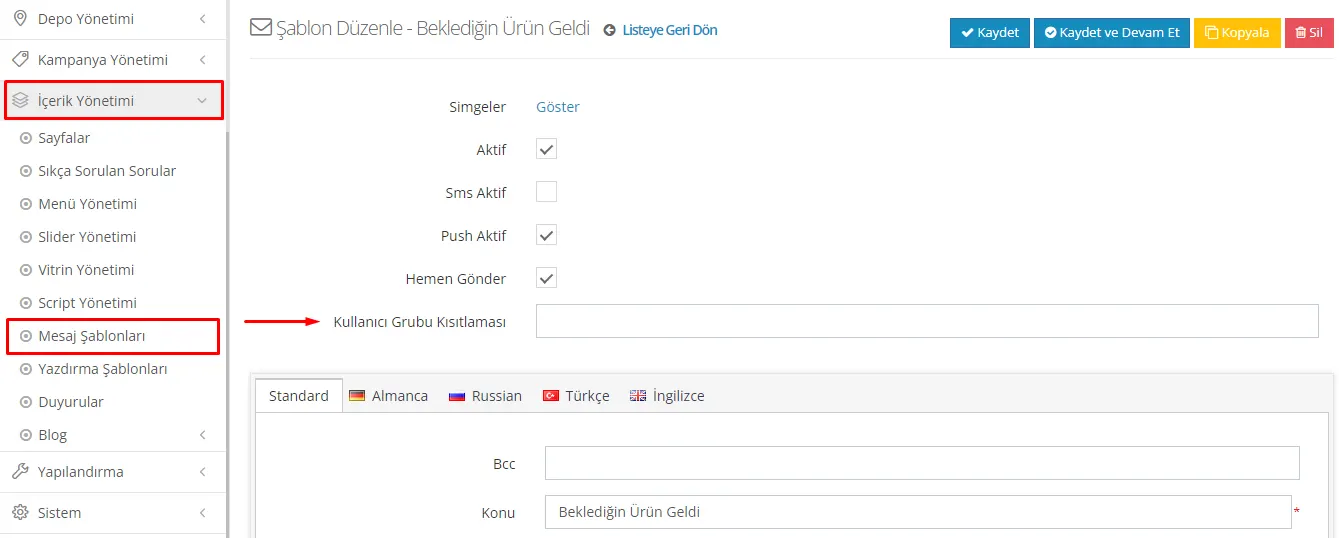
The restriction by user group feature offered in Faprika's "Content Management >> Message Templates" section can be part of an effective marketing and customer communication strategy. Using this feature, you can design special messages for specific user groups and ensure they are sent only to those groups. Here are the key aspects of this feature:
- Targeted Communication: By creating message templates specific to user groups, you can communicate with your customers in a more personalized and meaningful way.
- More Effective Marketing: By designing messages tailored to your users' needs and interests, you can increase conversion rates and customer satisfaction.
- Controlled Communication: By preventing the same message from being sent to all users, you can avoid messages going to the wrong target audience.
- Customized Discounts and Offers: You can make discounts, offers or announcements specific to certain user groups.
For example, if you want to run a discount campaign exclusively for your wholesale buyers, you can create a message template for that user group only and send it just to them. This helps you connect more effectively with your customers and present them with relevant offers.
In short, this Faprika feature can help you run customer communication in your e-commerce business in a goal-oriented and effective way. Sending messages suited to the needs of each user group is a powerful tool for enriching the customer experience and strengthening brand loyalty.
Faprika's "User Groups" feature lets you offer a multi-layered, personalized experience in your e-commerce business. By dividing your members into different groups, you can make custom arrangements in many areas such as shipping, tax, payment, permissions, discounts, scripts and message templates. This way, you can develop strategies specific to each user group, increase customer satisfaction, boost your sales and optimize your business processes. Managing user groups effectively can give you a unique advantage in today's competitive e-commerce world. Put these features into practice quickly and easily with Faprika, offer your customers a tailored shopping experience and take your business's success one step further. For more information and support, you can get in touch with us via contact.