
Contents 15 sections
- What Is Member List Management?
- Why Is the Member List Important?
- What Information Should Be Kept in a Member Record?
- How Do You Measure the Health of Your Member Base?
- How Do You Win Back Dormant Members?
- How to Manage the Member List in Faprika
- Which Filters Are Useful in the Member List?
- How Do You Plan Birthday and Special Occasion Campaigns?
- How Do You Separate Affiliate and Supplier Users?
- When Should You Log In on Behalf of a Customer?
- Why Do Members Abandon Membership and How Can You Prevent It?
- What Are Common Mistakes in the Member List?
- Member List Management Checklist
- How to Manage Member and Customer Relationships with Faprika
- Frequently Asked Questions
Thousands of members are registered in your store. Some shopped once and never came back, some order every month, some are dealers, some just signed up and filled their cart. If these people sit in a single list, you can't tell who is who. Managing the member list properly is the first step to knowing your customer and offering the right thing at the right time.
This guide explains how to manage a member list, what information to keep in a member record, filtering and segment logic, how to transfer data with Excel, the security of customer data and how to use the user list in Faprika. It also includes a tool that measures the health of your member base and a checklist.
What Is Member List Management?
Member list management means seeing, filtering and editing the information of customers who registered in the store in one place and making decisions based on it. The list keeps the customer's identity and contact information, user group, order history, addresses, cart and other activity together.
This management serves two purposes. On the operations side, it lets you answer customer questions quickly, fix incorrect records and act on behalf of the customer; on the sales side, it makes it possible to see which campaign suits which customer group.
What Is the Difference Between a Member List and Customer Segmentation?
The member list is a raw record store; segmentation is grouping these records by shared characteristics. The list answers “who is there”, the segment answers “what kinds of customers are there”. A well-managed list is the raw material for segmentation.
| Feature | Member list | Customer segment |
|---|---|---|
| What does it contain? | All registered members | A group of members with a shared characteristic |
| Question | Who is registered? | What kinds of customers are there? |
| Redemption | Record and information management | Campaign and communication plan |
| Example | List of all members | Members who haven't ordered in recent months |
Why Is the Member List Important?
The member list is one of the store's most valuable data assets. Finding a new customer is usually more expensive than getting an existing customer to buy again; that's why knowing the members you already have is very valuable. It matters for three reasons.
- It speeds up customer service: When a customer calls, you see their entire history on one screen.
- It enables the right communication: You can send different campaigns and messages to different groups.
- It increases repeat sales: You can notice dormant customers and try to win them back.
To measure customer value and long-term relationships, see the guide What Is Customer Lifetime Value (CLV) and How Is It Calculated? (Calculator and Examples).
What Information Should Be Kept in a Member Record?
Only information that is useful and that you can legally keep should be stored in a member record. Every piece of information is a responsibility; unnecessary data creates both a security risk and a legal obligation. Six pieces of information are enough for most stores.
| Information | What is it for? | Point to watch |
|---|---|---|
| Identity and contact | To reach and get to know the customer | Must be verified and up to date |
| Customer group | Group-specific price or campaign | Must be assigned to the right group |
| Order history | To see shopping habits | Enables quick answers to customer questions |
| Addresses | Delivery accuracy | An incorrect address creates return costs |
| Cart and favorites | Understanding interest | Used for reminders and recommendations |
| Admin note | Important information for the team | Sensitive and unnecessary information should not be written |
How Do You Ensure Personal Data Protection?
Member data is personal data and must be protected under the relevant legislation. Collect only the data you need, limit who has access to which data, and don't store customer information in insecure environments (such as files shared without control). Don't write sensitive or unnecessary information in the admin note. For legal compliance, see the guide How to Ensure KVKK (Turkish Personal Data Protection Law) Compliance for an E-Commerce Site? Privacy Notice, Explicit Consent, Cookies, İYS and Data Subject Requests: A Practical Guide.
How Do You Measure the Health of Your Member Base?
The number of members alone doesn't show success; what matters is how many of the members actually shop and come back. Three simple indicators summarize the health of the member base: the active member ratio, the repeat purchase rate and the number of dormant members.
The tool below calculates these three indicators when you enter the total number of members, the number of members who placed an order in the period you set, and those among them who placed two or more orders. You set the period (for example the last three months); each indicator should be calculated with the same period.
Interpret the numbers the tool gives according to your industry and store type; the natural ratios of a store selling frequently purchased products and one selling products bought once a year are very different. What is truly valuable is running the same calculation every month and tracking the trend: if the number of dormant members is rising and the repeat purchase rate is falling, it is time to invest in the customer relationship.
| Indicator | What does it tell you? | What to do if it is low |
|---|---|---|
| Active member ratio | How many of the members shop | Plan campaigns and reminders especially for dormant members |
| Repeat purchase rate | Are customers coming back | Strengthen the loyalty program and after-sales communication |
| Number of dormant members | How many members haven't shopped for a long time | Try a win-back message and a group-specific offer |
How Do You Win Back Dormant Members?
A dormant member is a customer who is registered but hasn't shopped for a long time. This customer already knows your store and has trusted it once; they are often easier to win back than a brand-new customer is to acquire. First define your dormant members, then reach out to them with targeted communication.
- Set a clear definition: Define a period for “dormant” according to your store's shopping frequency.
- Export the list: Export to Excel to review the dormant members separately.
- Write it personally and relevantly: A message based on products the customer last viewed or bought is more effective than a general announcement.
- Don't forget consent: Send the marketing message only to members who have given contact consent.
- Measure the result: Look at the number of members won back and improve the message.
For the rules of reaching customers by email and SMS, see How to Do SMS Marketing in E-Commerce? A Guide to Consent, Message Writing, Timing and Measurement and What Is an E-Newsletter? How to Set Up a Newsletter Subscription in E-Commerce? Subscriber Sign-Up Field and Confirmation, Content Types, Sending Frequency, Segment, Subject Line and Sender Name, Consent and Opt-Out, List Cleaning, Measurement, Common Mistakes, Subscriber Value Calculator and Setup Audit.
How to Manage the Member List in Faprika
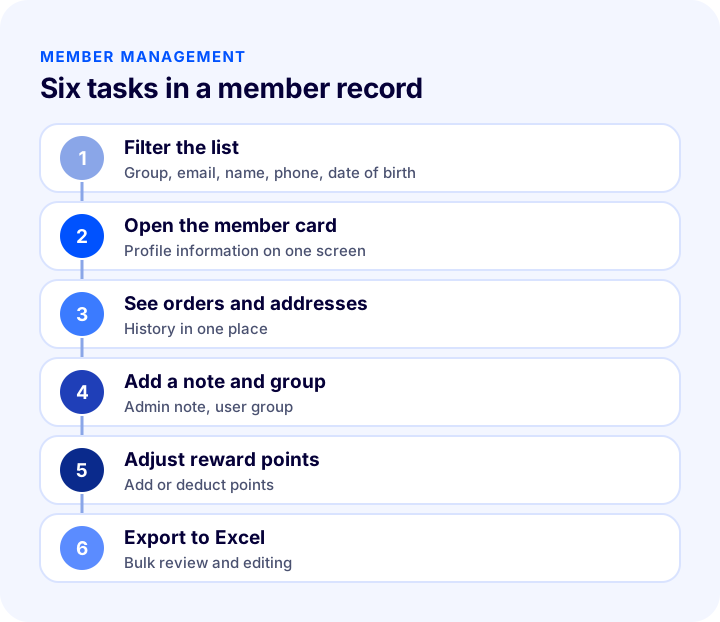
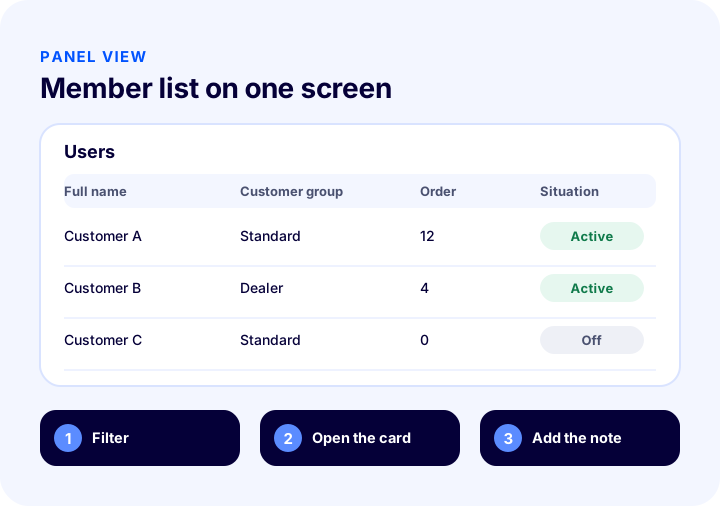
In Faprika, you manage registered customers from the Users section. The section lists all users registered on your site; with the advanced filter, you quickly find the user you are looking for by parameters such as user group, email address, name, phone number and date of birth.
How Do You Add a New User?
You can create a new user with the “Add New” button in the list. At this stage there are many details you can assign to the user: name, contact details, user group and more. Because customers can register themselves on the site, adding a user manually is usually needed only in special cases such as a phone or in-store order.
What Is Shown on the User Card?
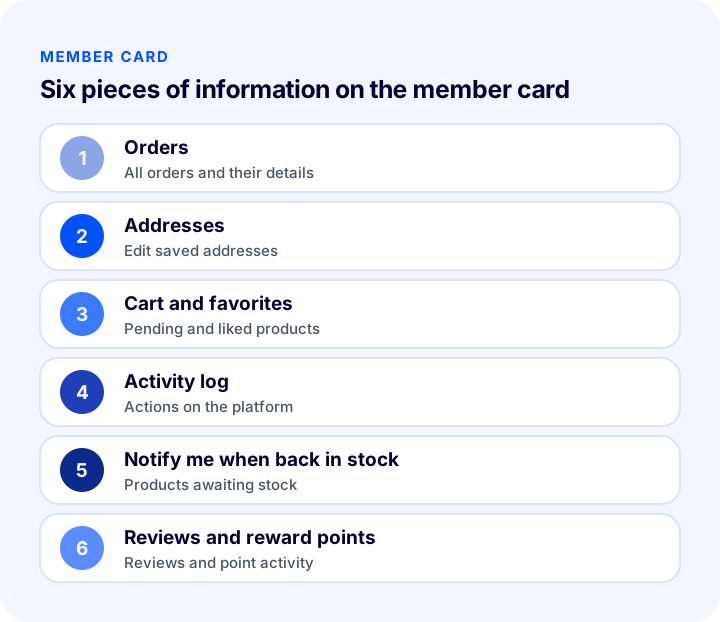
When you select a user from the list, the user card opens, where you can fully update the profile information. The card contains the following sections:
- User information: You add details such as user-specific groups, supplier information or affiliate status, and the admin note.
- Orders: You see all of the user's orders and click an order number to go to its details.
- Addresses: You see, edit or remove saved addresses.
- Cart list and favorites list: You see the products in the cart, quantities, total amount and the products added to favorites.
- Activity log: The user's actions on the platform are recorded.
- Log in: Lets you enter the customer's account and browse the site on the customer's behalf.
- Back-in-stock notification: Shows which out-of-stock products the user has requested.
- Product reviews: Shows the reviews the customer has left.
- Reward points: You can add points to the user or deduct them, and track the points earned and spent.
How Do You Export Customer Data to Excel?
You can export all user data in Excel format and review it. Using Faprika's Excel template, you can edit user data in bulk and upload it to your website again. The exported file contains personal data; share it only with authorized people, don't leave unnecessary copies and delete it securely when the work is done.
How Do You Separate Members with User Groups?
Dividing users into groups makes group-specific prices, discounts or permissions possible: a dealer group, a corporate customer group, standard members and so on. A member not assigned to the right group may see the wrong price; so audit group assignments regularly. For how to set up user groups, see the guide What Are User Groups?.
For step-by-step use with screenshots, see the Member List Management tutorial page.
Which Filters Are Useful in the Member List?
A filter is the fastest way to split a large list into meaningful groups. In Faprika you can search by parameters such as user group, email address, name, phone number and date of birth. The table below shows practical uses of these filters.
| Filter | What is it used for? | Example scenario |
|---|---|---|
| Customer group | Listing the members of a group | Seeing all members in the dealer group |
| Email address | Finding a specific member | Quickly opening the record for a customer question |
| Full name | Search by name | Finding a customer who calls by phone |
| Phone number | Search by number | Matching the member to an order question |
| Date of birth | Listing by date | Finding members for a special occasion campaign |
How Do You Plan Birthday and Special Occasion Campaigns?
Information such as date of birth makes it possible to add a personal touch for the customer. Collecting this data requires consent and a reason: ask only for information that you will use and that the customer agrees to share. Sending a special occasion message or a small discount to members with a date of birth keeps the relationship warm. Send the message only to members who have given contact consent and plan the campaign in advance.
How Do You Separate Affiliate and Supplier Users?
On the user card, details such as user-specific groups, supplier information or affiliate status can be added. This way you can manage users in different roles, such as dealers, suppliers and affiliates, separately from regular customers. If you are setting up an affiliate program, marking partners' records correctly is the foundation of commission tracking. For details, see the guide What Is Affiliate Marketing? How to Set Up an Affiliate Program in E-Commerce?.
When Should You Log In on Behalf of a Customer?
Logging in on behalf of a customer is a support tool used to see what the customer sees and solve their problem. When a customer reports that their cart won't proceed to payment or that their order history doesn't look right, this feature provides quick diagnosis. Acting on behalf of a customer is a sensitive permission; it should be used only for support purposes and by authorized people, and no orders or changes should be made without the customer's knowledge.
Seeing the customer's cart, favorites and products awaiting stock also creates sales opportunities: the posts What Is a Favorites List? How to Set Up a Favorites List in E-Commerce, How Do Favorites Turn into Sales? Return Calculator and Health Audit and What Is Back in Stock Notification? How to Set Up Stock Alerts for Sold-Out Products and Win Back Sales? Variant-Based Requests, Notification Channels and Threshold, Win-Back Calculator and Setup Audit explain how to make use of this data.
Why Do Members Abandon Membership and How Can You Prevent It?
As important as the growth of the member list is that members keep shopping. A customer signs up but may drift away because of a demanding registration process, not finding the benefit they expected, or forgetting the store. Making membership genuinely useful (fast checkout, order tracking, personal campaigns) and keeping the sign-up process short raises the active member ratio. For the effect of mandatory membership on cart abandonment, see the guide What Is Guest Checkout? Mandatory Membership in E-Commerce, Guest Payment and Encouraging Membership: A Practical Guide.
What Are Common Mistakes in the Member List?
- Never reviewing the list: Looking at the number of members without measuring activity hides the real situation.
- Assigning to the wrong group: A dealer or corporate customer sees the wrong price.
- Not cleaning up duplicate records: Multiple records for the same person show the data split.
- Leaving the exported file uncontrolled: A file containing personal data is a security risk.
- Writing inappropriate information in the admin note: Sensitive or personal comments carry legal risk.
- Sending messages without permission: Sending a marketing message to a member who has not given contact permission creates both reputational and legal risk.
- Forgetting dormant members: Searching only for new customers instead of winning back existing ones is expensive.
Member List Management Checklist
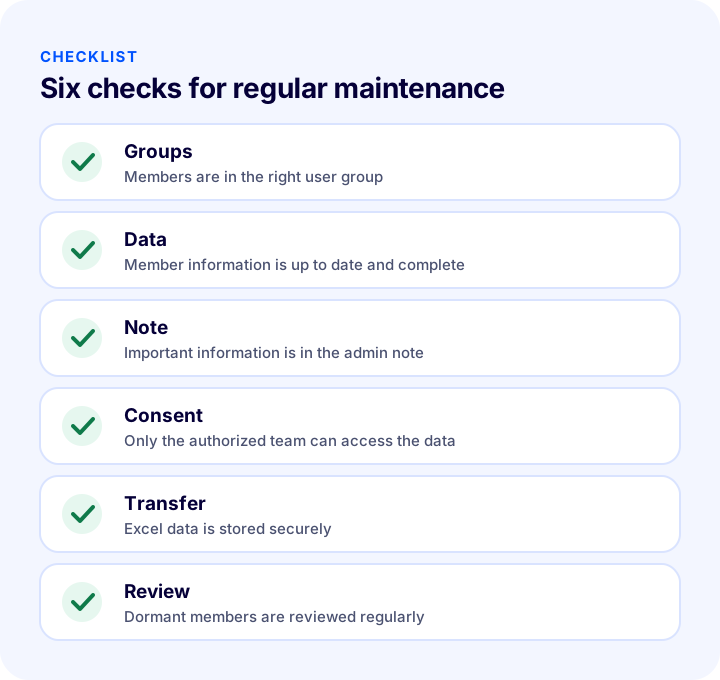
The list below summarizes the cornerstones of your member management routine.
| Stage | Check | Done? |
|---|---|---|
| Groups | Members are assigned to the right user group | Yes / No |
| Data | Member details are up to date, complete and free of duplicates | Yes / No |
| Note | Only useful information is written in admin notes | Yes / No |
| Authorization | Only the authorized team can access the data | Yes / No |
| Transfer | Exported files are stored securely and deleted when the job is done | Yes / No |
| Consent | Marketing messages go only to members who have given permission | Yes / No |
| Review | Active, repeat and dormant members are measured regularly | Yes / No |
How Do You Manage Members and Customer Relationships with Faprika?
Faprika makes member management the starting point of customer relationships. The main options are:
- User list: Search and list all registered users with an advanced filter (group, email, name, phone, date of birth).
- User card: See orders, addresses, cart, favorites, activity log and reviews in one place.
- User groups: Divide members into groups and apply group-specific prices and rules.
- Reward points: Add points to or deduct points from a user account and track point movements.
- Excel transfer: Export user data, edit it in bulk with a template and upload it again.
- Log in as a customer: See what the customer sees with your own eyes and solve their problem.
- Online users: See which users are on the site right now, together with the last page they viewed.
You can see which features are included in which plan in the e-commerce plans comparison.
We recommend readingWhat Is Guest Checkout? Mandatory Registration in E-Commerce, Guest Payment and Encouraging Registration: A Practical GuideFrequently Asked Questions
What is member list management?
Member list management means seeing, filtering and editing the information of customers registered in the store in one place and making decisions based on it. The list keeps identity and contact information, user group, order history, addresses and cart together.
What information should be kept in a member record?
Only information that is useful and that you can legally keep: identity and contact details, user group, order history, addresses, cart and favorites and, when needed, a short admin note. Unnecessary data creates security and legal risk.
How is the active member ratio calculated?
You divide the number of members who placed an order in the period you set by the total number of members and multiply by one hundred. Choose the period according to your store's shopping frequency. Track the trend by running the same calculation regularly.
How do you win back dormant members?
First define the dormant member, export the list to Excel to review it, and send a personal message based on the customer's last interest. Send the message only to members who have given contact consent and measure the number of members won back.
How do you export customer data in Faprika?
From the Users section you can export all user data in Excel format. With the Excel template you can edit data in bulk and upload it to the site again. Because the file contains personal data, share it only with authorized people.
What is shown on the user card?
Orders, addresses, cart list, favorites list, activity log, back-in-stock requests, product reviews and reward point activity are shown. You can also add a user-specific group and admin note, and log in on behalf of the customer.
You May Also Like
- What Is Customer Segmentation? How to Segment Customers with RFM Analysis in E-Commerce
- What Are User Groups?
- How to Set Up a Loyalty Program? A Practical Guide to Store Points Systems, Tier Design and Cost Calculation in E-Commerce
- What Is Customer Lifetime Value (CLV) and How Is It Calculated? (Calculator and Examples)