Contents 12 sections
- What Is a Free Shipping Threshold?
- Why Is a Free Shipping Threshold Important?
- How Do You Calculate a Free Shipping Threshold?
- How Far Above the Average Cart Should the Threshold Be?
- How Is the Cost of Free Shipping Covered?
- How Do You Manage Free Shipping During Campaign Periods?
- How Do You Think About Free Shipping, Returns and Cash on Delivery Together?
- How Do You Set the Free Shipping Threshold in the Faprika Panel?
- What Are Common Mistakes with the Free Shipping Threshold?
- Free Shipping Threshold Checklist
- How Do You Manage Shipping and Free Shipping with Faprika?
- Frequently Asked Questions
A customer filled their cart, reached the payment step and saw the shipping fee. The product price was reasonable, but once the shipping fee was added the total came out higher than expected; they closed the tab. On the other hand, if you cover shipping on every order, small carts leave no profit. The tool that strikes the balance between the two extremes is the free shipping threshold.
This guide explains step by step what a free shipping threshold is, which models it is applied with, how to calculate the threshold, how to compare it with the average cart, how to cover the shipping cost and how to define the threshold in the Faprika panel. There are also two small tools: a calculator that works out the threshold and a checklist that audits your setup.
What Is a Free Shipping Threshold?
A free shipping threshold is a rule under which the shipping fee is not charged to the customer once the order total goes above a certain amount. Orders below the threshold are charged the shipping fee as usual; once the cart reaches the threshold, shipping is free.
The threshold does two jobs at once. It gives the customer the thought "if I buy a bit more, shipping is free" and pushes the cart total up; for the store, it means taking on the shipping cost only for orders of a certain size. That makes it a much more controlled method than free shipping on every order.
Which Models Are Used to Offer Free Shipping?
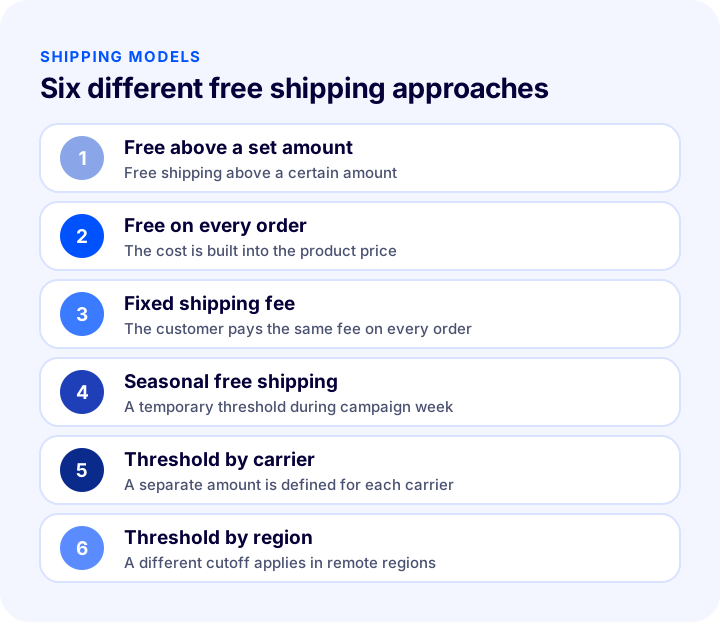
Free shipping is not offered in a single form. Different models are chosen depending on the store's product mix, margin and customer expectations. The table below compares the six most commonly used models.
| Model | How does it work? | Strength | Point to watch |
|---|---|---|---|
| Free above a set amount | Free shipping above a certain amount | Raises the cart total | The threshold must be calculated correctly |
| Free on every order | The shipping cost is built into the product price | A simple and appealing message | The margin erodes on small carts |
| Fixed shipping fee | The same fee is charged on every order | The cost is predictable | May deter customers on small orders |
| Seasonal free shipping | A temporary threshold during campaign week | Turns seasonal traffic into orders | The threshold must be restored when the period ends |
| Threshold by carrier | A separate amount for each carrier | Balances different costs | Management is more detailed |
| Threshold by region | A different cutoff in remote regions | Limits losses in expensive regions | Must be explained clearly to the customer |
Why Is a Free Shipping Threshold Important?
A free shipping threshold is one of the few settings that affects conversion, cart size and profitability at the same time. It matters for three reasons.
Unexpected Costs Make Customers Abandon the Cart
A shipping fee that appears at the last step is one of the most common causes of cart abandonment. The customer liked the product and accepted the price, but a total higher than expected shakes their trust. Showing the threshold in advance on the product page and in the cart removes this surprise.
It Raises the Average Cart Value
To make shipping free, a customer may add one more product to the cart. The threshold is a natural incentive that moves the cart total slightly above the average. The mechanism is simple: the owner of a cart close to the threshold would rather spend the same money on a product than pay a shipping fee.
It Protects the Profit Margin
Covering shipping on every order wipes out profit on low-value orders and even turns it into a loss. A threshold makes sure the shipping cost is absorbed only on orders large enough to cover it.
We recommend readingHow to Increase Average Order Value? 12 Ways to Raise Revenue per Order in E-CommerceHow Do You Calculate a Free Shipping Threshold?
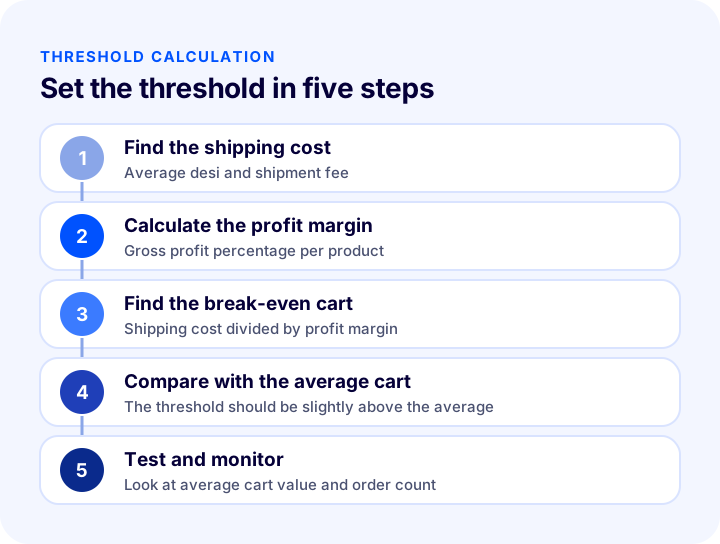
Calculating a free shipping threshold takes three pieces of information: average shipping cost, gross profit margin and average cart value. First you find the smallest cart on which the shipping cost does not wipe out your profit (the break-even cart), then you set the threshold above it and close to the average cart.
1. Pin Down Your Shipping Cost
The shipping fee passed on to the customer and the amount you pay the carrier may not be the same. The calculation uses the real amount you pay. Average desi, the price in your shipping agreement and packaging cost are part of this calculation. For the desi and price calculation, see the guide Desi Calculation: How to Calculate Shipping Desi (Calculator and Examples), and for negotiating with the carrier, see the post How to Make a Shipping Agreement in Ecommerce? Getting Quotes, Calculating Shipping Fees and Passing Them On to Customers (2026). For a quick estimate, you can also use the free shipping fee calculator.
2. Find Your Profit Margin
Gross profit margin is found by subtracting the product cost from the selling price and dividing by the selling price. If margins differ between product groups, use the cart's average margin. The guide Profit Margin Calculation: How to Calculate Profit Margin in Ecommerce? (Calculator and Examples) helps with the margin calculation.
3. Calculate the Break-Even Cart
The break-even cart value is the amount at which a cart's gross profit equals its shipping cost. The formula is: break-even cart = shipping cost ÷ profit margin. For example, if the shipping cost is 60 and the profit margin is 35 percent, the break-even cart is about 171. If you cover shipping on an order below this amount, your profit falls below zero.
4. Compare It with the Average Cart
The threshold cannot be lower than the break-even cart, but if you set it exactly there, it will matter to very few customers. For most stores, a sensible starting point is to set the threshold slightly above the current average cart value. That way, customers whose carts are below average tend to add one more product to reach the threshold.
5. Test and Monitor
A threshold is not calculated once and forgotten. After a few weeks, look at your average cart value, order count, and the ratio of shipping cost to revenue. If the average cart value is not rising, the threshold may be too high; if shipping costs are squeezing your profit margin, it may be too low.
The result from the tool is a starting point. If your margin varies by product group, you can run two separate calculations, one with the margin of your best-selling category and one with the overall average, and evaluate the difference.
| Input | Example value | Effect on the calculation |
|---|---|---|
| Average cart | 700 | Sets the upper direction of the threshold |
| Shipping cost | 60 | Raises the break-even cart |
| Profit margin | 35 percent | As the margin falls, the break-even cart rises |
| Target cart increase | 20 percent | Moves the threshold above the average |
| Recommended threshold | 850 | Well above the break-even cart, slightly above the average |
How Far Above the Average Cart Should the Threshold Be?
The threshold should be slightly above the average cart, not far above it. If the threshold is far above the average, it looks out of reach for most customers and loses its incentive effect. If it is below the average, you cover shipping on most orders and the threshold loses its meaning.
Looking at the cart distribution makes this decision easier. In which amount range are most orders concentrated, how many orders fall just below the threshold, and what is the median cart value? These give a more reliable picture than the average. Extreme values (very large single orders) can inflate the average; in that case, it is more accurate to use the median.
| Situation | What happens? | What should be done? |
|---|---|---|
| Threshold below the average | You pay for shipping on most orders | Raise the threshold and recheck your margin |
| Threshold close to the average | An incentive effect emerges and shipping costs stay under control | Monitor for a few weeks |
| Threshold far above the average | Looks out of reach to the customer | Try lowering the threshold gradually |
| Average cart approaching the threshold | Customers add products to reach the threshold | Don't raise the threshold right away; measure the result |
How Should the Free Shipping Threshold Be Shown to Customers?
If the threshold stays hidden, its incentive effect is zero. Customers need to see the amount on the product page, in the cart, and at the checkout step, and the same threshold must be written the same way everywhere. If the cart total is below the threshold, a short reminder such as “Add products worth this much more to get free shipping” is the most natural way to grow the cart. If the threshold changes during campaign periods, make sure all displays are updated together; two conflicting thresholds make customers distrustful.
How Is the Cost of Free Shipping Covered?
Free shipping does not remove the cost; it only means you pay instead of the customer. There are a few legitimate ways to cover this cost, and most stores use them together.
- Margin above the threshold: The gross profit of a cart that reaches the threshold should be large enough to cover the shipping cost; the break-even calculation guarantees this.
- Carrier agreement: As your shipment volume grows, you can negotiate a better tariff with your carrier.
- Desi control: An oversized box means unnecessary desi (volumetric weight). Packaging in the right size directly reduces shipping costs.
- Growing the cart: Complementary product recommendations and cross-selling push the cart above the threshold while also increasing your margin.
- Building it into the product price: Some stores add shipping to the price and call it “free shipping”; with this method, you should check whether the price stays competitive.
Do Remote Regions and Large Products Need a Separate Threshold?
If shipping cost is not the same in every region and for every product size, a single threshold can cause losses on some shipments. For shipments to remote regions or products with high desi, the break-even cart is much higher. In this case, defining separate thresholds by region or carrier is a solution that is fair to the customer and safe for the store. To decide which carrier to use in which region, you can also look at the method in What Is Automatic Carrier Assignment? How to Automate Carrier Selection by Order: Scenarios, Priority Order, Cost Calculator, and Needs Assessment.
How Should Free Shipping Be Managed During Campaign Periods?
Traffic and cart size change during campaign weeks. Temporarily offering a lower threshold in these periods is one of the effective ways to turn the increased visitors into orders; but do not forget to return the threshold to its previous level when the period ends.
- Set a start and end date: If a temporary threshold is not tied to a calendar, it becomes permanent.
- Recalculate the margin: Because the campaign discount lowers the margin, the break-even cart rises; a low threshold can increase losses.
- Update the threshold everywhere together: The product page, cart, and checkout step should show the same amount.
- Measure the result: At the end of the period, compare the order count, average cart value, and shipping cost.
To plan your campaign calendar in advance, see the guide E-Commerce Campaign Calendar: How to Prepare a Campaign Plan That Drives Sales All Year; for using it together with coupons, see What Is a Discount Coupon? How to Create a Coupon Code in E-Commerce and Use It Profitably.
How to Think About Free Shipping, Returns, and Cash on Delivery Together
The cost of free shipping does not end with outbound shipping. If a customer returns the product, the return shipping is also a cost; with cash on delivery, an additional service fee and the risk of undelivered orders come into play. Both of these items need to be factored in when setting the threshold.
In a product group with a high return rate, free shipping effectively means paying for shipping twice. To think separately about return costs and return conditions, see How to Manage the Returns Process in E-Commerce; to calculate the cost of cash on delivery, see What Is Cash on Delivery? How to Manage Cash on Delivery in E-Commerce, Calculate Its Cost, and Reduce Undelivered Orders: A Practical Guide.
How to Set the Free Shipping Threshold in the Faprika Panel
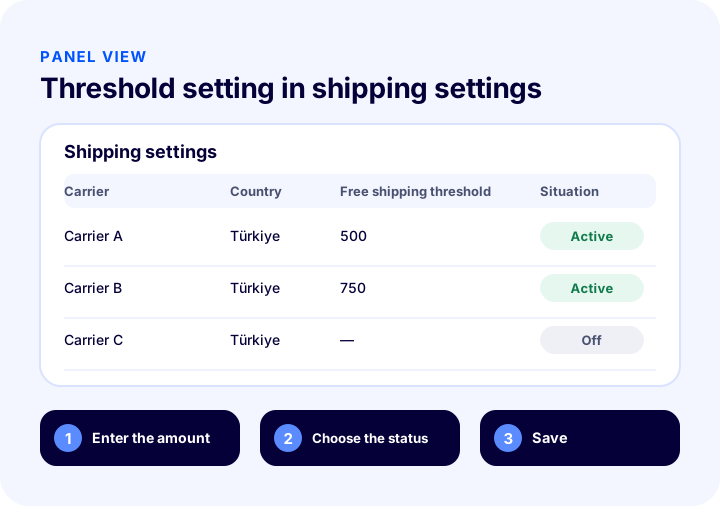
In Faprika, you define the free shipping threshold in the Shipping Settings panel. For the carriers you work with, you can make orders above a certain amount free; you do not need to create a separate discount rule for shipping.
How to Reach Shipping Settings
In the control panel, follow “Configuration >> Settings >> Shipping Settings”. On the page that opens, you enter the free shipping amount by carrier and by the country the order is placed from, make any necessary adjustments, and then click the “Save” button. In the example on the Faprika training page, the shipping service fee is made free for orders placed from Türkiye above a certain amount.
What to Watch for When Defining the Threshold
- Decide separately for each carrier: If carriers' prices differ, the break-even cart differs too.
- Consider the country: Shipping costs are very high for international orders; do not copy the domestic threshold to international orders.
- Match the amount to the text on your site: The amount defined in the panel and the message on the product page and in the cart should be the same.
- Note the change: Record the date the threshold changed; you can link the change in average cart value to it.
For step-by-step usage, see the Shipping Settings training page.
What Are Common Mistakes with the Free Shipping Threshold?
- Setting a threshold without calculating the cost: Looking at a competitor's threshold and copying it means taking a risk without knowing your own margin.
- Going below the break-even cart: If the threshold is below the break-even cart, every order that reaches it loses money.
- Hiding the threshold: If the customer cannot see the threshold, they will not grow their cart.
- Applying one threshold to all products: For large and heavy products, the break-even cart is much higher.
- Not reverting the threshold after a campaign: A temporary threshold becomes permanent and erodes your margin.
- Forgetting return shipping: If outbound shipping is free, the return cost must also be taken into account.
- Not measuring the result: If you don't look at average cart value and shipping cost when the threshold changes, you won't know the outcome.
Free Shipping Threshold Checklist
The list below summarizes whether your threshold rests on a solid foundation.
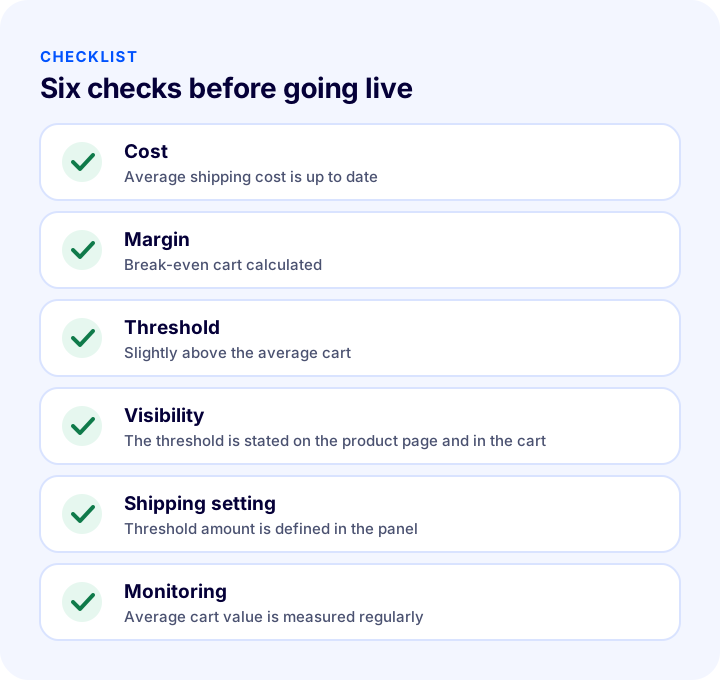
| Stage | Check | Done? |
|---|---|---|
| Cost | Average shipping cost is up to date and based on actual payments | Yes / No |
| Margin | Gross profit margin and break-even cart are calculated | Yes / No |
| Threshold | Slightly above the average cart, above the break-even cart | Yes / No |
| Visibility | The amount is the same on the product page, in the cart, and at checkout | Yes / No |
| Shipping setting | Threshold is defined in the panel by carrier | Yes / No |
| Special cases | Remote regions, international orders, and large products are handled separately | Yes / No |
| Monitoring | Average cart value and shipping cost are monitored regularly | Yes / No |
How to Manage Shipping and Free Shipping with Faprika
Faprika brings together the different steps of shipping management, from defining the free shipping threshold to reducing shipping costs, in the same panel. The main options are:
- Shipping Settings: Makes orders above a certain amount free for carriers; this feature is available in all plans.
- Shipping integrations: Orders are transferred to the carrier and the tracking number is recorded on the order.
- Regional, country-based, and user-based shipping management: You can define different shipping rules by region, country, and user.
- Product desi price calculation: The shipping price is calculated based on the product's desi.
- Automatic carrier assignment: Routes the order to the appropriate carrier depending on conditions.
You can see which features are in which plan in the e-commerce plan comparison. You can reach carriers and related add-ons on the add-ons page.
We recommend readingWhat Is an Abandoned Cart? How to Reduce the Cart Abandonment Rate in E-CommerceFrequently Asked Questions
What is a free shipping threshold?
A free shipping threshold is a rule under which the shipping fee is not charged to the customer once the order total goes above a certain amount. Orders below the threshold are charged the shipping fee as usual.
How do you calculate a free shipping threshold?
First you find the break-even cart by dividing the shipping cost by the profit margin. Then you set the threshold slightly above the average cart, provided it is not lower than the break-even cart. You monitor the result for a few weeks and update it if needed.
How high should the free shipping threshold be?
There is no general figure; it depends on the store's average cart, shipping cost and margin. A reasonable starting point is to set the threshold slightly above the average cart. A threshold that is too high loses its incentive effect, and one that is too low erodes the margin.
Does free shipping increase sales?
An unexpected shipping fee is one of the common reasons for cart abandonment; a threshold removes this surprise and creates an incentive to bring the cart up to the cutoff. You should measure the effect in your own store through average cart value and order count.
How do you set a free shipping threshold in Faprika?
In the control panel, follow Configuration, Settings and Shipping Settings. For the carriers you work with, enter the amount above which orders will ship free and save. This feature is available in all plans.
Should the threshold be changed during a campaign period?
A temporarily lower threshold can help turn campaign traffic into orders. However, because the discount lowers the margin, you should recalculate the break-even cart, set a start and end date, and restore the threshold when the period ends.
You May Also Like
- Desi Calculation: How Is Shipping Desi Calculated? (Calculator and Examples)
- E-Commerce How to Make a Shipping Agreement? A Guide to Getting Quotes, Calculating Shipping Rates and Passing Them On to Customers (2026)
- Profit Margin Calculation: How to Calculate Profit Margin in E-Commerce (Calculator and Examples)
- E-commerce Metrics: 15 KPIs You Should Track and Their Calculation Formulas