Contents 13 sections
- What Is a Product Data Feed?
- Why Is a Product Data Feed Important?
- Which Fields Should a Data Feed Include?
- Why Is Field Quality Decisive?
- Should You Use XML or CSV?
- How to Determine the Update Frequency?
- What Are Common Mistakes in a Data Feed?
- How Many Orders Do Faulty Records Cost You?
- How to Set Up a Product Data Feed?
- How to Audit Your Data Feed Readiness?
- How to Measure a Data Feed?
- How to Prepare a Product Data Feed (XML) with Faprika?
- Frequently Asked Questions
If you want to show your products on advertising platforms, product comparison sites and different sales channels, you don't need to enter products into each channel by hand. Product information is delivered to channels through a regular file, and this file refreshes itself as prices or stock change. The short answer to the question what is a product data feed is this: the regular export of your store's product records, with fields such as title, description, image, price, stock and identity, in a standard file format that channels can read (mostly XML or CSV).
In this guide, we explain what a data feed is, which fields it should carry, why field quality is decisive, how to choose the update frequency, the most common errors and why products may not be approved. Of the two tools in the article, one is designed for calculating how many orders faulty records can cost you, and the other for auditing the readiness level of your current data feed.
What Is a Product Data Feed?
A product data feed (product feed) is your store's products exported into a file that channels can read. The file has a record for each product; the record consists of fields such as the product's title, description, image, price, stock status, barcode, brand and category. The channel reads this file at set intervals, checks the records and publishes the eligible ones.
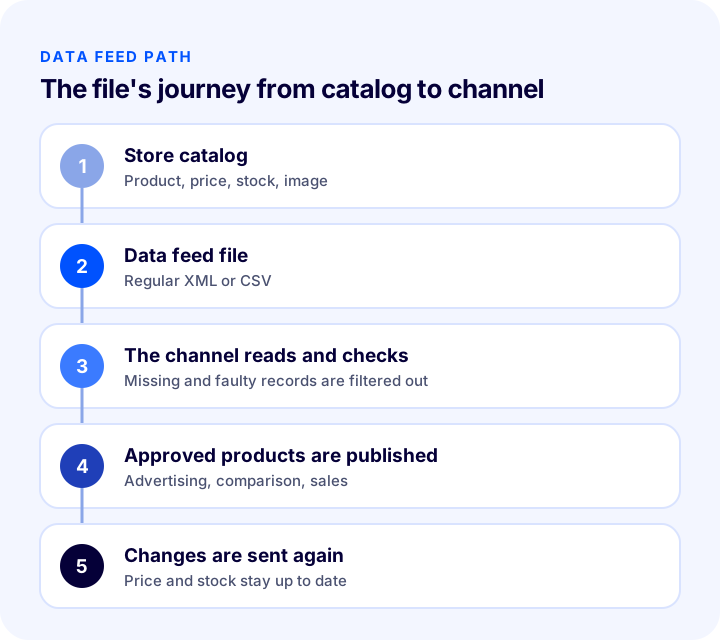
The value of a feed lies in its regularity. The file is not prepared once and left; its address stays fixed and its content is refreshed along with changes in the store. Each time the channel reads it, it sees the most current price and stock. This way, a product whose price changed or that sold out does not keep being advertised in its old state.
Are a Data Feed and XML the Same Thing?
No; XML is a file format, while a data feed is the way that file is used to carry product information and be refreshed regularly. The same feed can be built with either XML or CSV. Channels mostly ask for their own template; field names and required fields can vary from channel to channel.
| Concept | What does it tell you? | Example use |
|---|---|---|
| Data feed | Products in a regularly refreshed form offered to the channel | Sending products to advertising and comparison channels |
| XML | A file format structured with tags | A feed file that carries fields with explicit names |
| CSV | A flat table format divided into columns | Simple, small catalog transfer |
| Template | The field names and layout the channel asks for | Each channel's own feed rules |
Why Is a Product Data Feed Important?
A product data feed is the infrastructure that makes the products in the catalog visible on channels. If the feed doesn't work or the records are faulty, the product doesn't appear on the channel, however good it is.
- Determines visibility: Only approved records are shown in ads or on comparison pages. A product that isn't approved brings no orders from that channel.
- Eliminates manual work: Entering hundreds of products into each channel separately is both time-consuming and error-prone; a feed reduces this to a single file.
- Keeps price and stock consistent: If the price on the channel differs from the one on the site, you lose customer trust; channels also count this inconsistency as an error.
- Protects the ad budget: Ad budget spent on a sold-out product is wasted. An up-to-date feed takes a sold-out product off the channel.
- Speeds up moving to a new channel: A well-prepared catalog can be carried over to a new sales channel with small adjustments.
Which Fields Should a Data Feed Include?
Although each channel's template is different, the core fields are common to almost all of them: title, description, image, price, stock status, product ID (barcode and unique code), brand and category. When these fields are complete and correct, the product is published without problems on most channels.
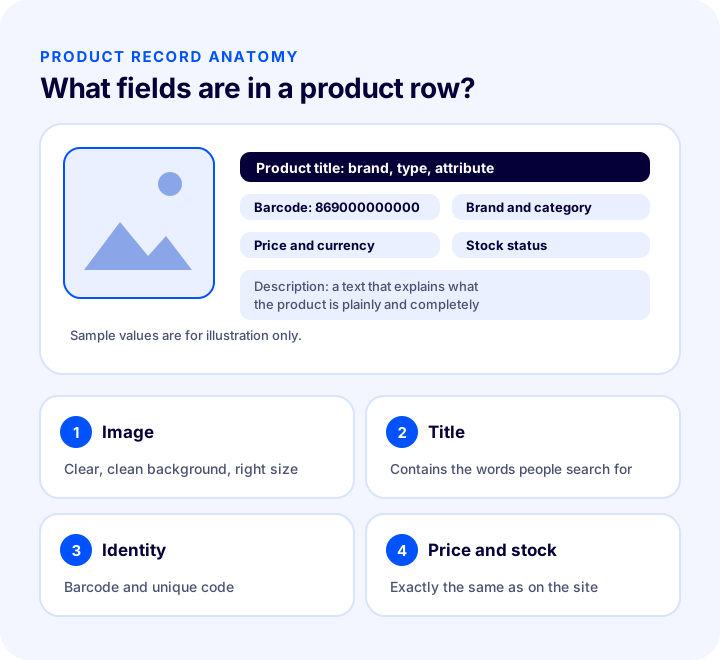
| Field | What is it for? | Point to watch |
|---|---|---|
| Title | The product's name as it appears in search results | Should carry the brand, type and distinguishing feature |
| Description | Explains what the product is | Should be plain, accurate and complete; should not contain exaggeration |
| Image | The product's storefront | Should be sharp, of sufficient size and on a clean background |
| Price | The amount the customer will see | Must be exactly the same as the price on the site |
| Stock status | Indicates whether it can be sold | A sold-out product must not appear as in stock |
| Identity (barcode, code) | Identifies the product definitively | Should be correct, unique and specific to the product |
| Brand | States the manufacturer of the product | Should be entered with the same spelling on every product |
| Category | Places the product in the right class | Should fit the channel's category structure |
What Should the Product Title Look Like in a Feed?
The title in the feed is a clear product name that carries the words customers search for. Brand, product type and distinguishing feature (color, size, model) should be in the title; unnecessary embellishments and emphasis in capital letters should be removed. We explained in detail how to build the title in a separate guide.
Recommended readingHow to Write a Product Title: SEO-Friendly Product Names in E-Commerce, Title Formula and Examples by Category, a Practical GuideWhat Should the Product Description Look Like in a Feed?
The description should explain what the product is in plain language. Channels dislike exaggerated promises, misleading statements and irrelevant keyword stuffing in descriptions. Real information such as the product's material, size, purpose of use and contents should be written; each product's description should be unique, and the same text should not be copied across hundreds of products.
Why Is the Image Critical in a Feed?
On most channels, the image is where the customer first sees the product. The image needs to be sharp, of sufficient resolution and clearly show the product. Images with text, watermarks or promotional stickers on them are often rejected by channels. The image link must also work; a broken link leaves the product without an image.
Recommended readingHow to Optimize Product Images? Size, Format (WebP), File Name and Alt Text in E-commerce: A Practical GuideWhy Must Price and Stock Match Exactly?
The price and stock status shown on the channel must be the same as what the customer sees when they arrive at the product page. When there is a difference, channels may reject the product or put the account under warning, both to protect the customer and to ensure trust. That is why price and stock fields are the ones that most need frequent refreshing.
Why Are Barcodes and Product IDs Needed?
A barcode is the code that identifies a product worldwide and helps channels match the product correctly. A unique product code (SKU) is your store's own internal code. Both must be complete and consistent; if the same code is repeated across multiple products or the barcode is wrong, the channel cannot match the product.
We recommend readingWhat Is a Barcode? How to Get, Read and Use a Product Barcode (GTIN/EAN) in E-Commerce – A Practical Guide We recommend readingWhat Is an SKU? How to Create a Stock Keeping Unit (SKU) Code: Examples, Coding Rules and an SKU Generator ToolHow Should Brand and Category Be Entered?
The brand field should be entered with the same spelling on every product; if the same brand appears in uppercase on one product and lowercase on another, or with a different spelling, the channel may count them as separate brands. The category, in turn, must match the channel's own category structure. A wrong category causes the product to appear in irrelevant searches or not to be published at all.
Why Is Field Quality Decisive?
Field quality means not just that a field is filled in, but that it is accurate, consistent and in the format the channel expects. A field that is filled but wrong can cause more problems than an empty one, because the channel either publishes wrong information thinking it is correct or sees an inconsistency and rejects the product.
- Accuracy: The title must match the product, the price the page, and the stock the warehouse.
- Consistency: The same brand, the same color and the same unit of measure must be entered with the same spelling on every product.
- Completeness: All required fields must be filled in for every product.
- Freshness: Changing fields such as price and stock must be refreshed along with the source.
- Format compliance: Price, currency and stock status must be written in the format the channel asks for.
Should You Use XML or CSV?
Both carry product information; the choice depends on the channel's support and the size of your catalog. Most channels accept both XML and CSV, while some ask for only one. So first check which format the channel supports.
| Format | Strength | Weakness |
|---|---|---|
| XML | Fields are carried with explicit names; suitable for long text and many fields | Hard to read and edit by hand |
| CSV | Simple table structure; easy to understand | Limited for products with many fields and long text |
In a large catalog, XML is generally more flexible and less error-prone. In a small catalog or at the starting stage, CSV may be enough. Whichever format is chosen, the file must be readable regularly from an address.
How to Determine the Update Frequency?
Update frequency is how often the file is refreshed. If price and stock change quickly, the feed must be refreshed quickly too; if change is slow, less frequent refreshing is enough. The rule is this: the feed's refresh interval should not be longer than the interval at which changes in price or stock must be reflected on the channel.
- Fast-selling and low-stock products: Frequent refreshing is needed; otherwise a sold-out product keeps showing in ads.
- Campaign periods: Since price changes are intense, it makes sense to refresh the feed more often.
- Slowly changing catalogs: A daily refresh is often enough.
- The channel's read frequency: The channel reads the file at certain intervals; refreshing the feed much more often than the channel reads may bring no extra benefit.
Are the Channel's Read Time and Your Refresh Time the Same?
No. Your refreshing the file and the channel reading it are separate events. You refresh the file; the channel picks up the new version at its next read time. So a change may not reach the channel instantly; for fast-changing products, this gap needs to be taken into account.
We recommend readingHow Should an E-Commerce Product Page Look? 15 Elements of a Product Page That SellsWhat Are Common Mistakes in a Data Feed?
Feed errors generally come from three places: missing information, inconsistent information and broken information. Most can be caught in advance.
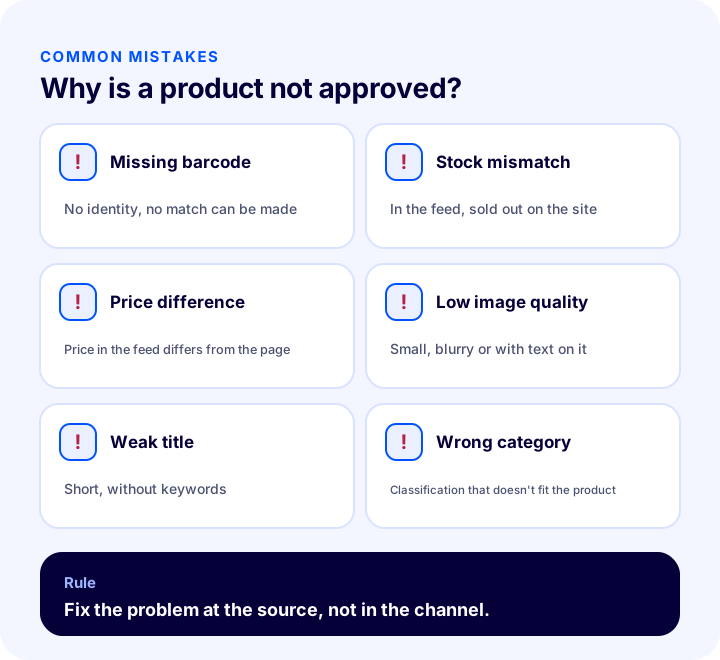
| Mistake | Why does it happen? | How to prevent it? |
|---|---|---|
| Missing barcode | No identity is entered in the product record | Make the barcode a required field and check in bulk |
| Stock mismatch | The feed carries old stock information | Refresh the feed according to stock changes |
| Price difference | The price in the feed was changed on the site but not refreshed | Link price updates to the feed |
| Low image quality | The image is small, blurry or has text on it | Set an image standard |
| Weak title | The title is short or lacks keywords | Build the title with brand, type and feature |
| Wrong category | The category doesn't match the channel's structure | Review category mappings one by one |
| Corrupted file | There is a special character or an unclosed tag | Validate the file before publishing |
Why Are Products Not Approved?
A product not being approved usually stems from a required field being missing or wrong; each channel applies its own rules, but the common reasons are similar.
- Missing required field: A basic field such as title, image, price or stock status is empty.
- Identity problem: The barcode is incorrect, duplicated or missing.
- Inconsistency: The price or stock in the feed doesn't match the information on the site.
- Image violation: The image is of insufficient quality, has text on it or is misleading.
- Content rule: The title or description contains exaggeration, misleading statements or prohibited content.
- Access problem: The product page doesn't open or the link in the feed goes to the wrong page.
Channel policies may change over time; so approval reasons should be reviewed not just once but regularly in the channel's own help pages. Structured data on the product page also helps the channel understand the product.
Recommended readingWhat Is Structured Data (Schema)? How to Add, Test and Validate Product Schema in E-commerce? A Practical GuideHow Many Orders Do Faulty Records Cost You?
A product that is not approved is not shown on that channel at all; in other words, that product cannot bring orders from the channel. The size of the loss depends on two things: the share of faulty products in the feed and the orders these products could bring from the channel on average. The tool below calculates the number of rejected products and the estimated orders missed by taking your total product count and faulty product rate. The values are examples; enter your own figures.
The main lesson the tool shows is that the cost of a faulty record is not limited to that product alone: even if the rate looks small, missed orders grow quickly as the catalog grows. So setting up the feed correctly for every product is much cheaper than fixing them one by one afterwards.
How to Set Up a Product Data Feed?
Setting up a feed can be summarized in five steps. The order matters: first the data is fixed, then the feed is set up, and finally it is connected to the channel.
- 1. Clean up the catalog: Complete missing barcodes, empty images and short titles.
- 2. Learn the channel's template: Read from the channel's help page which fields are required and which format is asked for.
- 3. Decide which products will go: Starting with active products that have images and stock reduces the risk of errors.
- 4. Create the file and give its address to the channel: Make sure the file is refreshed regularly.
- 5. Monitor the report and fix: Fix the error report that arrives after the first read at the source and have it read again.
Which Products Should Be Included in the Feed?
Not every product needs to go to every channel. Leaving out products without images, sold-out products or products not yet ready for publication directly lowers the error rate. Limiting the products you want to promote on the channel to those that are active, have images and have stock is a good start.
How to Audit Your Data Feed Readiness?
Running the feed through the eight checks below before publishing greatly reduces the errors you will get on the first read. The same items appear in the image and in the tool beneath it.
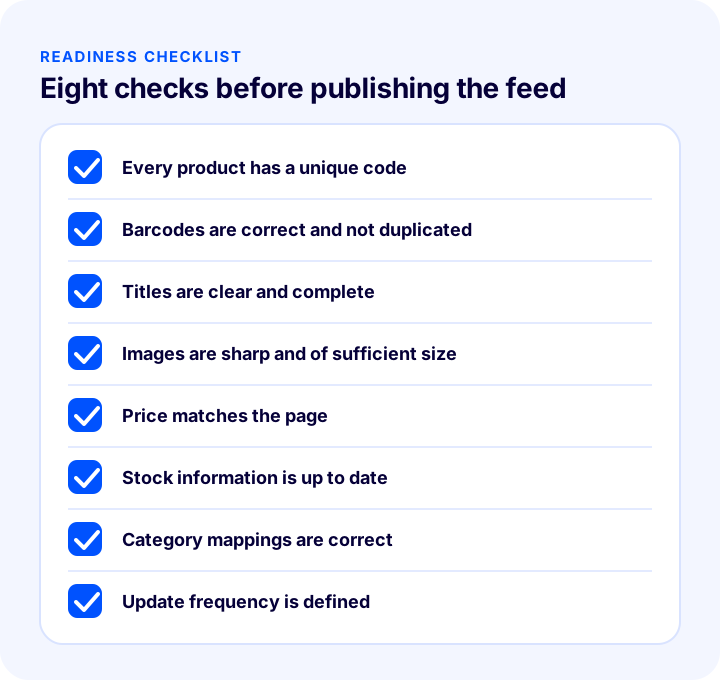
| Check | What to look at? |
|---|---|
| Unique code | Does every product have a separate, non-duplicated code? |
| Barcode | Are barcodes correct and complete? |
| Title | Are titles clear, keyworded and complete? |
| Image | Are images sharp, of sufficient size and free of text? |
| Price | Is the price in the feed the same as on the page? |
| Stock | Is stock information up to date? |
| Category | Are category mappings correct? |
| Update | Is the refresh frequency suitable for product speed? |
The tool below checks your current setup with eight questions. Tick the items that apply to you; the tool tells you how solidly you have built your data feed.
How to Measure a Data Feed?
A few indicators tell the health of the feed. Track all of them by channel; the overall figure may hide the problem channel.
| Indicator | What does it tell you? |
|---|---|
| Approved product rate | How much of the feed is published |
| Number of rejected products and the reason | Which error affects the most products |
| Price and stock mismatch warnings | How up to date the feed stays |
| Clicks and orders from the channel | The real contribution of published products |
| Last successful read time | Whether the channel can reach the file |
How to Prepare a Product Data Feed (XML) with Faprika?
In Faprika, you can transfer your products to advertising and shopping platforms with XML. In the Faprika Admin panel, an output is defined under Catalog > Transfer > Export Products; the link of the defined XML is given to the channel.
- Filtering: You choose which products to export with filters: products with images, product type, active products, starting stock quantity and category. Filters are not mandatory; if you leave them empty, all products go out. However, making sure the products you will advertise have images and stock helps you avoid errors and prevents ads for products without stock.
- Output settings: Output name, file type (XML), the ready template for advertising and shopping platforms, language, currency, price value, price type, calculation type (amount or percentage) and calculation direction (increase or decrease) are selected. If your products have additional language information, output can be produced in different languages.
- Number of parts and access: The total parts field determines how many links the output is split into if the catalog is large; 1 is generally recommended. If you wish, you can allow only specific IP addresses to access it.
- Up-to-date feed: In Faprika's XML integrations, update intervals and many fields are managed directly by the customer; the update interval can be set at the level of minutes.
- Shopping platform integration: Integration with the search engine's product management service comes as standard in all plans; products you upload to your site are published automatically on this service.
- Product XML and table output: The panel has options for product export and XML import; which option is in which plan varies by plan.
You can compare which feature is included in which plan on the plans page and see all the integrations you can use on the add-ons page. For how to set up the product page, see E-Commerce Product Page: 15 Elements of a Product Page That Sells article, and how to receive products from a supplier via XML in the XML Tedarikçi Nedir? in our article.
Frequently Asked Questions
What is a product data feed?
It is the regular export of the products in a store, together with fields such as title, description, image, price, stock and identity, in a file format that channels can read (mostly XML or CSV). The channel reads the file at set intervals and publishes the eligible products.
Which fields are required in a data feed?
It varies by channel, but title, description, image, price, stock status, product ID, brand and category are core fields on most channels. For the exact list of required fields, check the channel's own template page.
Why are products not approved?
The most common reasons are missing required fields, incorrect or duplicate barcodes, price and stock mismatches, insufficient or text-covered images, exaggerated content and an inaccessible product page. Channel rules may change over time.
How often should a data feed be updated?
As often as price and stock change. Fast-selling and low-stock products and campaign periods require frequent refreshing; for slowly changing catalogs, a daily refresh is often enough. Also take into account how often the channel reads the file.
Is XML or CSV better?
Both do the job. XML is more flexible for multi-field and large catalogs; CSV is enough for small, simple catalogs. What matters most is which format the channel supports.
How do you get a product XML in Faprika?
In the Faprika Admin panel, go to Catalog > Transfer > Export Products, select the filters, set the file type to XML and the template to the advertising and shopping platforms template to define the output; the resulting XML link is given to the channel. The update interval is managed by the customer. Which option is in which plan varies by plan.
You May Also Like
- E-Commerce Product Page: How Should It Look? The 15 Elements of a Product Page That Drives Sales
- XML Tedarikçi Nedir?
- What Is Structured Data (Schema)? How to Add, Test and Validate Product Schema in E-Commerce? A Practical Guide
- How to Optimize Product Images? A Practical Guide to Size, Format (WebP), File Name and Alt Text in E-Commerce