Contents 12 sections
- What Is an SKU?
- Why Does an SKU Matter?
- What Makes a Good SKU?
- How to Create an SKU?
- How to Structure SKUs for Products with Variants?
- SKU Examples: Coding in Different Industries
- SKU, Barcode and Marketplace Matching
- How to Audit an SKU List?
- The 8 Most Common Mistakes When Creating SKUs
- SKU Coding Checklist
- SKU Management with Faprika
- Frequently Asked Questions
When a store has hundreds of products and each product has size, color and model options, the question "how much stock of which product do we have" is quickly left unanswered. The fix is to give every product and every variant a single code that never changes. That is also the short answer to what an SKU is: the unique code you assign to identify each product variant in stock.
This article is built like a lesson: it explains what an SKU is, how it differs from a barcode, what makes a good SKU, how to create one step by step, how to structure it for products with variants and how to use it in multichannel selling. The two tools in the article help you generate your own SKU list and check an existing list for errors.
What Is an SKU?
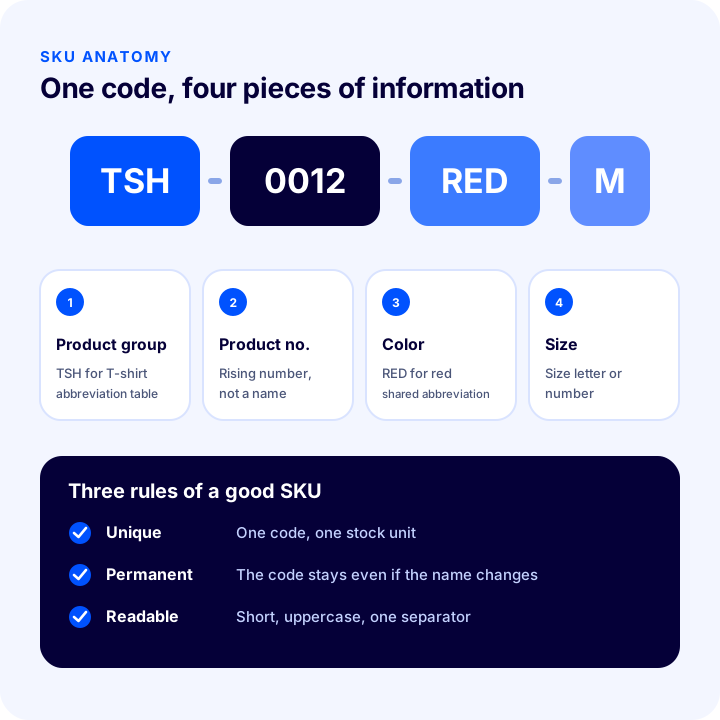
SKU stands for "Stock Keeping Unit". It is the unique code, made of letters and digits, given to each product variant a store sells. A different color or size of the same product is a separate stock unit and carries its own SKU.
For example, if a T-shirt comes in three colors and four sizes, there is not one product but twelve stock units: each has its own stock, price and sales speed. The SKU tells these twelve units apart.
Are SKU and Barcode the Same Thing?
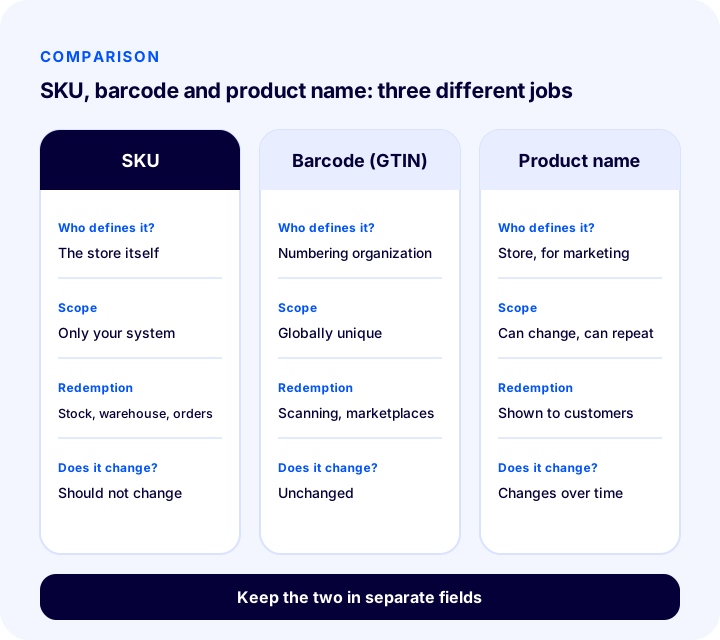
No. An SKU is the internal code you define for your own system; a barcode is the scannable form of the standard number (GTIN) that identifies a product worldwide. The two do not replace each other; they work together.
| Criterion | SKU | Barcode (GTIN) | Product name |
|---|---|---|---|
| Who defines it? | The store itself | The organization that manages the numbering standard | Store, for marketing |
| Scope | Valid only in your system | Globally unique | Can change, can repeat |
| Format | Free format: letters, digits, separator | Standard digit sequence | Free text |
| What is it used for? | Stock, warehouse, orders, reporting | Scanning at the checkout and in the warehouse, marketplace matching | Shown to customers |
| Does it change? | Should not change | Unchanged | Can change over time |
Why Does an SKU Matter?
An SKU, in e-commerce, is the shared key behind almost every operation in the background. Picking the right product from the warehouse when an order arrives, deducting stock from the right product and writing the report to the right line all depend on the SKU.
- Stock accuracy: The stock of each variant is tracked separately; "blue M is out, black M is available" becomes certain.
- Warehouse efficiency: Picking and counting by code instead of product name reduces mistakes; products that look alike do not get mixed up.
- Multichannel matching: If the same product is sold on your website, on marketplaces and in a store, a single SKU ties them all together.
- Reporting: It becomes easier to read from the code which variant sells a lot and which one waits in stock.
- Purchasing and accounting: Supplier orders, costs and invoice lines match through the same code.
- Scaling: As the number of products grows, messy coding becomes costly; a clean structure is a foundation that is very hard to fix later.
What Makes a Good SKU?
A good SKU is a code that is short, unique and readable. There is no single universal standard for coding, but the structures that work share the same principles:
- It is unique: One code points to only one stock unit; the same code is never given to two products.
- It is permanent: The code does not change even if the product name, price or supplier changes. If a product is discontinued, its code is not handed to another product.
- It is short: 8 to 16 characters are enough for most stores; very long codes are mistyped and cut off in some systems.
- It is meaningful but does not tell everything: Segments such as category, color and size give the reader a hint; sensitive information such as cost or supplier is not embedded in the code.
- It uses only letters, digits and hyphens: Spaces, punctuation and language-specific letters (such as ç, ş, ğ, ı, ä, ö, ü, é or accented characters) cause problems when moving data between systems.
- It avoids look-alike characters: Characters that resemble each other, such as zero and the letter O, or one and the letter I, cause errors when read; avoid the letters O and I in numeric segments.
- It is consistent: Uppercase letters, the same separator and segments of the same length; "TSH-12" and "tsh_0012" for the same product create confusion.
How to Create an SKU?
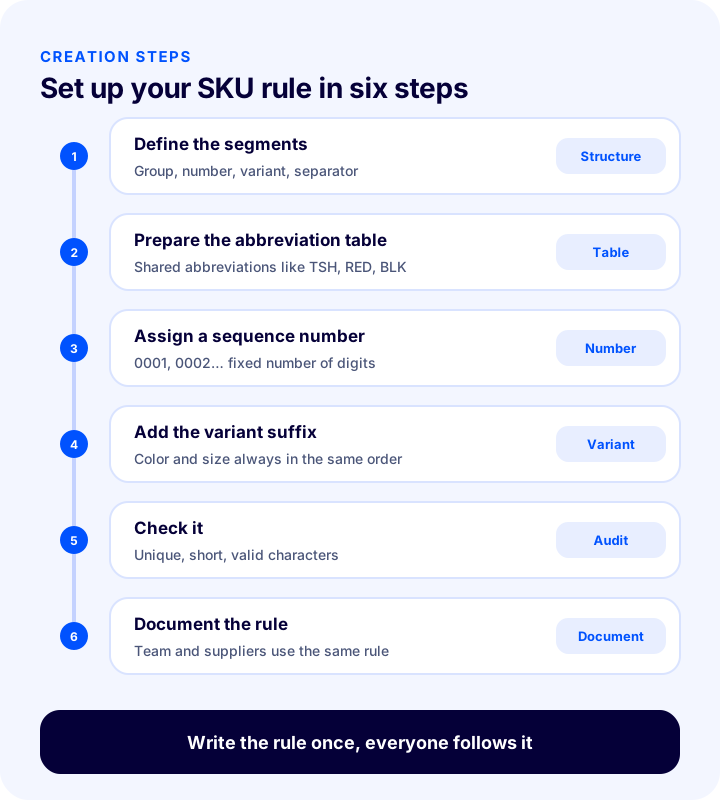
Creating an SKU starts with writing a coding rule that is decided once and followed by everyone. Once the rule is set, every new product is coded according to it, and producing the code becomes a mechanical job.
1. Define the Segments
Decide what information the code will carry. A structure that is enough for most stores is this: product group, product sequence number and variant segments (such as color and size). Each segment is separated by a separator; the most common separator is the hyphen.
2. Prepare the Abbreviation Table
Write the abbreviations of segments such as product group, color and size into a table and make sure everyone uses the same one. For example, TSH for "T-shirt", RED for "Red" and BLK for "Black". If the table is not written down, different people produce different abbreviations for the same color.
3. Assign a Sequence Number
The sturdiest way is to let a rising number rather than a meaningful name carry the product segment: 0001, 0002, 0003. A fixed number of digits (for example four) keeps codes the same length and neatly sorted. Once a number has been used, do not give it again.
4. Add the Variant Suffix
The options of the same product are added to the main code: such as color and size. This way you can tell the main product and its variants apart from the code, and filter all variants with "TSH-0012".
5. Check the Code
Before adding a new code, check its uniqueness, length and characters. The two tools below do this job for you.
6. Document the Rule
Write the coding rule, the abbreviation table and examples on a single page; let new team members and suppliers use the same rule. The SKU rule should not be knowledge that only one person on the team has.
SKU Generator Tool
The tool below produces the SKU of every variant combination from the product group code, product number, and color and size abbreviations. Letters are converted to uppercase, and language-specific letters and spaces are dropped. The values are examples; enter your own abbreviations.
What the tool shows is that combinations multiply quickly: a product with four colors and six sizes makes twenty-four stock units. That is why you need to calculate the number of variants in advance and build the code so neatly that it can withstand this growth.
How to Structure SKUs for Products with Variants?
In a product with variants, every combination of options gets its own SKU; the main product code is shared and the variant suffixes change. This way you can track both the stock and sales of each individual variant and of the product as a whole.
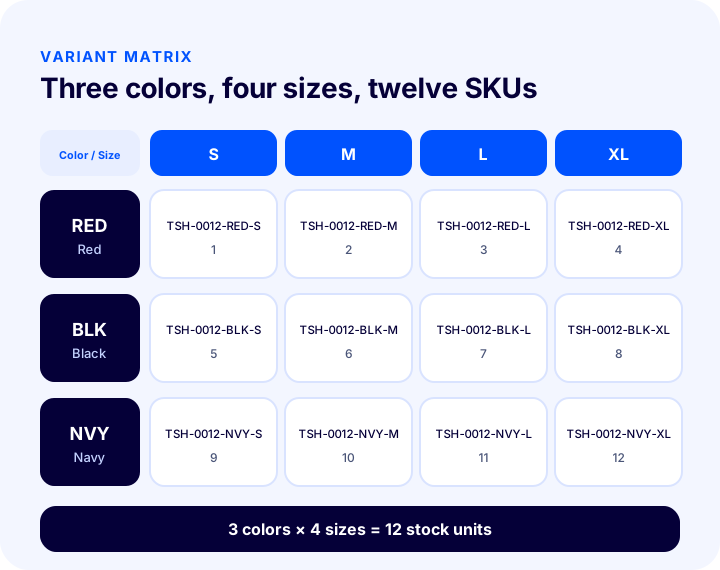
- The main product code stays shared: "TSH-0012" shows the whole product, the suffixes show the variant.
- Fix the order: Always add them in the same order, such as color first and then size, so that "TSH-0012-M-RED" and "TSH-0012-RED-M" do not become two different codes for the same variant.
- Standardize size abbreviations: Do not mix letter sizes such as S, M, L with number sizes such as 36, 38 in the same product group.
- Do not code combinations that do not exist: Opening an SKU for a color-size combination that is not produced or will never be sold needlessly swells the list.
- Keep bundles and sets separate: A set of three products gets an SKU independent of the single products; its stock is calculated from its own components.
SKU Examples: Coding in Different Industries
The examples below are made-up products to show the logic of coding. What matters is the structure; set the abbreviations according to your own product groups.
| Industry | Example SKU | Sections |
|---|---|---|
| Clothing | TSH-0012-RED-M | Product group · product no. · color · size |
| Shoes | SNK-0045-WHT-42 | Product group · product no. · color · shoe size |
| Electronics accessories | CBL-0007-USBC-2M | Product group · product no. · type · length |
| Cosmetics | SRM-0031-30ML | Product group · product no. · volume |
| Food | CFE-0004-250G | Product group · product no. · weight |
| Home textiles | BDS-0019-GRY-160 | Product group · product no. · color · size |
SKU, Barcode and Marketplace Matching
For a store that sells on more than one channel, the SKU is the common language that connects the channels. Every marketplace produces its own product ID; if you do not give your own SKU to every channel as the seller code, matching an order to the right product becomes manual and error-prone work.
- One SKU, on every channel: The code of the same variant stays the same on the website and on marketplaces; a stock update spreads from one place to every channel.
- The barcode is kept separate: Marketplaces and the warehouse ask for a barcode; do not write your SKU in place of the barcode, keep the two in separate fields.
- Matching table: Keep the relationship between the channel's product ID and your SKU in one place; if the channel recreates the product, the match is not lost.
- Deactivate instead of deleting: Instead of deleting the SKU of a discontinued product, deactivate it; order history and reports keep looking for the code.
How to Audit an SKU List?
However good the coding rule is, mistakes slip into codes entered by hand. A regular audit catches duplicate codes, characters that break the rule, overly long codes and characters that can be confused. The tool below scans the SKU list you paste against these four criteria.
Repeat the audit not only once but also after product imports and bulk uploads. A duplicate SKU looks like a single mistake, but it adds up the stock of two products in the same record and causes orders to be matched with the wrong product.
The 8 Most Common Mistakes When Creating SKUs
- Deriving the code from the product name: When the name changes, the code changes too and the history is cut off.
- Giving the same code to two products: Stocks get mixed up and orders fall to the wrong product.
- Writing a long and descriptive code: Long codes are entered wrongly and shortened in some systems.
- Not writing the rule down: If the rule is in one person's head, everyone produces their own code as the team grows.
- Mixing look-alike characters: Zero and O, one and I cause errors when read and when typed by hand.
- Using language-specific letters and spaces: This causes encoding problems in import and export files.
- Writing the SKU and the barcode in the same field: When one changes, the other breaks too; the two identities must be kept separate.
- Reusing the SKU of a discontinued product: Old order and report records get mixed up with the new product.
SKU Coding Checklist
| Title | To check |
|---|---|
| Structure | Have the segments (group, sequence no., variant) and the separator been defined? |
| Uniqueness | Does every stock unit have its own code, with no duplicate codes? |
| Permanence | Is the code independent of the product name, and is a code of a discontinued product not given to another? |
| Readability | Is it short, and consistent in uppercase letters and a single separator? |
| Characters | Only letters, digits and hyphens; have look-alike characters been avoided? |
| Variant | Is the main product code shared and are the variant suffixes in the same order? |
| Barcode | Is the barcode in a separate field and not confused with the SKU? |
| Document | Has the rule and the abbreviation table been written down, and does the team know it? |
| Audit | Is the SKU list scanned after bulk uploads? |
SKU Management with Faprika
After setting up the SKU structure, coding every product by hand takes time. Faprika has the following tools for this job; which feature starts in which plan varies by plan, so see the e-commerce plans page for details.
- Automatic SKU and barcode generation: With the buttons on the product edit screen you can create the stock code and the barcode with one click; the steps are explained in the Automatic SKU and Barcode Generation training.
- Variant management: You can define options such as size and color as variants and enter separate stock and price for each variant; details are in the Adding a New Product training.
- Bulk product update: To update the stock code, barcode or price of many products at once, see the Bulk Product Update training; Excel upload and update options vary by plan.
- Stock and variant report: With stock and variant reports you can see how many units each variant has.
- Warehouse and barcode scanning: For goods receipt, shelf placement, picking and counting by scanning, use the WMS Warehouse Management System; its scope varies by plan.
The code generated by the Faprika panel is a valid identifier in your own catalog; if marketplaces or search engines ask for a registered GTIN for a product of your own brand, enter the number you obtained from the numbering organization in the barcode field.
Frequently Asked Questions
What is an SKU?
SKU is short for Stock Keeping Unit. It is the unique internal code you give to every product variant a store sells, such as each color and size. It works as the common key for inventory, warehouse, orders and reporting.
What is the difference between an SKU and a barcode?
An SKU is a free-format internal code you define for your own system. A barcode is the scannable form of the standard number (GTIN) that identifies a product worldwide and is obtained from a numbering organization. The two are kept in separate fields.
How is an SKU created?
First define the segments of the code (such as product group, product number, color and size). Then prepare an abbreviation table, give each product a rising sequence number, add variant suffixes in the same order, and check the code for uniqueness, length and characters.
How many characters should an SKU have?
There is no single required limit; for most stores 8 to 16 characters are enough. A code should be short enough not to be mistyped and meaningful enough to tell its segments apart. Also check the limits of your system and your marketplaces.
Which characters should be used in an SKU?
Uppercase letters, digits and a hyphen or underscore are recommended. Avoid spaces, punctuation and language-specific letters, and do not mix look-alike characters such as zero and the letter O in the numeric segments.
Can the SKU of a discontinued product be reused?
This is not recommended. Old order, invoice and report records keep pointing to that code; if it is given to another product, historical data gets mixed up. Deactivating the product instead of deleting it is safer.