Contents 15 sections
- What Is In-Store Selling?
- Why Does In-Store Selling Matter for E-Commerce?
- How Does the In-Store Sales Screen Work?
- How Do You Save the Sale When the Product Is Not in the Store?
- How Are Customers, Invoices and Payments Managed in In-Store Selling?
- Which Businesses Is In-Store Selling Suitable For?
- How Do You Prepare Store Staff?
- The Link Between Store Stock and the Warehouse
- How Do You Measure the Success of In-Store Selling?
- How Do You Calculate the Cost of Lost Sales in the Store?
- In-Store Sales Readiness Check
- Common Mistakes in In-Store Selling
- In-Store Selling Checklist
- In-Store Selling with Faprika
- Frequently Asked Questions
A customer is looking at a product in your store, asks about the size, and it is not on the shelf. Staff check the stockroom, find nothing, and the customer walks out. Yet the same product may be sitting in your store across town or in your e-commerce warehouse. The short answer to the question what is in-store selling is this: making sales in a physical store using the same stock, customer and order data as your e-commerce system, so that even if the product is not in that store, the sale is fulfilled from other stock and shipped to the customer.
In this guide we explain step by step what in-store selling is, how it differs from classic point-of-sale software, how selling by scanning barcodes with a phone works, how to save a sale when the product is not in the store, and how to handle everyday situations such as invoices, discounts and holds. Of the two tools in the article, one shows what a sale lost off the shelf costs you, and the other lets you check your in-store sales readiness.
What Is In-Store Selling?
In-store selling means running sales made in a physical store or showroom on the same system as your e-commerce infrastructure. Sales staff find the product by barcode or name, add it to the cart, select the customer or continue as a guest, take the payment and create the order. The order lands in the same list as orders from your website and marketplaces.
In a classic point-of-sale program, the store works as a closed system: the stock is the store's stock, customer records are separate, reports are separate. With in-store selling, the store is part of all your sales channels. This is decisive especially for businesses with multiple points of sale that want to manage stock together.
The Difference Between In-Store Selling and a Classic Point-of-Sale Program
| Criterion | Classic point-of-sale program | In-store selling (connected to e-commerce) |
|---|---|---|
| Stock | Sees only that store's stock | Sees the stock of warehouses and stores together |
| If the product is missing | The sale is lost | Can be fulfilled from other stock and shipped to the customer |
| Customer record | A separate record for the store | Same as the e-commerce customer record |
| Order | Store sales are reported separately | In the same order list as all channels |
| Price and campaigns | Updated separately | Come from the same catalog |
| Mobile use | At the checkout | By the shelf, on the phone |
Why Does In-Store Selling Matter for E-Commerce?
Customers don't distinguish channels; they look for a product both in the store and online. When the store and e-commerce work separately, stock is split in two, the customer experience becomes inconsistent and sales are lost on both sides. In-store selling brings the two under one roof.
- Saves lost sales: If the requested size or color is not in that store, the product sitting in another warehouse or store is shipped to the customer and the sale belongs to the store.
- Stock is managed from one center: A product sold in the store is deducted from the same stock; wrong stock levels do not appear on the website or marketplaces.
- Shortens the checkout queue: Barcode scanning, camera scanning and a single-cart screen cut transaction time.
- Empowers staff: A sales associate can look at their phone next to the customer and tell them the stock status.
- Unifies customer data: A customer who shops in the store is matched to their e-commerce record; later communication and loyalty work is done from a single record.
- Simplifies reporting: Because store and online sales appear in the same order list, comparing channels becomes easier.
How Does the In-Store Sales Screen Work?
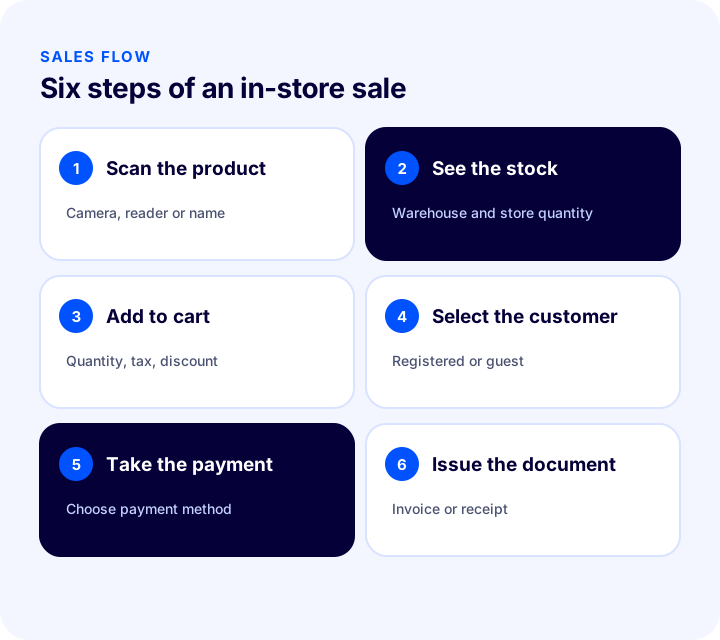
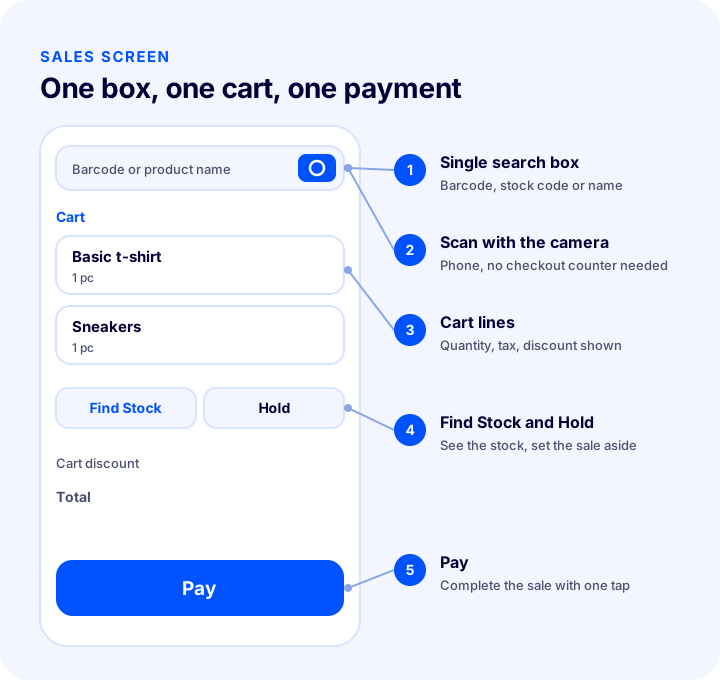
A good in-store sales screen is simple: a single search box, one cart and one payment button. Staff should be able to use it without training and should not have to navigate between screens at peak hours. The basic steps of a sale are as follows.
- Find the product: Scan the barcode, or type the stock code or product name. Scanning with the phone's camera frees staff from being tied to the checkout counter.
- See the stock: How many units are in which warehouse and which store should be visible at a glance.
- Add to cart: The product goes into the cart; quantity, unit price, tax and discount are tracked line by line, and the total updates instantly.
- Select the customer or continue as a guest: A registered customer is found by phone or name; a customer in a hurry is not required to register.
- Take the payment: The payment method is selected and the sale is completed.
- Choose the document: Depending on the need, an invoice is issued or a receipt is given.
Why Does Phone Barcode Scanning Make a Difference?
Scanning barcodes only with the reader at the checkout keeps staff tied to the counter. Scanning with the phone's camera moves the sale next to the customer, in front of the shelf. Staff scan the product, check the stock, answer the customer's "is there another size?" on the spot and complete the sale right there. This shortens waiting time, especially in stores with a wide product range and busy hours. In a high-volume store a barcode reader can be used as well; the screen should accept both methods from the same search field.
We recommend readingWhat Is a Barcode? How to Get, Read and Use a Product Barcode (GTIN/EAN) in E-Commerce – A Practical GuideHow Do You Save the Sale When the Product Is Not in the Store?
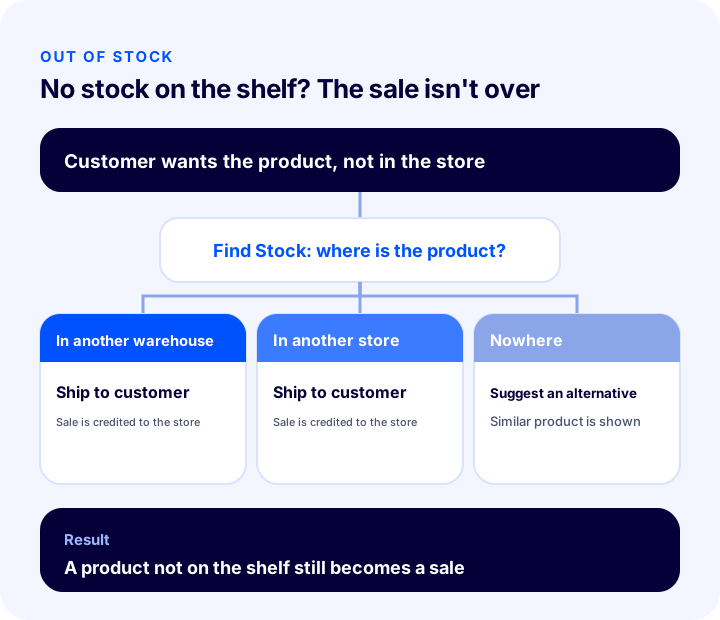
This is the most valuable side of in-store selling. When a customer can't find the product they want on the shelf, the sale is lost in a classic setup. In a system that sees stock across all warehouses and stores, the product is shipped to the customer's address; the sale is recorded as that store's sale even though the product physically leaves from elsewhere. This model is also called the endless aisle or "ship from store".
Common Store Situations and the Right Answers
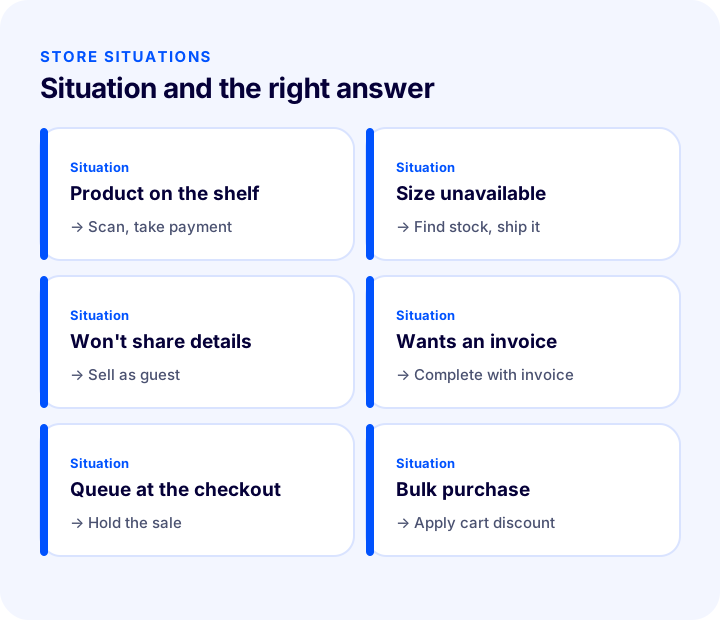
| Situation | What is done? |
|---|---|
| The product is on the shelf and the customer wants it right away | The barcode is scanned, the product is added to the cart, payment is taken. |
| The requested size or color is not in the store | Stock is checked; if it is in another warehouse or store, the product is shipped to the customer. |
| The customer does not want to give their details | The sale is completed without a customer record. |
| The customer wants an invoice | The sale is completed with an invoice; those who do not want one receive an information receipt. |
| There is a queue at the checkout and the customer will look at one more product | The sale is put on hold, you move on to the next customer, then the held sale is reopened where it left off. |
| A discount will be given on a bulk purchase | A cart discount is applied to the entire cart at once. |
How Are Customers, Invoices and Payments Managed in In-Store Selling?
The order of a store sale matters as much as its speed. Wrong customer details, the wrong document or scattered payment records turn into lost time at the end of the day.
Customer Record
A registered customer should be found quickly by first name, last name or phone. Registration should not be mandatory; a customer in a hurry should be able to shop without giving details. For customers who do want to share their details, the sale is recorded under their own profile and becomes the basis for loyalty and communication work later. Separate information fields and invoice details should exist for corporate customers.
Invoice and Receipt
There are two document paths in a store sale: an invoice for customers who ask for one, and a receipt for retail sales that don't. Choosing the document should take a single tap during the sale, and the document should be ready when the sale is complete. Regulations differ from country to country; confirm your invoicing rules with your accounting lead.
Discounts, Notes and Holds
Line-level discounts and cart discounts applied to the whole cart provide flexibility in the store. Order notes allow information such as delivery details or internal operation notes to be entered in the system. Holding a sale is a lifesaver at peak hours: the open sale is set aside, you move on to the next customer, and the held sale is reopened from the list where it left off.
Okumanızı öneririze-Ticarette Fatura Nasıl Kesilir?Which Businesses Is In-Store Selling Suitable For?
In-store selling creates value for any business with multiple points of sale and shared stock; the clearest benefit appears where stock is scattered, the product range is wide and customers face options such as size and color. Even in a single small shop, managing sales, stock and invoicing from one place saves time.
| Business profile | What does in-store selling provide? |
|---|---|
| Brand with multiple stores | Stock visibility across stores, shipping from another store if the product is missing |
| Business selling both in stores and via e-commerce | Shared stock, a single order list, consistent prices and campaigns |
| Fashion and footwear seller with many size and color options | Variant-level stock lookup, saving lost sales |
| Business with a showroom or exhibition space | Showing the product and completing the sale, shipping from the warehouse |
| Business selling both wholesale and retail | Separating individual and corporate customers, different document options |
| Small shop selling from a single point | Simple screen, fast selling by barcode, registered customers |
How Do You Prepare Store Staff?
Even the best screen delivers nothing if staff don't use it properly. The biggest gain of in-store selling comes from a change in staff behavior: checking the stock instead of giving up when a product is missing, and offering to ship. A short, hands-on preparation is enough for that.
- Give a single rule: "If the product is not on the shelf, check the stock first." Because the rule is simple, it sticks.
- Practice with real scenarios: Let staff try common situations themselves: size unavailable, color unavailable, customer doesn't want to register, customer wants an invoice.
- Keep shipping information ready: When offering to ship to the customer, they need to be able to give a clear answer about delivery time and shipping fee.
- Plan for peak hours: Discuss in advance when to use the hold feature and how to move on to the next customer.
- Collect feedback: The sales associate is the best person to tell you where the screen slows down; run a short review in the first weeks.
The Link Between Store Stock and the Warehouse
In-store selling works properly only if stock data is reliable. If the quantity in the system is wrong, staff promise the customer a product that doesn't exist. This is why store stock needs to be counted regularly, movements between warehouses recorded, and barcodes entered completely.
- Regular counts: Store and warehouse stock should be counted at set intervals and compared with the system.
- Recorded transfers: Product movement between stores should be done with a transfer record; products passed hand to hand corrupt the stock.
- Barcode discipline: The barcode of every product and variant should be entered completely and be unique.
- Safety margin: For products that sell often in the store, keep the gap between system stock and actual stock small.
For movement between warehouses, see our article How to Transfer Between Warehouses?.
How Do You Measure the Success of In-Store Selling?
Once in-store selling is set up, track a few indicators to see its effect. All of them can be derived from the same order data.
- Number of sales lost due to missing stock: Did the customer leave without finding what they wanted, or was the sale saved by shipping?
- Share of sales completed with shipping from the store: If the method is being used, it shows that the store's selling capacity has grown.
- Average transaction time: Are finding the product and taking payment getting faster?
- Number of held sales: If sales are held very often, the checkout flow or the number of staff should be reviewed.
- Share of registered customers: What proportion of store customers are matched to an e-commerce record?
- Channel comparison: How do cart value and product mix differ between store and online sales?
How Do You Calculate the Cost of Lost Sales in the Store?
Most stores don't measure the value of the customer who leaves because the product isn't there. The tool below calculates your monthly additional revenue by entering how many customers a day can't find the product they want, how many of them could be saved with the shipping option, and your average cart value. The values are examples; enter your own figures.
What the tool shows is that a few lost customers a day add up to a meaningful amount of revenue given up by the end of the month. The real lever is for staff to adopt the habit of checking stock and offering to ship.
In-Store Sales Readiness Check
The tool below checks your in-store sales setup with eight items. Tick what you already do; the tool tells you what to focus on.
Common Mistakes in In-Store Selling
- Keeping store stock separate: If a product sold in the store is not deducted from online stock, the same product gets sold twice.
- Giving up when the product is missing: A sale is lost even though a product in another warehouse could have been shipped to the customer.
- Making registration mandatory: If a customer in a hurry is held up to give details, they give up.
- Using a complicated screen: Navigating between screens at peak hours lengthens the queue.
- Not entering barcodes: A product without a barcode can't be scanned; search slows down and errors increase.
- Leaving the document choice to the end: If the decision between invoice and receipt is not made during the sale, corrections are needed at the end of the day.
- Not training staff: Staff who don't know about stock lookup and the shipping option will still say "we don't have it".
- Not monitoring store data: If lost sales and transaction time aren't measured, areas for improvement stay invisible.
In-Store Selling Checklist
| Title | To check |
|---|---|
| Order | Are store sales in the same order list as other channels? |
| Stock | Is stock shared across warehouses, stores and online channels? |
| Finding products | Is search by barcode, stock code and name done from a single box? |
| Mobile | Can staff scan products with a phone? |
| Out of stock | Is there an option to ship to the customer from other stock? |
| Customer | Are registered customers found quickly, and can sales be made as a guest? |
| Document | Is the choice between invoice and receipt made during the sale? |
| Flexibility | Do cart discounts and holding a sale work? |
| Training | Does staff know the stock lookup and shipping flow? |
| Report | Are lost sales, transaction time and the share of registered customers monitored? |
In-Store Selling with Faprika
In Faprika, in-store selling is run with the In-Store Sales Module. Which plan includes it varies by plan; see the e-commerce plans page or the Store Sales Module page for details.
- A single search box, one cart, one Pay button: On the redesigned In-Store Sales screen the whole sale runs through these three parts; staff scan the barcode or type the product name, the product drops into the cart, the total appears instantly, and payment is taken.
- Barcode scanning with the phone's camera: With the camera button next to the search box, staff start the sale in front of the shelf without going back to the checkout.
- Find Stock: How many units of the scanned product are in which warehouse and which store is visible at a glance.
- Shipping when out of stock: If the product has run out in that store, the sale is still made in the store, payment is taken and the product is shipped to the customer's address.
- Sales with or without a customer: A sale can be made to a registered customer or completed without taking any customer details.
- Sales with an invoice or a receipt: Depending on the need, the sale is completed with an invoice or a receipt.
- Cart discount and hold: A cart discount is applied to the whole cart at once; the Hold button sets the open sale aside, and you continue from the On Hold list.
- Detailed screen: The previous screen remains for teams who want to work with the detailed order form; the "Back to the old screen" link on the new screen opens it.
- Together with warehouse management: It can be used alongside the WMS Warehouse Management System for multi-location stock and warehouse operations.
For an approach to managing stores and other channels together, see our article Omnichannel (çok kanallı) pazarlama stratejisi nedir? as well.
Frequently Asked Questions
What is in-store selling?
In-store selling means making sales in a physical store using the same stock, customer and order data as your e-commerce system. Staff find the product by barcode, add it to the cart, take the payment and create the order; the order appears in the same list as orders from other channels.
What is the difference between in-store selling and a classic point-of-sale program?
A classic point-of-sale program sees only that store's stock and works separately. In-store selling sees the stock of warehouses and stores together, lets you ship from other stock when a product is missing, and keeps sales in the same list as e-commerce orders.
How do you make a sale when the product is not in the store?
In a system that shows stock across all warehouses and stores, if the product is elsewhere, the sale is made in the store, payment is taken and the product is shipped to the customer's address. This way a product that is not on the shelf still counts as the store's sale.
Can barcodes be scanned with a phone in the store?
Yes. The phone's camera can work as a barcode reader; staff scan the product in front of the shelf, check the stock and start the sale. Searching with a barcode reader or by product name works from the same search field.
Can a sale be made if the customer doesn't want to share their details?
Yes. A good in-store sales screen lets you complete a sale without a customer record. For customers who do want to share their details, the sale is recorded under their own profile.
Is an invoice or a receipt issued for in-store sales?
It depends on the need. An invoice is issued to customers who request one; retail sales can be closed with a receipt. Document rules vary by country, so confirm the practice with your accounting lead.