Contents 14 sections
- What Is a Product Variant?
- Why Product Variants Matter for E-Commerce
- Should You Use a Variant or a Separate Product?
- How to Create a Product Variant Step by Step
- How to Manage Variant-Level Stock, Price and Delivery
- Product Variants and SEO
- Variant Management on Marketplaces
- How to Calculate the Variant Count
- Variant Setup Health Check
- How to Read Variant Data
- Common Mistakes with Product Variants
- Product Variant Checklist
- Managing Product Variants with Faprika
- Frequently Asked Questions
When the same t-shirt comes in three colors and four sizes, how many products do you have in your store? One product, or twelve? The answer affects everything from your stock count and price updates to marketplace matching and your return rate. The short answer to what a product variant is is this: each version of the same product that differs in an attribute such as color, size or capacity, with its own stock code and often its own stock.
In this guide we explain what a variant is, how a variant differs from a separate product, how to set up variants step by step, how to manage stock, price and barcode at the variant level, and what to watch for with search engines and marketplaces. Of the two tools in the article, one calculates how many variants your store will end up with, and the other shows how solid your current variant setup is.
What Is a Product Variant?
A product variant is a version of the same product that differs in a single attribute. A blue t-shirt, a red t-shirt, a size M t-shirt or a phone with 128 GB of storage are each a variant. To the customer they are all "the same product"; to the store each is a separate sales item, because it has its own stock, often its own barcode and sometimes its own price.
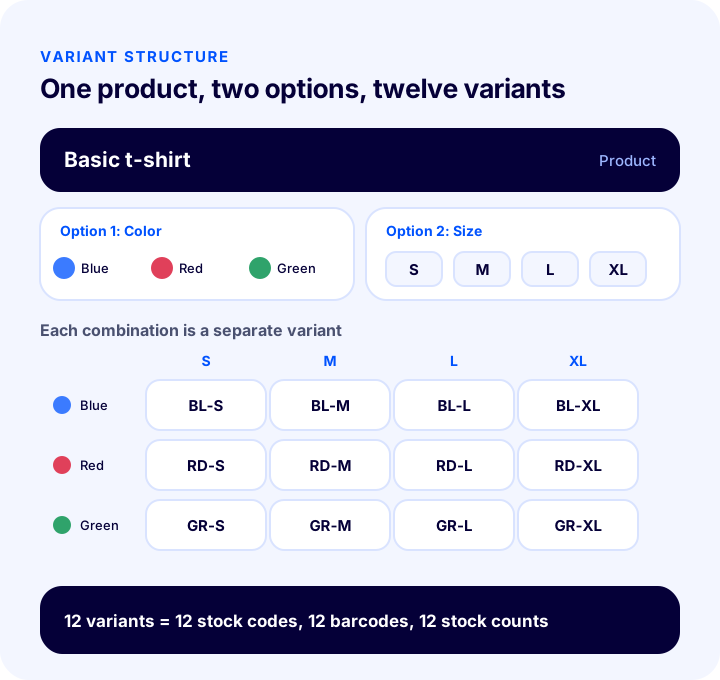
A variant has two parts: the option (the name of the attribute, such as color or size) and the value (a choice that attribute can take, such as red or M). When a product has several options, each combination of values becomes a separate variant: a product with 3 colors and 4 sizes has 12 variants.
The Relationship Between Variant, Product and Stock Code
Three concepts are often confused. The product is the card the customer sees. A variant is a selectable version of that product. The stock code (SKU) is the code that uniquely identifies each variant in the warehouse and in the system. In a correct setup, one product has several variants, and each variant has exactly one stock code of its own.
| Concept | What does it tell you? | Example |
|---|---|---|
| Product | The main card and page the customer sees | Basic t-shirt |
| Option | The name of the attribute that differs | Color, size |
| Variant | A single combination of option values | Blue, M |
| Stock code (SKU) | The unique code that identifies the variant | TSR-BL-M |
| Barcode | The numeric code that identifies the variant when scanned | Separate for each variant |
Why Product Variants Matter for E-Commerce
The variant structure affects both the storefront and warehouse sides of your store at once. It makes choosing easy for the customer, while giving you accurate stock, accurate prices and a clean catalog. A broken variant structure, on the other hand, can spread a single error across hundreds of products.
- It makes choosing easier: Instead of looking for a separate page for each color and size, customers make their choice on one product page; your product catalog does not bloat either.
- It shows stock accurately: Variant-level stock tracking shows "blue M is sold out but blue L is available" correctly on the product page, so customers do not order something that is not there.
- It does not lose sales: A notification can be enabled only for the sold-out variant; the other variants keep selling.
- It strengthens reporting: You see which size sells out fast and which color sits idle, and you adjust order quantities accordingly.
- It makes marketplace compatibility easier: Marketplaces want products at the option and stock code level; well-built variants simplify matching.
- It protects search visibility: Keeping a single product on a single URL does not split its value across many pages.
Should You Use a Variant or a Separate Product?
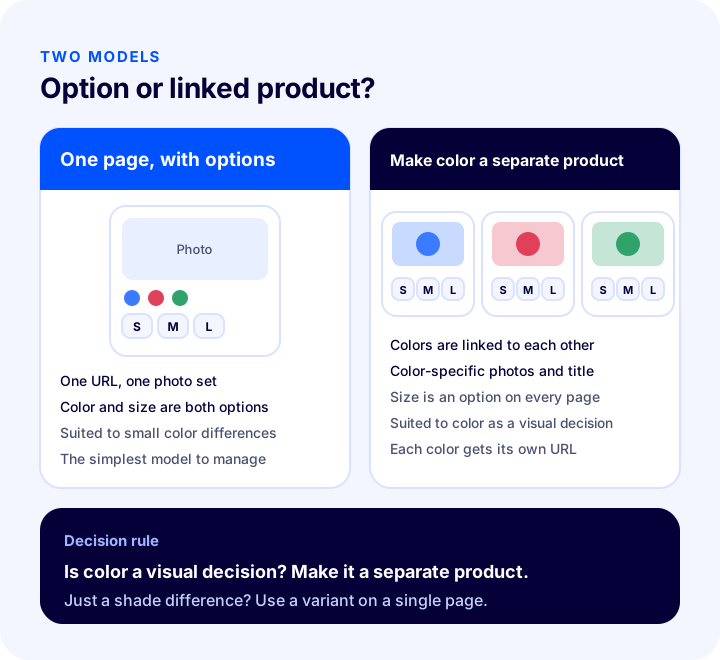
The rule is simple: if the customer sees it as "another choice of the same product," it is a variant; if they see it as "a different product," it is a separate product. Size is almost always a variant. Color can be set up in two ways, and the right choice depends on the product.
Which Model in Which Situation?
| Situation | Recommended model | Why? |
|---|---|---|
| Size, shoe size, measurement | Variant | The product is the same; only stock and size change |
| The color's look and description are very different | A separate product per color, linked to each other | Each color gets its own photos, title and URL |
| Color is only a shade difference | Variant | Choosing on a single page is enough |
| Capacity, memory, pack size | Variant | Price and stock differences are managed through the option |
| A completely different model | Separate product | Different description, different search intent |
In sectors like fashion, where color is a visual decision, it is common to set up each color as its own product page and link the colors together. The customer taps the color swatches on the product page to move to that color's page, while sizes sit on each color page as an option. That way you can use photos specific to each color and still manage sizes in one place.
How to Create a Product Variant Step by Step
Setting up variants product by product by hand is both slow and error-prone. Defining options and values once and then assigning them to products keeps the catalog consistent. Each step builds on the previous one.
- Decide on the options: List which attributes in your store affect the purchase decision: size, shoe size, color, capacity, material. Only attributes that drive the decision become options.
- Define the values once: Create the possible values for each option (such as S, M, L, XL) in one place. When assigning to a product you do not need to retype the values, and name inconsistencies (Large, L, big) cannot appear.
- Assign to the product and make it required: Add the option to the relevant products. Mark the option as required so customers cannot add to the cart without choosing.
- Give every variant a unique stock code: Codes should be meaningful and unique; no two variants should share the same code.
- Enter the barcode at the variant level: It is each variant's own barcode, not the product's, that is scanned in the warehouse and sent to marketplaces.
- Enter stock per variant: Total stock is not a single number but the sum of the variants, so enter each variant's stock separately.
- Define price and delivery differences: If some variants cost more, link the extra charge to the variant; if heavier, the extra desi (volumetric weight unit); if not in the warehouse, the delivery time.
- Check the default selection and the image: Decide which variant comes pre-selected, and make sure the product photo changes when a color is selected.
What Should the Customer See When Choosing a Variant?
The selection area on the product page should be simple and clear. Customers should understand at a glance what they are choosing, what is sold out and whether the selection changes the price. The illustration below shows the parts of a good selection area.
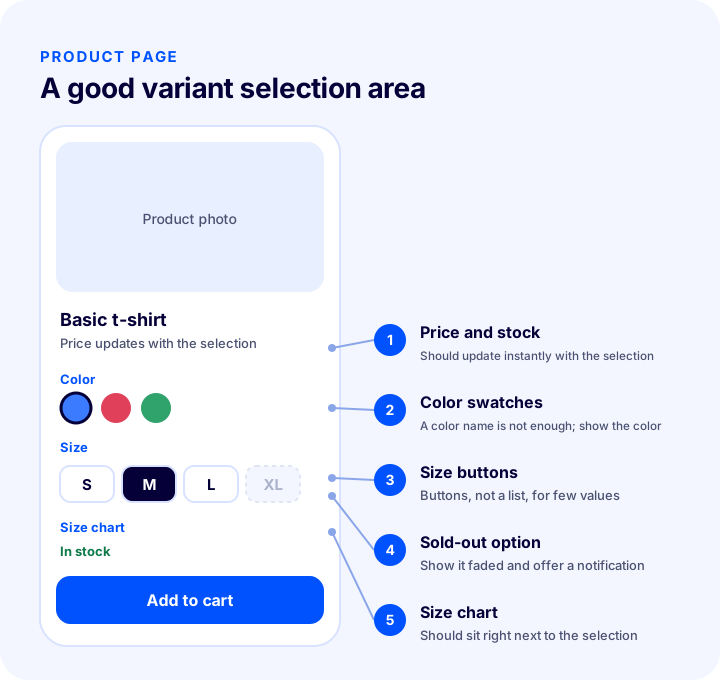
- A swatch or small photo for color: A color name is not enough; customers want to see the color.
- Buttons for size: With few values, buttons instead of a dropdown reduce the choice to a single tap.
- A sold-out option should be clearly marked: Instead of hiding a sold-out value, showing it faded and offering "Notify me when back in stock" protects the sale.
- Price should update with the selection: If the variant price differs, the price should change instantly when a selection is made.
- The size chart should be close by: A link to the size chart right next to the size selection lowers the return rate.
How to Manage Variant-Level Stock, Price and Delivery
The real value of a variant is that information can be kept at the option level rather than the product level. Not all sizes of the same product sell at the same speed, are bought at the same price or can be delivered in the same time; the system needs to know this separately.
1. Stock
Each variant has its own stock. The "in stock" message on the product page should be shown according to the variant the customer has selected. Looking at total stock and writing "in stock" leads customers to order a sold-out size and run into a cancellation.
2. Price
For most variants the price is the same. In some cases, though, a difference is needed: a model with more storage, a special color, an extra-large size. That difference is linked to the variant as an amount added to or subtracted from the base price. When you want to clear overstock in one size, you can also set a lower price just for that variant.
3. Delivery and Shipping Size
A variant that is in stock can ship right away, while one in production can ship later; if this difference is recorded on the variant, the customer sees the correct delivery date. Likewise, if a large size is heavier or bulkier, defining an extra desi (volumetric weight unit) difference makes the shipping cost calculate correctly.
4. Purchase Price and Profitability
Entering a variant's purchase price lets you see which option actually leaves a profit. An expensive capacity or a special color may raise the cost as well as the sale price.
| Information | At product level or variant level? | Why? |
|---|---|---|
| Name, description, category | Product | Common to all variants |
| Stock code and barcode | Variant | Each option is identified separately in the warehouse and on marketplaces |
| Stock count | Variant | Each option sells out at a different speed |
| Selling price | Usually product, variant if needed | A difference is defined only when needed |
| Delivery time | Variant if needed | Ready-to-ship and in-production options can differ |
| Purchase price | Variant | Profit can differ for each option |
| Photo | Product and color | The right image should show when a color is selected |
Product Variants and SEO
Variant setup directly affects search engine visibility. The basic principle is not to split the value of the same product and to tell search engines clearly which page is the main one.
- Do not open separate URLs for size and measurement: A separate page for each size repeats almost the same content and splits its value. Sizes should stay as options on a single product page.
- If you make each color a separate page, differentiate them: The title, description and photos of color pages should be specific to that color; otherwise a duplicate content problem arises.
- Report product data at the variant level: In structured data, each variant's price and stock status must be stated correctly. Wrong stock information creates the wrong expectation in search results.
- Do not cram every option into the title: Instead of titles like "Blue Size M Basic T-Shirt", use a title that describes the product itself; options are presented within the page.
- Do not delete a sold-out variant from the page: An option may be sold out; the product page itself should keep existing.
Variant Management on Marketplaces
If you sell on more than one marketplace, variants must be matched correctly between the two systems. Each marketplace wants products in its own option structure: some expect color and size as separate fields, others expect items grouped under a single model code.
- The stock code is the key to matching: An order from a marketplace is matched to your variant through the stock code. If the code is wrong or duplicated, stock is deducted from the wrong variant.
- Barcodes must be unique: Using the same barcode on two variants causes the wrong product to be shipped from the warehouse.
- Option names must be standard: If the marketplace expects "Red", writing "Reddish" or "Rouge" breaks the match. Keep names standard in your own catalog from the start.
- Stock must update instantly: Variant stock is shared across sales channels; an option sold on one channel must also decrease on the others.
How to Calculate the Variant Count
The variant count is the product of the number of values in each option. With one option, 5 values produce 5 variants; adding 4 values as a second option makes 20, and adding 3 values as a third makes 60. Each variant means one stock code, one barcode and one stock count.
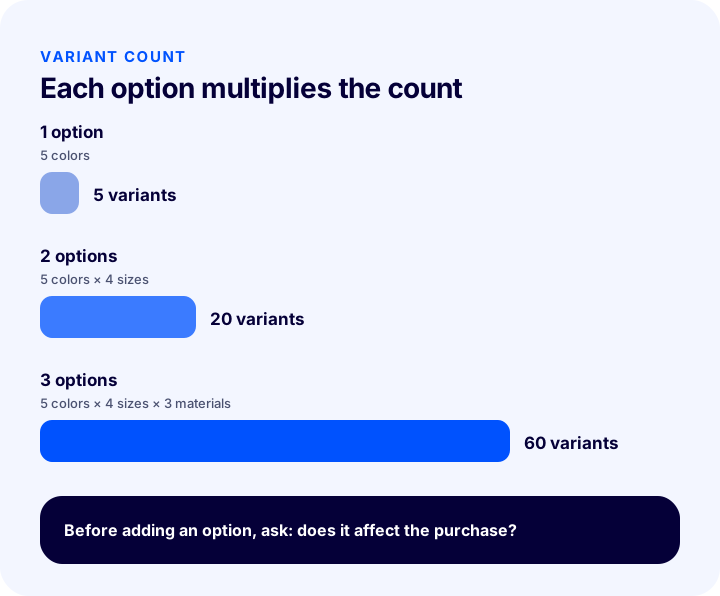
The tool below calculates the number of variants per product and the total number of stock codes you need to manage in your catalog from the option counts in your store. The values are examples; enter your own numbers.
The thing to watch in the tool is the effect of the third option. For a product with two options, a variant count of 15 jumps to 60 when you add another option with 4 values. The management load grows exponentially, not linearly.
Variant Setup Health Check
The tool below quizzes your current setup with eight items. Tick what you have done; the tool tells you how many items you meet and where to focus.
How to Read Variant Data
A variant is not just a catalog structure but a data source. Which option sold how much, how much was returned and when it sold out feed directly into your order and product decisions.
- Sales distribution by size: If a size is always the first to sell out, you should shift order quantities toward that size.
- Returns by variant: If returns for a particular size or color are high, the size chart, photos or fabric description may be the problem.
- Sell-out speed: Set up a stock alert for fast-selling variants; for slow ones, make a price or showcase move.
- Back-in-stock requests: The demand accumulated for a sold-out variant is the clearest justification for reordering.
- Profitability: The gap between a variant's purchase and sale price determines which option you should push.
Common Mistakes with Product Variants
- Giving the same stock code to several variants: Stock is deducted from the wrong variant and marketplace matching breaks.
- Entering the barcode at the product level: It is unclear which size was scanned in the warehouse.
- Looking at total stock: The product page says "in stock" but the requested size is not available; cancellations and complaints follow.
- Typing option names freely: L, Large and big are not counted as the same thing; reports and marketplace matching fall apart.
- Creating an option for every distinction: The variant count explodes and management gets harder.
- Not changing the photo when a color is selected: The customer does not see the color they chose, hesitates and returns it.
- Hiding a sold-out variant: The customer assumes the size never existed, and the chance to send a notification is lost.
- Leaving out the size chart: Uncertainty about measurements is one of the most common reasons for returns.
Product Variant Checklist
| Title | To check |
|---|---|
| Option | Are only attributes that affect the purchase decision made options? |
| Value | Are option values managed from one place with standard names? |
| Stock code | Does every variant have a unique stock code that follows a rule? |
| Barcode | Is the barcode at the variant level and unique? |
| Stock | Is stock kept per variant and shown on the page according to the selection? |
| Price and desi | Are differences linked to the variant when needed? |
| Image | Is the right photo shown when a color is selected? |
| Notifications | Is "notify me when back in stock" enabled for sold-out variants? |
| Marketplace | Are stock codes and option names compatible with marketplace requirements? |
| Report | Are sales, returns and sell-outs tracked by variant? |
Managing Product Variants with Faprika
In Faprika, variants are managed in the panel under the name "Product Variations". Which feature is included in which plan varies; see the e-commerce plans page for details.
- Define a variation once, use it on many products: In Catalog > Definitions > Product Variations, a variation (for example, letter sizes) and its predefined values are created once; you do not need to retype the values when adding them to products. The steps are explained in the Product Variations tutorial.
- Per-value settings: You can define an extra variation charge, extra desi and purchase price for each value; with "preselected" you decide which value is ready-selected on the product page.
- Required selection and selection type: When adding a variation to a product, you can make the selection required and set how the customer's selection field looks (for example, a dropdown).
- Linked products for color: A product's colors are linked to each other in the "Linked Products" area, while values such as size, shoe size and measurement are defined as variations.
- Automatic stock code and barcode: Buttons on the product edit screen generate a stock code and barcode in one click; the Automatic SKU and Barcode Generation tutorial explains the steps.
- Entering a price per variant: Different prices can be entered for variants; entering a different delivery date for a variant varies by plan.
- Variant-level notifications: Notify me when back in stock and Notify me when price drops work at the variant level, not the product level; the Back-in-Stock Notification tutorial explains the setup.
- Bulk operations: You can edit many products at once with bulk product update.
- Full detail to marketplaces: When sending products to marketplaces, you can send all details, including variants, colors, attributes and linked products, and you can filter options and update them in bulk.
- Reports: With stock and variant reports you can track which options are moving; coverage varies by plan.
The What Is a Variant? and What Is a Stock Code? entries in the glossary summarize the concepts briefly.
Frequently Asked Questions
What is a product variant?
A product variant is a version of the same product that differs in one attribute, such as color, size or capacity. Each variant has its own stock code, often its own barcode and its own stock. For example, a blue size M t-shirt is a variant of that t-shirt.
What is the difference between a variant and a product?
The product is the main card the customer sees; variants are the selectable versions of that product. The customer opens a product and chooses their color and size from among the variants. Stock and barcode are kept at the variant level, not the product level.
Should I make colors variants or separate products?
If each color's photos, description and search intent are very different, it is better to set each color up as a separate product and link them together. If color is only a shade difference, offering it as a variant on a single page is enough. Size and measurement are almost always variants.
How many variants can a product have?
The variant count is the product of the number of values in each option; 3 colors and 5 sizes make 15 variants. Adding a third option makes the number grow quickly. To keep things manageable, make an option only of attributes that genuinely affect the purchase decision.
Does every variant need its own stock code and barcode?
Yes. For every option to be identified separately in the warehouse and on marketplaces, each variant must have a unique stock code and barcode. Using the same code on several variants causes stock to be deducted from the wrong variant.
How do variants affect SEO?
Opening a separate URL for options such as size duplicates almost identical content and splits its value, so sizes should stay on a single product page. If you make each color a separate page, prepare the title, description and photos specifically for that color.
You May Also Like
- What Is an SKU? How to Create a Stock Keeping Unit (SKU) Code: Examples, Coding Rules and an SKU Generator Tool
- What Is a Barcode? How to Get, Read and Use a Product Barcode (GTIN/EAN) in E-Commerce – A Practical Guide
- What to Do with an Out-of-Stock Product Page? A Practical Guide to SEO, Customer Experience and Redirects for Sold-Out Products in E-Commerce
- How Should an E-Commerce Product Page Look? 15 Elements of a Product Page That Sells