
Contents 15 sections
- What Is an E-Commerce FAQ Page?
- Why Is an FAQ Page Important?
- Which Questions Should an FAQ Page Include?
- Where Do FAQ Questions Come From?
- How Do You Group FAQ Questions?
- How Do You Write FAQ Answers?
- Where Should the FAQ Page Appear on the Site?
- How Do You Calculate the FAQ Page's Effect on Support Load?
- How Do You Prepare an FAQ Page for SEO?
- How Often Should the FAQ Page Be Updated?
- How Do You Measure the Success of an FAQ Page?
- Common Mistakes When Building an FAQ Page
- How Do You Audit an FAQ Page?
- How Do You Build an FAQ Page with Faprika?
- Frequently Asked Questions
A customer likes the product and is close to adding it to the cart, but a question stays on their mind: how much is shipping, how do returns work, which payment methods are accepted? If they cannot find the answer right away, they either write to the support line or close the page. An e-commerce FAQ page, that is, a frequently asked questions page, exists to catch this moment: instead of answering the same question a hundred times, you publish the answer once, where everyone can see it. A well-built FAQ page lightens your support team's load and moves a hesitant visitor one step closer to buying.
In this guide we explain step by step how to build a frequently asked questions page: which questions to include, where to collect them, how to group them, how to write answers, where the page should appear on the site, how to organize it for search engines, when to update it and how to measure it. Of the two tools in the article, one helps you calculate the support load an FAQ takes off your team, and the other audits your current FAQ page with eight questions.
What Is an E-Commerce FAQ Page?
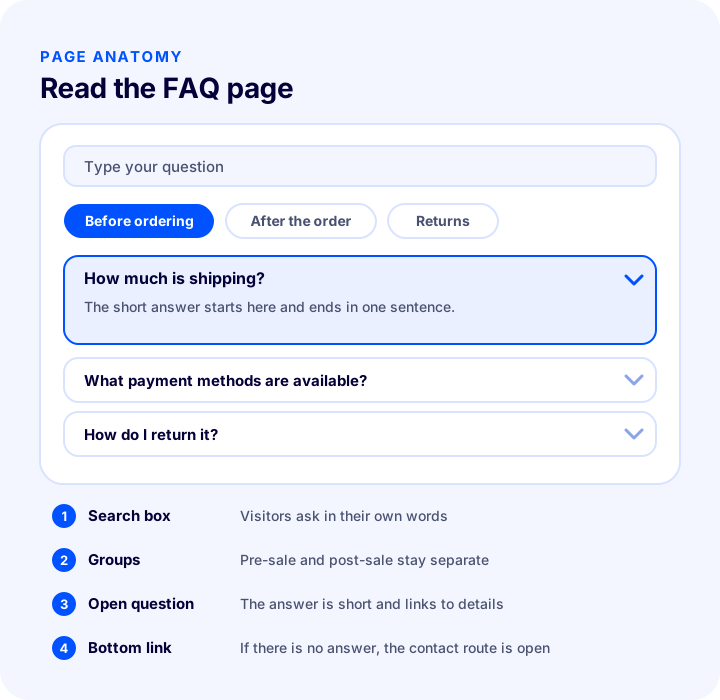
An e-commerce FAQ page is a page that collects, in one place, the questions customers ask most before and after ordering, along with short answers. Its purpose is twofold: to give the customer the information they need while making a decision, and to keep the same questions from reaching the support team again and again.
Is an FAQ Page the Same as a Support Page?
No. An FAQ page is one-way and ready-made: the customer finds the question, reads the answer, and is done. A support page is where the customer gets in touch with you. The two complement each other; the FAQ covers part of the requests that would reach the support team up front and leaves the rest to the support page.
| Page | What does it do? | What happens if it is missing? |
|---|---|---|
| FAQ page | Gives ready answers to frequent questions | The same questions reach the support team again and again |
| Legal pages | Set out return, delivery and privacy rules formally | Customers cannot know their rights, and the contract is incomplete |
| Support and contact | Handles customers whose question has no answer in the FAQ | A customer who cannot find the answer gives up |
Why Is an FAQ Page Important?
Customers want to ask a question at the moment they decide to buy, but they do not want to wait. If the answer is right in front of them they continue; if not, the chance they leave goes up. That is why an FAQ page affects both support cost and lost sales.
- Reduces support load: Frequent questions such as delivery time, return terms and payment options are answered up front, so the team can spend its time on more complex requests.
- Answers at the moment of decision: The customer does not have to leave the page to ask.
- Builds trust: A store that speaks openly about returns and delivery looks more trustworthy.
- Can bring search traffic: People type their questions into search engines; a well-written answer can show up in those searches.
- Keeps answers consistent: It prevents different support staff from giving different answers to the same question.
Which Questions Should an FAQ Page Include?
The questions on an FAQ page come from the points where customers get stuck on their shopping journey: what they want to know before ordering and what they wonder about after ordering. Separating these two groups makes things easier for both the customer and you.
Pre-Order Questions
These questions directly affect the buying decision; without an answer, the customer usually leaves without ordering.
- Shipping: Which carriers do you work with, how long does delivery take, how is the shipping fee calculated, is there a free shipping threshold?
- Payment: Which payment methods are accepted, are there installment options, is cash on delivery possible, is payment secure?
- Returns and exchanges: How long is the return period, who pays for return shipping, which products cannot be returned?
- Product: How do I choose a size or dimensions, is the product genuine, does it have a warranty, will an out-of-stock product come back?
- Membership and invoice: Can I order without signing up, how is the invoice issued?
Post-Order Questions
These questions reassure the customer after ordering; if the answers cannot be found, the customer goes straight to the support line.
- Order tracking: Where is my order, where do I find my shipment tracking number?
- Changes and cancellation: Can I cancel the order or change the address, and until what stage?
- Return process: How do I create a return request, when is the refund made?
- Damaged or missing product: What should I do if the product arrives damaged, who should I contact?
- Invoice and documents: Where do I find my invoice, can I change the invoice details?
Where Do FAQ Questions Come From?
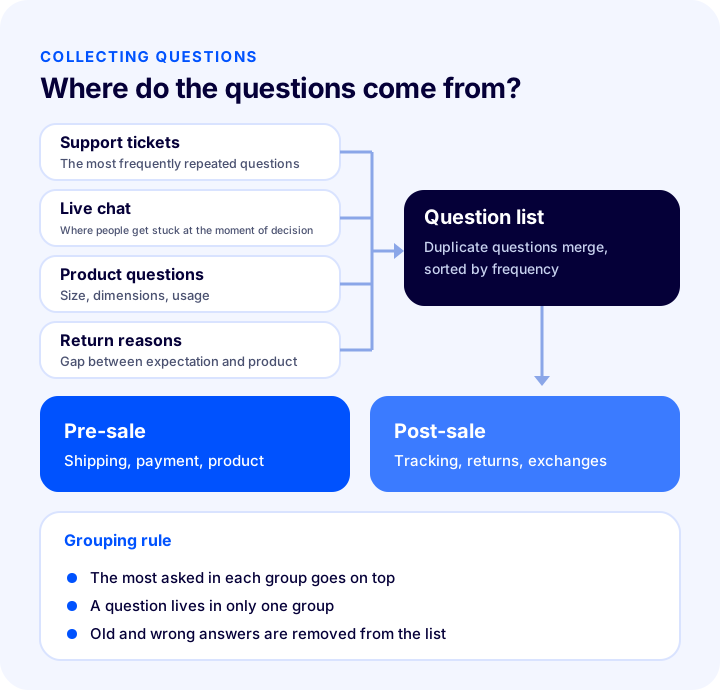
Instead of guessing FAQ questions at a desk, you need to collect them from what customers actually ask. The questions are already with you; they just need to be compiled in an orderly way.
| Source | What it teaches |
|---|---|
| Support tickets (email, phone, form) | The most repeated questions and the words customers use |
| Live chat conversations | Where the customer gets stuck at the moment of decision |
| Product questions | Information missing from the product page |
| Return and cancellation reasons | The gap between expectation and product |
| Marketplace customer questions | What people most want to know about the product |
| Sales and support team | Questions customers ask that never get recorded |
Putting the Questions into a List
While collecting questions, merge different sentences that mean the same thing into one question; "when will my parcel arrive," "how many days does delivery take" and "when will I have my order" are the same question. If you note how many times each question was asked, you can sort the list by frequency. The most asked goes to the top of the page.
We recommend readingHow to Manage Marketplace Customer Questions? A Guide to Fast Replies and Ready-Made AnswersHow Do You Group FAQ Questions?
Grouping determines how readable the page is. If questions are in mixed order, the customer cannot find what they are looking for; if they are split into groups, the customer goes straight to the heading that matches their situation.
- The main split is pre-sale and post-sale: The stage the customer is at determines which question will help them.
- A reasonable number of questions per group: If dozens of questions pile up in one group, split it in two; in a long list, the question being sought gets lost.
- Use the customer's words for group names: Plain names such as "Delivery and shipping" are easier to understand than corporate ones such as "Logistics processes".
- A question lives in only one group: If the same question appears in two places, you will forget one during an update and the two answers will contradict each other.
- Order is set by frequency: Within each group, the most asked comes first.
How Do You Write FAQ Answers?
A good FAQ answer is short, clear and serves a single question. Customers are on this page not to read but to get the answer quickly; every unnecessary sentence takes them further from it.
- Make the first sentence the answer itself: For "What is the delivery time?", instead of opening with something like "Orders are delivered after they are handed to the carrier", write the time and the condition directly.
- One answer for one question: Do not cover three separate topics in one answer; split the topics into separate questions.
- Use the customer's language: Use the word the customer will search for in the heading and the answer, such as "right to return" instead of "right of withdrawal".
- Leave no ambiguity: Instead of phrases like "generally" or "sometimes", state the condition clearly. If something changes, say why.
- Link for details: Linking from the short answer to the relevant legal page or product page keeps the answer short while keeping the details accessible.
- Don't let answers contradict the legal pages: If the return period or delivery condition is written one way in the FAQ and another way on the legal page, the customer loses trust.
What Separates a Bad Answer from a Good One?
| Weak answer | Strong answer |
|---|---|
| A long introduction, then the answer | The answer in the first sentence, details after |
| Mixes several topics | One answer for one question |
| Corporate, vague language | A concrete condition in the customer's own words |
| No pointer to details | A link to the relevant page |
Where Should the FAQ Page Appear on the Site?
However well an FAQ page is written, it is useless if customers cannot find it. The page should sit close to where the customer's question arises.
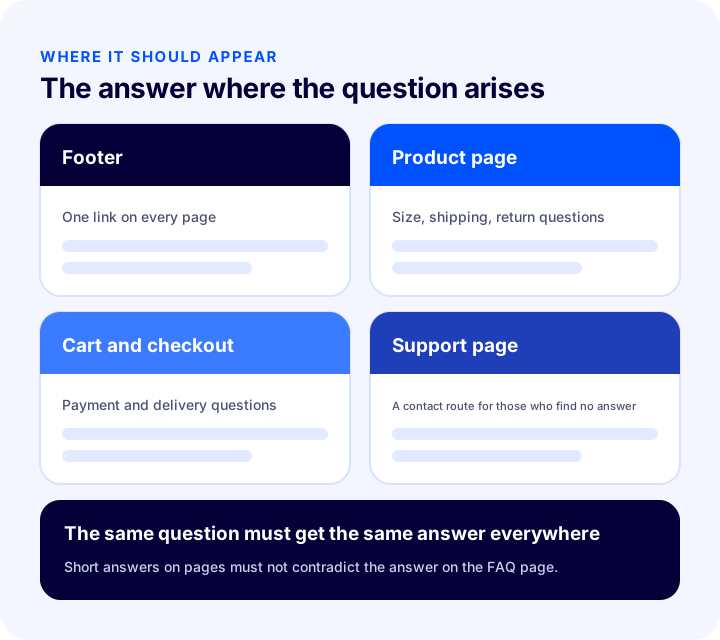
- Footer: A single "Frequently Asked Questions" link in the footer, which appears on every page, makes the page accessible to everyone.
- Product page: Showing a few questions directly related to the product, such as size, shipping and returns, with short answers on the product page lets the customer decide without leaving the page.
- Cart and checkout: Answers to last-minute questions such as payment method, delivery time and returns should sit near the cart page.
- Support and contact page: When a customer arrives at the contact page, directing them to the FAQ first reduces support requests; if they cannot find the answer, the contact route is open anyway.
Wherever you show it, the same question should get the same answer everywhere. The short answer on the product page and the detailed answer on the FAQ page should support each other, not contradict.
We recommend readingHow Should an E-Commerce Product Page Look? 15 Elements of a Product Page That SellsHow Do You Calculate the FAQ Page's Effect on Support Load?
Before investing in an FAQ page, you may want a rough idea of what you will gain in return. The tool below starts from your monthly support requests and calculates the number of requests an FAQ can prevent, the working time saved and its cost equivalent. The values are examples; enter your own figures.
The real lesson of the tool is that the gain depends on the product of two rates: even if the page has the right questions, the gain shrinks if customers cannot find it. That is why placing the FAQ in visible spots matters as much as writing it.
We recommend readingE-Commerce Metrics: 15 KPIs to Track and How to Calculate ThemHow Do You Prepare an FAQ Page for SEO?
People type their questions directly into search engines. A well-built FAQ page can bring organic visitors to your site by meeting these questions. To do that, the page must be organized so that it is both readable and understandable to search engines.
- Phrase the question the way the customer will type it: The heading or question text should be close to the sentence people would type into the search box.
- Keep answers as visible text: Answers should sit on the page as real text; text embedded in images does not reach search engines.
- Make the page title and description clear: The page title and meta description should say clearly what the page offers.
- Add internal links: Linking from answers to relevant product, category and legal pages guides the customer and shows search engines how pages relate to each other.
- Don't keep one very long list on a single page: For a very broad topic, separate pages are easier to read than a single huge page.
What Is Structured Data (Markup) for FAQs?
Structured data means telling search engines the questions and answers on the page in a machine-readable form. The type of markup used for FAQs defines the question-answer pairs on the page.
- Mark up only content visible on the page: The question and answer in the markup must match what the visitor sees on the page.
- There is no guarantee: Adding markup does not mean questions and answers will be shown in search results; that decision belongs to the search engine and may change over time.
- The real goal is for the page to be understood: Markup is not a shortcut; good questions and good answers come first.
- Validate: After adding markup, check with structured data testing tools whether it produces errors.
How Often Should the FAQ Page Be Updated?
An FAQ page is not written once and left. When the return condition, the carrier or the payment method changes, answers go stale; an outdated answer is more harmful than no answer, because it misleads the customer.
- Immediately when conditions change: When a shipping, return or payment condition changes, update its counterpart in the FAQ the same day.
- Regular review: At set intervals, review all answers and fix or remove the ones that have gone stale.
- Add new frequent questions: If you see a new question recurring in support tickets, add it to the page.
- Check before campaigns and seasons: If delivery time or return conditions change in a busy period, state it in advance.
- Have a clear owner: If it is clear who is responsible for keeping the FAQ current, the page is not forgotten.
How Do You Measure the Success of an FAQ Page?
A few indicators show whether the FAQ is working. Instead of looking at one number, track support requests and page usage together.
| Indicator | What does it tell you? |
|---|---|
| Number of support requests and topic breakdown | On which topics the FAQ reduces requests and on which it does not |
| Number of FAQ page visits | Whether the page is being found |
| Time on page and exits | Whether the customer finds what they are looking for |
| On-page search terms | Questions that are not on the list |
| Abandonment at the cart and checkout stage | Whether questions at the moment of decision are being answered |
Words searched in the on-page search box but not found are the clearest sign of a need for a new question; adding them to the FAQ regularly turns the page into a living resource.
Common Mistakes When Building an FAQ Page
- Writing questions by guesswork: Questions customers never ask fill the page, and the ones they really ask are missing.
- Writing ads instead of questions: Questions like "Why are we the best?" are not an FAQ; customers look for information, not advertising.
- Making answers longer than needed: A long answer makes the customer give up reading.
- Giving one long list without grouping: The question being sought gets lost among dozens of questions.
- Leaving the page hidden: With no link in the footer or on the product page, customers cannot find the page.
- Answers that contradict the legal pages: If the return period or delivery condition is written differently in two places, trust is damaged.
- Not updating the page: An answer describing old conditions misleads the customer.
- Leaving no route for those who find no answer: A contact route should be open for customers whose question has no answer in the FAQ.
How Do You Audit an FAQ Page?
The tool below checks your current FAQ page with eight questions. Tick the items that apply to you; the tool tells you how solidly your page is built.
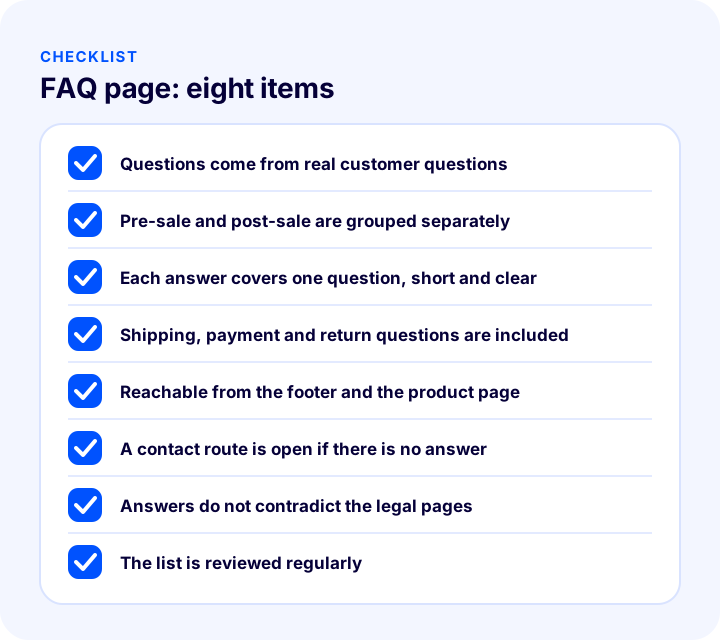
The eight items on the checklist: questions should come from real customer questions; they should be grouped as pre-sale and post-sale; each answer should cover one question, short and clear; shipping, payment and return questions should be included; it should be reachable from the footer and the product page; a contact route should be open for those who find no answer; answers should not contradict the legal pages; and the list should be reviewed regularly.
We recommend readingE-Commerce Home Page Design and Showcase Management: How to Organize the Home Page Showcase? Sections, Ordering, Mobile, Speed and Campaign Calendar: A Practical Guide, Product Click-through Calculator and Home Page AuditHow Do You Build an FAQ Page with Faprika?
Faprika's Frequently Asked Questions area collects the questions users ask often in the panel so that they can easily reach the right answers. All the questions and answers you add to the system are listed in this panel. Which plan includes this feature may vary by plan; see the plans page for details.
- You can create multiple headings: You can design different headings for frequently asked questions, for example separating them into pre-sale and post-sale FAQs.
- Questions are added one by one: With "Add New" you pick the language, fill in the question and answer fields and save; a question added by mistake can be removed with "Delete".
- Language options: The question details area offers Standard, Turkish and English options; Standard and Turkish work the same way. For content in an additional language, contact the support team.
- The heading is visible on the site: The heading field determines the name under which the page appears in the footer.
- Footer column and order: You can choose from the panel which footer column the page appears in and its order within that column.
- Active and inactive status: For the page to be live, the "Active" option must be ticked; if you untick it, the page becomes inactive, and you can delete it if you wish.
- SEO details: Meta keywords, meta description and page title fields are in the panel; you can edit them according to the content you create.
- Question order: If no number is entered in the order field, the first question entered is listed at the top; you can enter numbers when you want to change the order.
Assess the general principles above on FAQ markup against your own site's situation. If customer questions also come from marketplaces, you can follow these questions from the Faprika panel; you can find how to manage them in our post How to Manage Marketplace Customer Questions? A Guide to Quick Replies and Ready-Made Answers, and the elements of a product page in E-Commerce Product Page Essentials: 15 Elements of a Product Page That Sells.
Frequently Asked Questions
What is an e-commerce FAQ page?
It is a page that collects, in one place, the questions customers ask most before and after ordering, along with short answers. Its purpose is to give customers an answer at the moment of decision and to reduce how often the same questions reach the support team.
Which questions should an FAQ page include?
Before ordering: shipping, payment, return and product questions. After ordering: tracking, cancellation, the return process, damaged product and invoice questions. Questions should be collected from support tickets and live chat conversations, not guessed.
How should FAQ answers be written?
They should be short, clear and serve a single question. Give the answer in the first sentence, use the customer's own words and link to the relevant page for details. Answers must not contradict the legal pages.
Where should the FAQ page appear on the site?
It should be reachable from every page via a single footer link; related questions should also appear on the product page, at the cart and checkout stage, and on the contact page. The same question should get the same answer everywhere.
Does an FAQ page help SEO?
A page that answers customer questions in the words customers use can attract organic search traffic. Structured data markup can be added, but showing questions and answers in search results is not guaranteed; that decision belongs to the search engine.
How do you create an FAQ page in Faprika?
In the Frequently Asked Questions area of the Faprika panel, you create a heading and add questions and answers one by one with "Add New". You can open different headings such as pre-sale and post-sale; the page's footer column, order, active status and SEO details are edited from the panel. Which plan includes it varies by plan.
You May Also Like
- E-Commerce Site Legal Pages: Which Agreements and Disclosure Pages Should You Have? Distance Sales, Privacy, Membership, Payment and Delivery, Warranty and Returns, Page Placement, Common Mistakes, Update Workload Calculator and Setup Audit
- How to Manage Marketplace Customer Questions? A Guide to Fast Replies and Ready-Made Answers
- E-Commerce Product Page: How Should It Look? The 15 Elements of a Product Page That Drives Sales
- What Is Structured Data (Schema)? How to Add, Test and Validate Product Schema in E-Commerce? A Practical Guide