Table of Contents 16 sections
- Email Newsletter: What Is It?
- Why Is an Email Newsletter Important for E-Commerce?
- How Does a Newsletter Subscription Work?
- What Should a Subscriber Sign-up Field Look Like?
- Which Content Types Work in an Email Newsletter?
- How Often Should a Newsletter Be Sent?
- Why Do You Need Segmentation and Personalization?
- How Do You Write a Newsletter Subject Line and Sender Name?
- Permission, Opt-out and Legal Compliance
- How Do You Clean the List?
- How Do You Measure Email Newsletter Success?
- Common Mistakes in Email Newsletters
- How Do You Audit Your Email Newsletter Setup?
- Email Newsletter Checklist
- How Do You Manage Your Email Newsletter with Faprika?
- Frequently Asked Questions
A customer usually does not buy on their first visit to your site; but if they leave their email address, the relationship has begun. The short answer to what an email newsletter is: it is a regular email sent, with their permission, to people who have subscribed to your site. It contains a campaign, a new product or a useful guide; its purpose is to keep subscribers from forgetting you and bring them back to your site at the right time.
This guide explains what an email newsletter is, how to set up a subscriber sign-up field, what each content type is for, how to choose sending frequency and segment, why the subject line and sender name matter, how to manage permission and opt-out, and how to handle list cleaning and measurement. Of the two tools in the article, one estimates the potential revenue from your subscribers, and the other audits your current email newsletter setup with eight questions.
What Is an Email Newsletter?
An email newsletter is an email sent at regular intervals to people who have subscribed to your e-commerce site. It brings campaigns, new products and company news together in a single message. Subscribing is a voluntary decision; that is why an email newsletter is very different from mass advertising sent to a purchased list.
Is an Email Newsletter the Same as Bulk Email?
No. An email newsletter is sent with subscribers' permission and on a regular schedule; bulk email is any message delivered to a list in one go. A newsletter is the permission-based, planned form of bulk sending.
| Concept | Who gets it? | When is it sent? |
|---|---|---|
| Email newsletter | Subscribers who have given permission | At a regular interval promised in advance |
| Automated notification | The customer who took the action (such as an order or shipment) | When the event occurs |
| Campaign email | The selected segment | According to the campaign period |
Why Is an Email Newsletter Important for E-Commerce?
An email newsletter is a communication channel you own: the subscriber list is yours and is not bound by anyone's ranking or reach rules. That is why you can keep talking to your list even when your sales channels change.
- Keeps interest alive: Someone who browsed your site once is reminded of you by the newsletter.
- Supports repeat sales: Announcing new products and campaigns to existing customers is usually cheaper than finding new ones.
- Direct and measurable: You can see who opened it, what they clicked and what they bought.
- Builds trust: Newsletters with guides and tips position the brand as a guide, not just a seller.
- Announces campaigns: It is one of the fastest channels to reach people during campaign periods.
How Does a Newsletter Subscription Work?
The process starts when a visitor enters their email address in the sign-up field and continues with an opt-out option offered in every send. The five steps below summarize a healthy, permission-based newsletter flow.
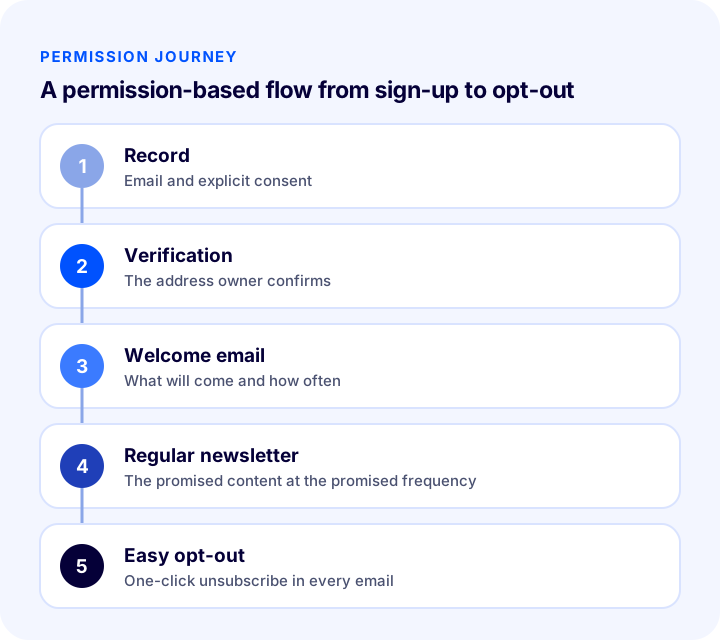
- 1. Sign-up: The visitor enters their email address and explicitly agrees to receive the newsletter.
- 2. Verification: A confirmation email can verify that the address really belongs to them.
- 3. Welcome email: The subscriber is told up front what they will receive and how often.
- 4. Regular newsletter: The promised content is sent at the promised frequency.
- 5. Easy opt-out: Every email includes a link to unsubscribe with one click.
What Should a Subscriber Sign-up Field Look Like?
The sign-up field is the gateway to the newsletter: a short form that says what it promises and asks for permission gives the best results. A new subscriber should know what they are signing up for.
Where Should the Sign-up Field Go?
On most sites the sign-up field sits at the very bottom of the page, in the footer; visitors are used to finding what they look for there. Post-checkout pages, the end of blog posts and spots such as the "notify me when back in stock" option on product pages can also work well. Use a consistent form that makes the same promise everywhere.
Which Fields Should You Ask For?
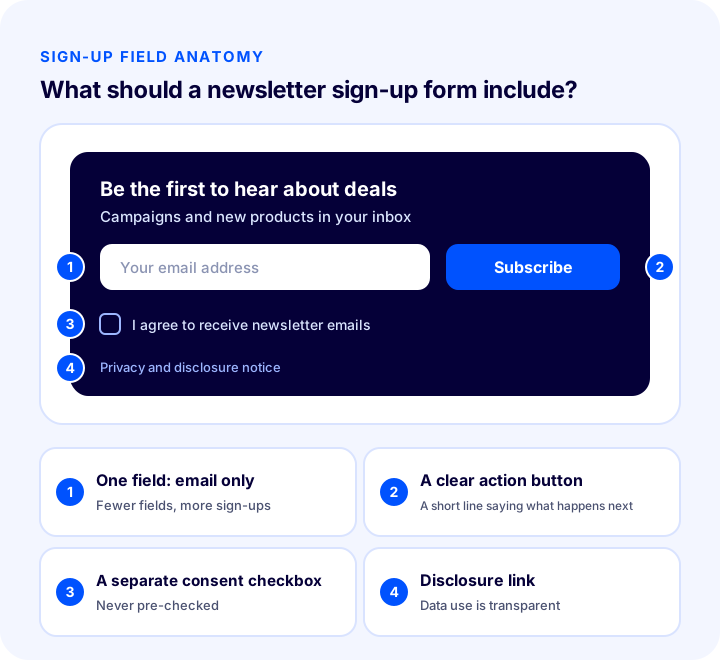
An email address alone is enough. Every extra field reduces sign-ups. If you need details such as name or interests, ask for them in a separate step after the person has subscribed.
| Item | Recommended | Why? |
|---|---|---|
| Number of fields | Only email | Fewer fields, more sign-ups |
| Button text | A short action that says what happens next | Makes the expectation clear |
| Consent checkbox | A separate box that is not pre-checked | Consent is clear and deliberate |
| Promise | What they will receive and how often | Reduces unsubscribes |
| Link | Privacy and disclosure notice | It is clear how the data will be used |
How Do You Get Consent and Permission?
Consent must be clear and given knowingly and willingly. A pre-checked box, or sending a newsletter to an address collected for another purpose, does not count as permission. For legal details, see the current rules on personal data protection and commercial electronic messages, and get expert advice if needed.
Recommended readingHow to Ensure KVKK Compliance for an E-commerce Site? A Practical Guide to Privacy Notices, Explicit Consent, Cookies, IYS and Data Subject RequestsWhich Content Types Work in an Email Newsletter?
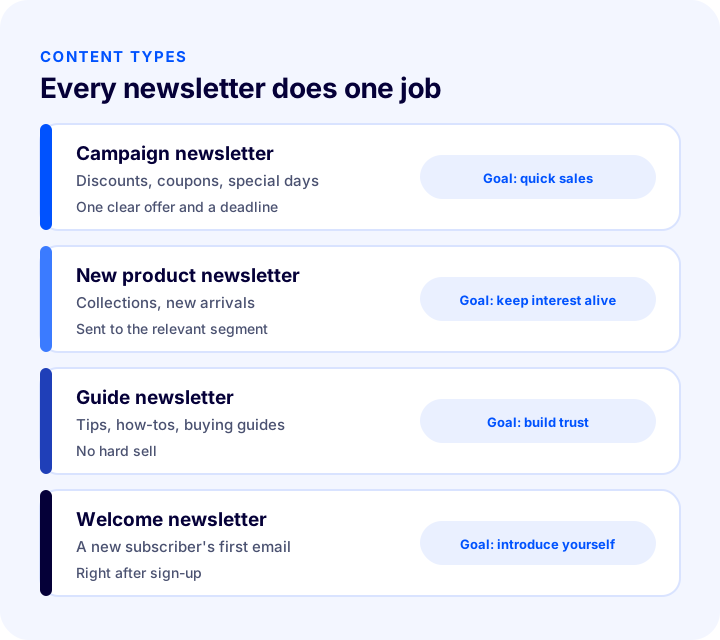
Email newsletter content generally falls into three main types: campaign, new product and guide. Each newsletter should do one job; cramming everything into one email highlights nothing.
Campaign Newsletter
Announces a discount, coupon or special day. It should contain one clear offer and a clear end date. What the offer is should be understood from the subject line and the first line, and the button should go straight to the campaign page.
New Product Newsletter
Introduces a new product or collection. Sending it to subscribers in the relevant segment works far better than sending the same product to the whole list.
Guide Newsletter
Informational content such as a buying guide, a usage tip or a care recommendation. Because it does not push a sale, it builds trust and prepares the subscriber for the next newsletter. It shows that you are an expert, not just a seller.
Welcome Newsletter
The first email, sent as soon as someone subscribes. It tells them what they will receive and how often. The subscriber's interest is at its freshest at this moment, so a short, simple welcome is a good habit.
| Newsletter type | Purpose | Content focus |
|---|---|---|
| Campaign | Quick sales | One offer and a deadline |
| New product | Keeping interest alive | Products suited to the relevant segment |
| Guide | Trust and return visits | Useful information, light selling |
| Welcome | Introduction | What they will receive and how often |
How Often Should a Newsletter Be Sent?
There is no single frequency that suits every business; the right one is the frequency you promised the subscriber and they can accept. Send too rarely and subscribers forget you; send too often and they unsubscribe.
- State the frequency up front: Make a promise such as "once a week" or "twice a month" in the sign-up field and the welcome email, and stick to it.
- Be consistent: A newsletter that arrives on a set day and time builds a habit.
- Plan campaign periods separately: If you will send extra emails during busy periods, tell subscribers in advance.
- Adjust based on results: If opens are falling and unsubscribes are rising, reduce the frequency.
On Which Day and Time Should It Be Sent?
There is no universal best day and time; the best time is when your subscribers open. Try different days and times with small groups, compare the results and fix on the best performer.
Why Do You Need Segmentation and Personalization?
A segment is a group of subscribers who share a characteristic; each group receives a newsletter suited to it. Sending the same email to the whole list is easy, but it is irrelevant to most subscribers.
- By interest: Recommend products based on the category they browsed.
- By purchase history: Send different emails to first-time buyers and loyal customers.
- By engagement: Send more often to those who open regularly and less often to those who have not opened for a long time.
- By sign-up source: Someone who signed up after checkout and someone who signed up from the blog do not have the same expectations.
Personalization is not just writing the name. Showing the right product to the right person is far more effective than using their name. Start segmentation with a few meaningful groups; many small groups make management harder.
Recommended readingWhat Is Customer Segmentation? How Is Segmentation Done with RFM Analysis in E-Commerce?How Do You Write a Newsletter Subject Line and Sender Name?
Subscribers usually decide whether to open a newsletter by looking at two things in their inbox: the sender name and the subject line. These two determine opens regardless of how good the content is.
Sender Name
The sender name should be familiar and consistent; the subscriber should see at a glance who it is from. Use your brand name and keep it the same in every newsletter. A sender that keeps changing, or that uses a personal name, reduces trust.
Subject Line
- Be clear: Say in the subject line what is inside the newsletter.
- Keep it short: Long subject lines get cut off, especially on phones; put the key word first.
- Don't exaggerate: Capital letters, many exclamation marks and misleading promises hurt both opens and deliverability.
- Complete the subject with preview text: The short text shown right next to the subject line is a second chance.
| Weak title | Better subject line | Why? |
|---|---|---|
| Newsletter no. 12 | New season products have arrived | Tells what is inside |
| LAST CHANCE!!! | The campaign ends this weekend | Clear, without hype |
| Hello | Our picks are ready for you | Promises value |
Permission, Opt-out and Legal Compliance
A newsletter should be sent only to people who have given permission, and every email should include a way to opt out. This is both a legal requirement and good practice: an email sent to someone who does not want it turns into complaints and reputation loss.
- Get explicit consent: Use a separate, unchecked consent checkbox at sign-up.
- Make the unsubscribe link visible: Put a one-click unsubscribe link at the end of every email; hiding it or making it difficult increases complaints.
- Apply opt-out requests immediately: Do not send any more emails to someone who has left.
- Record the permission you received: Keep a record of who gave permission, when and through which form.
- Do not add addresses from other sources: Do not send to a list without permission.
Is Unsubscribing a Bad Thing?
No. When someone who has lost interest leaves the list, that is healthy for your list. Easy opt-out is far cheaper than the complaints a subscriber kept against their will would cause. Asking a short question about the reason at opt-out can help with your frequency and content decisions.
How Do You Clean the List?
List cleaning means removing from the list the addresses that have not opened emails for a long time and the addresses that cannot be reached. A smaller but relevant list gives higher engagement and better deliverability.
- Remove undeliverable addresses: Addresses that keep bouncing at send time damage the list.
- Give long-term non-openers a chance: Send them an email asking "Do you still want to receive these?"; remove those who do not reply.
- Fix typos: Validating the address in the sign-up form prevents incorrect entries from the start.
- Clean up duplicates: The same address appearing in the list more than once leads to double sends.
| Record type | What is done? |
|---|---|
| Undeliverable address | Removed from the list |
| Hasn't opened for a long time | A win-back email is sent; removed if there is no reply |
| Unsubscribed | Removed from the list immediately and not added again |
| Duplicate address | Merged into a single record |
How Do You Measure Email Newsletter Success?
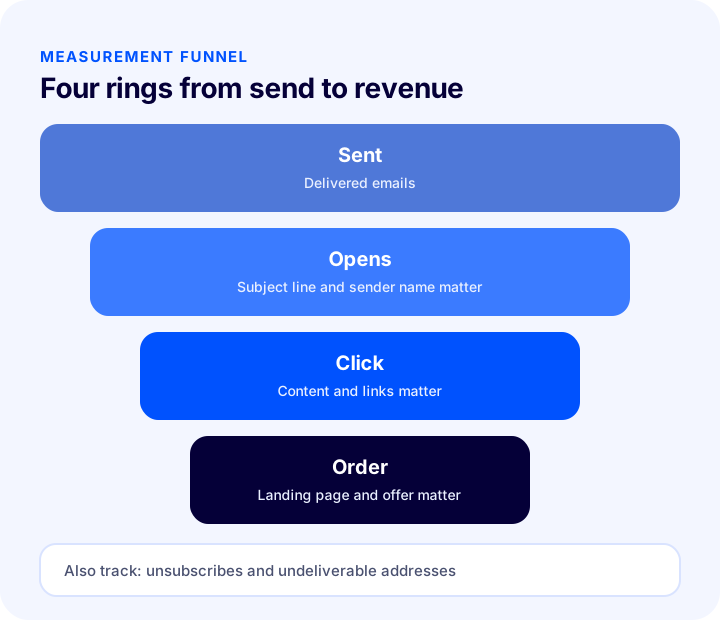
Newsletter success is measured in a four-ring funnel: sent, opened, clicked and ordered. Each ring is linked to the next by a conversion rate, and each ring has a different owner.
| Indicator | What does it tell you? | What to check if it is low? |
|---|---|---|
| Open rate | The strength of the subject line and sender name | Subject line, sender name, send time |
| Click rate | The appeal of the content and link | Content, one clear button, product selection |
| Order rate | The strength of the landing page and the offer | Page match, offer, speed |
| Unsubscribe rate | Fit between expectations and content | Frequency, content, segment |
| Undeliverable rate | The health of the list | Sign-up verification, list cleaning |
Open rate alone is not a sufficient measure: some email apps can preload images, so opens may look higher than they really are. That is why you should look at click and order results together. Track the numbers by send and by segment; the overall figure hides a weak segment.
How Much Revenue Does a Subscriber Bring?
The tool below starts from your subscriber count, calculates opens, clicks and orders in turn, and shows the revenue expected from a single send. The values are examples; enter your own rates.
The real lesson of the tool is that the result is the product of four factors: improving one ring carries through proportionally to the whole result. A small subject line improvement raises opens and so enlarges every ring after it.
We recommend readingE-Commerce Metrics: 15 KPIs You Need to Track and Their Calculation FormulasCommon Mistakes in Email Newsletters
- Sending without permission: Sending a newsletter to an address collected for another purpose leads to complaints and reputation loss.
- Making the sign-up form long: A form that asks for many fields reduces the number of subscribers.
- Not stating the promise: A subscriber who does not know what they will get or how often leaves quickly.
- Sending the same email to the whole list: A newsletter without segments is irrelevant to most people.
- Loading too much into one email: Multiple offers highlight none of them.
- Using misleading or exaggerated subject lines: They bring opens in the short term and lose trust in the long term.
- Hiding the unsubscribe link: A subscriber who cannot leave will complain.
- Never cleaning the list: Dead addresses distort deliverability and measurement.
- Not checking on a phone: Newsletters are mostly read on phones; an email that looks broken on a small screen is lost.
How Do You Audit Your Email Newsletter Setup?
The tool below checks your current setup with eight questions. Tick the items that apply to you; the tool tells you how solid your email newsletter practice is.
We recommend readingHow to Do SMS Marketing in E-Commerce? Consent, Message Writing, Timing and Measurement GuideEmail Newsletter Checklist
Before sending a newsletter, look at the summary table below; the same items also appear in the audit tool above.
| Title | Check |
|---|---|
| Sign-up field | Visible, short and asks only for an email |
| Consent | A separate, unchecked consent box and a disclosure link |
| Promise | What they will receive and how often is stated up front |
| Content | One clear goal and one clear button |
| Subject line and sender | Clear, short, no hype; the sender name stays fixed |
| Segment | Sent to the relevant group |
| Opt-out | One-click unsubscribe in every email |
| Measurement and cleaning | Opens, clicks and unsubscribes are tracked; dead addresses are cleaned out |
How Do You Manage an Email Newsletter with Faprika?
In Faprika, an email newsletter subscriber is a user who wants to hear about the campaigns on your site, the new products you put on sale and other news. In addition, the Faprika panel offers the following:
- Sign-up field: The sign-up field for email newsletter subscribers is in the footer section on your site's home page; your users and guests can subscribe to the newsletter there.
- Subscriber list: You can list the users who signed up for the newsletter from the "Campaign Management > Email Newsletter Subscribers" screen.
- Search and filter: You can search subscribers within specific date ranges or by entering a particular email account; sign-up dates are shown on the screen.
- Export: With the export button at the top right of the screen you can download the data of all subscribers as a spreadsheet file, which makes bulk email sending with this list easier.
- Message templates: Email templates (Message Templates) that automatically inform your customers at stages such as membership, order and shipment are available in all plans; subject, content, BCC address and when the message is sent are set in the template. These templates are automatic, event-triggered notifications, not newsletters.
- Send queue and bulk sending: The plan table includes the "Email Settings / Send Queue Monitoring" and "Bulk SMS / Email Sending" rows; which plan includes them varies by plan. See the plans page for details.
- Email setting: For sends to reach the recipient, the email account settings must be defined correctly.
For consent management, message approval and personal data, see our post E-Commerce Site KVKK Compliance: How to Achieve It? A Practical Guide to Privacy Notice, Explicit Consent, Cookies, İYS and Data Subject Requests; for the notification flow for sold-out products outside order and transaction notifications, see What Is Back-in-Stock Notification? How to Set Up Stock Alerts for Sold-Out Products and Win Back the Sale: Variant-Based Demand, Notification Channels and Threshold, Recovery Calculator and Setup Audit; and for ways to grow the basket, see How to Increase Average Cart Value? 12 Ways to Raise Revenue per Order in E-Commerce.
Frequently Asked Questions
What is an email newsletter?
It is a regular email sent, with their permission, to people who have subscribed to your site. It contains a campaign, a new product or a guide. Its purpose is to keep subscribers from forgetting you and bring them back to your site at the right time.
What is the difference between an email newsletter and bulk email?
An email newsletter is sent with subscribers' permission and at a frequency promised in advance. Bulk email is any message delivered to a list in one go. A newsletter is the permission-based, planned form of bulk sending.
How often should a newsletter be sent?
There is no single right frequency; the right one is the one you promised the subscriber and they can accept. State the frequency in the sign-up field, send regularly and adjust based on open and unsubscribe results.
Is an unsubscribe link mandatory?
Yes, every email must include an easy-to-find way to opt out. It is both a legal requirement and a way to stop subscribers who cannot leave from filing complaints. Opt-out requests should be applied immediately and the person removed from the list.
How do you measure email newsletter success?
By open, click, order and unsubscribe rates. Opens alone are not enough; look at click and order results together, and track the numbers by send and by segment.
How do I access email newsletter subscribers in Faprika?
Under Campaign Management, the Email Newsletter Subscribers screen lists users who signed up for the newsletter. You can search by date range or email address and export the list. Which plan includes the bulk sending feature varies by plan.
You May Also Like
- E-Ticarette E-Mail Marketing Stratejileri
- What Is Customer Segmentation? How to Segment Customers with RFM Analysis in E-Commerce
- How Do You Ensure KVKK Compliance for an E-Commerce Site? A Practical Guide to the Privacy Notice, Explicit Consent, Cookies, IYS and Data Subject Requests
- E-commerce Metrics: 15 KPIs You Should Track and Their Calculation Formulas