Contents 15 sections
- What Is a Push Notification?
- What Is the Difference Between a Browser Notification and a Mobile App Notification?
- Why Are Push Notifications Important in E-Commerce?
- What Are the Use Cases for Push Notifications in E-Commerce?
- How and When Do You Ask for Notification Permission?
- How Often Should Push Notifications Be Sent?
- How Do You Personalize Push Notifications?
- When Should Push Notifications Be Sent?
- How Do You Write an Effective Push Notification?
- How Do You Calculate the Return on Push Notifications?
- Common Mistakes When Sending Push Notifications
- How Do You Audit Your Push Notification Setup?
- How Do You Measure Push Notification Success?
- How Do You Set Up Push Notifications with Faprika?
- Frequently Asked Questions
A customer places their order, then wonders what happens next: has the payment been received, is the package being prepared, has the shipment left? The customer can see the answer to this on their phone or computer screen without waiting for you to call. The short answer to what a push notification is: it is a short message that lands on a device's screen, with the user's permission, even when your site or app is not open. Used right, it gets order status, shipping movement, a sold-out product's return and campaigns to the customer instantly; used wrongly, it loses you the most valuable channel people have given permission for.
This guide explains what a push notification is, the difference between a browser notification and a mobile app notification, where it is used in e-commerce, the right moment and wording for asking permission, sending frequency, personalization and timing, writing short and clear copy, common mistakes and measurement. Of the two tools in the article, one helps you calculate the estimated return on your notification work, and the other audits your current notification setup.
What Is a Push Notification?
A push notification is a short message that a site or app sends directly to a user's device with the permission they gave in advance. The user does not have to be on the page; the notification appears on the lock screen or in the notification center and, when tapped, opens the set page. It is called this because the sender "pushes" the message: the user is not searching for anything, the information comes to them.
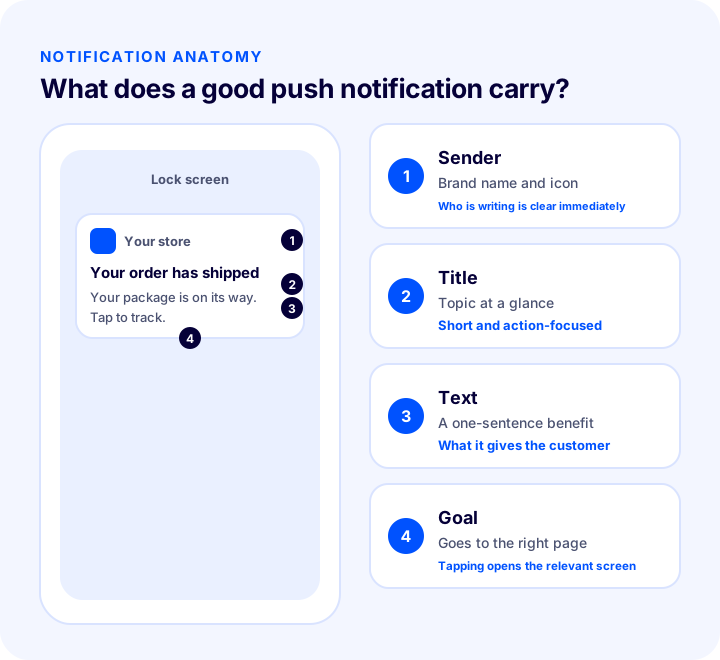
A notification has four parts. The sender tells with a brand name and icon who the notification is from. The title explains the topic at a glance. The text gives a one-sentence benefit. The target is the page that opens when tapped; an order notification should go to the order page, a stock notification to the product page. If any of the four is missing, the notification is either unclear or useless.
Is a Push Notification the Same as SMS and Email?
All three are channels for communicating with the customer, but they are used in different places. Push notifications are for fast, short information; email is for long content that needs to be on record; SMS reaches a phone number and often carries a separate cost. Which channel the customer prefers, and which one they gave permission for, is decisive.
| Channel | Best used for | Point to watch |
|---|---|---|
| Push notification | Instant status information, short reminders, campaign announcements | Permission is needed; the text must be very short |
| Order summaries, invoices, detailed explanations | Can get lost in the inbox | |
| SMS | Reaching a phone number directly, important transaction information | Each send may carry a separate cost; if used too often, it annoys |
What Is the Difference Between a Browser Notification and a Mobile App Notification?
A browser notification comes through the browser when a visitor gives permission on your site; a mobile app notification is sent by an app installed on the phone. Both look the same on the screen, but the audience they reach, the installation requirement and the permission process are different.
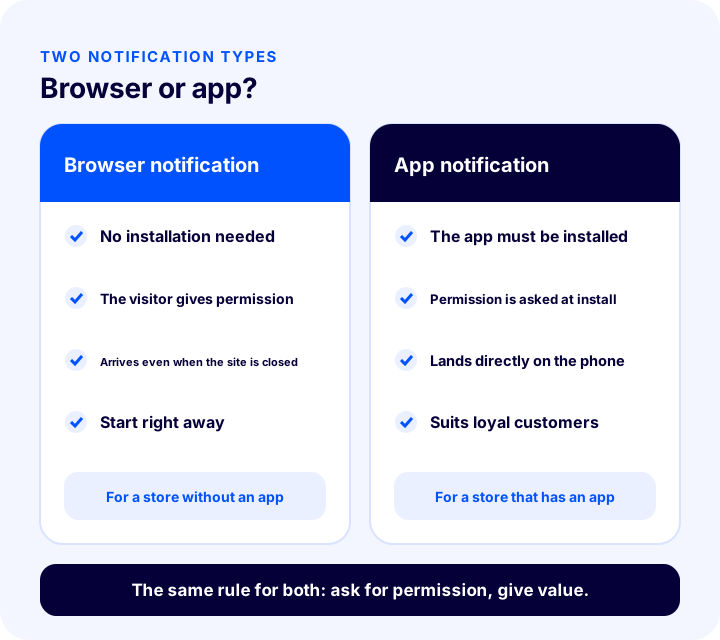
| Feature | Browser notification | Mobile app notification |
|---|---|---|
| Prerequisite | Visiting the site and giving permission | Installing the app |
| Permission moment | Asked with a prompt on the site | Usually asked the first time the app is used |
| Audience reached | Everyone who visits the site and gives permission | Those who installed the app, mostly loyal customers |
| Investment | No extra app needed | An app must be built and published |
| Suitable store | A store without an app | A store that has an app or plans to launch one |
Which one is right for you depends on your customer base. If most of your customers visit the site occasionally and shop, a browser notification is a quick start. If you have an audience that shops regularly and often, an app notification builds a more lasting bond. The two routes are not mutually exclusive; many stores use both together.
Recommended readingWhat Is an E-commerce Mobile App? When You Need One, How to Build and Publish It, How It Differs from a Mobile Site, Notifications and App Needs AuditWhy Are Push Notifications Important in E-Commerce?
In e-commerce, customer attention is scattered; even someone who doesn't open individual emails will see a short order notification that lands on the screen. That is why push is a strong channel, especially for time-sensitive information.
- Reduces customer questions: When customers learn order and shipping status on their own, "where is my order?" calls and messages fall.
- Builds trust: A customer who hears about every step of an order feels the store knows what it is doing.
- Arrives on time: Instant opportunities such as an expected product coming into stock or a price change are announced by notification before the chance is missed.
- Supports repeat purchases: Bringing customers back to your site needs no extra ad cost; you reach users who gave permission directly.
- Becomes your own channel: Those who give permission are a communication list that is not bound by another platform's rules.
What Are the Use Cases for Push Notifications in E-Commerce?
Push notifications in e-commerce fall into three main groups: transactional notifications (orders and shipping), triggered notifications (cart, stock, price) and marketing notifications (campaigns). The first group is what the customer expects; the last is received because the customer gave permission.
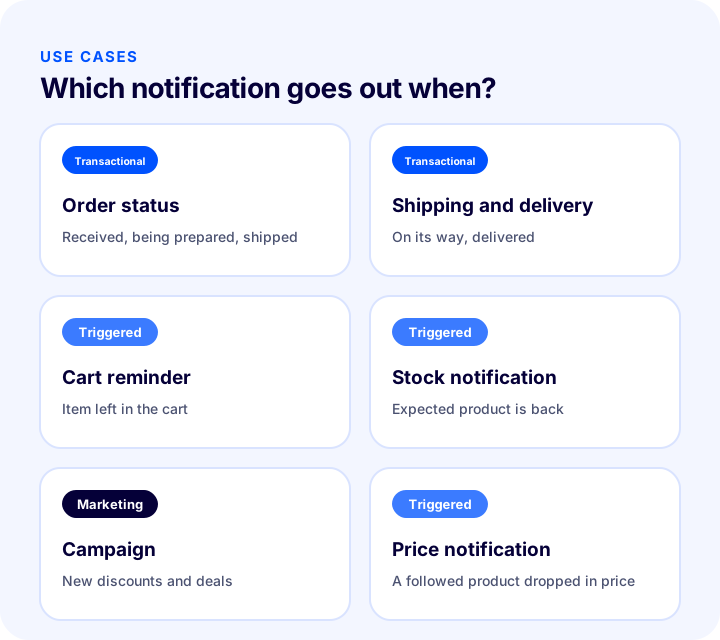
| Use case | Type | Example message |
|---|---|---|
| Order status | Transactional | Your order has been received and is being prepared |
| Shipping and delivery | Transactional | Your package has been handed to the carrier; tap to track |
| Cart reminder | Triggered | The items in your cart are waiting for you |
| Stock notification | Triggered | The product you were waiting for is back in stock |
| Price notification | Triggered | The price of a product you follow has changed |
| Campaign | Marketing | A new deal has started on selected products |
Order Status Notification
Every stage, such as order placed, payment received, being prepared and handed to the carrier, is a moment the customer is curious about. Announcing these stages with a short notification both reassures the customer and reduces the "status inquiry" load on customer service. The text of order notifications should be precise and should lead to the order page.
Shipping and Delivery Notification
A shipping notification should include the tracking number or tracking link. When the customer taps the notification, they should reach the tracking information directly; having to search again after the notification reduces its value. A delivered notification is also a natural opportunity to ask for a review, but rather than sending that as a separate notification, leaving it to a suitable time after the customer has received the product is less intrusive.
Cart Reminder Notification
Sending a reminder to a customer who added products to their cart and left is a gentle nudge to someone who already intends to buy. The message should not pressure; it should clearly show the product and the way back to the cart. Sending the reminder repeatedly for the same cart backfires.
Stock and Price Notification
If a customer has said "notify me when it's back" or "notify me when the price changes" for a product, that notification is information they asked for; it is one of the notification types that draws the most interest. Since the customer has already shown interest in the product, the message should be short and direct and should lead to the product page.
Recommended readingWhat Is Back-in-Stock Notification? How to Set Up Stock Alerts for Sold-Out Products and Win Back Sales: Variant-Based Demand, Notification Channels and Threshold, Recovery Calculator and Setup Audit We recommend readingWhat Is Price Drop Notification? A Guide to Notifying Customers of Price Drops, Variant-Based Tracking, Notification Channels and Timing, Protecting Profit Margin, Extra Revenue Calculator and Setup AuditCampaign Notification
Campaign notification is the easiest type to misuse. Sending every discount to everyone quickly pushes users who gave permission to turn notifications off. Send campaign notifications only when there is a real opportunity and the audience is relevant; state clearly in the message what applies and until when.
How and When Do You Ask for Notification Permission?
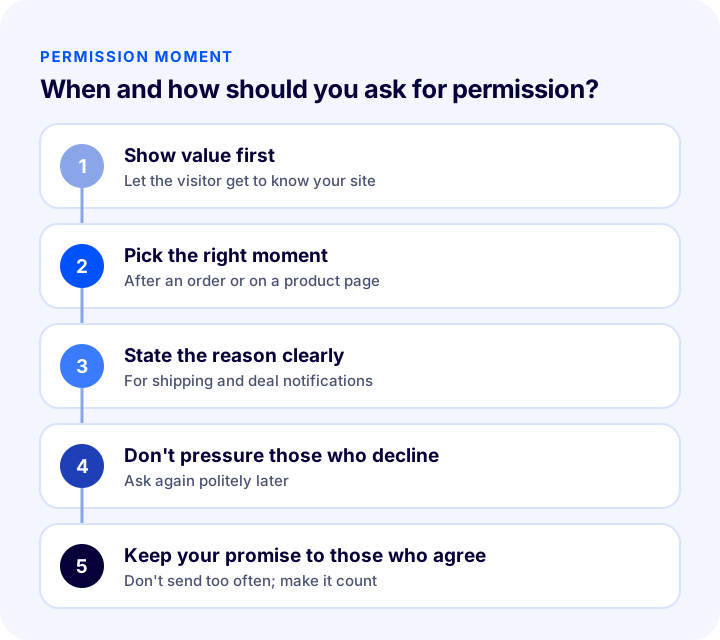
Push notifications cannot be sent without permission; the moment and manner of asking determines the size and quality of your notification list. The basic rule is to show the visitor value first, then ask for permission while explaining the reason.
What Is the Right Moment to Ask for Permission?
Showing a permission prompt to a visitor the moment they land on the site is an approach that is mostly declined, because the visitor doesn't know you yet. More suitable moments are offers made when a natural need arises on a product page, such as "notify me when it's back" or "notify me when the price changes"; in a "learn your order status by notification" offer after an order is completed; or when the visitor has browsed a few pages and shown interest.
How Do You Write the Permission Text?
The permission text should tell the user what they will receive, why and how often. Clear, honest text also raises the permission rate, because the user knows what they are saying "yes" to.
| Weak text | Strong text | Why? |
|---|---|---|
| Allow notifications | Would you like to learn your order's shipping status by notification? | The benefit is stated clearly |
| Don't miss the deals | Shall we let you know when the product you were waiting for is in stock? | Tied to the user's need |
| Allow now | You can turn notifications off at any time | Control stays with the user |
If a user declines permission, wait a while before asking again, and offer it again only when a new need arises, for example for a different product. Asking repeatedly in the same visit both annoys the user and can lead the browser to suppress the permission prompt.
Recommended readingHow to Ensure KVKK Compliance for an E-commerce Site? A Practical Guide to Privacy Notices, Explicit Consent, Cookies, IYS and Data Subject RequestsHow Often Should Push Notifications Be Sent?
The right frequency depends on the type of notification and the customer's expectation. Transactional notifications come on their own as the order changes at each stage, and the customer expects them; for marketing notifications, frequency should be kept limited.
- Transactional notifications are not subject to frequency limits: When order and shipping status changes, the customer wants to hear; but don't notify the same status twice.
- Be restrained with marketing notifications: A store that sends a campaign notification every day is a store whose notifications get turned off.
- Set a per-customer limit: Set an upper limit on the total number of notifications you will send a user in a given period, and apply this limit across all notification types combined.
- Watch the reaction: If the number of users withdrawing permission is rising, the frequency is too high.
The "monthly notifications per user" value in the calculator lets you see this balance: when the same number of sends goes to a small audience, the notifications per person go up and the risk of permission withdrawal rises.
How Do You Personalize Push Notifications?
Personalization turns a notification from an announcement that goes to everyone into a message written to one person. For this, information such as the customer's name, the product they viewed, the order status or the category they were previously interested in is used. Saying "the product you were interested in is back in stock" instead of a generic campaign message makes the same notification far more relevant.
- Tie it to the product: Show the product the customer viewed or follows in the message and on the target page.
- Tie it to the order: Link the transactional notification to the order number and the relevant order page.
- Split the audience: Instead of sending the same notification to everyone who gave permission, divide them into groups by interest or purchase history.
- Use the right information: Missing or wrong personalization is worse than none; if the customer name comes through empty, fall back to the generic text.
When Should Push Notifications Be Sent?
Timing varies by notification type. A transactional notification goes at the moment the event happens; a marketing notification should be sent at a time when the customer can see it and act on it. A notification that arrives late at night or at a moment when the customer is busy is as irritating as it is irrelevant.
- Send transactional notifications without delay: Order status information is valuable while it is fresh.
- Send the cart reminder after a while: Remind the customer not right after they leave the cart, but after giving them a little time to think.
- Schedule campaign notifications for a suitable hour: Find from your own data the hours your customers are most active on the site and send the notification close to those hours.
- Avoid irritating hours: Do not send marketing notifications at night.
- Test: Send the same message to different groups at different times and measure which time gets more clicks.
How Do You Write an Effective Push Notification?
An effective push notification is a message that is short, clear and contains a single call to action. There is very little room on the screen; the title and text must say in a few words what it is and what the customer should do.
- State the topic in the title: Choose a title that is understood at a glance, such as "Your order has shipped".
- Give the benefit in the text: Say in one sentence what it gives the customer.
- Ask for one action: One target per notification; the target page should match the message's promise.
- Keep the language plain: Avoid capital letters, many exclamation marks and exaggerated promises.
- Use the image for a purpose: The notification image introduces your brand, but it doesn't replace the text.
| Weak example | Good example |
|---|---|
| LAST CHANCE!!! DON'T MISS OUT!!! | The items in your cart are waiting for you |
| We have a new notification | Your package has been handed to the carrier; tap to track |
| Visit our website | The product you were waiting for is back in stock |
How Do You Calculate the Return on Push Notifications?
To see what a notification effort returns, you follow a chain: some of the notifications sent are clicked, some of those who click place an order, and the orders turn into revenue through the average cart value. The tool below calculates this chain and also shows the monthly notifications per user. The values are examples; enter your own figures.
The real lesson of the tool is that the return depends not only on the number of sends but on the click and order rates: improving the click rate with the same number of notifications is often a healthier path than sending more. Increasing the number of sends also raises the risk of permission withdrawal.
Common Mistakes When Sending Push Notifications
- Asking for permission in the first second: A permission prompt that appears before the visitor knows you is mostly declined.
- Not stating the reason for permission: A user who doesn't know why they would get notifications won't give permission.
- Sending the same message to everyone: When the audience isn't split, the message is irrelevant for most people.
- Sending too often: As frequency rises, notifications get turned off and the audience erodes.
- Going beyond the promise made: Constantly sending campaigns to someone who gave permission for order status damages trust.
- Writing long, vague text: Text that is cut off on the screen becomes unintelligible.
- Choosing the target page carelessly: If the customer who taps the notification lands on the home page, they can't find what they were after.
- Not measuring results: Without knowing which notification works, it is impossible to improve frequency and copy.
How Do You Audit Your Push Notification Setup?
The tool below checks your current notification setup with eight questions. Tick the items that apply to you; the tool tells you how solidly your notification work is built.
How Do You Measure Push Notification Success?
A notification's success is measured not just by how many people it was sent to, but by how many clicked and ordered and how many withdrew permission. Measurement needs to be split by notification type; transactional and campaign notifications are not judged by the same yardstick.
| Indicator | What does it tell you? |
|---|---|
| Number of users who gave permission | The size and growth rate of your notification list |
| Click rate | Whether the copy, timing and personalization are working |
| Order rate among clickers | How consistent the notification's target page and promise are |
| Revenue from notifications | The financial return of the effort |
| Share of users who withdrew permission | Whether frequency and relevance are right |
How Do You Set Up Push Notifications with Faprika?
Faprika provides order status notifications through a free notification service. For setup, a project is created in this service, the app is registered, and a server key and a web key pair are generated; then this information is entered in the "Push Notification Settings" tab under Settings in Configuration in the e-commerce panel. Step-by-step setup is explained on the push notifications training page. Which plan includes push notifications varies by plan; see the plans page for details.
- Guest users: If you tick the "Guest Users Active" option, notifications are also sent to visitors who are not members.
- Notification image: You can upload from the panel the image users will see when a notification is sent.
- Automatic notifications with message templates: In the Message Templates area under Content Management in the panel, when you tick the "Push Active" box on the template's edit screen and fill in the "Push Content" field, the message also goes out as a notification. For example, the "Your Order Has Been Created" template can be delivered as a notification when a customer places an order.
- Sending custom notifications: In the Push Notifications section under Campaign Management, from the "Send Notification" tab, you can enter the notification title, description and the address of the page that opens when tapped, and send the notification to users who are open to receiving them.
- Push subscribers: From the "Push Subscribers" list under Campaign Management you can see the users who gave notification permission on your site; this list is useful for assessing interest and reach.
- Mobile app: Faprika's mobile app option varies by plan; see the mobile app page for details.
In message templates, email and SMS options sit next to the push option; that means for the same event you can use together the channels that suit the customer's preference. To use SMS, SMS integration settings must be set up beforehand. You can browse all add-ons on the add-ons page.
Frequently Asked Questions
What is a push notification?
It is a short message sent directly to a device by a site or app with the user's permission. Even when the site or app is not open, it appears on the lock screen or in the notification center, and when tapped it opens the set page.
What is the difference between a browser notification and an app notification?
A browser notification comes through the browser when a visitor gives permission on the site and needs no additional app. An app notification is sent by an app installed on the phone and reaches the customer who installed the app.
Where are push notifications used in e-commerce?
They are used for order status, shipping and delivery information, cart reminders, stock and price alerts, and campaign announcements. Transactional notifications such as order and shipping updates are messages the customer expects; campaign notifications should be kept limited in frequency.
When should you ask for notification permission?
It should be asked after the visitor has gotten to know you and at the moment they really need notifications; for example, after an order or for a product that is out of stock. In the permission prompt, state the reason clearly and do not pressure those who decline.
How often should push notifications be sent?
Transactional notifications are sent whenever the event happens. For marketing notifications, you need to set a per-user frequency limit; if the number of users withdrawing permission is rising, the sending frequency is too high.
How do you set up push notifications in Faprika?
A project is created in a free notification service, and the keys obtained are entered in the panel under Push Notification Settings. Then in Message Templates you select "Push Active" and fill in "Push Content" to send order status notifications. Custom notifications can also be sent from Campaign Management. Which plan includes it varies by plan.
You May Also Like
- E-Commerce Mobile App: What Is It? When Do You Need One, How Is It Built and Published? Differences from a Mobile Site, Notifications and App Need Audit
- How to Write an Order Confirmation Email? A Practical Guide with Examples and Templates for Order, Shipping, Delivery and Return Transaction Emails in E-Commerce
- What Is a Back-in-Stock Notification? How to Set Up Stock Alerts for Sold-Out Products and Win Sales Back: Variant-Based Demand, Notification Channels and Threshold, Recovery Calculator and Setup Audit
- E-commerce Metrics: 15 KPIs You Should Track and Their Calculation Formulas