
Contents 14 sections
- What Is a Product Tag?
- Why Do Product Tags Matter?
- How Do Product Tags Enable Cross-Grouping?
- How Do Product Tags Affect Search and On-Site Navigation?
- How Do Product Tags Affect SEO?
- How Are Product Tags Named?
- How Do You Limit the Number of Tags?
- How Are Tags Used with Campaigns and Showcases?
- How Do You Clean Up and Maintain Product Tags?
- What Are Common Mistakes with Product Tags?
- How Do You Audit Your Tag Setup?
- How Do You Measure Product Tag Performance?
- How Do You Manage Product Tags with Faprika?
- Frequently Asked Questions
As the number of products grows, fitting every product into a single category gets harder. A product can be both a "gift" and "new season" and also be part of a campaign, yet it sits in only one place in the category tree. Product tags fill this gap, but when used without control they turn into hundreds of small, contentless and near-identical listing pages. The short answer to what is a product tag is this: short phrases that group products around a shared feature or purpose, independent of the category tree; in some systems they are also used as a short badge that appears in the corner of the product image.
In this guide we explain what a product tag is, how it differs from a category and a filter, cross-grouping, its effect on search and on-site navigation, the thin content and duplicate page risk from an SEO perspective, tag naming rules, how to limit the number of tags, use with campaigns and showcases, cleanup and maintenance, common mistakes and measurement. Of the two tools in the article, one is for calculating the workload and thin content risk of your tag inventory, and the other is for auditing your current tag setup.
What Is a Product Tag?
A product tag is a short, descriptive phrase given to a product; products carrying the same tag can be listed together, searched or featured in a showcase. A tag does not change which category a product is in; it only creates an additional link.
In e-commerce the word "tag" is used in two different senses, and the two should not be confused. The first is the grouping tag: it links a product to a topic, a use or a campaign and often generates a listing page. The second is the visual label: a short badge such as "New Product" or "Free Shipping" sitting in a corner of the product image. We cover both later in the article, because both demand the same discipline: a short name, a single meaning and regular maintenance.
What Is the Difference Between a Category, a Filter and a Tag?
A category describes a product's permanent place, a filter its measurable attribute, and a tag its flexible, multi-purpose group. The three do not replace each other; they complement each other.
| Concept | What does it tell you? | Example | Who is it set up for? |
|---|---|---|---|
| Category | The product's permanent place in the catalog | Clothing, Accessories, Home | For navigation and page structure |
| Filter (attribute) | A measurable or selectable attribute | Color, size, material | To narrow down the list |
| Tag | A flexible group or highlight across categories | Gift, new season | For topic, purpose and campaign |
The rule is simple: the question "where do I find the product" belongs to the category, "which attribute does it have" belongs to the filter, and "what purpose or group is it related to" belongs to the tag. Turning color into a tag, turning a category into a tag, or keeping the same information in three places are the most common mix-ups.
Recommended readingHow to Do Category Page SEO? 12 Steps to Rank Your E-Commerce Category Pages HigherWhy Do Product Tags Matter?
The value of a tag appears where the category tree falls short. Used correctly, it makes it easier for the customer to find the product and for the site manager to group products.
- Enables cross-grouping: It gathers products from different categories into one list; there is no need to build a separate category tree for an idea like "gift".
- Provides a ready-made set for campaigns and showcases: You can use products marked with the tag in bulk in a campaign or showcase.
- Supports search and navigation: It is a lightweight way to link the word the customer uses to the product.
- Draws attention: A visual label carries a short message on the product card and makes the product stand out.
- Speeds up management: Products carrying a shared tag can be updated in bulk.
How Do Product Tags Enable Cross-Grouping?
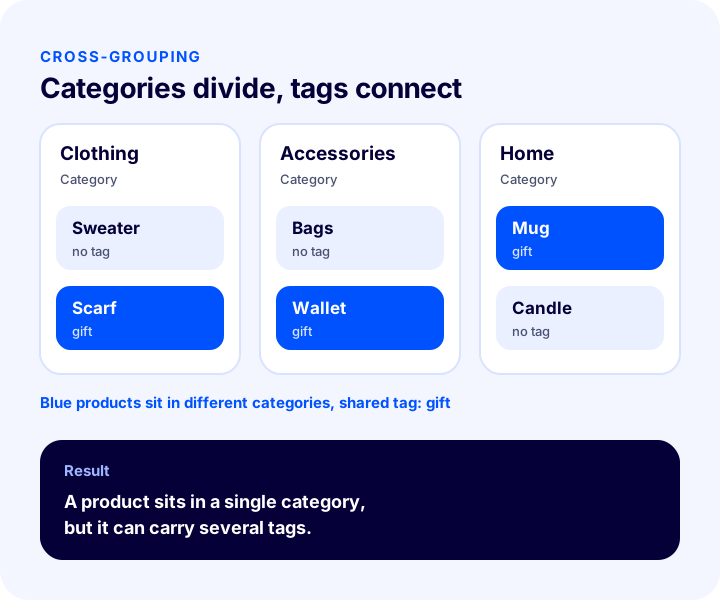
Cross-grouping means bringing together products that carry the same tag regardless of category. A scarf sits in the clothing category, a wallet in accessories, a mug in home; if all three carry the "gift" tag, they meet in a single list.
This structure is especially suitable for groups that change over time or do not fit a category, such as season, special occasions, purpose of use and campaigns. Adding a new branch to the category tree for every new idea grows the tree and makes navigation harder; a tag does the same job without touching the tree.
When Are Tags Used?
- Purpose or use: Groups that describe the product's use, such as "gift", "office" or "travel".
- Period and season: Groups that change over time, such as "new season", "summer" or "back to school".
- Campaign and highlight: Attention-grabbing phrases such as "new product", "free shipping" or "limited edition".
- Collection and series: Product series spread across more than one category.
When Is a Category or a Filter More Suitable Than a Tag?
Use a category if the product has a permanent, single place, and a filter if the customer needs to narrow the list by a measurable attribute. If you write information such as color, size and material into a tag, you lose both the power of the filter and clean data.
We recommend readingHow to Sort Products in a Category? Ordering by Best Sellers, New, Profit Margin and Stock Status, Sold-Out Products, Season and Campaign, Relationship with Filters, Measurement, Sorting Impact Calculator and Setup AuditHow Do Product Tags Affect Search and On-Site Navigation?
A tag can close the gap between the word the customer uses and the product's official name. If the customer searches for "gift" and the product name does not contain that word, the tag links the product to that search. For this to work, however, the site's search must also scan tags and the tag must actually be written in the customer's word.
- On-site search: A tag can be used to link words the customer uses, which do not appear in the product name, to the product. Whether tags are included in search depends on the settings of the system you use.
- Navigation: Tag links offer an additional gateway on the product page and in showcases. This gateway should be chosen deliberately; attaching hundreds of tags to every product scatters the customer instead of guiding them.
- Together with filters: If filters keep working on the list reached through a tag, the customer can narrow the list by their own criteria.
- Zero-result risk: If you delete a tag later, links pointing to that tag land on an empty page; check its usage before deleting.
You can find the details of the search and filter side in the E-Ticarette Ürün Filtreleme ve Arama Çubuğu Optimizasyonu guide. The principles described there also apply to tags: the customer's language is what counts, and the same information is not kept in several places.
Okumanızı öneririzE-Ticarette Ürün Filtreleme ve Arama Çubuğu OptimizasyonuHow Do Product Tags Affect SEO?
A tag does not guarantee rankings on its own; the effect depends on the quality of the listing page the tag produces. A well-designed tag page can answer a specific search; poorly managed tags, on the other hand, turn into a pile of worthless pages in the eyes of search engines.
What Is the Thin Content and Duplicate Page Risk?
A tag page with only a few products and no description can count as thin content; two tags listing the same set of products, or a tag and a category, produce duplicate pages. This makes it harder for search engines to decide which page to put forward.
- Thin content: Tag pages with very few products and no description.
- Duplicate pages: Several tags listing the same products, or a tag and category overlapping.
- Crawl load: Tag pages that multiply without control disperse the attention a search engine would give to important pages.
- Old tag links: Links pointing to deleted tags produce broken pages.
When Does a Tag Page Create Value?
A tag page creates value if it answers a specific search, contains enough products and carries its own title and a short intro text. Otherwise the tag's role should stay limited to navigation and showcases.
- Title and description: The tag page should have its own title and a short description.
- Enough products: There should be enough products to make the list meaningful.
- No overlap with a category: If another page already offers the same set of products, indicate the main page with a canonical.
- Internal links: Important tag pages should be linked from category and product pages.
The structured data on the product page is independent of the tag; but to tell search engines clearly what the product is, take a look at the guide What Is Structured Data (Schema)? How to Add, Test and Validate Product Schema in E-Commerce: A Practical Guide. How the product name is written is also more decisive than the tag; details are in our article How to Write a Product Title? SEO-Friendly Product Name in E-Commerce, Title Formula and Examples by Category: A Practical Guide.
Recommended readingWhat Is Structured Data (Schema)? How to Add, Test and Validate Product Schema in E-commerce? A Practical GuideHow Are Product Tags Named?
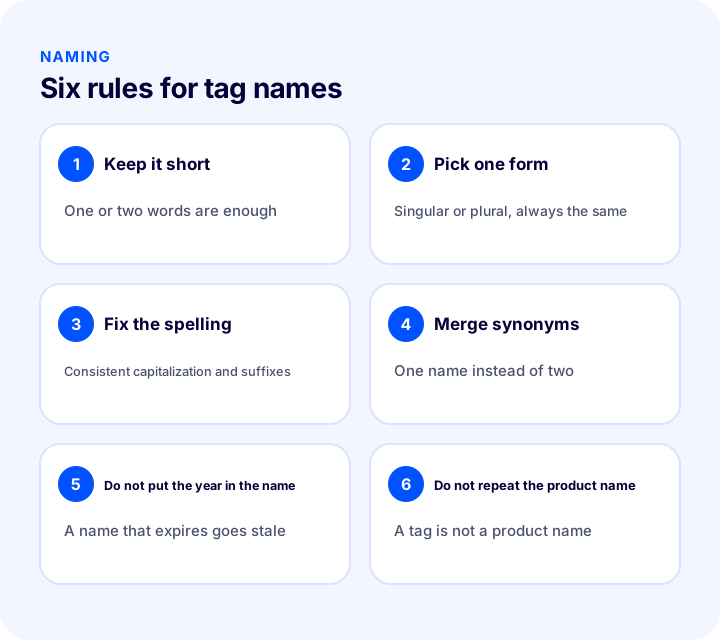
A good tag name is short, single-meaning and written in the word the customer uses. Without a naming rule, the same concept is split into three separate tags such as "gift", "gifts" and "Gift Idea", and each becomes a half-empty list.
| Rule | Why does it matter? | Example |
|---|---|---|
| Keep it short | Fits on the product card and in the list, and is easy to remember | "gift" is enough; "products that can be given as gifts to our family" is unnecessary |
| Pick one form | If singular and plural are mixed, the list splits | Either always "gift" or always "gifts" |
| Fix the spelling | Differences in capitalization and suffixes create separate tags | Use a single style guide |
| Merge synonyms | The same set of products should not be spread across two tags | "gift" and "giftware" are reduced to a single name |
| Do not put the year in the name | A name that expires goes stale and creates maintenance load | Use "new season" instead of the year |
| Do not repeat the product name | A tag does not describe the product, it links the product to a group | The product name lives in its own field |
Keeping the naming rule on a written page prevents the setup from falling apart as the people managing the site change. Limiting the right to create new tags to one or two people is often the most effective measure.
How Do You Limit the Number of Tags?
The number of tags should be limited according to catalog size; the measure is that each tag links enough products and the maintenance load stays manageable. A large number of tags leaves only a few products under each one, which leads to both thin content risk and maintenance load.
The tool below measures your tag inventory: from the number of products, the average tags per product and the total number of tag types it calculates the average products per tag and the total number of relations; from the maintenance time and hourly cost it calculates the annual maintenance load. The tool does not look at individual tags; it only shows values that can be derived from the figures you enter. The values are examples; enter the figures for your own catalog.
The main lesson of the tool is that the maintenance load grows in direct proportion to the number of tag types: halving the tag types halves the maintenance time. When there are few types and many products under each tag, the structure is healthy for both users and search engines.
We recommend readingHow to Update Products in Bulk? Guide to Changing Price, Stock, Category and SEO Information in One Go, Filters, a Safe Method for Irreversible Operations, Price Change Calculator and Setup AuditHow Are Tags Used with Campaigns and Showcases?
A tag provides a ready-made set of products for campaigns and showcases: the products you tag can be linked to a campaign or a showcase area in one go. This removes the hassle of picking products one by one for every campaign.
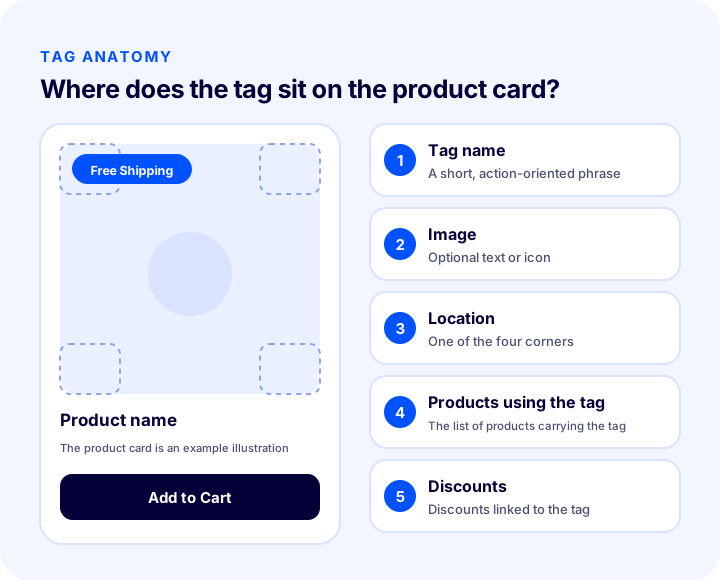
- Visual tag (badge): A short phrase in a corner of the product image, such as "new product", "free shipping" or "limited edition".
- Campaign link: A bulk campaign or discount can be defined for the products carrying the tag.
- Showcase: Products with the same tag can be shown together in a homepage or category showcase.
- Duration management: Removing the tag from products when the campaign ends keeps the product card up to date.
For the other principles of showcase layout, see the guide E-Commerce Homepage Design and Showcase Management: How to Arrange the Homepage Showcase? Sections, Ordering, Mobile, Speed and Campaign Calendar: A Practical Guide, Click-Through to Product Calculator and Homepage Audit. Showing many badges on a product card at once creates clutter; one badge, two at most, is enough on a product card.
We recommend readingE-Commerce Homepage Design and Showcase Management: How to Arrange the Homepage Showcase? Sections, Ordering, Mobile, Speed and Campaign Calendar: A Practical Guide, Click-Through to Product Calculator and Homepage AuditHow Do You Clean Up and Maintain Product Tags?
Tag maintenance means reviewing the list at regular intervals, merging synonyms, deleting unused tags and removing campaign tags that have expired. A tag list that is not maintained turns into a junkyard over time.
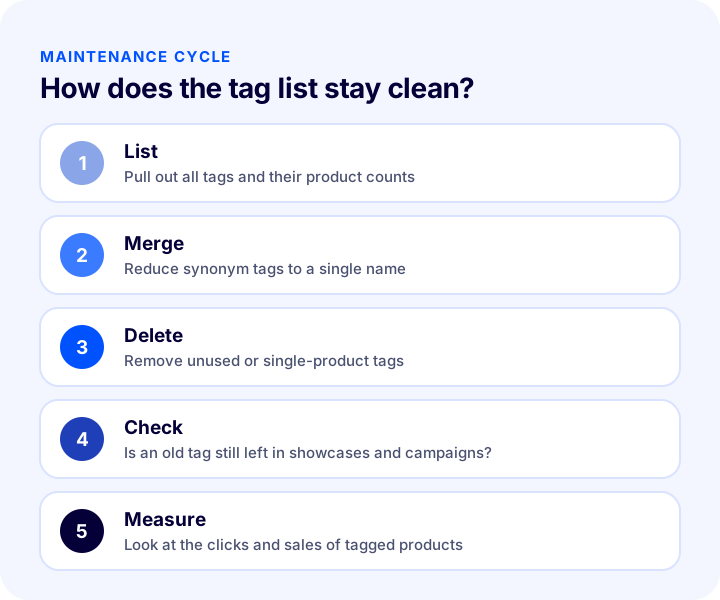
- 1. List: Pull out all tags and how many products each is used on.
- 2. Merge: Reduce tags that are synonyms or split by spelling differences to a single name.
- 3. Delete: Remove tags that are never used or have a single product, or link them to another tag.
- 4. Check: Make sure no link to the old tag remains in showcases, campaigns and menus.
- 5. Measure: Look at the clicks and sales of tagged products and drop tags that do not work.
Tie the frequency of maintenance to your campaign calendar: cleaning up a campaign's tags right after a big campaign ends takes far less work than one big clean-up a year.
What Are Common Mistakes with Product Tags?
The most common mistakes are using a tag instead of a category or filter and multiplying tags without limit. The mistakes below recur on most sites.
- Using a tag for everything: Color, size, category and campaign are gathered in the same tag; none of them works properly.
- Creating too many tags: Only a few products remain under each tag; thin pages and maintenance load result.
- Keeping synonym tags separate: The same set of products is split into two half-empty lists.
- Naming without rules: Differences in spelling and format multiply the same tag.
- Leaving a finished campaign's tag in place: A message that is no longer valid stays on the product card and damages trust.
- Indexing all tag pages: Weak pages lower the overall quality of the site.
- Not checking usage before deleting: Links pointing to a deleted tag land on an empty page.
- Not measuring: It is unknown which tag works; maintenance is done blindly.
| Mistake | Result | Solution |
|---|---|---|
| Using a tag instead of a filter | Data scatters, the filter weakens | Move the measurable attribute to a filter |
| Many tags with few products | Thin content and maintenance load | Merge or delete |
| Expired campaign tag | Misleading product card | Remove it when the campaign ends |
| Tag multiplied by spelling differences | The same list is split in two | Write a naming rule |
How Do You Audit Your Tag Setup?
The tool below questions your current tag setup with eight questions. Tick the items that apply to you; the tool tells you how solid your setup is.
How Do You Measure Product Tag Performance?
Whether a tag works is understood by looking at how tagged products behave compared with untagged ones. Indicators should be tracked per tag; the total figure hides the ineffective tag.
| Indicator | What does it tell you? | How to interpret it? |
|---|---|---|
| Visits to the tag page | Whether the tag is used in navigation | A tag that gets no visits goes on the delete-candidate list |
| Click-through rate of tagged products | Whether the visual tag attracts attention | Compared with similar untagged products |
| Add to cart and sales | The tag's effect on sales | Compared before and after the campaign |
| Number of products per tag | Whether the tag is large enough | If very low, merge or delete |
| Zero-result pages | Deleted or empty tags | Make sure no links remain |
When measuring, it is hard to isolate a single factor: campaigns, price and season also affect the result. So when interpreting a tag's effect, use a comparison group and a time range; do not draw conclusions from a single day's difference.
How Do You Manage Product Tags with Faprika?
In Faprika, product tags are managed from the Tag Management area in the panel. The tag described here is a call-to-action phrase that appears in a corner of the product image; more than one tag can be assigned to products, and one tag can be used on many products. Which plan includes the Tag Management feature varies by plan; for details, see the plans page.
- Creating a tag: Enter the tag name with Add New; an image can optionally be added. There is a language option for the tag name.
- Choosing the position: You set whether the tag appears in the top left, bottom left, top right or bottom right corner of the product image; if no position is selected, the tag image is not shown.
- Products using the tag: The products carrying the tag are listed in the tag's edit panel; products from different categories can appear in the same list. Products can be removed from the list.
- Discount link: Discounts defined for the tag are listed in the panel's Discounts area; if no discount is defined, the area appears empty.
- Adding a tag to a new product: When adding a new product, one of the saved tags can be selected.
- Bulk tag update: In the Bulk Product Update area, a category can be selected and tags added to or removed from products in bulk. Since this operation cannot be undone, it is recommended to recheck the changes before saving.
In Faprika's own training pages you can find the details of tag management on the product tag management page, the attributes that narrow products on product attributes, the category structure on category management, brand definitions on brand management and product entry on adding a new product. Using tags together with categories and attributes helps you keep the distinction in this guide in the panel as well.
Frequently Asked Questions
What is a product tag?
It is a short phrase that groups products around a shared feature, purpose or campaign, independent of the category tree. In some systems it is also used as a badge that appears in the corner of the product image.
What is the difference between a product tag and a category?
A category determines a product's permanent, single place in the catalog; a tag is a flexible group that can be attached to a product many times. A product sits in a single category but can carry several tags.
Do product tags hurt SEO?
They can when used without control: tag pages with few products and no description risk being thin content, and tags listing the same products risk duplicate pages. Tag pages with enough products and their own title, however, can create value.
How many tags should a product have?
There is no fixed number; the measure is that each tag adds real meaning to the product. A few meaningful tags are better than many weak ones. One or two visual tags on the product card are enough.
How should tag names be written?
They should be short, single-meaning and in the word the customer uses; singular or plural should be consistent, synonyms should be merged, and expiring terms such as the year should not be put in the name.
How do you add a product tag in Faprika?
A new tag is created in the Tag Management area of the Catalog section, the corner of the image is chosen, and the tag is assigned to products when adding a new product or with Bulk Product Update. The products using the tag and the discounts linked to it are listed in the edit panel. Which plan includes the feature varies by plan.
You May Also Like
- How to Do Category Page SEO: 12 Steps to Move E-Commerce Category Pages Up the Rankings
- E-Ticarette Ürün Filtreleme ve Arama Çubuğu Optimizasyonu
- How to Write a Product Title? SEO-Friendly Product Name in E-Commerce, Title Formula and Examples by Category: A Practical Guide
- E-Commerce Homepage Design and Showcase Management: How to Arrange the Homepage Showcase? Sections, Ordering, Mobile, Speed and Campaign Calendar: A Practical Guide, Click-Through to Product Calculator and Homepage Audit