
Contents 17 sections
- What Is a Price-Drop Alert?
- Why Are Price-Drop Alerts Important?
- How Does a Price-Drop Alert Work at the Variant Level?
- Who Are Price-Drop Alerts Important For?
- How Is a Price Drop Tied to the Discount Decision?
- Through Which Channel and When Should the Notification Be Sent?
- How Do You Protect Profit Margin When a Price Drops?
- How Do You Include Price-Drop Alerts in a Campaign Plan?
- Price Notifications and Communication Consent
- How Should the Price-Drop Alert Button Appear on the Product Page?
- What Happens If Customers Get Used to Waiting for Prices?
- Who Manages Price-Drop Alerts Within the Team?
- How Do You Measure Price-Drop Alerts?
- Common Mistakes When Using Price-Drop Alerts
- How Do You Audit Your Price-Drop Alert Setup?
- How Do You Use Price-Drop Alerts with Faprika?
- Frequently Asked Questions
A customer likes the product, even adds it to the cart, but leaves the page because the price does not sit right with them. Most stores lose this customer at that moment, because they offer no mechanism that can say “I will let you know when the price drops.” The short answer to the question what is a price-drop alert is this: it is a sales feature that automatically sends a customer a notification when the price of a product they are interested in drops, bringing the undecided visitor back.
In this guide we explain what the price-drop alert feature is, how it works at the variant level, who uses it, how to tie it to the discount decision, through which channel and when the notification should go, how to protect profit margin and how to measure the result. Of the two tools in the article, one is for calculating the extra revenue and margin that a price drop will generate, and the other is for auditing your current setup.
What Is a Price-Drop Alert?
A price-drop alert means a customer turns on a notification for a product or variant and is automatically informed when that product's price drops. The customer is looking for a trigger to decide; with the notification they set up that trigger themselves, of their own accord, without you having to give it to them.
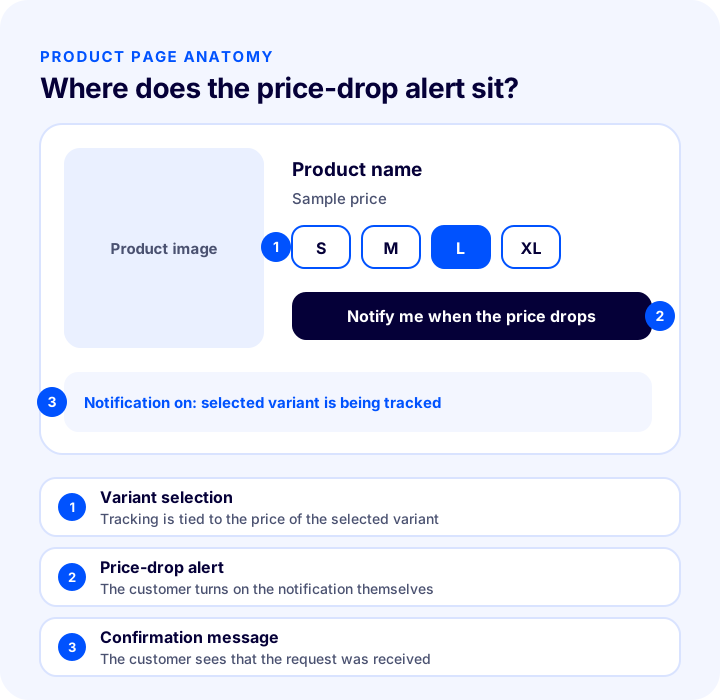
The logic of the feature is simple: the customer likes a product but does not want to buy at today's price. Instead of losing them, the store records a request. When the price drops, these requests turn into a sales list, because these customers already wanted the product and are only waiting for the price.
Are Price-Drop Alerts and Back-in-Stock Notifications the Same?
They are sibling features but with different triggers. A back-in-stock notification depends on stock when the product has sold out; a price-drop alert depends on price while the product is in stock. In one the customer waits because they cannot get the product, in the other because they find the price high.
| Feature | Trigger | Why does the customer wait? |
|---|---|---|
| Price-drop alert | The product's price drops | Finds the price high but wants the product |
| Notify me when back in stock | The product returns to stock | The product is sold out |
| Wishlist | The customer saves the product | Wants to come back later |
Why Are Price-Drop Alerts Important?
Price is one of the factors that most delays decision-making in online shopping. The customer may look for the product elsewhere, wait for the next campaign or give up. A price-drop alert keeps this waiting time inside the store.
- Does not lose the undecided customer: A way back opens up for the customer who leaves the page.
- Makes demand visible: Seeing how many people are waiting for a price on which product and variant takes the discount decision out of guesswork.
- Targets the discount: Instead of discounting for everyone, you reach the customer who has already said they are waiting for a price.
- Generates direct sales: A customer who receives the notification is one who knows the product and wanted it.
- Builds a link after the sale: A customer who gives notification consent is also a valuable audience for later communication.
How Does a Price-Drop Alert Work at the Variant Level?
Working at the variant level means the notification is tied not to the product but to the option the customer chose, such as size or color. Because variants of the same product can have different prices, the tracking also needs to be variant-specific.
Faprika's “Variant-Based Price-Drop Alert” feature is defined for exactly this need: for products with variants at different prices, the customer can use this feature for a specific variant. The goal is to increase order rates.
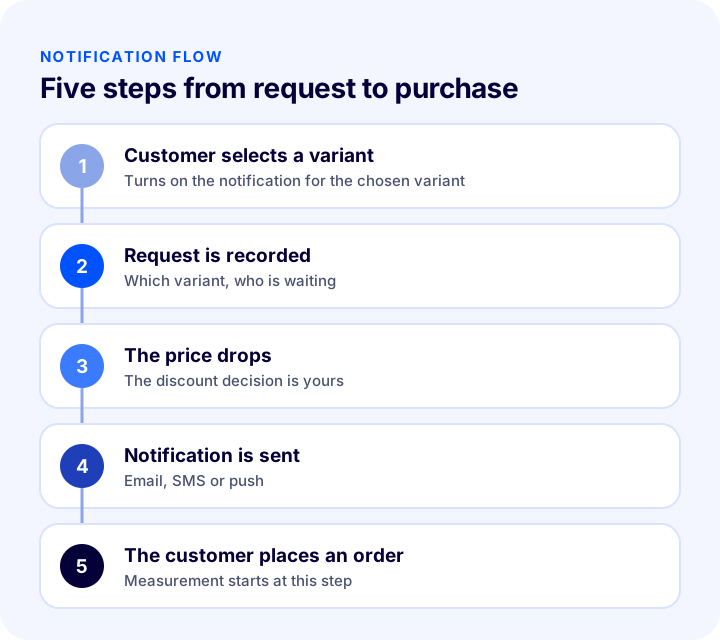
Why Variant-Level and Not Product-Level?
With product-level tracking you do not know which option the customer is interested in. Yet price often changes by variant: a large size or a different capacity option can be priced differently from the others of the same product. If a customer is waiting for size L, a price drop on size S means nothing to them. Variant-level tracking prevents wrong notifications and notification fatigue.
- The right person, the right notification: The notification goes only to those waiting for the variant whose price dropped.
- More meaningful demand data: You see separately which variants customers are waiting on for price.
- Fewer wrong notifications: A discount on an irrelevant variant does not bother the customer.
Who Are Price-Drop Alerts Important For?
The feature is most valuable for customer types and product groups that decide by price or postpone the decision. It does not carry the same weight in every store; its effect grows as product price rises and decision time lengthens.
| Customer or product type | Why do they wait? | The contribution of the notification |
|---|---|---|
| Undecided customer | Weighing the price in their mind | Gives a concrete reason to come back |
| Buyer of expensive products | Postponing a big purchase | Keeps the waiting time in the store |
| Customer waiting for a campaign | Watching for a discount period | Makes sure they hear about the campaign |
| Customer comparing options | Evaluating several options | Reminds them of the store during the comparison |
Its effect may stay limited on low-priced, frequently purchased products, because the customer buys without waiting anyway. The value of the feature rises on products that are reconsidered and require budget planning.
Recommended readingWhat Is a Wishlist? How to Set Up a Wishlist in E-Commerce and Turn Favorites into Sales: ROI Calculator and Health CheckHow Is a Price Drop Tied to the Discount Decision?
A price-drop alert does not discount on its own; you plan the discount, and the feature notifies those who requested it about that discount. So the value of the notification depends on how well the discount decision is made.
In Faprika, discounts are managed from the Discounts panel under Campaign Management. You can apply a discount to the order total, selected products, categories, brands or tags; define it as an amount or a percentage; set a start and end date; and choose whether you want a coupon code to be required. You can plan the products whose price will drop with a discount you define in this panel or by changing the product price directly.
- Decide by looking at demand: Products and variants that many customers are waiting on are the first candidates for a discount.
- Define a duration: A start and end date prevent the discount from turning into a permanent expectation.
- Choose the scope correctly: Apply the discount only to the relevant product, variant or category; spreading it across the whole catalog needlessly strains the margin.
- Check for overlap with other discounts: Decide up front whether the discount can combine with other discounts.
Through Which Channel and When Should the Notification Be Sent?
A notification's effect depends not only on its content but also on its channel and timing. The customer wants to be informed when the price drops, but if the notification arrives too late, the appeal of the discount is lost.
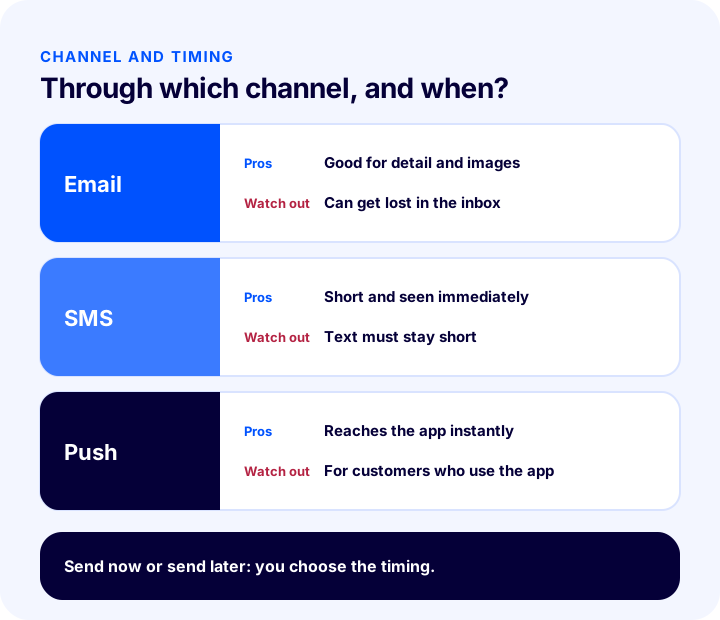
| Channel | Strength | Point to watch |
|---|---|---|
| Can carry detail, images and links | Can get lost in the inbox | |
| SMS | Short and seen immediately | Text must be kept short, consent is required |
| Push notification | Reaches customers who use the app directly | Goes only to those who use the app |
How Do You Manage Notifications with Message Templates in Faprika?
In Faprika, notification texts are managed from the Message Templates section. For each template there are settings such as turning it on or off, enabling SMS and push sending, a “send now” or “send later” option, and restricting to specific user groups. The message can be personalized by adding store, user and product parameters inside the template. For email messages to be delivered, the email account settings must be defined correctly; for SMS, the SMS integration must also be ready.
- Send now: Informs the moment the price drops; preferred when the discount is time-limited.
- Send later: Delivers the message after a set time; it can be used in long campaigns to remind the customer without making them feel pressured.
- User group restriction: You can prevent the message from going to a particular group.
- Personalization: Parameters such as product name and customer name turn the message from a general announcement into a customer-specific notice.
We recommend checking in the panel, under Message Templates, which template comes ready for price notifications and what it is called; the template list may vary by version and plan.
We recommend readingE-Commerce Campaign Calendar: How to Build a Campaign Plan That Drives Sales All YearHow Do You Protect Profit Margin When a Price Drops?
Not every price drop increases sales, and not every sale brings profit. If the discount falls below the margin, an order coming from the notification makes a loss for the store. That is why the discount rate should be chosen knowing the product's unit cost.
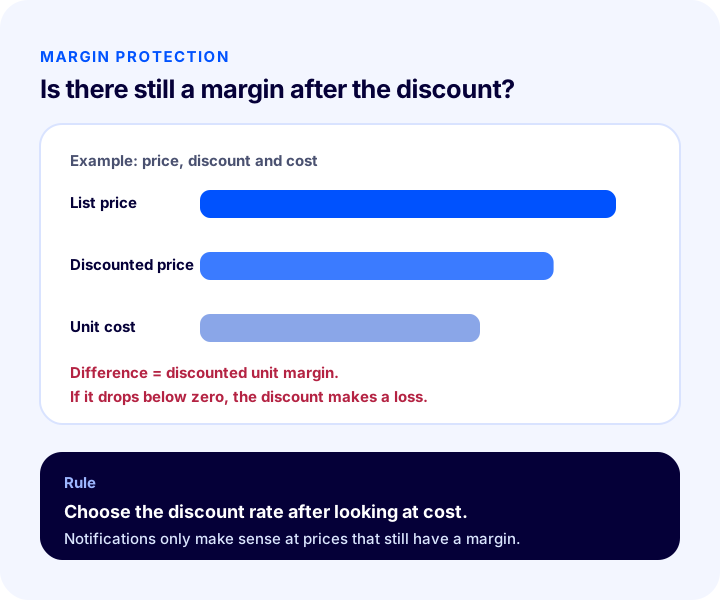
How Do You Calculate the Extra Revenue from a Price Drop?
The calculation rests on four values: the number of customers who turn on alerts for the product, the discount rate, the purchase rate of those who receive the alert, and the unit cost. The tool below gives you the extra order count, the amount of extra revenue, the discounted unit margin and the extra gross profit. The values are examples; enter the figures for your own product.
The main lesson of the tool is that the discount rate determines not only sales but also margin: raising the rate may bring extra orders but erodes the margin left per unit. When choosing the discount rate, think about cost first and demand second.
Recommended readingProfit Margin Calculation: How to Calculate Profit Margin in E-Commerce (Calculator and Examples)How Do You Include Price-Drop Alerts in a Campaign Plan?
The feature works better when it is part of the campaign calendar. A price drop should sit inside a planned campaign rather than happen at random, so that both the alert and the overall campaign communication carry the same message.
- 1. Pull out the demand waiting on price: See which products and variants have the most alerts turned on.
- 2. Check cost and margin: Confirm that the discounted price stays above the unit cost.
- 3. Define the discount: Set the scope, the rate and the end date.
- 4. Prepare the alert template: Check the channel, timing and content of the message.
- 5. Verify stock: Demand rises when the price drops; the discounted product must have enough stock.
- 6. Measure the result: Record the number of orders coming from the alert and the margin.
Price Alerts and Communication Consent
A price alert is a reminder the customer asked for, but communication rules still apply. The customer must know through which channel they will receive alerts and must give permission.
- Get clear consent: When the alert is turned on, the customer must be told plainly through which channel they will be notified.
- Do not exceed the scope: Consent given for a price alert must not be used for unrelated promotional messages.
- Leave a way out: The customer must be able to turn the alert off.
- Check the legal requirements: Commercial message rules vary by country; confirm with your own legal adviser before going live.
In Faprika's back-in-stock notification feature, the customer needs to be a member of the site; check in the panel and the training pages whether a similar membership requirement applies to price alerts.
How Should the Price-Drop Alert Button Look on the Product Page?
The button should sit close to where the customer sees the price and hesitates, and it should explain what it does at a glance. Nobody uses a hidden or unclear button; a button that is too dominant, on the other hand, steals attention from the actual purchase button.
- Placement: It should be right next to the price and the variant selection; the moment the customer picks a variant, they should understand that the alert will be set for that variant.
- Text: Use a clear phrase that says what will happen; a label such as "notify me when the price drops" sets the customer's expectation correctly.
- Confirmation: Once the alert is turned on, the customer should see this clearly; they should be able to read which variant it is for and through which channel they will be notified.
- Appearance on phone: The button should be large enough to tap comfortably on a small screen and should not take the place of the purchase button.
These details look small, but they determine how much the feature gets used. If the customer cannot find the button, no demand data is generated either.
What Happens If Customers Get Used to Waiting for a Lower Price?
If the price alert is perceived as promising constant discounts to every customer, customers never buy the product at the first price. This is the biggest risk of the feature, and it most often stems from a poorly designed discount policy.
- Keep discounts rare and justified: A price drop should be tied to a clear reason such as a campaign, end of season or a stock plan.
- Do not discount every product: Choose products with strong demand, sufficient margin and high stock.
- Explain the value: If the customer focuses not only on price but also on the product's benefit, the tendency to wait decreases.
- Manage expectations: The alert should not promise "there will definitely be a discount"; it should only say it will notify the customer if the price changes.
Who Manages Price-Drop Alerts Within the Team?
The feature is not the job of a single team: the price decision belongs to sales or product management, the alert text to marketing, stock control to operations, and measurement to the e-commerce manager. If responsibility is not shared out, the setup stays half finished.
- Price and discount: The person who knows the margin and cost decides.
- Alert text: Marketing sets the channel and timing.
- Stock: Operations verifies that the discounted product has enough stock.
- Measurement: The e-commerce manager reports the result and carries it into the next campaign.
How Do You Measure Price-Drop Alerts?
A few indicators show whether the feature is working. All of them should be tracked by product and variant; the total figure hides the variant that is not working.
| Indicator | What does it tell you? |
|---|---|
| Number of customers who turned on price tracking | Which product and variant is perceived as expensive |
| Purchase rate after notification | How well the alert converts into orders |
| Revenue coming from alerts | The direct contribution of the feature |
| Discounted unit margin | Whether the incoming sales are profitable |
| Time to order after the alert | Whether the timing is right |
The "Back-in-Stock Notification / Favorites / Price Report" row in Faprika shows that this kind of demand report is offered by plan; to see which plan includes it, you can look at the plans page.
We recommend readingE-Commerce Metrics: 15 KPIs to Track and How to Calculate ThemCommon Mistakes When Using Price-Drop Alerts
- Discounting without calculating the margin: Sales coming from the alert can make a loss.
- Thinking by product only: If the variant whose price drops differs from the variant being waited on, the alert becomes irrelevant.
- Sending the alert late: A message that arrives long after the price drop loses the appeal of the discount.
- Sending the same text in every alert: A message without product and customer parameters reads like a generic announcement.
- Not checking stock: A discounted product sells out quickly after the alert; if it is gone when the customer clicks, trust is lost.
- Discounting constantly: Customers start to expect the price to drop every time.
- Ignoring the demand data: Deciding on a discount without seeing which product's price is being awaited is left to chance.
- Not measuring the result: If the alert's contribution to sales is unknown, the value of the feature cannot be proven.
How Do You Audit Your Price-Drop Alert Setup?
The tool below questions your current setup with eight questions. Tick the items that apply to you; the tool tells you how solid your price alert setup is.
How Do You Use Price-Drop Alerts with Faprika?
In Faprika, the price-drop alert feature is among the marketing features and works at the variant level. On products with variants at different prices, the customer can turn on an alert for the variant they are interested in. Which plans include it varies by plan; for details, see the plans page.
- Variant-based price alert: The customer turns on the alert for a specific variant; the goal is to increase order rates.
- Variant-based back-in-stock notification: The same logic works for a variant that is out of stock; for example, if only size 38 is out of stock, the customer can be notified for that variant.
- Message templates: The alert text is managed with email, SMS and push options, a "send now" or "send later" setting and a user group restriction.
- Discount management: In the Discounts panel you define an amount or percentage, product and category scope, and start and end dates.
- Demand reports: The "Back-in-Stock Notification / Favorites / Price Report" row is offered by plan.
You can find the setup of the back-in-stock notification feature in our article What Is a Back-in-Stock Notification? How to Set Up Stock Alerts for Sold-Out Products and Win Sales Back: Variant-Based Demand, Notification Channels and Threshold, Recovery Calculator and Setup Audit, discount and coupon management in What Is a Discount Coupon? How to Create a Coupon Code in E-Commerce and Use It Profitably, and automatic price updating in What Is Automatic Pricing? How to Calculate the Selling Price from Marketplace Commission, Shipping and Profit Margin: Category and Channel Rules, Selling Price Calculator and Audit.
We recommend readingWhat Is Automatic Pricing? How to Calculate the Selling Price from Marketplace Commission, Shipping and Profit Margin, Category and Channel Rules, Selling Price Calculator and AuditFrequently Asked Questions
What is a price-drop alert?
It is a feature that automatically sends a customer a notification when the price of a product they are interested in drops. The customer turns on the notification for a product or variant; when the price drops they are informed, and a customer who left undecided returns to the order.
What is the difference between a price-drop alert and a back-in-stock notification?
The trigger is different. A back-in-stock notification is sent when a sold-out product returns to stock; a price-drop alert is sent when the price drops while the product is in stock. Both serve to keep the customer in the store.
Why is variant-level price tracking important?
Variants of the same product can be priced differently. With variant-level tracking, the customer is informed only when the price of the option they are interested in drops; they are not bothered by a discount on an irrelevant variant, and demand data is visible at the variant level.
How does a price drop affect profit margin?
A discount lowers the unit margin. If the discounted price falls below unit cost, every sale makes a loss. That is why, when choosing the rate, you should first know the unit cost and then calculate the extra orders the notification will bring.
Through which channel should the notification be sent?
Email carries detail and images, SMS is short and seen immediately, and push reaches customers who use the app directly. The choice depends on your customer base and how long the discount lasts; make sure commercial message consent has been obtained.
How does the price-drop alert work in Faprika?
The feature works at the variant level: for products with variants at different prices, the customer can turn on a notification for the variant they are interested in. Notification texts are managed from Message Templates, and discounts are defined in the Discounts panel. Which plan includes it varies by plan.
You May Also Like
- What Is a Back-in-Stock Notification? How to Set Up Stock Alerts for Sold-Out Products and Win Sales Back: Variant-Based Demand, Notification Channels and Threshold, Recovery Calculator and Setup Audit
- What Is a Wishlist? How to Set Up a Wishlist in E-Commerce and How Favorites Turn into Sales: Return Calculator and Health Audit
- What Is Automatic Pricing? How to Calculate the Selling Price from Marketplace Commission, Shipping and Profit Margin, Category and Channel Rules, Selling Price Calculator and Audit
- E-Commerce Campaign Calendar: How to Prepare a Campaign Plan That Drives Sales All Year