

Contents 12 sections
- What Is a Sitemap?
- Why Is a Sitemap Important for E-Commerce?
- What Is robots.txt and How Does It Differ from a Sitemap?
- Which Pages Should Go in an E-Commerce Site's Sitemap?
- How to Create a Sitemap
- How to Split a Sitemap for Large Catalogs
- How to Use the lastmod Field Correctly
- How to Submit a Sitemap to Search Engines
- What Are Common Sitemap Mistakes?
- Checklist for Your Sitemap
- How Are the Sitemap and robots.txt Managed in Faprika?
- Frequently Asked Questions
You added a new category to your store and updated hundreds of products, but weeks later you still don't see them in search results. Or the reverse: cart, account and filter URLs show up in search results while the pages you actually want to sell fall behind. The common cause of both problems is often the same: you haven't clearly told search engine robots which pages of your site are important. The most basic tool for this job is the sitemap.
In this guide we answer what a sitemap is from an e-commerce perspective: what the sitemap.xml file is and what it contains, how it differs from robots.txt and how the two work together, which URLs should and should not go into the sitemap of an e-commerce site, how the sitemap is split for large catalogs, how to use the lastmod field correctly, how the sitemap is submitted to search engines, common mistakes and a checklist to run before going live. At the end you'll find its connection to Faprika and a six-question FAQ.
What Is Sitemap?
A sitemap is a file that lists the addresses of the pages on a website that you want indexed and presents them to search engine robots. Its most common form is the XML file at the root of the site, usually named sitemap.xml.
Search engine robots usually crawl a site by following links: they move from one page to another and discover new addresses. This method often works, but it isn't flawless. If a newly added page isn't linked from anywhere, if reaching a product page buried deep takes many clicks, or if the site is very large, some pages are discovered late or never. A sitemap closes this gap: it hands the robot a list before it starts crawling.
It's worth knowing from the start that a sitemap guarantees nothing. A page listed in the sitemap is not certain to be indexed or to rank high; the sitemap is a hint, not a command. But it is a strong hint and makes a difference, especially for new, deep or frequently changing pages.
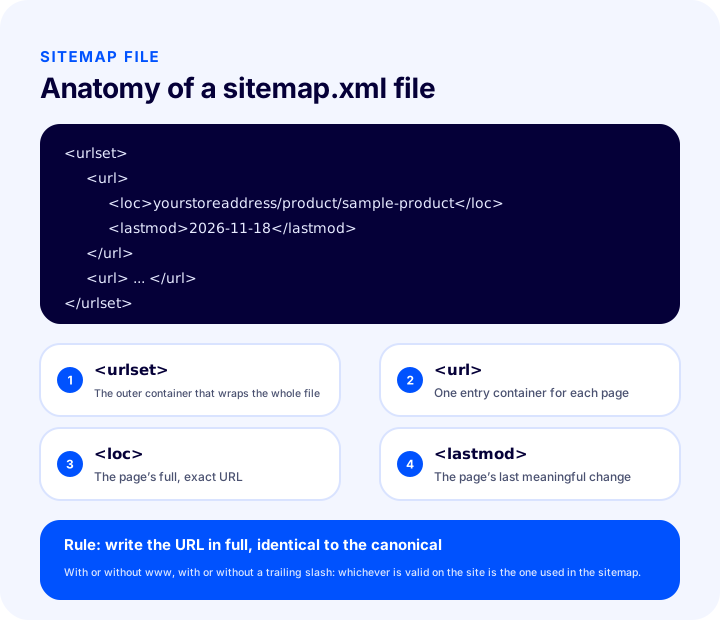
As the diagram shows, the file is built from a few simple tags. The outermost urlset tag wraps all the entries, each page goes into a url box, loc carries the page's full address and lastmod carries the date of the page's last meaningful change. The example below shows the content of a one-page sitemap; “magazaadresiniz” stands for your domain name.
<urlset>
  <url>
    <loc>magazaadresiniz/urun/ornek-urun</loc>
    <lastmod>2026-11-18</lastmod>
  </url>
</urlset>| Tag | Its job | Required? |
|---|---|---|
| urlset | The root box covering all addresses in the file | Yes |
| url | One entry per page | Yes |
| loc | The page's full address | Yes |
| lastmod | Date of the page's last meaningful change | No, but useful when used correctly |
A sitemap doesn't have to be XML; sites also have “sitemap” pages for visitors. What this article describes is the XML file prepared for robots. A plain list of links aimed at visitors, on the other hand, is for user experience and contributes to the internal link structure.
Why Is a Sitemap Important for E-Commerce?
E-commerce sites host a large number of constantly changing pages, so they are among the site types that benefit most from a sitemap. Products are added, prices and stock change, categories are reorganized, campaign pages open and close.
- New products are discovered faster. A product added to the store appears in the sitemap, and the robot doesn't have to hunt for it along a chain of links.
- Deep pages don't get lost. Products buried behind categories, subcategories and pagination can take a long time to reach; the sitemap gives the address directly.
- Crawl budget isn't wasted. The time and number of requests robots allocate to a site are limited. If the sitemap holds only valuable pages, the robot's attention is directed there.
- Problems become visible early. In search engine tools you can check how many of the sitemap's URLs were indexed and which returned errors; this is one of the most practical ways to catch technical problems.
- Big changes are announced. After a redesign, a URL structure change or a bulk product update, an up-to-date sitemap helps the new situation be learned quickly.
What Is robots.txt and How Does It Differ from a Sitemap?
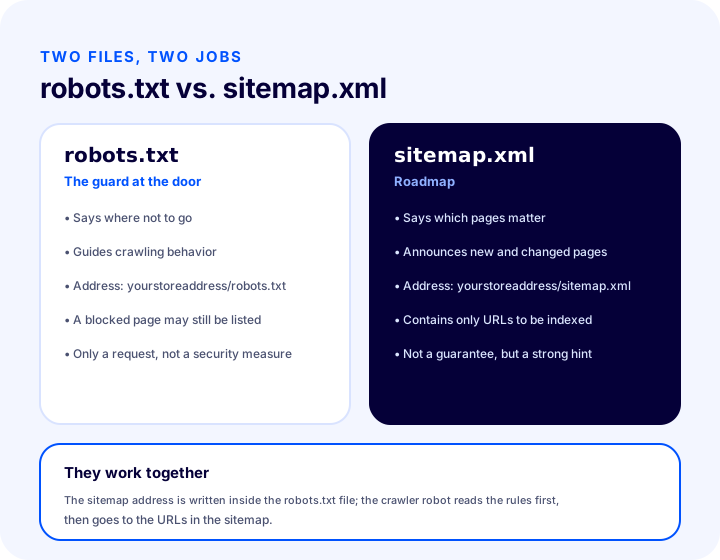
Robots.txt is a text file at the root of the site that tells search engine robots which sections they should not enter. The sitemap says “come here”, robots.txt says “don't go in here”; one is an invitation, the other a boundary.
| Feature | robots.txt | sitemap.xml |
|---|---|---|
| What does it tell you? | Where robots should not go | Which pages are important |
| Role | Steers crawling behavior | Supports discovery and crawl priority |
| Format | Plain-text rules | XML list of URLs |
| Location | Site root | Usually the site root; its address is stated in robots.txt |
| A security tool? | No, only a request | No |
| Does it prevent indexing on its own? | No, it only restricts crawling | No |
A robots.txt file looks simple. In the example below, the cart and account sections are not crawled for all robots, and the sitemap address is given at the end. The paths are written as examples; they change according to the real addresses on your own site.
User-agent: *
Disallow: /sepet
Disallow: /uye

Sitemap: magazaadresiniz/sitemap.xml
The last line is important: writing the sitemap address inside robots.txt is a simple and reliable way to make robots find the sitemap automatically. That way, even if no separate announcement was made for the sitemap address, the robot reads the rules first and then goes to the URLs in the sitemap.
How do the two work together?
When a robot arrives at a site, it first looks at the robots.txt file, learns the rules and takes the sitemap's address from there. Then it visits the URLs in the sitemap in order; it won't crawl a URL blocked by robots.txt even if it's in the sitemap. This contradiction is a common mistake on e-commerce sites and is covered in later sections: blocking with robots.txt a URL you put in the sitemap tells the robot both “come” and “don't enter”.
Is blocking with robots.txt the same as blocking with noindex?
No; robots.txt restricts crawling, while noindex asks for the page not to appear in search results. If the robot can't enter the page, it can't see the noindex directive on it either; so if you want to remove a page from the results, blocking it with robots.txt is not the right way.
| Purpose | Right tool | Note |
|---|---|---|
| Wanting robots not to crawl a section at all | robots.txt | Suitable for useless areas such as cart and account |
| A page not appearing in search results | noindex | The robot must be able to enter the page to read the directive |
| Saying which of several similar pages is the main one | canonical tag | The page stays open and the main URL is specified |
| Moving an old URL to a new one | 301 redirect | The redirecting URL stays out of the sitemap |
For details on redirects, you can read the article what is a 301 redirect.
We recommend readingWhat Is a 301 Redirect?Which Pages Should Go in an E-Commerce Site's Sitemap?
Every page you want to appear in search results, that opens without problems and has its own canonical URL belongs in the sitemap. As a simple yardstick: any page you'd be happy for a customer to land on from a search result is suitable.
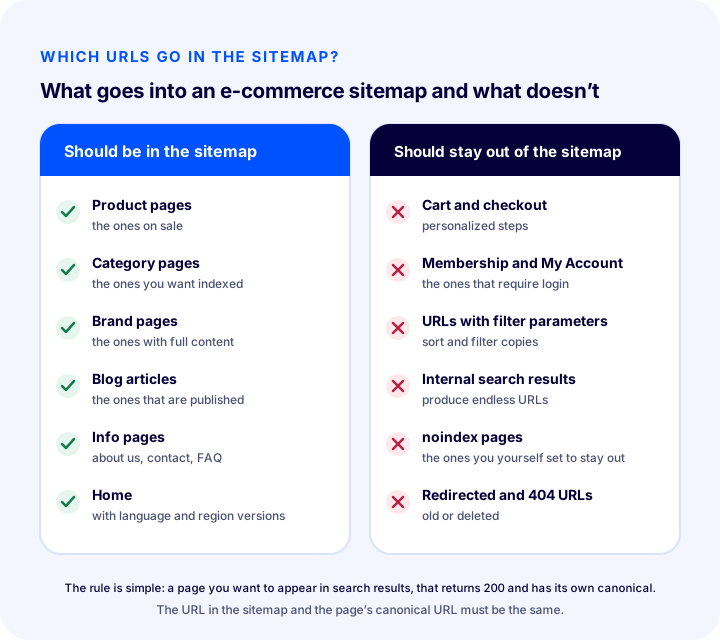
What should go in the sitemap
- Product pages. Products on sale that have a description and an image. Decide what happens to products taken off sale: if permanently removed, they should be taken out of the sitemap and a suitable redirect set up.
- Category pages. Categories you want indexed and that have enough content. For how to strengthen category pages, see the category page SEO guide.
- Brand and collection pages. Those with filled-in content.
- Blog posts and guides. Published posts that have no duplicates.
- Information and corporate pages. Pages such as About Us, Contact and FAQ. For the mandatory legal pages, the legal pages for an e-commerce site article is a guide.
- Home page. On a multilingual site, the home page of each language, together with the related language versions.
What should stay out of the sitemap
- Cart, checkout and order steps. Pages that are personal and useless in search results.
- Membership, login and my account pages. Every page that requires signing in.
- URLs with filter and sort parameters. Different sort and filter combinations of the same category produce countless duplicate URLs. For why these URLs cause problems, see the article on product filtering and search bar optimization.
- Internal search result pages. Every word a visitor types can generate a new URL; a bottomless pool of URLs emerges.
- Pages with a noindex tag. Listing a page you've told search engines “don't show this page in results” as “this is important” in the sitemap is inconsistent.
- Redirected URLs. List the destination of a redirect, not the old URLs that point elsewhere via a 301.
- URLs that return 404 or an error. The URL of a deleted product should not stay in the sitemap.
- Duplicate and empty pages. A category with no products, a tag page with no content.
| Page type | Should it be in the sitemap? | Reason |
|---|---|---|
| Product available for sale | Yes | Can turn into a sale from search |
| Category to be indexed | Yes | Covers broad searches |
| Published blog post | Yes | Brings information seekers to the store |
| Cart and checkout | No | Personal, no search value |
| Account pages | No | Requires login |
| URL with filter parameters | No | Duplicate content and URL proliferation |
| Internal search results | No | Unlimited, worthless URLs |
| noindex page | No | Contradicts the sitemap |
| URL redirected with a 301 | No | List the destination URL |
| URL returning 404 | No | Causes errors and damages trust |
How to Create a Sitemap
A sitemap is usually generated automatically by the e-commerce platform, or produced with a tool and uploaded to the root of the site. Writing one by hand is reasonable only for very small sites; as the page count grows, a hand-managed sitemap inevitably goes stale.
- Decide which pages should be included. Apply the table in the previous section to your own site.
- Generate the sitemap or enable it in the panel. If your platform generates it itself, check its contents; if not, create it with a tool and upload it to the root.
- Check the URLs. Are the domain, www usage, https and trailing slash consistent?
- Add the sitemap URL to robots.txt. Crawlers find the sitemap there.
- Submit the sitemap to search engine tools. These tools show whether the sitemap is being read and the status of the URLs in it.
- Check regularly. Do new products, deleted categories and a changed URL structure show up in the sitemap?
What information should go in the sitemap, and what is unnecessary?
The essential information for each URL is the URL itself. The last modified date (lastmod) is useful, but only if it is accurate. Many platforms also generate extra fields; their presence does not break the sitemap, but rather than relying on fields other than the URL and an accurate date, the page itself and its internal links need to be strong.
What formats are there?
Sitemaps are most often prepared as XML. A simple text format can also be used; one URL is written per line. XML is preferred in e-commerce because it can carry extra information such as lastmod.
How to Split a Sitemap for Large Catalogs
A single sitemap file is limited to a certain number of URLs and file size; when the catalog grows, the sitemap is split into several files and an index sitemap listing those files is prepared. The index sitemap contains no page URLs itself; it only lists the URLs of the child sitemaps.
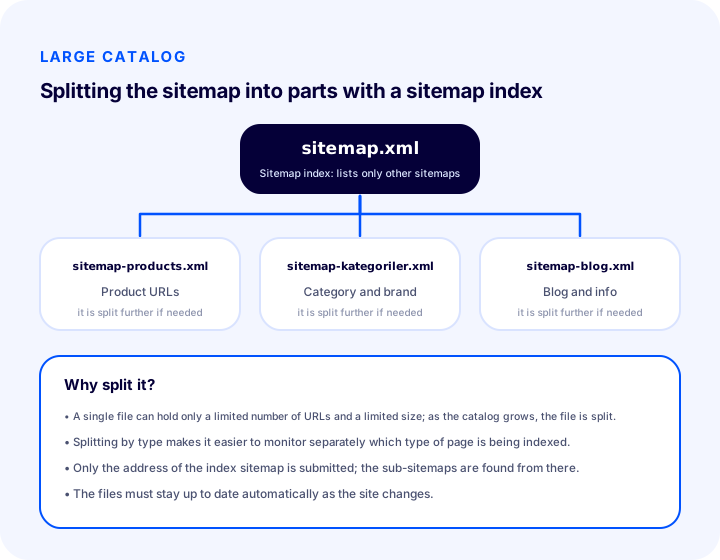
For splitting, the most useful criterion is often page type: products, categories and brands, and blog and information pages go into separate files. This has two advantages. First, every file stays within the limit. Second, in search engine tools you can see separately how many pages of each type are indexed; problems with products show up independently of categories. For multilingual sites, separating by language also makes sense.
The point to note is that only the URL of the index sitemap is submitted; the child sitemaps are found from there. You decide the names and number of the child files according to your site's structure; the file names above are for illustration.
How to Use the Lastmod Field Correctly
Lastmod is the date that tells when a page's content last changed in a meaningful way. If it is accurate, it reminds crawlers which pages to revisit; if it is wrong, it reduces credibility.
- Enter the real change date. The date is updated when a product's description, image, price or important content changes.
- Don't set the date of all pages to today every day. If the date is updated although nothing has changed, crawlers stop trusting the date and the field loses its value.
- Don't change the date for small, insignificant changes. A date or counter in the page footer should not change the date.
- Use a standard date format. Year, month and day is enough; example: 2026-11-18.
- If you don't know the date, don't make one up. The field is optional; leaving it empty is better than entering a wrong date.
There is one more distinction: the sitemap only carries URLs and dates; structured data describes what the page's content is about. To mark up information such as products, prices and reviews for search engines, see the article on what structured data is.
We recommend readingWhat Is Structured Data?How to Submit a Sitemap to Search Engines
A sitemap is submitted in two ways: by writing it into the robots.txt file and by sending it through the tools that search engines offer site owners. Doing both together is the most robust method.
- Write it in robots.txt. Add the full URL of the sitemap at the end of the file with a “Sitemap:” line. Crawlers see it when they first visit the site.
- Verify the site in search engine tools. After proving you are the site owner, you enter the sitemap URL in the tool.
- Monitor the status. The tool shows whether the sitemap is being read, how many URLs were discovered and which ones return errors.
- Keep track of updates. If your sitemap updates automatically, you don't need to resubmit it; it is enough to check the tool from time to time for the last read date.
Don't expect results soon after submitting the sitemap; search engines read it on their own schedule. But the status report is valuable because it shows faulty URLs from day one.
What Are Common Sitemap Mistakes?
The most common mistake is setting up the sitemap once, forgetting it and letting it go stale over time. The sitemap should live along with the site; the mistakes below mostly stem from this neglect.
1. URLs that contradict the canonical
If the URL in the sitemap points to a different URL in the page's canonical tag, the crawler is caught between the two. Only the canonical URL should be written to the sitemap.
2. URLs that redirect or return 404
If an old URL stays in the sitemap and that URL goes elsewhere with a 301 or returns an error, the crawler goes there for nothing. The sitemap should contain only pages that open directly and return a 200 status.
3. noindex pages left in the sitemap
It is not possible to say “index this” and “this page is important” at the same time. If a page is noindex, it is removed from the sitemap; this check should be automatic so the sitemap stays current.
4. URLs blocked by robots.txt appearing in the sitemap
The crawler takes the URL from the sitemap but cannot enter because of a robots.txt rule. It shows up as a “blocked” error in the tool and the sitemap loses its credibility.
5. Filter, sort and internal search URLs entering the sitemap
These URLs produce duplicate pages many times the size of the catalog; the sitemap bloats and the crawler cannot spend time on the pages that are truly valuable.
6. Inconsistent URL format
If some URLs are written with www and some without, some with a trailing slash and some without, a mismatch arises between the sitemap and the site. A single format is chosen and used the same way everywhere.
7. Leaving an old, dead sitemap in place
If the old sitemap file is left behind when the URL structure changes, the crawler keeps looking for pages that no longer exist. During restructuring, check that the sitemap has been renewed too.
8. Child sitemap files not being listed
If you use an index sitemap, make sure all child files are listed in the index; a child sitemap that is not listed may not be read.
| Mistake | Consequence | Solution |
|---|---|---|
| URL contradicting the canonical | The crawler gets confused about which URL to trust | Write only the canonical URL to the sitemap |
| URL returning 301 or 404 | Wasted crawling, error reports | List only URLs that return 200 |
| noindex page | Inconsistent signal | Remove the noindex page from the sitemap |
| URL blocked by robots.txt | Blocked error | Either lift the block or remove the URL from the sitemap |
| Filter and internal search URLs | Bloated sitemap, duplicate content | Don't include these URLs in the sitemap |
| Inconsistent URL format | Site and sitemap don't match | Choose a single format |
Sitemap Checklist
Before publishing the sitemap or when reviewing it regularly, it is enough to look at these eight items. If you can answer yes to all of them, your sitemap is healthy.
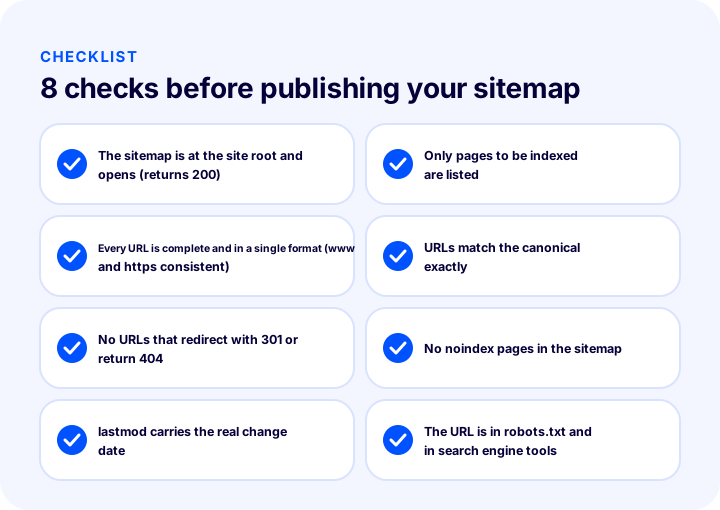
- The sitemap is at the root of the site and opens. Open the URL in a browser; the file should load and the page status should be successful.
- Only pages to be indexed are listed. No cart, account, filter or internal search URLs.
- Every URL is written in full and in a single format. Domain, www and https are consistent.
- URLs are exactly the same as the pages' canonical URLs.
- There are no URLs that redirect with a 301 or return 404.
- No noindex page is in the sitemap.
- Lastmod carries the real change date or is not used at all.
- The sitemap URL is written in robots.txt and submitted in search engine tools.
How Are the Sitemap and robots.txt Managed in Faprika?
In the Faprika e-commerce platform, canonical, title tag, robots and sitemap management sit in a shared feature line. This way, these settings that concern a page's identity are not thought of as disconnected from one another.
The feature comparison of the plans includes a “Canonical / H Tag Management / Robots / Sitemap” line; its scope may vary by plan, and for details you can see the e-commerce plans page. Besides sitemap-related work, there are other lines that support the SEO side: “301 / 302 / 410 Panel / Managing URL Records” is for managing redirects when URLs change, “Bulk Automatic SEO/Meta Information Update” is for editing title and description fields in bulk, and “SEO Reports” is for monitoring status. Which plan includes these features can also be seen in the plan comparison.
For where and how general SEO settings are made in the Faprika panel, the e-commerce SEO settings guide and the SEO settings training page will guide you. If your store has a special situation related to the sitemap, such as a multilingual structure or a large catalog, you can ask our team in the demo meeting.
Frequently Asked Questions
What is a sitemap?
A sitemap is a file that lists the addresses of the pages on a website that you want indexed and presents them to search engine robots. Its most common form is the sitemap.xml file at the root of the site, and it helps robots discover new and changed pages faster.
Is a sitemap the same as robots.txt?
No. A sitemap tells robots which pages are important, while robots.txt specifies where they should not go. The two are used together: the sitemap's address is written inside robots.txt, and a robot first reads the rules and then goes to the addresses in the sitemap.
Does every e-commerce site need a sitemap?
In practice, yes. For e-commerce sites with many products and constantly changing pages, a sitemap speeds up the discovery of new products and categories and makes it easier to monitor technical problems. A sitemap does not guarantee anything, but it reduces losses.
Which pages should not be in the sitemap?
Cart, checkout, membership and account pages, URLs with filter and sort parameters, internal search results, noindex pages, URLs redirected elsewhere and URLs returning 404 should not be in the sitemap. The sitemap contains only pages you want indexed, that open without problems and have their own canonical URL.
How is a sitemap submitted to search engines?
The sitemap address is written into the robots.txt file with a “Sitemap:” line and is also submitted through the tools search engines offer to site owners. The tool also shows whether the sitemap was read and the status of the URLs in it.
How do you manage a sitemap as the catalog grows?
A single sitemap file can hold only a limited number of URLs and a limited size; for large catalogs the sitemap is split into several files by page type, and an index sitemap listing these files is prepared. Only the address of the index sitemap is submitted. The sitemap should update automatically as products are added and removed.