Contents 13 sections
- What Is Announcement Management?
- What Can You Announce on an E-Commerce Site?
- How Do You Write a Good Announcement?
- How Long Should an Announcement Stay Live?
- How Many Announcements Should Be Live at Once?
- How Do You Use Announcements, Email and Notifications Together?
- How Do You Use an Announcement and the Homepage Banner Together?
- How Do You Create an Announcement in the Faprika Panel?
- What Should Announcement Text Examples Look Like?
- What Are the Common Mistakes in Announcement Management?
- Announcement Management Checklist
- How Do You Manage Announcements and Customer Communication with Faprika?
- Frequently Asked Questions
A new discount has started in your store, delivery times are longer because of a holiday, or a new collection has gone live. There are many ways to get this news to customers: email, SMS, social media. But when the customer is already on your site, telling them at that moment, in the right place, is often the most effective way. The tool for that is the announcement area on your site.
This guide explains what announcement management is, what to announce on an e-commerce site, how to write a good announcement, how long it should stay live, and how to create an announcement step by step in the Faprika panel. It also includes a tool for planning announcement duration and a checklist.
What Is Announcement Management?
Announcement management is a feature that lets you publish the campaigns, news and notices you want customers visiting your site to see from a single place. An announcement consists of a title, a short description and an optional link; it stays live between the dates you set.
An announcement is not an outbound message like email or SMS; it is a notice that appears when the customer visits your site. That is why it reaches visitors who are already interested and come with purchase intent, and by linking the campaign to the relevant page it can turn directly into sales.
What Is the Difference Between an Announcement, a Banner and a Notification?
These three concepts are often confused. A banner is the large visual area on the homepage and is part of the design. An announcement is a short, quickly updated notice. A notification is a message sent to the customer through the browser or an app, reaching them independently of your site.
| Tool | Where does it appear? | What is it used for? |
|---|---|---|
| Announcement | On the site, while the customer browses | Campaigns, news and short notices |
| Banner | On the homepage and category showcase | Visual-heavy promotion |
| Notifications | As a browser or app notification | Instant reach independent of the site |
| Email and SMS | In the customer's inbox and on their phone | Reaching customers who do not visit the site |
What Can You Announce on an E-Commerce Site?
The announcement area is limited, so it should be used only for news that is useful to the customer and time-bound. The six topics below suit most stores.
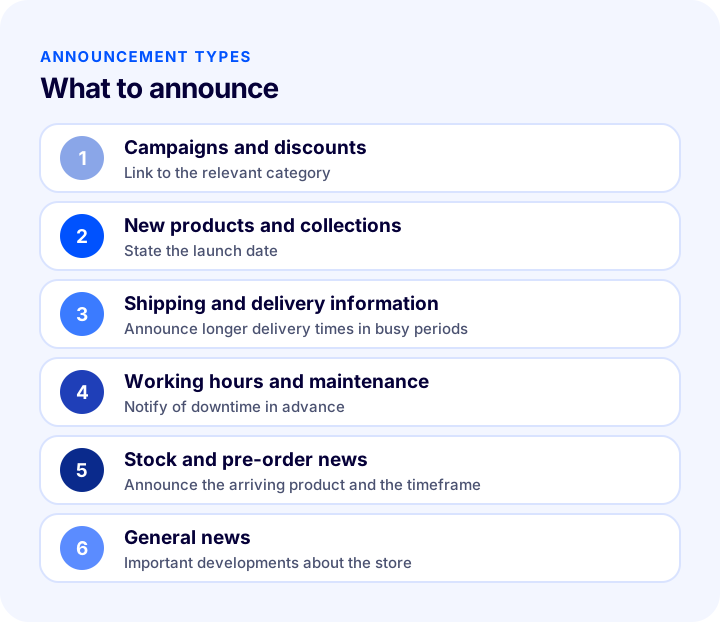
| Announcement type | Example | Where to link |
|---|---|---|
| Campaigns and discounts | Seasonal discount in a category | The relevant category page |
| New products and collections | New season collection is live | Collection or category page |
| Shipping and delivery information | Delivery times may be longer during the holiday period | Delivery information page |
| Working hours and maintenance | Planned maintenance on the site | Usually no link needed |
| Stock and pre-order news | Pre-order opened for an awaited product | Product page |
| General news | Important developments about the store | News or blog post |
Which News Should Not Be an Announcement?
News that is not useful to the customer, changes often or is too long should not fill the announcement area. Announcing every small development causes the important announcement to be missed. Permanent information (return terms, shipping policy) is a matter for the relevant information page, not an announcement.
How Do You Write a Good Announcement?
A good announcement is short, carries a single message and directs the customer to the next step. The title grabs attention, the description complements the title, and the link takes the customer to the right place.
1. Keep the Title Clear and Short
The title is the most-read part of the announcement and appears in bold. It should explain the subject at a glance and not turn into long sentences. A title that says plainly what is happening, such as “Special discount on sweaters,” is more effective than a vague slogan.
2. Finish the Description in One Sentence
The description gives supporting information for the title: until when it is valid, who it covers or what the customer should do. One or two sentences are enough; anything more should be explained by the target page, not the announcement.
3. Link to the Relevant Page
An announcement should take the customer not to the general homepage but directly to the page related to the subject. A campaign announcement should link to the category where the campaign applies, and a new product announcement to that product. Otherwise, the customer reads the announcement and cannot find what they were looking for.
4. Set the Dates from the Start
Every announcement should have a lifespan. Setting the start and end dates in advance keeps the announcement from being forgotten and staying live after the campaign ends. A site that still announces an old campaign damages its credibility.
5. Match the Language and Tone to Your Store
An announcement should be written in the voice of the store. Announcements that shout, use many exclamation marks or make exaggerated claims reduce trust. If you sell in more than one language, prepare the announcement for each language using that language's natural phrasing.
How Long Should an Announcement Stay Live?
Announcement duration depends on how long the subject remains valid: until the campaign ends, until the maintenance is finished or until the information is no longer current. An announcement with no end leaves an outdated and untrustworthy impression over time. Setting an end date for every announcement from the start is the safest method.
By entering a start date and a duration, the tool below shows when the announcement will end, how many weekend days it includes and how many weeks it spans. Weekend days help when planning periods in which traffic differs for some stores.
The date the tool gives is a planning aid; you are the one who sets the real end date of your campaign. What matters is giving every announcement an end date from the start and noting it in your calendar. For seasonal campaign planning, see E-Commerce Campaign Calendar: How to Prepare a Campaign Plan That Drives Sales All Year, and for peak-season preparation, see How to Prepare for Black Friday? 2026 E-Commerce Campaign Preparation Guide: Stock, Site, Shipping and a 6-Week Plan.
| Situation | Recommended duration | Note |
|---|---|---|
| Seasonal campaign | Until the campaign ends | Make the end date the same as the campaign's |
| Shipping or delivery warning | Until the busy period ends | Remove it when times return to normal |
| Planned maintenance | Starts shortly before the maintenance and ends when it does | Include the time information |
| New collection | Launch week | Then move it to the showcase |
| General news | Short duration | Permanent information should move to a page |
How Many Announcements Should Be Live at Once?
Having many announcements live at once means none of them gets noticed. When the customer opens the announcement area, they should see a short list; if everything is equally important, nothing stands out. Prefer few, current and distinct announcements, and deactivate old ones regularly.
We recommend readingWhat Is a Discount Coupon? How to Create and Profitably Use Coupon Codes in E-CommerceHow Do You Use Announcements, Email and Notifications Together?
An announcement alone does not reach all customers; only visitors who come to the site see it. To get the news to a wider audience, you need to use channels together. Announcing the same campaign through an email newsletter and a notification reaches customers on the site via the announcement and those who have not yet visited via the other channels.
- Announcement: Visible to the visitor on the site at that moment and close to the sale.
- Newsletter: Explains the campaign in detail to subscribers and links to the target page.
- Notification: Reaches customers who have given permission instantly.
- SMS: Suitable for short, urgent news; consent rules apply.
See the detailed guides for each channel: What Is a Newsletter? How to Set Up a Newsletter Subscription in E-Commerce? Subscriber Sign-Up Field and Consent, Content Types, Sending Frequency, Segments, Subject Line and Sender Name, Consent and Opt-Out, List Cleaning, Measurement, Common Mistakes, Subscriber Value Calculator and Setup Audit, What Is a Push Notification? How to Use Push Notifications in E-Commerce? Browser vs. Mobile App Notification, Order Status, Shipping, Cart and Stock Notifications, Getting Consent, Frequency, Timing and Copywriting, Return Calculator and Setup Audit and How to Do SMS Marketing in E-Commerce? A Guide to Consent, Message Writing, Timing and Measurement.
How Do You Use an Announcement and the Homepage Banner Together?
In big campaigns, the announcement and the banner complement each other. The banner carries the campaign's visual identity and call to action; the announcement is a short reminder that appears to the customer on every page of the site as they browse. The banner only reaches those who see the homepage, while the announcement is visible whichever page the customer lands on. Link both to the same target page and remove them on the same date. That way, whichever door the customer enters through, they reach the same campaign, and when the campaign ends no outdated information is left anywhere.
One more small detail: before the campaign ends, adding a short “last days” announcement for the final few days can prompt undecided customers to act. Preparing this announcement in advance and setting its start date to the campaign's last week keeps the team from scrambling at the last minute.
How Do You Create an Announcement in the Faprika Panel?
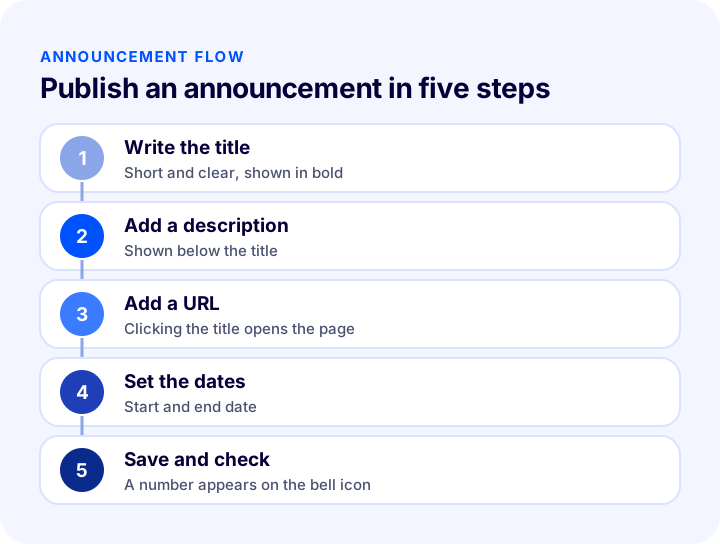
In Faprika, you create an announcement from the Announcements page under Content Management in the control panel. In the Faprika theme, announcements appear at the top right of the homepage, under the bell icon; the number on the bell shows how many announcements are currently live.
What Are the Announcement Fields?
After following “Content Management >> Announcements” and clicking “Add New,” you fill in the following fields:
- Language: Determines in which languages the announcement appears. The store language is selected by default.
- Announcement title: The title of the announcement; it appears in bold by default.
- Url: The address of the page that opens when the title is clicked. Open the relevant page, copy the part of the address bar after the domain name and paste it here.
- Description: The text shown below the title.
- Start date: The announcement's start date; even if left blank, a date appears on the announcement.
- End date: Determines until which date the announcement stays live; when the date arrives, the announcement is removed without you needing to go back into the panel.
- Active: If you have not set an end date and want to republish the announcement later, it lets you turn it on or off without deleting it.
After making the necessary changes, do not forget to click the “Save” button.
How Do You Add a Page Link to an Announcement?
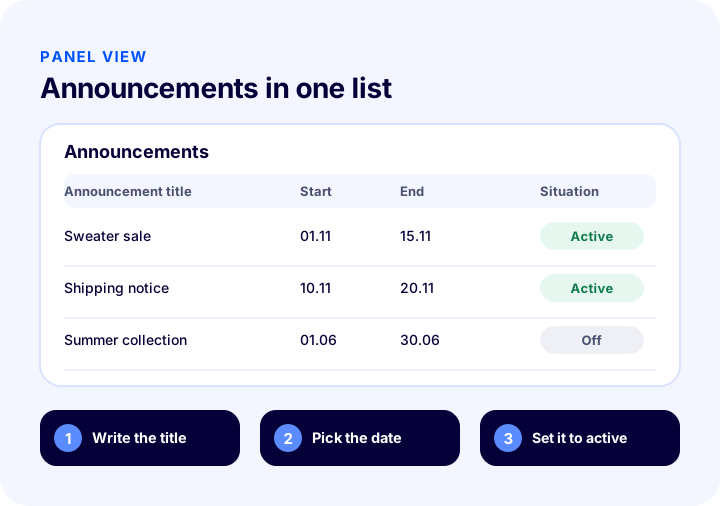
If you want a page to open when the announcement title is clicked, enter that page's address in the Url field. For example, if you are announcing a discount in the sweater category, open the category page in your browser, copy the part of the address bar other than the domain name and paste it into the Url field. Once you save, a customer who clicks the announcement title goes directly to that category. This method both takes the customer to the right place and makes it easier to track the clicks the announcement brings.
For step-by-step usage with screenshots, see the Announcement Management training page.
What Should Announcement Text Examples Look Like?
Good announcement text is short, concrete and action-oriented. The table below gives examples of title and description writing for different situations. Adapt the wording in the examples to your own store and real conditions; do not publish without verifying the campaign terms.
| Situation | Title example | Description example |
|---|---|---|
| Category discount | Special discount on sweaters | Discount on selected products is valid until the end of this weekend. |
| New collection | New season collection is live | Check out the new arrivals now. |
| Delivery notice | Delivery times may be longer during the holiday period | Be prepared by placing your order early. |
| Planned maintenance | Short maintenance on the site | Transactions may not be possible during the stated hours. |
| Pre-order | Pre-order started for the awaited product | Your order will be shipped first when stock arrives. |
How Do You Measure the Impact of an Announcement?
To know whether an announcement works, you need to look at the number of visitors who click the title and what those visitors do on the target page. Always linking the announcement to a page dedicated to the subject makes measurement easier, because you know that most of the traffic to that page comes from the announcement. Comparing periods when the announcement is live with periods when it is not also shows its impact. You can find which indicators to watch in the E-Commerce Metrics: 15 KPIs You Need to Track and Calculation Formulas guide.
How Do You Manage Announcements in a Multilingual Store?
If you sell in more than one language, prepare the announcement separately for each language. Because Faprika lets you choose a language for an announcement, the same campaign can be published in each language with that language's natural phrasing and linked to the relevant country's product page. An announcement that is translated but whose link goes to the wrong language takes the customer to a foreign page. So check the target address separately for each language.
What Are the Common Mistakes in Announcement Management?
- Not setting an end date: If an expired campaign is still being announced, trust is damaged.
- Not providing a link: The customer reads the announcement and does not know what to do.
- Linking to the homepage: Sending the campaign to the homepage forces the customer to search.
- Publishing too many announcements: None stands out and the area becomes cluttered.
- Writing long text: An announcement should be short; the target page explains the details.
- Skipping the language: Entering the announcement in only one language in a multilingual store leaves customers in other languages out.
- Not measuring the result: If the clicks an announcement brings are not tracked, you cannot know which message works.
Announcement Management Checklist
The list below summarizes the building blocks of your announcement setup.
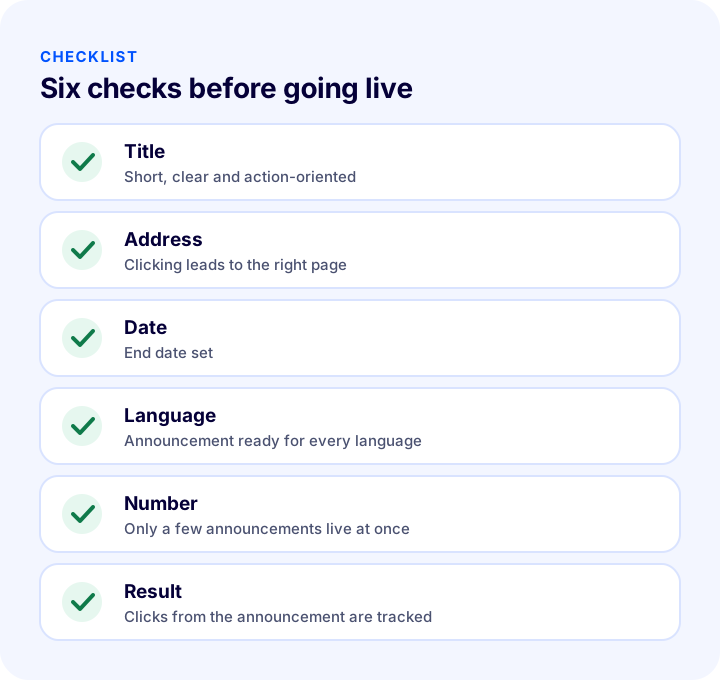
| Stage | Check | Done? |
|---|---|---|
| Title | Short, clear and calls the customer to action | Yes / No |
| Address | Clicking the title opens the page related to the subject | Yes / No |
| Date | Start and end dates set | Yes / No |
| Language | Announcement and text ready for every language | Yes / No |
| Number | Only a few distinct announcements live at once | Yes / No |
| Cleanup | Expired announcements are deactivated | Yes / No |
| Result | Clicks and sales from the announcement are tracked | Yes / No |
How Do You Manage Announcements and Customer Communication with Faprika?
Faprika lets you manage communication from the announcement on the site to the notification sent to the customer from the same panel. The main options are:
- Announcement management: Create announcements with a title, description, page URL, language and date information; they are removed automatically on the end date.
- Number on the bell icon: In the Faprika theme, the number of live announcements is visible to the customer.
- Newsletter management: Share campaigns with subscribers in detail.
- Push notifications: Notifications can be set up with Google Firebase; order status notifications are free.
- Message templates: Edit the messages sent to customers from one place.
- Discounts and campaigns: Define the campaign you announce in the same panel and set its target page.
You can see which features are included in which plan in the e-commerce plans comparison.
We recommend readingE-Commerce Campaign Calendar: How to Build a Campaign Plan That Drives Sales All YearFrequently Asked Questions
What is announcement management?
Announcement management is a feature that lets you publish the campaigns, news and notices you want customers visiting your site to see from a single place. An announcement consists of a title, a short description and an optional link.
What can you announce on an e-commerce site?
You can announce campaigns and discounts, new products and collections, shipping and delivery information, working hours and planned maintenance, stock and pre-order news, and important developments about the store. For permanent information, a dedicated information page is more suitable.
How long should an announcement stay live?
As long as the subject is valid: until the campaign ends, the maintenance is finished or the information is no longer current. Setting an end date for every announcement from the start keeps outdated information from lingering on your site.
How many announcements should be live at the same time?
Only a few, and they should differ from one another. If many announcements are live, none of them gets noticed. Regularly deactivating old announcements keeps the area clean.
How do you create an announcement in Faprika?
In the control panel, go to the Announcements page under Content Management and click Add New. Enter the language, title, page URL, description, start date and end date, then save. When the end date arrives, the announcement is removed automatically.
How do you add a page link to an announcement?
In the Url field, enter the part of the target page's address that comes after the domain name. For example, open a category page, copy the path from the address bar and paste it there. When a customer clicks the announcement title, they go straight to that page.
You May Also Like
- E-Commerce Campaign Calendar: How to Prepare a Campaign Plan That Drives Sales All Year
- What Is a Push Notification? How to Use Push Notifications in E-Commerce? Browser vs. Mobile App Notifications, Order Status, Shipping, Cart and Stock Notifications, Getting Consent, Frequency, Timing and Copywriting, Return Calculator and Setup Audit
- What Is a Newsletter? How to Set Up a Newsletter Subscription in E-Commerce? Subscriber Sign-Up Field and Consent, Content Types, Sending Frequency, Segments, Subject and Sender Name, Consent and Opt-Out, List Cleaning, Measurement, Common Mistakes, Subscriber Value Calculator and Setup Audit
- How to Prepare for Black Friday? 2026 E-Commerce Campaign Preparation Guide: Stock, Site, Shipping and a 6-Week Plan