Contents 14 sections
- What Is Payment Status?
- How Does Payment Status Differ From Order Status and Shipping Status?
- What Does Payment Pending Mean?
- When Is Payment Completed Given?
- What Does Payment Failed Mean?
- How Are Orders With No Payment Received Cancelled Automatically?
- How Is Payment Status Managed for Bank Transfer and Cash on Delivery?
- How Does a Pending Payment Affect Stock and Shipping Time?
- How Is Payment Status Related to Refunds?
- How Much Burden Do Pending Payments Put on You?
- Common Mistakes With Payment Statuses
- Payment Status Settings Checklist
- How to Manage Payment Statuses With Faprika
- Frequently Asked Questions
In the order panel, a row says “Payment Pending”. Has the customer paid, or did they only place the order? Is it safe to pack it and hand it to the carrier now, or should you wait? A wrong answer is costly in both directions: shipping an unpaid order becomes a loss, and holding a paid order becomes a complaint. In most businesses the source of this confusion is that it is not clear what the payment statuses mean and when they change.
This guide covers the concept of payment status from start to finish: what “payment pending”, “payment completed” and “payment failed” mean, which status each payment method starts from, how and when the status changes, how an order that is never paid is cancelled automatically, and how pending orders tie up stock. The article also includes a tool that calculates the cost of pending payments and a small checklist that audits your payment status settings. Because bank transfer, cash on delivery and refunds are explained in detail in their own guides, only the points where they intersect with payment status appear here.
What Is Payment Status?
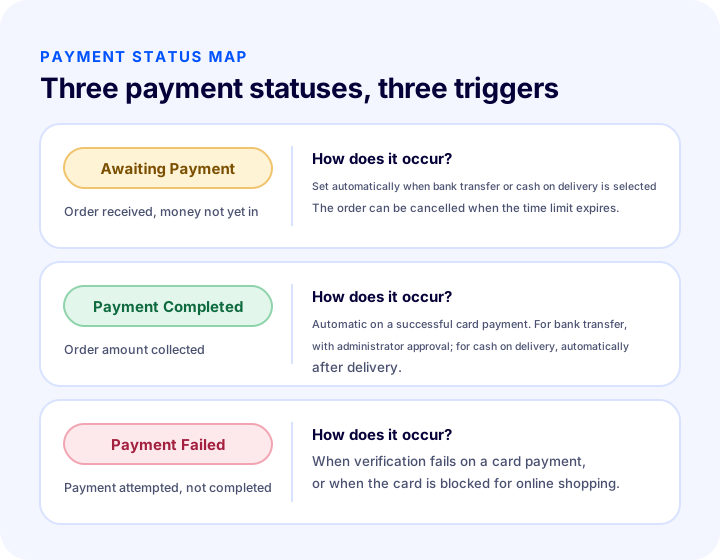
Payment status is a label that shows whether the amount of an order has been collected. In the Faprika control panel, an order appears in one of three payment statuses: Payment Pending, Payment Completed and Payment Failed.
Some statuses are synchronized automatically with the payment system, and some can be updated manually by an administrator. The table below summarizes the three statuses by meaning, how they occur and the next step.
| Payment status | What does it mean? | How does it occur? | Next step |
|---|---|---|---|
| Awaiting Payment | Order received, payment not yet completed | Assigned automatically in the panel when the customer chooses bank transfer or cash on delivery | Set to “Payment Completed” when the payment arrives; cancelled when the time limit expires if it does not |
| Payment Completed | Order amount collected | Automatic on a successful card payment; with administrator approval for bank transfer; automatic after delivery for cash on delivery | The order is prepared and handed to the carrier, or the shipping process continues |
| Payment Failed | Payment attempted but not completed | When verification fails on a card payment or the card is blocked for online shopping | The customer is shown a way to retry; if configured, the order is cancelled when the time limit expires |
How Does Payment Status Differ From Order Status and Shipping Status?
Payment status describes only the state of the money; order status shows the order's journey inside the business, and shipping status shows the package's journey. The three affect each other but are not the same thing.
An order can be “Payment Completed” but not yet prepared; while it is “Payment Pending”, the order may have been received and stock reserved; with cash on delivery, the payment may still be pending while the shipment is on its way. The confusion mostly comes from reading these three fields as if they were one. The table below sums up the difference.
| Status type | What does it tell you? | Example values | What contributes to the update? |
|---|---|---|---|
| Payment status | Has the amount been collected? | Pending, Completed, Failed | Payment system, administrator, shipping delivery |
| Order status | Where does the business hold the order? | Received, preparing, cancelled | Administrator and process settings |
| Shipping status | Where is the package? | Handed to carrier, delivered | Shipping integration or administrator |
To see the whole order flow, you can look at the order management guide; this article focuses only on the payment link in the flow.
What Does Payment Pending Mean?
“Payment Pending” means the order was received successfully but its amount has not yet been collected. When a customer chooses a method where payment is not completed at order time, such as bank transfer or cash on delivery, the order opens in the panel automatically with this status.
This status is not a problem; it is a normal stopover. What matters is that every pending order has an end: either the payment arrives and the order moves on, or it does not and the order is closed. Pending orders with no end pile up in the list, tie up stock and make it hard to see the real situation.
Two common causes of a pending order
- Bank transfer: The customer places the order but sends the money later. The order waits until the money reaches your account.
- Cash on delivery: Payment is taken at delivery. The order waits until the shipment sets off and reaches the customer.
When Is Payment Completed Given?
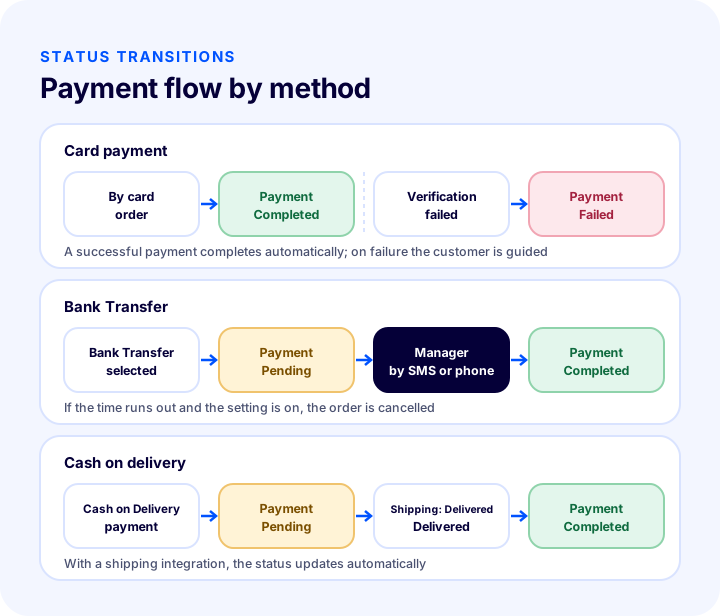
“Payment Completed” shows that the order amount has been collected and occurs in three different ways depending on the payment method: automatically for card payment, with administrator approval for bank transfer, and automatically after delivery for cash on delivery.
Card payment: automatic
The payment status of successful orders made with a credit card on the site becomes “Payment Completed” directly in the panel. No administrator intervention is needed; it works in sync with the payment system and the order moves quickly to the preparation stage.
Bank transfer: with administrator approval
A bank transfer order starts as “Payment Pending”. When the customer sends the money, the administrator sees the payment in the bank account and manually sets the payment status to “Payment Completed” from the order details. This step is critical for methods that need manual approval such as bank transfer: the order does not move on without approval, and if approval is given wrongly, an unpaid order goes out.
Cash on delivery: automatic after delivery
For orders placed with cash on delivery, when the shipping status is updated to “Delivered”, the system automatically moves the payment status to “Payment Completed”. If a shipping integration is used, the shipping status already updates automatically. If the shipping process runs manually, you need to update the delivery status yourself from the control panel; until you do, the payment status waits.
What Does Payment Failed Mean?
“Payment Failed” means a payment was attempted but not completed. It most often appears when something goes wrong during a card payment: for example, an order is marked with this status when 3D Secure verification fails or the customer’s card is blocked for online purchases.
This status does not mean the customer has given up on the order. Many customers unlock their card, re-enter the verification code or try another card and complete the payment. The store’s job is to make this second attempt easy: the error message should be clear, the customer should know what to fix, and they should be able to return to the payment step easily.
What to Do When a Payment Fails
- Identify the cause. A verification code error, a card limit, a card blocked for online purchases and a connection interruption each call for a different solution.
- Guide the customer. Instead of “An error occurred,” show a helpful message such as “Your card may be blocked for online purchases; please contact your bank or try another method.”
- Offer an alternative. The customer may want to complete the payment with another method; keeping the payment method options visible makes this easier.
- Set a time limit. An order whose payment never arrives should not stay in the list forever; the automatic cancellation setting does this job.
The verification step in card payments is a separate topic and 3D Secure rehberinde is covered there.
How to Automatically Cancel Orders With Unpaid Payments
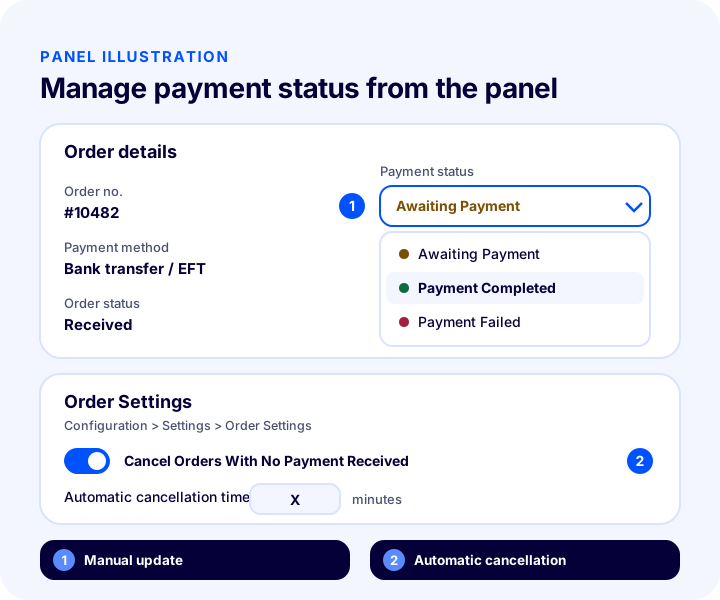
In Faprika, you can define an automatic cancellation time for orders whose payment does not arrive within a set period. When the time is up, an order with incomplete payment is moved to the “Cancelled” status by the system, which reduces manual follow-up work.
- Log in to the control panel.
- Select “Settings” from the “Configuration” menu.
- Open the “Order Settings” section.
- Enable the “Cancel Unpaid Orders” option.
- In the field that opens, enter after how many minutes you want the order to be cancelled.
This setting can be customized for different payment methods and order sources according to your business needs. When choosing the time, keep two facts in mind: a very short time may cancel the order of a customer who is about to send the money, while a very long time lets orders that will never be paid tie up stock for a long time. For bank transfers, choose the time by taking banks’ processing hours and weekend delays into account.
How to Manage Payment Status for Bank Transfer and Cash on Delivery
Bank transfer and cash on delivery are the two methods where payment status needs the most hands-on attention. With cards the status changes automatically; with these two methods, a person or an integration confirms whether the payment has really arrived.
Matching the Transfer to the Order
When a transfer arrives, finding out which order it belongs to is the most error-prone part of the daily routine. Having the order number written in the transfer description and comparing the amount with the order total reduces the risk of approving the wrong order. If the amount arrives short or excessive, the order should stay in “Payment Pending” and the difference should be clarified with the customer. Matching, pending payments and the time limit are covered separately in the bank transfer guide.
Tracking Collection on Cash on Delivery
With cash on delivery, the money first goes to the shipping company; the store receives it later. In the panel the order becomes “Payment Completed” after delivery, but this does not mean the money has reached the store’s account. Separately track that the collections for delivered orders are passed from the carrier to the store. Orders that are not delivered never leave “Payment Pending” and enter the return process.
The Risk of Double Collection and Unfinished Payments
A customer tries to pay by card, gets an error and then pays the same order by bank transfer; or leaves the payment page and places a second order. In this case the same amount may have been collected twice. Regularly scanning payment statuses and checking for duplicate orders from the same customer placed within a short interval helps you catch such double collections early. The excess amount collected is refunded to the customer.
How Does a Pending Payment Affect Stock and Shipping Time?
Payment status directly determines two operations: whether the product is reserved in stock and when the package ships. The right rule depends on the risk of the method.
Reserving stock for a pending order keeps the promise made to the customer, but for orders that will not be paid it prevents you from selling the product to another customer. Not reserving stock carries the risk of telling a customer who has sent the money that “the product is out of stock.” The table below offers a general way of thinking for the three methods; adjust it to your own products and risk profile.
| Method | When is the payment status settled? | Inventory approach | Shipping |
|---|---|---|---|
| Card | At the time of the order | Reserved when the payment is completed; the result is instant, so there is no waiting | Immediately when preparation is done |
| Bank Transfer | When the money reaches the account | Reserved for a limited time; released when the time expires | After the payment is confirmed |
| Cash on delivery | After delivery | Reserved when the order is received; the possibility of rejection is taken into account | After the order is verified, without waiting for payment |
With cash on delivery, shipping takes place without waiting for payment because the payment is collected at delivery; so the step that reduces risk is verifying the order before it ships. Order verification is covered in a separate guide.
We recommend readingWhat Is Order Verification? A Guide to Verifying Orders With a Barcode Before ShippingHow Is Payment Status Related to Returns?
A return starts on an order whose payment has been completed: if the amount was collected it is refunded to the customer, and if it was not collected there is no money to return and the order is cancelled. So payment status answers the first question of the return process: “Was the money for this order received?”
Cancelling an order in “Payment Failed” or “Payment Pending” status does not require a refund; nothing has been collected from the customer. For an order in “Payment Completed” status, if there is a cancellation or return, a refund is made, and the payment and the refund must match in your records. For an undelivered cash-on-delivery order, no refund is needed because it was never collected; your loss is the shipping and operational cost. The whole return process is covered in the returns guide.
We recommend readingHow to Manage the Return Process in E-Commerce?How Much Burden Do Pending Payments Put on You?
The cost of orders whose payment is never completed has two components: stock tied up to the value of the order and the time spent monitoring these orders. By entering the share of incomplete orders among your bank transfer and cash-on-delivery orders and the automatic cancellation time, the tool below lets you see this burden.
Enter into the tool your daily number of bank transfer and cash-on-delivery orders, the average order amount, the share of orders whose payment is never completed and the automatic cancellation time in minutes. The result shows how many orders and how much value are tying up stock at the same time. “Currency” is written instead of a currency symbol; read it in your own currency. The numbers in the example are only to show how to use the tool and do not reflect your business.
When reading the result, look at the relationship rather than a single number: as the cancellation time grows, the amount tying up stock grows linearly. But pushing the time toward zero is not the solution; if the order of a customer who wants to pay by bank transfer and sends the money a few hours later is cancelled too early, the sale is lost. The aim is to choose a reasonable time that fits the real payment times of your orders.
Common Mistakes in Payment Statuses
- Approving a transfer without confirming it. A customer saying “I sent it” or sending a receipt does not mean the money has reached the account. Approval must be based on a payment you see in the account.
- Not setting a deadline for pending orders. In systems with no automatic cancellation time defined, orders that will not be paid pile up in the list and in stock.
- Treating “Payment Failed” as giving up. Customers often want to retry the payment; without a clear error message and guidance, the sale is lost.
- Not updating the delivery status with manual shipping. Cash-on-delivery orders are completed automatically on delivery, but if the delivery status is not entered by hand in a manual shipping process, the payment status stays pending.
- Confusing payment status with order status. “Payment Completed” does not mean the order has been prepared or shipped.
- Not tracking cash-on-delivery collection. Seeing “Payment Completed” in the panel does not guarantee the money has reached your account; reconcile with the shipping company separately.
- Never measuring the status distribution. How many orders are pending, how many are in payment failed status, how many go to cancellation; a business that does not monitor these numbers notices problems late.
Payment Status Settings Checklist
Go through the list below to review your payment status flow. When every item is “yes,” payment statuses will not mislead you and orders move forward in the right order.
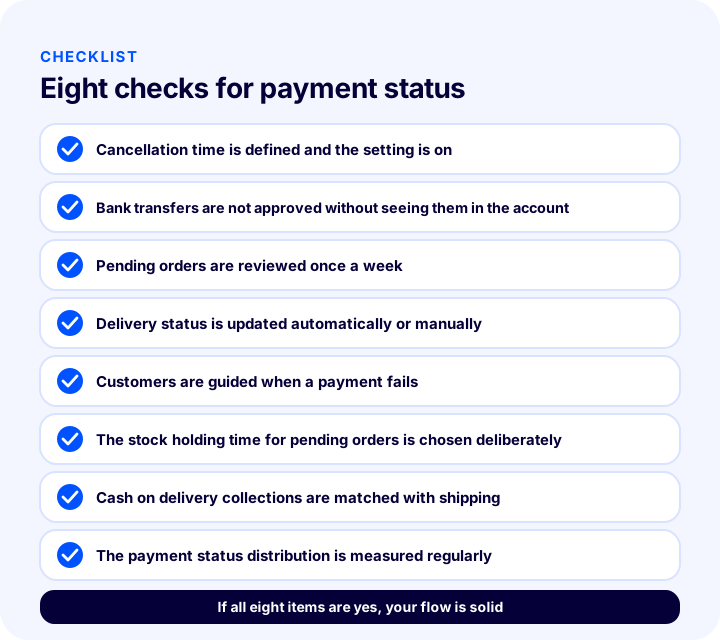
| Field | Check | Done? |
|---|---|---|
| Automatic cancellation | The cancel-unpaid-orders setting is on, time defined | Yes / No |
| Bank Transfer | Payment is not approved before it appears in the account | Yes / No |
| Pending scan | Old pending orders are scanned once a week | Yes / No |
| Shipping | Delivery status is updated automatically or manually | Yes / No |
| Error message | A guiding message appears when payment cannot be completed | Yes / No |
| Stock | The stock holding time for pending orders is chosen deliberately | Yes / No |
| Cash on delivery | Collection is reconciled with the shipping company | Yes / No |
| Measurement | Status distribution is monitored regularly | Yes / No |
How to Manage Payment Statuses With Faprika
The Faprika control panel lets you view the payment statuses of incoming orders and update them manually when needed. Payment transactions are automatically synchronized with specific payment systems; statuses are generally shown as Payment Pending, Payment Completed and Payment Failed.
- Automatic assignment: Successful card payments become “Payment Completed”; bank transfer and cash-on-delivery orders open as “Payment Pending.”
- Manual update: You can move pending orders to “Payment Completed” from the order detail; this step is used for methods that need manual approval, such as bank transfer.
- Automatic completion for cash on delivery: When the shipping status becomes “Delivered,” the payment status automatically becomes “Payment Completed.” If a shipping integration is in place, the shipping status is also updated automatically.
- Automatic cancellation: With the “Cancel Unpaid Orders” option under Configuration, Settings, Order Settings, the time is defined in minutes; when the time ends, an order whose payment is not completed is cancelled.
For step-by-step instructions and screenshots, see the Payment Status Operations tutorial, and for cash-on-delivery settings, the Cash on Delivery Management tutorial. Coverage may differ by plan; for details, see the e-commerce plans. Add-ons that complete the payment, shipping and order flow are listed on the add-ons page.
We recommend readingWhat Is Cash on Delivery? How to Manage Cash on Delivery in E-Commerce, Calculate Its Cost and Reduce Undelivered OrdersFrequently Asked Questions
What is payment status?
Payment status is a label that shows whether the amount of an order has been collected. In Faprika there are generally three statuses: Payment Pending, Payment Completed and Payment Failed.
What does “payment pending” mean?
It means the order has been received but its amount has not yet been collected. When a customer chooses bank transfer or cash on delivery, the order opens with this status; when the payment arrives it is set to “Payment Completed”, and if it does not arrive, it can be cancelled when the time limit expires.
Why does a payment fail?
It is most often seen when a problem occurs with a card payment: for example, when 3D Secure verification fails or the card is blocked for online shopping. Customers usually want to retry the payment, so it is important to show a clear error message.
How do I set the payment status to “completed” on a bank transfer order?
First, check that the payment has reached your bank account; then update the payment status manually to “Payment Completed” from the order details. Do not approve it without seeing it in the account.
Can orders that are not paid be cancelled automatically?
Yes. In Faprika, under Configuration, Settings, Order Settings, turn on “Cancel Orders With No Payment Received” and enter the time in minutes; when the time runs out, an order whose payment has not been completed is cancelled.
When is the payment status completed for cash on delivery?
When the shipping status is updated to “Delivered”, the payment status automatically becomes “Payment Completed”. With a shipping integration, the shipping status updates automatically; with manual shipping, you need to update the delivery status yourself from the panel.
You May Also Like
- E-Commerce Payment Methods: Credit Card, Bank Transfer/EFT, Cash on Delivery, Wallets and Alternative Methods
- How to Manage Bank Transfer/EFT Payments: Order-Payment Matching, Pending Payments and Time Limits
- E-Commerce Order Management: A Step-by-Step Guide from Order to Delivery
- How to Manage the Return Process in E-Commerce?