
Contents 13 sections
- What Is a URL and What Parts Does It Consist Of?
- Why Does URL Structure Matter?
- How Do You Write an SEO-Friendly URL?
- How Do You Build Category and Product Addresses in E-Commerce?
- How Deep Should the Address Hierarchy Be?
- What Are Addresses with Parameters and How Are They Managed with a Canonical?
- What Should You Do If an Address Changes?
- How Should the Address Structure Be in a Multilingual Store?
- How Do You Keep Upper/Lowercase, www and the Trailing Slash Consistent?
- What Are Common URL Mistakes?
- URL Structure Checklist
- URL and Redirect Management with Faprika
- Frequently Asked Questions
A customer sends the product link in your store to a friend, and the link looks like “yourstoreaddress/index?route=product&id=48213&ref=x7”. It is unreadable, builds no trust, and is hard to remember. If another link to the same product were “yourstoreaddress/women/shoes/sport-shoes”, anyone looking at the link would understand what the page is about without clicking. The address is your site’s first impression; it tells both the visitor and the search engine what the page is and where it sits on the site.
In this guide we answer the question how should a URL structure look from an e-commerce perspective: the definition and parts of a URL, why it matters, the writing rules for an SEO-friendly address, category and product address patterns, hierarchy depth, addresses with filter, sorting and tracking parameters and their relation to the canonical, 301 redirects when an address changes, multilingual addresses, upper/lowercase and trailing slash consistency, common mistakes and a checklist. At the end you will find information on address and redirect management in Faprika and a six-question FAQ.
What Is a URL and What Parts Does It Consist Of?
A URL is the full address of a web page on the internet; it is the text shown in the browser’s address bar and used to reach the page. In Turkish it is also called a “web address”, a “page address”, or simply an “address”.
An e-commerce product address is usually built from four parts: protocol, domain name, path and last segment. The fourth part is often a short expression generated from the product’s or category’s name; this is called a “slug”. Optionally, a query parameter section starting with a question mark can be added at the end of the address.
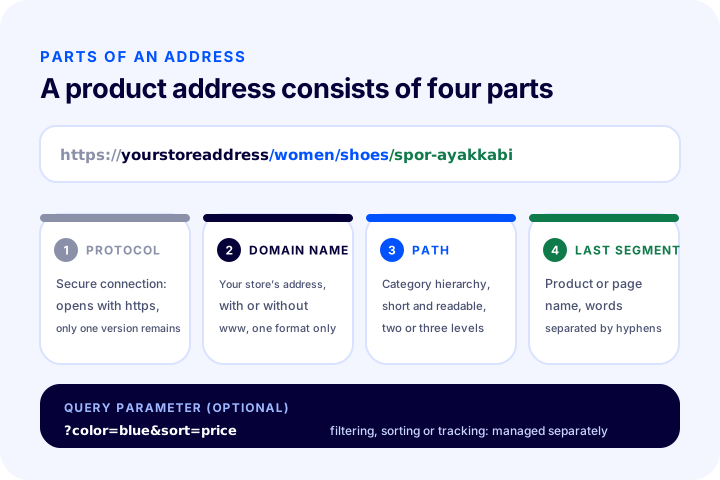
The same information can also be summarized in a table:
| Part | Equivalent in the example | What does it tell you? | Who defines it? |
|---|---|---|---|
| Protocol | https:// | That a secure connection is used | Server setting |
| Domain name | yourstoreaddress | The store’s main address | You, once |
| Route | /women/shoes | The category hierarchy on the site | Your category structure |
| Last segment (slug) | /spor-ayakkabi | The page’s own name | Product or category name |
| Query parameter | ?color=blue | Filter, sorting or tracking information | Page functions and campaign links |
In this article we write “yourstoreaddress” instead of the domain name; the example addresses are for illustration and are not clickable links.
Why Does URL Structure Matter?
URL structure matters for three reasons: it gives the visitor confidence and a hint about the page’s content, it gives the search engine extra information about the page’s topic and place on the site, and it determines the site’s long-term health. The third is often overlooked: once published, an address is a permanent identity on which outside links, saved pages and shares depend.
For visitors: a readable address builds trust
People often look at the address before clicking a link. A readable address confirms that the page is the expected place. Meaningless character strings, on the other hand, raise suspicion, get shortened when shared, or are not shared at all. The path shown in the address bar is also a quick answer to the visitor’s question “where on the site am I now?”.
For search engines: it describes the topic and structure
The words in the address are a light signal that confirms the page’s topic; the structure of the path shows which category the page sits under. The address alone is not a strong factor in determining ranking; but when it is consistent with the page’s title, content and internal links, it does not create extra confusion. In search results, the address may appear under the product title or, if structured data is present, in the form of a path. How it is shown is the search engine’s decision.
For site health: permanence and crawl order
The search engine crawls the site through addresses. If there are several addresses for the same page, crawl budget is wasted, ranking strength is scattered and it becomes unclear which one is the main one. A consistent address structure prevents this uncertainty from the start.
| Who benefits? | What does a good address provide? | What does a bad address cause? |
|---|---|---|
| Visitor | Understands what the page is beforehand | Does not trust it, does not share it |
| Search engine | Gets a clear signal about topic and structure | Sees the same content at multiple addresses |
| Store manager | Recognizes the page easily in reports | Gets lost among hundreds of similar addresses |
| External links | Point to a permanent address | Break when the address changes |
How Do You Write an SEO-Friendly URL?
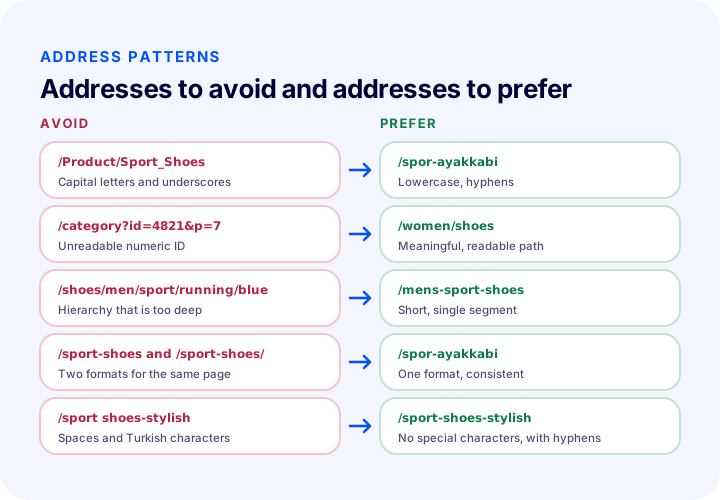
An SEO-friendly URL is an address that is short, readable, written in lowercase, has words separated by hyphens, contains no Turkish characters or special marks, and directly describes the page’s topic. Each of these rules is explained below together with its reason.
1. Keep it short and readable
A URL should carry the name of the page and contain no unnecessary words, dates or filler. “/sneakers” is short and clear; “/new-season-discounted-best-price-sneaker-models” is long, repetitive and ugly. You do not need to carry the whole title into the URL; the main phrase is enough.
2. Always use lowercase
Some servers treat uppercase and lowercase as different. “/Spor-Ayakkabi” and “/spor-ayakkabi” can count as two separate URLs and show the same content at both. Writing all URLs in lowercase and redirecting any uppercase URL to its lowercase version prevents this duplication.
3. Separate words with hyphens
The hyphen (-) is used as the word separator. An underscore (_) can join words together, and a space turns into an encoded, unreadable string of characters in the URL. A hyphenated URL is the clearest form for both people and search engines.
4. Avoid Turkish characters
The letters ç, ğ, ı, ö, ş, ü can turn into encoded character strings in a URL and can break when shared, copied or used in some systems. Using their Latin equivalents (c, g, i, o, s, u) in the URL is a safe and common practice: “ayakkabi” instead of “ayakkabı”. The page title and content are of course written with Turkish characters; only the URL is simplified.
5. Drop special characters and unnecessary words
A URL does not contain symbols such as and, plus, question or asterisk, or filler words such as “a”, “and”, “for”. The URL consists of a simple phrase that carries the keyword.
6. Meaningful words instead of meaningless numbers
A URL like “/urun?id=48213” says nothing about the product. The internal ID number is the system’s business; the URL the visitor sees should carry the name of the product.
| Rule | Correct example | Incorrect example | Why? |
|---|---|---|---|
| Lowercase | /spor-ayakkabi | /Spor-Ayakkabi | Risk of duplicate URLs |
| Separating with hyphens | /spor-ayakkabi | /spor_ayakkabi | Words may merge |
| No Turkish characters | /sport-shoes-stylish | /spor-ayakkabı-şık | Encoding and sharing problems |
| Meaningful words | /women/shoes | /kategori?id=4821 | Does not describe the page |
| Short | /mens-sport-shoes | /erkek-icin-yeni-sezon-en-iyi-spor-ayakkabi-modelleri | Unreadable and repetitive |
How to Set Up Category and Product URLs in E-Commerce
A category URL carries the name of the category and a product URL carries the name of the product; if a hierarchy is needed, the parent category is added to the path. What matters is choosing one pattern across the whole store and applying it the same way everywhere.
Category URL
Category URLs are usually the short name of the category: “/shoes”, “/womens-shoes”. So that they do not clash with the product page, subcategories either add the parent category to the path (“/women/shoes”) or carry a single-segment name of their own (“/womens-shoes”). Both approaches are acceptable; this decision matters when you set up the SEO of category pages, and for details you can read our article on category page SEO.
Product URL
The product URL is generated from the product name: “/sneakers”. If two products have the same name, a distinguishing feature is added (“/sneakers-white”). Putting price, campaign or season information in a product URL is problematic because the URL would have to change whenever that information changes. Lasting information such as brand name and model can go into the URL; temporary information should not.
Should the product URL include the category?
Carrying the category path inside the product URL (“/women/shoes/sneakers”) and publishing the product at the root with a single segment (“/sneakers”) are two common approaches. A URL that carries the category path shows the hierarchy, but the URL changes when the product is moved to another category. A single-segment URL, on the other hand, is permanent and does not break even if the category changes. If a product is in more than one category, a single-segment URL also removes the risk of generating several URLs for the same product. Whichever approach you choose, a product should have one canonical URL; you will see the detailed rule below in the section on parameterized URLs and canonical.
| Approach | Example | Pros | Point to watch |
|---|---|---|---|
| With category path | /kadin/ayakkabi/spor-ayakkabi | The hierarchy is visible in the URL | The URL changes if the category changes; risk of multiple URLs if the product is in several categories |
| Single segment at the root | /spor-ayakkabi | Permanent and short, low risk of multiple URLs | The hierarchy appears only in the breadcrumb and the menu |
How Deep Should the URL Hierarchy Be?
The hierarchy should be kept as shallow as possible: two or three levels, such as main category, subcategory and product, are enough for most stores. The deeper a URL gets, the harder it is to read, the more likely it is to change, and the farther the page appears from the site’s home page.
A deep URL is usually a sign of a deep category tree. A six-level path such as “/shoes/men/sport/running/light/blue” means nothing to the visitor, and navigating the menu at that depth is just as hard. Simplifying the category structure improves both the URL and the navigation. For how to plan the menu and categories, you can read our article on how an e-commerce menu structure should be.
Going beyond three levels is not necessarily a mistake, but every additional level should have a reason. If there is no reason, drop the level. The summary below can help you decide:
- One level: enough for small catalogs; the URL is at its shortest.
- Two levels: main category and subcategory; a balanced choice for most mid-sized stores.
- Three levels: acceptable for large catalogs; the product URL should not come on top of this level.
- Four and above: usually shows that the category tree needs to be simplified.
What Are Parameterized URLs and How Are They Managed with Canonical?
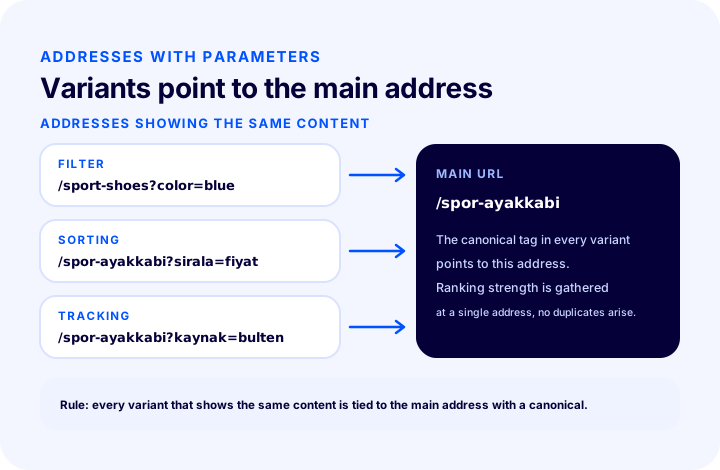
A parameterized URL is one that carries extra information after a question mark: “/sneakers?color=blue”. Filter, sort and tracking parameters change the page content little or not at all; they therefore create multiple URLs showing the same content and should be tied to the main URL with the canonical tag.
Parameter types
| Type | Example | Does it change the content? | Recommended approach |
|---|---|---|---|
| Filter | ?color=blue | Narrows the product list | In most cases tie it to the category URL with canonical; make a separate decision for a heavily searched filter combination |
| Sorting | ?sirala=fiyat | Shows the same products in a different order | Tie it to the main URL with canonical |
| Monitoring | ?kaynak=bulten | No, it only marks the source | Tie it to the main URL with canonical; do not use it in internal links |
| Page number | ?sayfa=2 | Shows the rest of the list | Manage it according to the pagination rule |
How does the canonical tag do this?
The canonical tag is a marker in the head section of the page that says “the main URL of this content is this”. The tag inside the parameterized page points to the main URL without parameters. This way the search engine understands that these pages are the same content and consolidates value on a single URL. Example:
<!-- https://magazaadresiniz/spor-ayakkabi?sirala=fiyat sayfasının başlık bölümünde -->
<link rel="canonical" href="https://magazaadresiniz/spor-ayakkabi">
Canonical is not a redirect; the visitor stays on the parameterized page, and only the search engine is told the main URL. For the details of canonical and its common mistakes, see our article on what the canonical tag is.
Use the URL without parameters in internal links
In the menu, product cards and content links, always use the main URL; parameterized URLs should be generated only for page functions (filter selection, sorting) and external campaign links. If an internal link is parameterized, URLs multiply within the site itself as well.
What Should Be Done If a URL Changes?
If a URL changes, a 301 (permanent) redirect should be set up from the old URL to the new one. Without a redirect, visitors and search engines arriving at the old URL see an error page, and the value the page has accumulated is lost.
There are times when you have to change a URL: a product name changes, a category is renamed, the store moves to a new infrastructure, or you switch the www usage or move to HTTPS. In each case the rule is the same: the old URL must go to the new one with a 301, the redirect must resolve in a single step (no chains), and internal links must be updated to the new URL.
- Map out the old and new URLs. Write in a table which URL will go to which.
- Define the 301 redirects. Let each old URL go to the closest matching new page.
- Shorten the chains. If A goes to B and B goes to C, A should go directly to C.
- Update the internal links. Menu, category and content links should point to the new URL; do not rely on the redirect.
- Refresh the sitemap and canonical. Only the new URLs should remain in the sitemap.
- Monitor. Check in the search reports whether the old URLs are returning errors.
The types of redirects, when to use a 301 versus a temporary redirect, and pages that are permanently removed are covered in our article on what a 301 redirect is. For how the error page behaves for removed pages, also take a look at our article on what a 404 page is.
We recommend readingWhat Is a 301 Redirect?What Should the URL Structure Be in a Multilingual Store?
In a multilingual store, each language’s URLs should be separated by a consistent pattern; the most common and easiest to manage method is adding the language code at the start of the path: “/en/running-shoes”, “/de/laufschuhe”. Each language’s page should have its own URL, and the languages should be linked to each other with hreflang.
Pay attention to three points when setting up language URLs. First, the language code should stay in the same place and in the same form on every page; using “/en/” on one page and “?lang=en” on another breaks consistency. Second, the last segment of the URL can be written in that language’s word (“/de/laufschuhe”); this option is more natural for visitors and search engines, but it means producing and managing a separate URL for each language. Third, for languages with non-Latin alphabets, you need to decide which alphabet to write the URL in: most stores leave URLs written in Latin letters.
The signal that tells the search engine about the relationship between language versions is the hreflang tag; for how to set it up, see our article on what the hreflang tag is. In the sitemap too, each language’s URLs must be correct and identical to the canonical; the details are in our article on what a sitemap is.
How Do You Keep Case, www and the Trailing Slash Consistent?
A page should have a single URL. Choose only one of the forms with or without www, with or without a trailing slash, uppercase or lowercase, and redirect the others to it with a 301. Otherwise the same page ends up published at multiple URLs.
| Consistency topic | Possible variants for the same page | What to do |
|---|---|---|
| Protocol | http:// and https:// | Keep only https, redirect http to it |
| Use of www | Domain name with and without www | Choose one, redirect the other |
| Trailing slash | /sport-shoes and /sport-shoes/ | Choose a single form, redirect the other |
| Uppercase/lowercase | /Spor-Ayakkabi and /spor-ayakkabi | Take lowercase as the standard, redirect the uppercase one |
| Default page name | / and /index | Take the root as the standard |
The form you choose should be the same in the canonical tag, the sitemap, internal links and structured data as well. Using the www version in one place and the non-www version in another makes the signals contradict each other. It does not matter which form you choose; what matters is that the choice is the same everywhere.
What Are the Common URL Mistakes?
The most common mistakes are: using meaningless IDs and parameters in the URL, leaving uppercase letters and Turkish characters, building too deep a hierarchy, changing URLs too often, and forgetting to set up redirects. Below you will find the cause and solution for each.
- Leaving meaningless IDs and session information in the URL. Solution: generate URLs with readable words and do not carry session and tracking information into the URL.
- Leaving multiple URLs for the same page. Solution: choose a single main URL and tie the others to it with a 301 or canonical.
- Using uppercase letters, spaces and Turkish characters. Solution: lowercase, hyphens and Latin characters.
- Putting price, campaign or year in the product URL. Solution: only lasting information goes into the URL; price and campaign stay in the page content.
- Changing the URL when a category name changes but not redirecting. Solution: if the URL changes, use a 301; if possible choose a permanent URL and keep it even if the name changes.
- Building too deep a hierarchy. Solution: simplify the category tree.
- Pointing internal links to parameterized or redirected URLs. Solution: internal links should always point to the main, final URL.
- Setting up language URLs inconsistently. Solution: choose a single language URL pattern and apply it everywhere.
- Leaving development or test URLs open. Solution: only live URLs should be crawlable.
URL Structure Checklist
The eight-item list below is a quick check you can use when reviewing your URL structure.
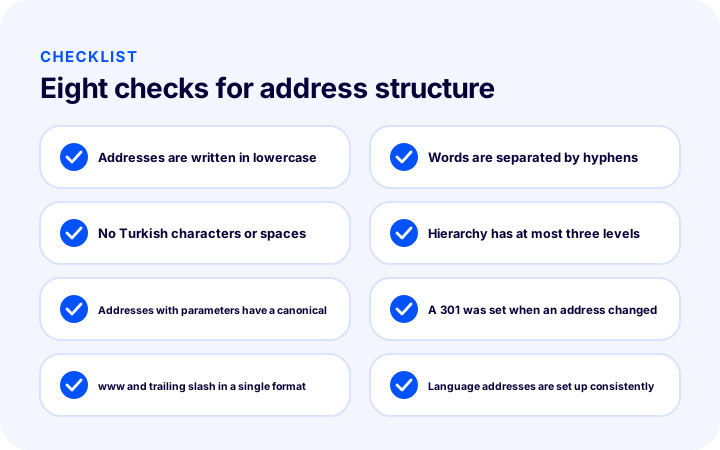
The items in the illustration are also included in the table so you have them at hand during a detailed check:
| # | Check | What happens if it’s wrong? |
|---|---|---|
| 1 | Addresses are written in lowercase | The same page can be published at two URLs |
| 2 | Words are separated by hyphens | Readability drops, words merge |
| 3 | No Turkish characters or spaces | It breaks when shared and copied |
| 4 | Hierarchy has at most three levels | The URL gets longer, more likely to change |
| 5 | Addresses with parameters have a canonical | Duplicate URLs multiply |
| 6 | A 301 was set when an address changed | The old URL returns an error, value is lost |
| 7 | www and trailing slash in a single format | The same page appears at multiple URLs |
| 8 | Language addresses are set up consistently | Language versions get mixed up |
Do the check regularly, not just once: look again whenever you add a new category, a new language or a new campaign parameter. After making corrections, do not expect the result to show immediately; the old state may remain in the results until the search engine recrawls the pages and re-evaluates the URLs.
URL and Redirect Management with Faprika
Faprika’s training content explains that the product page address is generated automatically, but can be changed for a more SEO-friendly structure, and that a readable, meaningful address helps search engines understand the page better. A product’s SEO information is edited in the “SEO Information” section of the product management screen. In the general SEO settings, there is the “Canonical URL Active” option and the “Domain Check” setting for serving www and non-www addresses consistently; both relate directly to the consistency and canonical topics covered in this article.
Faprika’s plan feature comparison includes the row “301 / 302 / 410 Panel / Managing URL Records”. Managing redirect records when an address changes or a page is removed is covered under this heading. The same comparison also includes the rows “Canonical / H Tag Management / Robots / Sitemap” and “Bulk Automatic SEO/Meta Information Update”. Which plan covers these features, and to what extent, may vary by plan; for the current scope, see the e-commerce plans page.
You can review your store’s current URL structure, category and product addresses, redirect needs and canonical settings together with the Faprika team. To set up titles, descriptions and addresses together, the guide how to configure e-commerce SEO settings will help. To see how the robots.txt and sitemap files covered in that guide work together with your URL structure, read the article what is robots.txt.
Frequently Asked Questions
How should a URL structure look?
A URL structure should consist of short, readable, lowercase addresses with words separated by hyphens and without Turkish characters. It should reflect the category hierarchy in at most two or three levels, carry the product’s name, and not change once it has been given. If it has to change, the old address is redirected to the new one with a 301.
How do you write an SEO-friendly URL?
Take the keyword that describes the page’s topic, write it in lowercase, separate the words with hyphens, remove Turkish characters and special marks, and drop unnecessary words and numbers. For example, for a “Women’s Sport Shoe Models” page, “/womens-sport-shoes” is a suitable address.
Can Turkish characters be used in a URL?
They can be used, but it is not recommended. Turkish characters may turn into encoded character sequences in the address and may break when shared or copied. Using the Latin equivalents (c, g, i, o, s, u) in the address is the safe route; the page’s title and content continue to be written with Turkish characters.
Should the category be included in the product address?
Both approaches are used. Including the category path shows the hierarchy in the address, but the address changes when the product is moved to another category. A single-segment address at the root, on the other hand, is permanent and prevents multiple addresses when a product sits in several categories. Whichever is chosen, a product should have a single main address.
Do URLs with parameters hurt SEO?
They can if left uncontrolled: filter, sorting and tracking parameters generate many addresses that show the same content. The problem is solved if these addresses are tied to the main address with the canonical tag. Internal links should always use the main address without parameters.
What should I do when a URL changes?
Set up a 301 (permanent) redirect from the old address to the new one, keep the redirect to a single step, and update internal links and the sitemap to the new address. Visitors and search engines arriving at the old address then reach the new page, and the page’s value is preserved.