
Contents 13 sections
- What Is a Title Tag?
- What Is the Difference Between a Title Tag and an H1 Heading?
- Why Is the Title Tag Important?
- How Long Should a Title Tag Be and Why Is It Cut Off?
- Where Does the Keyword Go in the Title Tag?
- Where Does the Brand Name Go in the Title Tag?
- What Should Title Tag Patterns Look Like by Page Type?
- What Is the Duplicate Title Tag Problem and How Is It Fixed?
- How Do You Bulk Update the Title Tags of Thousands of Pages?
- What Are Common Mistakes When Writing Title Tags?
- Title Tag Checklist
- Title Tag Management with Faprika
- Frequently Asked Questions
When one of your store’s pages appears in search results, the first thing the visitor sees is a large, blue, clickable line. That line is most often determined by the title tag. However good the page is, if the headline row is faint, cut off or no different from competing pages, the click goes elsewhere. And if you have hundreds of products, headlines written to the same pattern and copies of one another quietly harm your site as a whole.
In this guide we answer the question how to write a title tag from an e-commerce perspective: what a title tag is, how it differs from the H1 heading, the logic of length and truncation, where the keyword and brand name go, pattern examples for product, category, blog and home pages, the duplicate title problem, bulk updating thousands of pages, and a checklist. At the end you will find title management with Faprika and a six-question FAQ.
What Is a Title Tag?
A title tag is the HTML tag written in the head section of the page that defines the page’s title. It appears as the clickable title in search results, as the page name in the browser tab and as the default name when the page is saved.
In the industry it is also called “title tag”, “page title” or “SEO title”. The tag itself is a single line:
<head>
  <title>Beyaz Spor Ayakkabı Modelleri | Mağaza Adınız</title>
</head>
The visitor does not see this line inside the page; they see it in the search result and in the tab. Search engines, on the other hand, read this tag as one of the strongest signals for understanding the page’s topic. The same tag can also be used as the title in some environments when a link is shared; to manage the sharing appearance separately, see the what is an Open Graph tag guide.
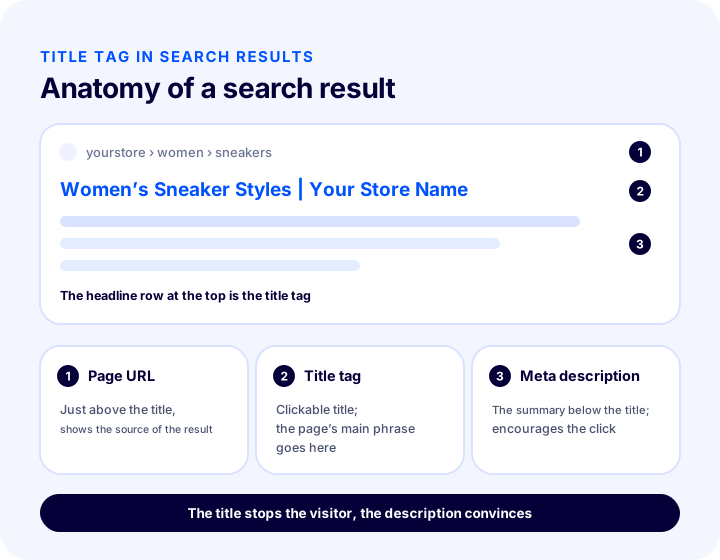
The illustration shows three parts of a search result. The small line at the top is the page’s address. The large, colored line just below it is the title tag. The gray text under it is the meta description; we covered it in detail in the how to write a meta description guide. The two fields complement each other: the title stops the visitor, the description convinces.
What Is the Difference Between a Title Tag and an H1 Heading?
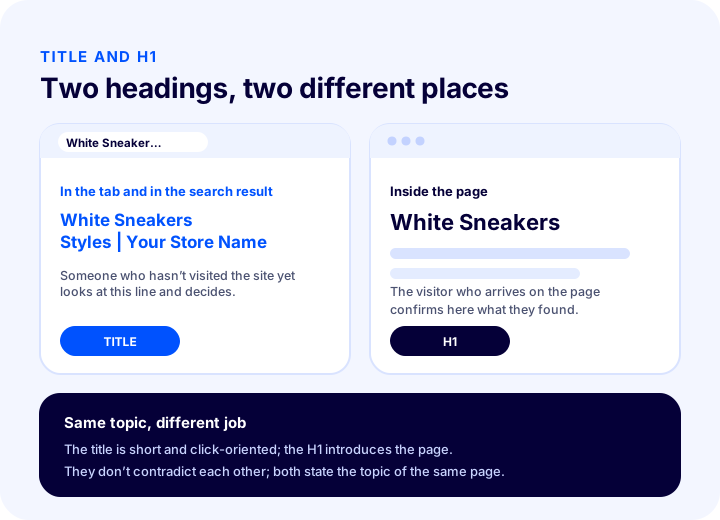
The title tag is the heading that appears in the search result and the tab; the H1 is the main heading inside the page, at the top of the content. Both describe the same topic but in different places, addressing different readers.
| Feature | Title tag | H1 heading |
|---|---|---|
| Where does it appear? | Search result, browser tab, saved page name | Inside the page, at the top of the content |
| Who does it address? | Someone who hasn’t visited the site yet, looking at the results | The visitor who has arrived on the page, confirming what they found |
| How many are there on a page? | One | One (a single main heading) |
| Brand name | Usually includes the brand name at the end | Usually doesn’t include it |
| Length | Kept short so it isn’t cut off | Can be a freer, fuller and more natural heading |
| Language | Close to the searched phrase, click-oriented | Readable, introduces the page’s content |
The practical rule is this: both should state the topic of the same page, but they don’t have to be identical. The H1 can be “White Sneakers” while the title is “White Sneaker Styles and Prices | Your Store Name”. If they contradict each other, that is, one topic is promised at the top of the page and another in the results, it confuses both the visitor and the search engine. To organize the page’s heading structure as a whole, the how to configure e-commerce SEO settings guide is a good starting point.
We recommend readingHow to Write a Meta DescriptionWhy Is the Title Tag Important?
The title tag is important because it is both a strong signal that tells the search engine what the page is about and the first text on which the visitor decides whether to click in the search result. A single line has two separate jobs.
- It states the topic. It tells the search engine briefly and clearly what the page is about.
- It influences the click. Among the many headlines on the same results page, the clarity of the headline often decides which one gets opened.
- It builds trust. A clear, well-written headline that matches expectations gives the impression that the store is well kept.
- It guides in the tab. A customer who opens several tabs recognizes the page by its title.
- It scales. Because each page’s title in a store comes from a pattern, a correct pattern improves thousands of pages at once, and a wrong pattern breaks them all at once.
It should be remembered that search engines sometimes do not show the title you wrote as is; they may rewrite the headline based on the page’s content. This usually happens when the title does not match the page, is excessively long, empty or repetitive. A title that describes the page correctly, is unique and has a reasonable length is less likely to be changed.
How Long Should a Title Tag Be and Why Is It Cut Off?
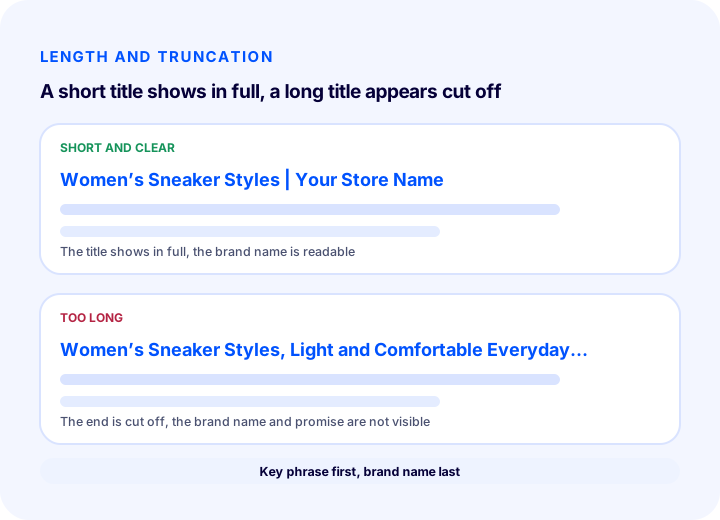
A title tag should be kept short enough so that as much as fits is shown in the search result; the part that exceeds the limit is cut off with an ellipsis. The limit is not a fixed number of characters but an area that depends on the width the letters take up and on the device.
That is why giving a single “this many characters” rule is misleading. Wide letters (like M, W) take up more space, narrow letters (like i, l) less. The same title may show in full on desktop but be shortened on a phone, and search engines may also change their layout over time. The solid approach is this: think of the title as a short sentence, put the most important phrase first and leave secondary parts such as the brand name at the end. That way, even if the title is cut off, neither the visitor nor the search engine loses the main meaning.
| Situation | What happens? | Solution |
|---|---|---|
| The title is too long | The end is cut off with an ellipsis, the brand name and valuable phrases are not visible | Move the key phrase to the front, drop unnecessary words |
| The title is too short | It doesn’t describe what the page is enough, the opportunity is wasted | Add the product type, model or benefit phrase |
| The title contains repetition | The same word written back to back doesn’t look natural | Write the keyword once, naturally |
| Many separators and symbols | The title looks scattered and untrustworthy | Use a single separator, avoid symbols |
Where Does the Keyword Go in the Title Tag?
The keyword is written in the title tag as close to the start as possible and as part of a natural sentence. The page’s main searched phrase appears once in the title; it is not repeated or lined up in a forced way.
There are two reasons to place it near the start. First, even if the title is truncated, the searched phrase stays visible. Second, when visitors see the phrase they searched for at a glance in the title, they take the result as an answer to their own question. To choose this phrase, you can follow the method in the e-ticarette anahtar kelime analizi nedir guide: one main phrase per page, plus a few supporting words close to that phrase.
1. Give each page one main phrase
When a page tries to target several different topics, the title becomes blurry too. Give the page a single intent: the “white sneakers” page targets that, the “women’s sneaker models” page targets the other. Targeting the same phrase on two different pages makes your pages compete with each other.
2. Write it the way people search
If customers search for “sneakers,” do not use a phrase you made up yourself, such as “athletic footwear,” in the title. Use the word your customer uses; keep your own internal naming out of the title.
3. Choose the supporting word
A short word that adds to the page’s value can be placed next to the main phrase: “models,” “varieties,” “prices,” “guide.” This word must reflect what the page actually offers; writing “prices” on a page without a price list defeats the expectation.
4. Do not overstuff
Titles that look like a comma-separated keyword list, with the same word lined up repeatedly, are both hard to read and untrustworthy. A title should read like a sentence or a short phrase.
We recommend readingWhat Is an Open Graph Tag?Where Does the Brand Name Go in the Title Tag?
The brand name usually sits at the end of the title tag, separated by a delimiter. That way the page’s main topic stays up front, and your store’s name appears consistently in every result.
On the home page this order can be reversed: since visitors are searching for the brand on this page, the brand name comes first, followed by a short description. On inner pages, write the topic first, then the brand. Choose a single separator and use the same one across the whole site. If the brand name takes up most of the title, shorten it; write the name your customer recognizes, not the full legal name.
| Option | Example format | When is it suitable? |
|---|---|---|
| Topic first, brand last | White Sneaker Models | Your Store Name | On inner pages such as product, category and blog |
| Brand first, description last | Your Store Name | Sneakers for Sport and Everyday | On the home page |
| Without brand | White Sneaker Models | If the title is already long and the brand name will be cut off |
Using the brand name in the same place and with the same spelling on every page ensures consistency. Writing “Your Store Name” on one page, “YourStoreName” on another and an abbreviated version on a third looks untidy and makes the brand harder to recognize.
What Should Title Tag Patterns Look Like by Page Type?
The title tag pattern changes with the page type: a product page highlights the product name and a distinguishing feature, a category page the category name and its benefit, a blog post a question or a promise, and the home page the brand and what you sell. Building one pattern for each type is the foundation for writing the titles of thousands of pages correctly in one go.
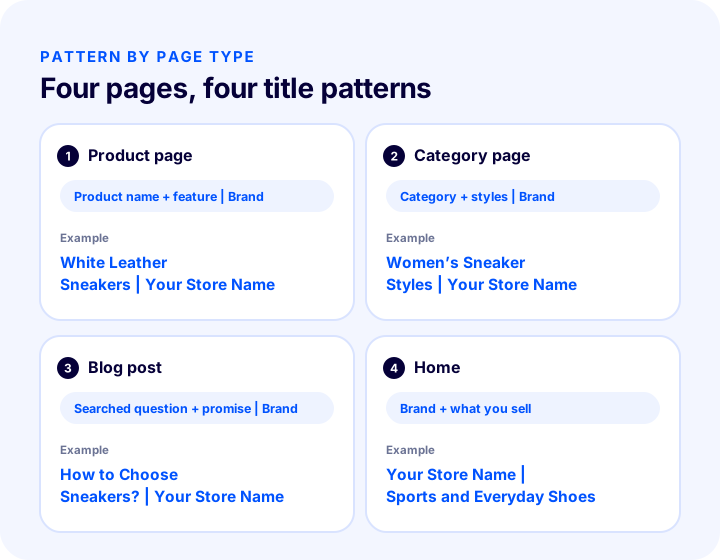
| Page type | Pattern | Example |
|---|---|---|
| Product page | Product name + distinguishing feature | Brand | White Leather Sneakers, Lightweight Sole | Your Store Name |
| Category page | Category name + models or varieties | Brand | Women’s Sneaker Styles | Your Store Name |
| Blog post | Searched question or topic + short promise | Brand | How to Choose Sneakers? The Right Size Guide | Your Store Name |
| Home | Brand + what you sell | Your Store Name | Sneakers for Sport and Everyday |
| Brand or collection | Brand or collection name + product type | Brand | Summer Collection Sandals and Slippers | Your Store Name |
| Info page | Page topic + short description | Brand | Return and Exchange Terms | Your Store Name |
Product page title tag
The product page is the type produced in the greatest numbers. The product name is often distinctive enough already; adding a feature to it (such as color, material, model or capacity) sets similar products apart. Instead of adding the same word to all of them, choose a feature in which the product genuinely differs. You can find how to build the rest of the product page in the e-commerce product page guide.
Category page title tag
Category pages target general search phrases, so they are often the most valuable pages. Write the category name the way people naturally use it, then add a short word that reflects user intent, such as “models” or “varieties.” Keeping the titles of filter and sort pages tied to the main category title, instead of writing them separately, prevents the duplicate title problem. For more, see the post on category page SEO.
Blog post title tag
In blog posts, the title is often the searched question itself. Put the question first, then briefly say what the post will deliver. The post’s H1 can be long and descriptive; the title is written shorter and so that it shows in full on the results page.
Home page title tag
The home page title should carry both the brand and what you sell. Empty titles such as “Home” or just the brand name waste this opportunity. If your store is published in more than one language, each language’s home page should carry a title written in its own language; to link the language versions to each other, see the guide on what the hreflang tag is.
We recommend readingHow to Do Category Page SEO?What Is the Duplicate Title Tag Problem and How Do You Fix It?
The duplicate title problem is when several pages carry the same title. In e-commerce it mostly arises because the pattern falls short, because the automatically generated title contains no distinguishing field, or because the same content lives at more than one address.
Pages with the same title replace one another in search results, it becomes unclear which one will be shown, and the visitor cannot tell these pages apart in the results list. An identical title is often also a sign of content similarity between pages; that is why the duplicate title report doubles as a structure audit.
| Reason | Example | Solution |
|---|---|---|
| The pattern has no distinguishing field | All products carry the title “Product | Brand” | Add the product name and a feature to the pattern |
| Same title across pagination | All pages of a category share the same title | Add the page number to the title or manage it separately |
| Filter and sort addresses | The same category opens with different parameters | Declare the main address with canonical |
| Variation pages | Each color at a separate address, with the same title | Add the color or size as a distinguishing term, or consolidate on a single product page |
| Default title forgotten | New pages come out as “Untitled” or with the site name | Fill in the default template and check it for new pages |
For pagination and parameterized addresses, the canonical matters along with the title. We explained how the two work together in the posts what the canonical tag is and what pagination SEO is. Making the title different is not always the solution: if two addresses are genuinely the same page, consolidating them on a single address, or redirecting if needed, is more correct than changing the title.
How Do You Bulk-Update the Title Tags of Thousands of Pages?
The titles of thousands of pages are not written by hand one by one; a pattern is built for each page type, the pattern is fed with fields such as product name and category name, and then the important pages are reviewed by hand. A bulk update is fast, but it also makes mistakes in bulk, so it is first tried on a small sample.
- Take stock of the current state. List the titles of all pages; flag those that are empty, too long, too short or duplicated.
- Split the pages by type. Define separate patterns for product, category, brand, blog, info page and home page.
- Write the pattern. For each type, write which fields come in which order: product name, feature, category, brand name and so on.
- Try it on a small group. Apply the pattern to the products of one category and read the resulting titles with your own eyes; catch awkward combinations.
- Apply it to everything. Check the results through the report; make sure no new empty or duplicate titles appear.
- Fix the important pages by hand. Pages that get the most traffic or earn the most should not settle for the pattern but be written with care.
- Monitor. The effect of the change is not visible right away; wait until the search engine recrawls the pages and re-evaluates the signals, and keep watching the reports.
In a bulk update, also consider the possibility that fields used in templates, such as the product name, may come through empty. If a product’s feature has not been entered, the pattern can leave an empty separator or an odd combination in the title. Defining a fallback behavior for an empty field (for example, skipping that part) keeps the titles clean.
We recommend readingHow Should URL Structure Be?What Are Common Mistakes When Writing Title Tags?
The most common mistakes in the title tag are leaving the title empty or identical, stretching it too long, stuffing it with keywords, making promises that do not match the page, and putting the brand name first so that it pushes the topic back.
- Leaving the title empty. The search engine has to generate the title itself, and the result is often not what you want.
- Using the same title on all pages. Pages cannot be told apart from each other.
- Writing a keyword list. Words strung together with commas are hard to read.
- Writing in capital letters. A title in all caps does not catch the eye, looks off-putting and takes up more space.
- Putting a promise in the title that is not on the page. The visitor cannot find the promise they were given and leaves immediately.
- Putting the brand first. On inner pages the topic falls behind, and when the title is cut off the main meaning is lost.
- Using too many symbols and separators. The title looks cluttered and untrustworthy.
- Writing the title independently of the page content. When the H1 and the content say one thing while the title promises something else, it creates a contradiction.
- Mixed languages. In a multilingual store, part of the title may have been left in a different language; each version must be written in its own language.
The easiest way to tell whether a title is faulty is to read it like a visitor: if I saw this line in the results list, would I click, and would I understand what I will find? If the answer to both questions is “yes,” the title is largely correct.
Title Tag Checklist
Before publishing a page’s title tag, answer the following questions. If all are “yes,” the title is ready for use.
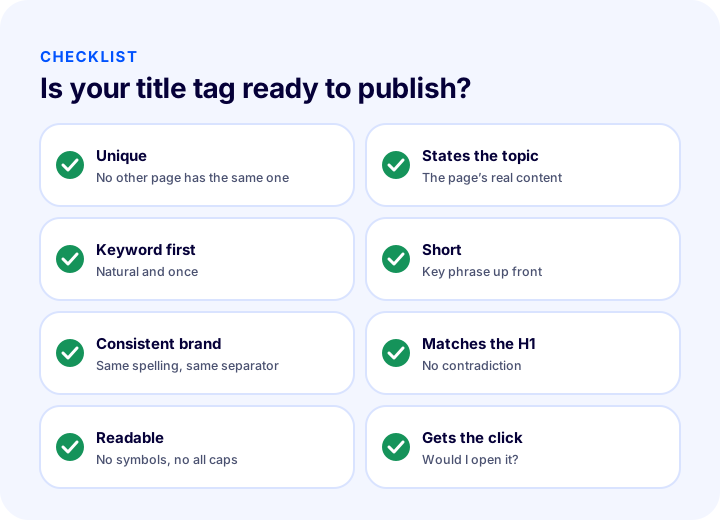
| Check | Question |
|---|---|
| Uniqueness | Is this title also used on another page? |
| Topic | Does the title state the page’s real topic? |
| Keyword | Does the main phrase appear in the title, near the start, and naturally? |
| Length | Is the title kept short, with the most important part first? |
| Brand | Is the brand name used consistently and mostly at the end? |
| Consistency | Does it avoid contradicting the H1 and page content? |
| Readability | Is there excessive use of symbols, capital letters or keyword repetition? |
| Click | If I saw it in the results, would I click? |
Title Tag Management with Faprika
In the Faprika e-commerce infrastructure, the general page title settings are among the store’s SEO settings. According to the SEO settings tutorial in the Help Center, in the control panel under Configuration, Settings, General Settings, the SEO section contains the “Default Page Title,” “Page Title Template” and “Page Title Separator” fields; these fields help you set up a consistent title format for the whole site. For products, a title and description can be entered per product using tags such as the product name in the “SEO Information” field in the Catalog, Product Management section.
The plan feature comparison includes rows such as “Bulk Automatic SEO/Meta Information Update,” “Canonical / H Tag Management / Robots / Sitemap” and “SEO Reports.” Which plan includes which SEO tools may vary by plan; for the current scope, see the e-commerce plans page. To set up SEO settings beyond the title and description together, take a look at the guides how to configure e-commerce SEO settings and, for address structure, how URL structure should be.
Frequently Asked Questions
What is a title tag?
A title tag is the HTML tag that defines a page’s title and is written in the head section of the page. It appears as the clickable title in search results and as the page name in the browser tab, and it is a strong signal that tells search engines what the page is about.
How to write a title tag?
Write the page’s main phrase close to the start as part of a natural sentence, keep it short, make sure it is different on every page, and add the brand name consistently, usually at the end with a separator. The title must match the page’s real content.
Should the title tag and the H1 be the same?
They don’t have to be identical, but they should describe the same topic. The title is the heading shown in search results and is kept short; the H1 is the main heading inside the page and can be written more freely. If the two contradict each other, it confuses both the visitor and the search engine.
How long should a title tag be?
There is no fixed number; the limit depends on the width the letters take up and on the device. Keep the title short, put the most important phrase first and leave secondary parts such as the brand name at the end; even if the title is cut off, the meaning is preserved.
Where should the brand name go in the title tag?
On inner pages it usually goes at the end, separated by a separator, while on the home page it goes at the start. Using the same spelling and the same separator across the whole site provides consistency; the brand name should not come before the topic.
How do you fix the duplicate title tag problem?
First find the cause: the pattern may lack distinguishing fields, or pagination or filter URLs may carry the same title. Add distinguishing fields such as the product name and feature to the pattern, and consolidate duplicate URLs of the same page at a single address with a canonical.