Contents 9 sections
- What Is Duplicate Content?
- Is Duplicate Content a Penalty?
- Why Does Duplicate Content Arise in E-Commerce?
- How Is Duplicate Content Detected?
- How Is Duplicate Content Fixed? Which Method When?
- How Do You Make a Product Description Unique?
- What Are Common Mistakes with Duplicate Content?
- Managing Duplicate Content with Faprika
- Frequently Asked Questions
Imagine you open a product page in your store and paste one sentence from its description into the search box. Alongside your own page, the results may show other stores carrying the same sentence, two or three different URLs of your own site, and perhaps the product's marketplace page as well. They all say the same text. The search engine has to decide which of these very similar pages to show, and the decision does not always land on the page you want.
In this guide we answer the question what is duplicate content in plain language: the definition, a balanced answer to “is it a penalty or a problem?”, the most common causes of duplicate content in e-commerce (variant products, filter and sort URLs, manufacturer descriptions, www and http versions, pagination, print versions, multilingual and multi-marketplace copies), ways to detect it, a table that helps you choose the right fix for your situation, and a practical way to make product descriptions unique. At the end you will find notes about Faprika and a six-question FAQ.
What Is Duplicate Content?
Duplicate content is the same or very similar text published at more than one URL. These URLs can be within the same site or on different sites; the copy can be word for word or differ by only a few words. It is also called “duplicated content” or “repeated content” in other terms; the technical English term is duplicate content.
There are two separate situations, and their fixes differ. Duplication within a site is your own site serving the same content at several URLs: a category URL with a sort parameter, a version with a trailing slash, a product that gets a separate URL for each color choice. Duplication across sites is the same text also appearing on another site or marketplace: dozens of stores using the description supplied by the manufacturer word for word is the most typical example.
Duplicate content is something far more everyday than the story of a “malicious competitor who copies you.” E-commerce platforms present product lists in many forms such as filters, sorting and pagination; each form can produce a separate URL. For this reason even a mid-sized store may be producing copies of its own content without noticing.
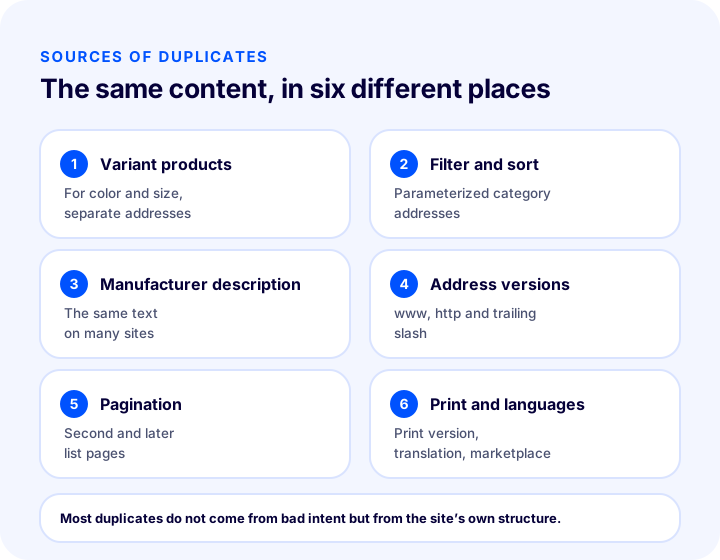
The diagram is the skeleton of this guide: each of the six sources is covered in its own section below. Let us start with the question people ask most.
Is Duplicate Content a Penalty?
In general, no: duplicate content on its own is not described as a reason for a “penalty.” The real problem is that when the same content sits in more than one place, the search engine decides for itself which page to show, and that decision may not be your preference.
It is best to avoid speaking with certainty here, because search engines' decisions cannot be seen in detail from the outside. The reasonable and generally accepted view is this: harmless copies that arise from your site's structure do not lead to a penalty in most cases, but they can lead to the following results:
- The wrong page stands out. A parameter-laden, ugly URL may appear in the results instead of the clean category URL.
- Value gets split. Links and interest signals pointing to the page are spread across several URLs; no single URL becomes strong enough on its own.
- Crawl budget is wasted. The search engine sets aside limited time to crawl your site. While busy with duplicate URLs, it may reach your new or important pages late.
- Reports get confusing. When the data of several URLs of the same page shows up separately, it becomes hard to read which page is really doing well or badly.
On the other hand, producing pages by copying content from other sites in bulk, or doing so with the aim of manipulating rankings, is a different matter and can count as a rule violation. This guide covers the harmless duplication that arises on its own in e-commerce sites; your aim should be to clean it up for clarity, not out of fear of a penalty.
Why Does Duplicate Content Arise in E-Commerce?
Duplicate content in e-commerce mostly comes from six sources: variant products, filter and sort URLs, manufacturer descriptions, URL versions (www, http, slash), pagination and print versions, and multilingual and multi-marketplace publishing. Each has its own fix; that is why you first need to identify the source correctly.
| Source | Example | Where is the copy? |
|---|---|---|
| Variant products | Color or size options of the same product | Within the site |
| Filter and sort addresses | Sort by price, filter by color | Within the site |
| Manufacturer descriptions | Using the text sent by the manufacturer word for word | With other sites |
| Address versions | with and without www, http and https, trailing slash | Within the site |
| Pagination and print | Second page, printable product page | Within the site |
| Multilingual and multi-marketplace publishing | The same text sitting in several languages or channels | Inside and outside the site |
1. Variant products
If a T-shirt comes in five colors or a phone case in three models, the platform may give each option a separate URL. The pages differ only in the color name or size label; the title, description and most images are the same. The search engine has to evaluate these pages one by one, and each of them ends up weak.
In most cases the right approach is to offer variants as options on a single product page. If a variant's own page genuinely carries search demand (for example, if people search for a specific model by name), that page needs unique text, unique images and its own title; otherwise the variant URLs should carry a canonical tag pointing to the main product page.
2. Filter and sort URLs
On a category page, choices such as “price ascending,” “newest,” “color: black” and “size: M” are mostly added to the URL as parameters. Every combination is a new URL, and the number of combinations multiplies quickly. As a result, a store working with a few hundred categories can easily produce tens of thousands of URLs, most of which are just the same products in a different order.
The goal here is not to stop visitors from using filters, but to tell the search engine which URL is the main one. A filter page that is useful to customers and genuinely searched for (such as “black sneakers”) can be treated as a separate page; the rest are marked with a canonical pointing to the main category URL. For the filter and search experience itself, see the product filtering and search bar optimization in e-commerce guide.
We recommend readingWhat Is a Canonical Tag? Duplicate Content, Standard URL and Correct Use3. Manufacturer descriptions
When every store selling a product receives the same description from the manufacturer, the same sentences are published on dozens of sites. This is the most common and least noticed form of duplication in e-commerce, because there is no technical error on your site; the problem is the text itself. Among sites carrying the same text, the search engine usually puts the strongest-looking site first. For a new and small store, this can mean staying in the background of the search results.
The fix is to make the text unique, at least for your important products. We explain how to do this step by step in a separate section below.
4. URL versions: www, http and trailing slash
If a site's home page opens at all of the following URLs, the same content is being published at several addresses: the www and non-www version, the http and https version, the version with and without a trailing slash, and a version written in capital letters. Each of them is technically a separate URL.
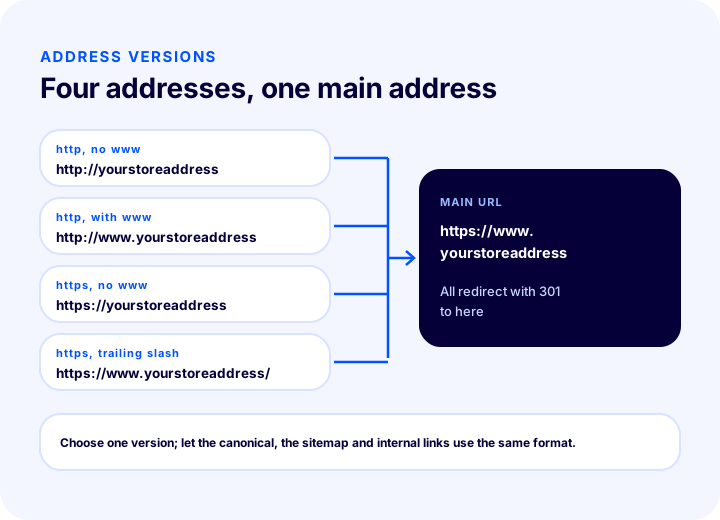
The fix here is clear: a single version is chosen (for example https with www), and all other versions are sent to it with a 301 redirect. The version is chosen once, and the same form is used everywhere on the site (canonical tags, sitemap, internal links). For redirect details see what is a 301 redirect, and for URL structure see how should a URL structure be.
5. Pagination and print versions
Long product lists are split across several pages: second page, third page… These pages are not exact copies of each other; each shows different products. But their titles, short category descriptions and template text can be similar. Treating pagination pages as duplicate content and pointing all of them to the first page can make it harder to discover the products on the second and later pages. The right approach is explained in the pagination SEO article: each page should show its own URL, and there should be a clear chain of links between the pages.
Print versions are a similar source. If a product page's “print” link serves the same content with a plain template at a separate URL, that URL is also a copy. Unless there is a real need, the print version should not be offered as a separate URL, or it should carry a canonical pointing to the main page.
6. Multilingual and multi-marketplace publishing
Publishing the same product in more than one language and using the same text on several sales channels can also lead to duplication. On a multilingual site, a translation is the same content in another language; you need to tell the search engine that these pages correspond to each other with the hreflang tag. Writing the translation from scratch, according to the search language of that market, also reduces the duplication problem altogether.
On marketplaces, it is common for the same description to also be used on your own site. The text may stay the same on the marketplace page, but making the page on your own site unique helps your brand become the “original source” for that product.
How to Detect Duplicate Content
To detect duplicate content, you need to review your site’s URLs, page titles and descriptions and find those that are identical or very similar. There are simple methods you can start with without needing an expensive tool.
- Sentence search. Type a sentence from your product description into the search box, in quotation marks. If other pages carrying the same sentence appear, there is duplication across sites.
- Try the address versions. Open your home page in www, non-www, http and https forms. If they all go to the same address, there is no problem; if each opens separately, a redirect is missing.
- Look for parameterized URLs. Add a sorting or filter parameter to the end of your category URL and check the canonical tag in the page source. Does the tag point to the original URL?
- Pull a list of titles and descriptions. Get the list of titles with a crawling tool or from your panel. Many pages carrying the same title are candidates for duplicate pages.
- Use search engine management tools. These tools show which URLs are indexed and which are excluded as “duplicate pages.” Seeing which URL the search engine chose as the original helps you tell whether it matches your preference.
- Scan on-site search and filters. If on-site search result pages and filter combinations are being indexed, a large number of thin, similar pages may have been created.
| Symptom | Likely cause | Where to look? |
|---|---|---|
| Many pages with the same title | Variant or filter URLs | Title list, canonical tag |
| Parameterized URLs appear in results | Canonical missing or conflicting | Page source, sitemap |
| Home page opens at multiple addresses | Address versions do not redirect | www and http test |
| Description also exists on other sites | Manufacturer text used verbatim | Sentence search |
| New pages are discovered late | Crawl budget goes to duplicate URLs | Crawl report, robots file |
How to Fix Duplicate Content: Which Method, When?
There are five basic fixes for duplicate content: the canonical tag, a 301 redirect, noindex, writing unique copy and merging pages. Which one to choose depends on whether the duplicate is useful to you and whether the page needs to stay open.
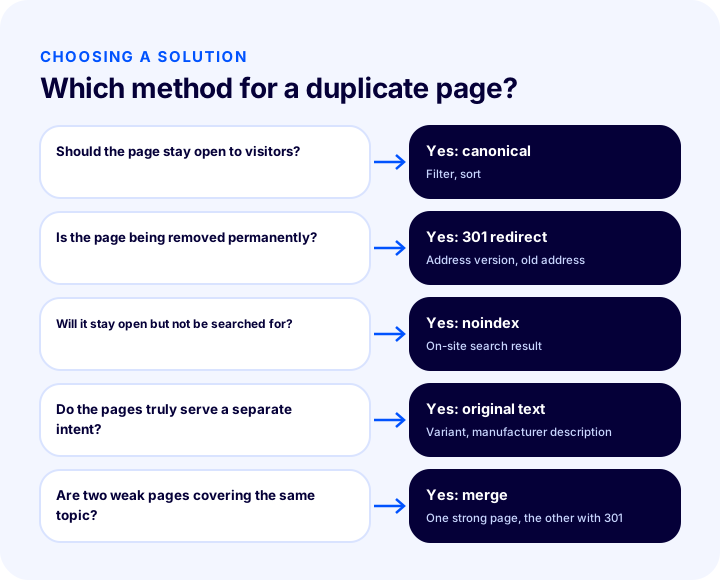
The flow in the diagram is also summarized in the table below, because seeing at a glance which fix suits which case speeds up the right decision.
| Situation | Solution | Why? |
|---|---|---|
| The duplicate page must stay open for visitors (filter, sorting, tracking parameter) | Canonical tag | The page works; the search engine learns the original URL |
| The duplicate page no longer needs to exist (old URL, URL version, removed product) | 301 redirect | Visitors and the search engine are sent permanently to the original page |
| The page must stay open but should not appear in search results (on-site search result, thank-you page) | noindex | The page is usable but not indexed |
| The pages answer separate intents but their texts are identical (variant, manufacturer description) | Write unique copy | Each page carries its own value |
| Two pages cover the same topic for the same audience; one is enough | Merge (with a redirect) | Value is consolidated in one strong page |
Canonical tag: if the duplicate stays open
The canonical tag keeps the duplicate URL open and tells the search engine the original URL. It is the most natural fix for filter, sorting, tracking-parameter and variant URLs. The tag is a strong hint, not a command; so your sitemap and internal links should also point to the same original URL. For detailed usage, see the guide on what a canonical tag is.
301 redirect: if the duplicate will be removed
If the duplicate page is no longer needed, a 301 redirect is the most definitive method: visitors and the search engine are sent permanently from the old URL to the new one. It suits URL versions (www, http), removed products and merged pages. Make sure redirect chains do not grow long and that the target page is genuinely suitable; instead of redirecting a removed product to an unrelated page, it makes more sense to redirect to the nearest category or a similar product.
noindex: if the page stays open but should not be searchable
Some pages are needed by users but have no place in search results: on-site search result pages, cart and checkout steps, thank-you pages. A noindex mark is applied to these. Mixing noindex and canonical on the same page creates a conflict; decide which to use according to the page’s purpose. robots.txt is also used to state which pages you do not want crawled, but this file is not a tool for removing pages from the index; the two are separate jobs.
Write unique copy: if the pages are truly separate
If the texts of two products or two categories are identical but the pages themselves answer a genuinely different search intent, the fix is not technical but editorial: writing each page its own copy. It takes the most effort but is the most lasting solution.
Merge: if two pages are one topic
Two weak pages targeting the same keyword can compete with each other. Merging them into one strong page and redirecting the other to it with a 301 consolidates value in one place. When merging, take the best parts of both pages; instead of simply deleting one, enrich the content.
We recommend readingWhat Is a 301 Redirect?How to Make a Product Description Unique
Making a product description unique means retelling the product around your own customers’ questions instead of using the manufacturer’s text verbatim. The goal is not to swap words but to say something useful about the product that is not found in other sources.
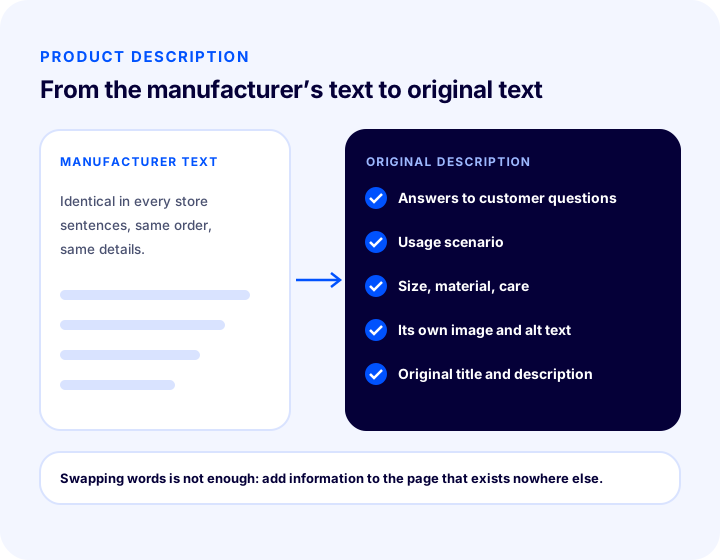
The headings below are content you can add to a unique product description:
- Answer customers’ questions. Collect the questions that come most often to customer service or in messages. Answers to questions like “Which devices is this product compatible with?”, “How many people is it for?” and “Is it washable?” are the most solid source of unique content.
- Describe a usage scenario. Explain with a concrete example who the product benefits, in what situation and how.
- Write the size, material and care information. Instead of copying technical details verbatim from the manufacturer’s catalog, give them from your own measurements and in your own sentences.
- Use your own images. Original photos and descriptive alt text are as important a sign of originality as the copy; the guides on product image optimization and image alt text cover this topic in detail.
- Make the title and meta description unique too. The page title and description are also the page’s identity; producing hundreds of pages with the same pattern creates a new source of similarity between titles. The guide on how to write a meta description will help here.
| Weak approach | Strong approach |
|---|---|
| Pasting the manufacturer’s text verbatim | Retelling the product in your own customer’s language |
| Swapping words for synonyms | Adding new information, examples and answers |
| The same template sentences on every product | Product-specific detail and usage scenario |
| Stock images only | Images you shot yourself and descriptive alt text |
| Copying the same variant text to every color | A single product page, with options separate or a variant page with unique copy |
The most important trap in making content unique is applying the same template to thousands of products, changing only the product name. Even to the reader they all look like the same text; the same is true for search engines. Instead, emphasize what is genuinely different about the product (who it suits, how it is used, what to watch out for).
What Are Common Mistakes with Duplicate Content?
Common mistakes with duplicate content mostly stem from choosing the wrong fix or from signals that contradict one another.
- Blocking all filter URLs with the robots file. A blocked page is not crawled; the search engine cannot see the canonical tag on the page either. Both blocking duplicate URLs and linking them to the original page with a canonical is contradictory.
- Pointing the canonical to an unrelated page. If two quite different pages point to the same URL, the search engine may ignore the tag.
- Keeping duplicate URLs in the sitemap. The sitemap is a list of original URLs; parameterized or redirected URLs should not be in it.
- Pointing internal links to different versions. Using the www address in the menu and the non-www address in content blurs signals, even if a redirect exists. For internal links, see the guide on what internal linking is.
- “Making text unique” only by swapping words. Text refreshed with synonyms still carries the same information; it offers the user nothing new.
- Deleting a removed product and leaving a 404. When a valuable product page is taken down, you need to redirect it to a suitable page or set up a proper 404 page.
- Stacking multiple fixes. Giving the same page noindex, canonical and a redirect all at once creates a conflict.
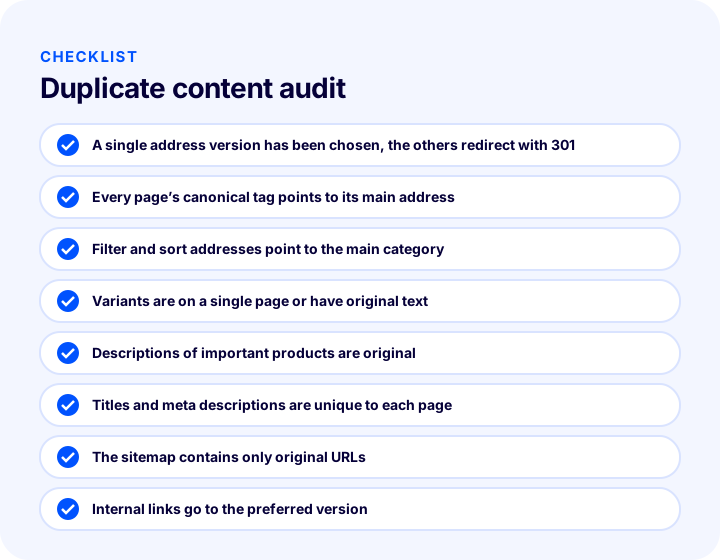
Duplicate content checklist
The list below is the text version of the items in the diagram; you can review your store in this order.
- The site has a single URL version (https and one preferred www form) and the others redirect to it with a 301.
- Every indexable page’s canonical tag points to its own original URL.
- URLs with filter, sorting and tracking parameters point to the original category URL or are not indexed.
- Variant products are consolidated on a single page or have their own unique copy.
- The descriptions of the most important products are unique and answer customer questions.
- Titles and meta descriptions are page-specific; they are not multiplied from template patterns.
- The sitemap contains only original URLs.
- Internal links always go to the preferred URL version.
- On multilingual pages, hreflang is correct; translations are written for each language’s search terms.
- Removed pages redirect to a suitable page.
Managing Duplicate Content with Faprika
The SEO settings in the Faprika control panel include several items that help reduce duplicate content. According to the SEO settings training in the Help Center, the SEO section under Configuration, Settings, General Settings has a “Canonical Url Active” option; this setting is used to specify unique page URLs and helps prevent content from being duplicated at different URLs. In the same section, consistent access to the www and non-www address versions is also handled through “Domain Name Check.”
The SEO information of product pages is edited per product under Catalog, Product Management. The same training describes the option to create SEO information with tags such as product name, stock code and price, and to generate product meta descriptions automatically; these tools save time, but remember that applying the same template to every product can produce similar titles and descriptions. Writing the title and description by hand for your most important products gives more unique results. The media settings training covers managing product images and is a starting point for using original images.
The plan feature comparison includes rows such as “Canonical / H Tag Management / Robots / Sitemap,” “301 / 302 / 410 Panel / Managing URL Records” and “Bulk Automatic SEO/Meta Information Update”; which management tools each plan includes may vary by plan, and for the current scope you can look at the e-commerce plans page. To set up SEO settings across the whole store together, the how to configure e-commerce SEO settings, and, for setting up a product page uniquely and strongly, the what an e-commerce product page should look like posts will help. To decide which keywords get their own page, the e-ticarette anahtar kelime analizi guide is a starting point.
Frequently Asked Questions
What is duplicate content?
Duplicate content is the same or very similar text published at more than one URL. It can occur within the same site (parameter URLs, variants, URL versions) or across different sites (using a manufacturer description verbatim). It makes it harder for the search engine to decide which page to show.
Is duplicate content a reason for a penalty?
In general, harmless copies that arise from a site's structure are not described as a reason for a penalty on their own. The real problems are that the search engine chooses the main page itself, link value gets split, and crawl budget is wasted. Mass copying from other sites or trying to manipulate rankings is a separate and more serious matter.
Where Does Duplicate Content Come From Most in E-Commerce?
The most common sources are variant products, filter and sort URLs, shared product descriptions taken from the manufacturer, URL versions such as www and http, pagination and print versions, and multilingual and multi-marketplace publishing. To see which one is the problem, first list your URLs and titles.
How is duplicate content fixed?
Use a canonical tag if the copy stays open, a 301 redirect if it is no longer needed, noindex if it stays open but should not be searched, unique text if the pages are genuinely different, and merging if two weak pages cover the same topic. Choosing only one fix per copy avoids conflicting signals.
Should I use canonical or 301?
If the duplicate URL stays open for visitors (filter, sort, tracking parameter), use canonical; if the URL is going away permanently or is just a URL version (www, http), use 301. A 301 is a definitive redirect; canonical is a strong hint.
Can I use the manufacturer description?
You can, but if many stores use the same text, your page may struggle to stand out. First make the descriptions of your best-selling and most-viewed products unique, based on customer questions, use cases, size and care information; add the rest over time.