

Contents 12 sections
- What Is the Hreflang Tag?
- Why Is Hreflang Important?
- How Are Hreflang Codes Written? Language and Country Codes
- What Are the Reciprocal Linking and Self-Reference Rules?
- How Do You Add Hreflang? Three Methods
- How Do You Use Hreflang and Canonical Together?
- Do a Language Switcher and Automatic Translation Replace Hreflang?
- How Do You Set Up Hreflang for Country and Currency Pages?
- What Are Common Hreflang Mistakes?
- Is Hreflang Working Correctly? How to Check and Measure It
- Multilingual, Multi-Country Selling with Faprika
- Frequently Asked Questions
You publish your store in three languages: Turkish, English and German. But a customer searching from Germany sees the Turkish page, while a customer coming from the United Kingdom lands on the German page. You did the translation and the work, yet the search engine does not know which page belongs to which visitor. It may even take the three language pages of the same product for copies of each other and push one forward.
In this guide we answer the question what is hreflang in plain language: what the tag does, how language and country codes are written, the reciprocal linking and self-reference rule, use together with canonical, declaration through the sitemap, its relationship with the language switcher and automatic translation, pages split by country and currency, common mistakes and measurement. At the end you will find how a multilingual setup is built with Faprika and a six-question FAQ.
What Is the Hreflang Tag?
The hreflang tag is a signal that states which language and country a page is prepared for and tells the search engine about the other language versions of the same page. It helps the search engine show visitors the page that fits their language and country.
Its name comes from combining “href” (link address) and “lang” (language). Its simplest form, added to the page’s head section, looks like this:
<link rel="alternate" hreflang="en-gb" href="https://magazaadresiniz/en-gb/sports-shoes">This line says: “This page has a counterpart prepared for English-speaking visitors in the United Kingdom, and its address is this.” The visitor does not see the tag, and nothing changes on the page. The one reading the tag is the search engine crawling the page.
An important detail: hreflang is not a redirect. It does not take the visitor to another page; it only gives a hint so that the right version is shown in search results. Even though this hint linking language versions to each other is a strong signal like the canonical tag, it is not a firm command. If the signals contradict each other, the search engine may make its own decision. That is why the consistency of the surrounding signals matters as much as the tag itself.
Why Is Hreflang Important?
Hreflang is important because, on a multilingual or multi-country e-commerce site, it supports search results that lead the visitor to the page in the right language and prevents translated pages from being mistaken for duplicate content.
- Right language, right customer: A visitor searching in German sees the German page; the chance of landing on the Turkish page and leaving the site decreases.
- Reduces duplicate content uncertainty: Two country versions of the same product (for example English pages for the United Kingdom and the United States) are very similar to each other. Without hreflang, the search engine may pick one and push the other into the background.
- Value is not scattered: When language versions are linked to each other, the pages are evaluated as siblings of a single product.
- Currency and campaign appear in the right place: The page priced in euros appears for visitors from Europe, the page priced in pounds for visitors from the United Kingdom.
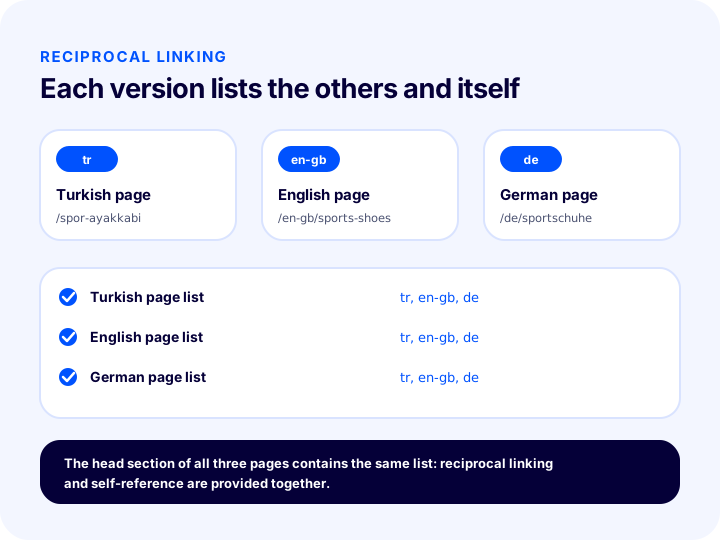
The illustration shows a product page in three languages. The Turkish, English and German versions each list the other two and themselves. Without this reciprocal structure, the search engine does not consider the link reliable; we cover this rule in detail in the following sections.
| Situation | Without hreflang | With hreflang |
|---|---|---|
| Search from Germany | The Turkish or English page may appear | The German version can be pushed forward |
| Pages in the same language for two countries | One may be treated as a copy and pushed back | Both count as prepared for their own country’s audience |
| Translated pages | Treated as independent addresses | Related as language versions of the same page |
How Are Hreflang Codes Written? Language and Country Codes
The hreflang value consists of a two-letter language code and, optionally, a two-letter country code; the two are joined with a hyphen. For example, de describes German only, while de-at describes German as used in Austria.
The language code is written in lowercase, and the country code can generally be written in lowercase or uppercase; choosing a single spelling on the site and using it everywhere prevents confusion. The order of the code also matters: language first, then country. Writing a country alone is not valid.
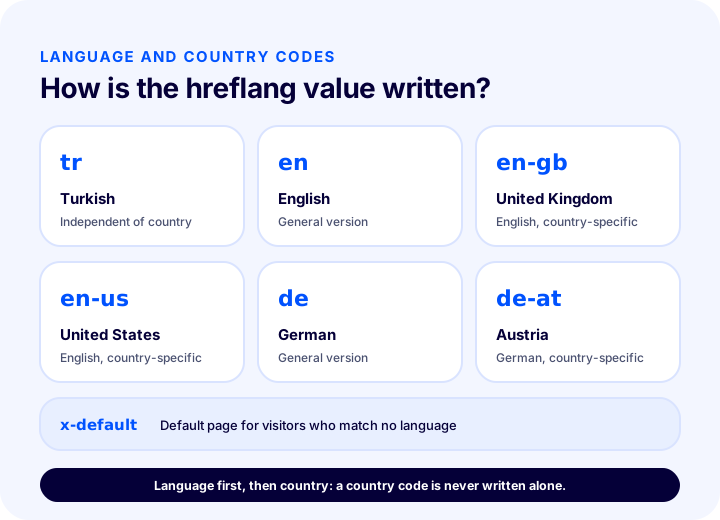
| Value | Meaning | When to use it? |
|---|---|---|
tr | Turkish | Turkish page independent of country |
en | English | If there is a single general English version |
en-gb | British English | If the English version is split by country |
en-us | American English | If there is a dollar-priced, United States-specific version |
de | German | A single version for German-speaking countries |
de-at | Austrian German | If there is Austria-specific pricing or shipping |
x-default | Default version | The page a visitor who matches no language is sent to |
Language only, or language and country?
If your pages are split by language, a language code alone is enough: tr, en, de. If you have opened separate pages for countries that speak the same language but see different prices, currencies, shipping or campaigns, language and country are written together: en-gb, en-us. Do not add the country unless necessary: writing the code in more detail than needed and leaving some countries uncovered makes management harder.
What is x-default?
x-default is a special value that specifies the default page for visitors who match none of the listed languages and countries. Usually the page with the language switcher or the version that appeals to the widest audience (for example the general English page) is chosen. It is not mandatory, but it is a safe route for visitors left outside the coverage, and it is written once per page group.
What Are the Reciprocal Linking and Self-Reference Rules?
The reciprocal linking rule means that if page A points to page B as a language version, page B must also point to page A. The self-reference rule means that every page also appears in its own list of language versions.
These two rules are the most frequently violated and most important aspect of hreflang. A one-way link is like someone claiming “this page is a translation of that one” without confirmation from the other side; the search engine may not trust the link and ignore it.
Example for a three-language product
Suppose a sneaker page exists in Turkish, UK English and German. All three pages contain the same four lines in their head section: three language versions and one default.
<link rel="alternate" hreflang="tr" href="https://magazaadresiniz/spor-ayakkabi">
<link rel="alternate" hreflang="en-gb" href="https://magazaadresiniz/en-gb/sports-shoes">
<link rel="alternate" hreflang="de" href="https://magazaadresiniz/de/sportschuhe">
<link rel="alternate" hreflang="x-default" href="https://magazaadresiniz/en-gb/sports-shoes">
Note that these four lines appear identically on the Turkish, English and German pages. The Turkish page lists its own address (the tr line), the English page its own (the en-gb line), and the German page its own (the de line). This provides both reciprocal linking and self-reference.
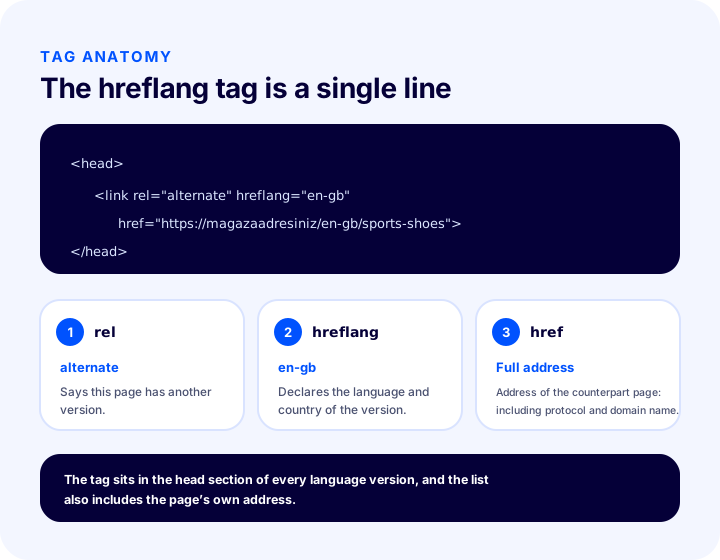
| Part | What to write? | Point to watch |
|---|---|---|
| rel field | alternate | The spelling must be exact; this field declares an alternate version of the page |
| hreflang field | Language or language-country code | Language first, then country; an invalid code invalidates the tag |
| href field | Full address of the matching page | Use an absolute address, including protocol and domain |
| Where | The page’s head section | A tag written in the body may be ignored |
How to Add Hreflang: Three Methods
Hreflang information can be provided in three ways: as tags in the head section of the page, in the page’s HTTP header, or in the sitemap. Using all three inconsistently at the same time creates conflicts; choosing a single method for each group of pages is the safest approach.
| Method | Where does it go? | When is it suitable? |
|---|---|---|
| Head tag | The head section of every page | When the page count is manageable and the template can generate the tag |
| Sitemap | Sitemap file | When there are many pages and many languages, to declare them without bloating page code |
| HTTP header | Header sent by the server | For non-HTML files (for example PDFs) |
Declaring Hreflang in the Sitemap
With many products and several languages, carrying dozens of lines in the head section of every page bloats the page. In a sitemap, each address can be written together with the list of its own language versions. The example below shows the three versions of a single product:
<url>
  <loc>https://magazaadresiniz/spor-ayakkabi</loc>
  <xhtml:link rel="alternate" hreflang="tr" href="https://magazaadresiniz/spor-ayakkabi"/>
  <xhtml:link rel="alternate" hreflang="en-gb" href="https://magazaadresiniz/en-gb/sports-shoes"/>
  <xhtml:link rel="alternate" hreflang="de" href="https://magazaadresiniz/de/sportschuhe"/>
</url>
Each version’s own url block carries the same list too; that is, three blocks for three versions, with the same three lines in each block. For what a sitemap is, how to set it up and when to update it, see our guide what is a sitemap.
How to Use Hreflang and Canonical Together
Hreflang and canonical complement each other: canonical points to a language version’s own address, while hreflang relates that version to the other language versions. On a multilingual site, every page carries a self-referencing canonical and links to neighboring language versions with hreflang.
The most common mistake is pointing the canonical tag of all language versions to the page in the main language (for example Turkish). Because this says “my real address is the Turkish page”, it prevents the translated pages from being indexed. The hreflang list may also be ignored because it contradicts the canonical.
<head>
  <link rel="canonical" href="https://magazaadresiniz/de/sportschuhe">
  <link rel="alternate" hreflang="tr" href="https://magazaadresiniz/spor-ayakkabi">
  <link rel="alternate" hreflang="en-gb" href="https://magazaadresiniz/en-gb/sports-shoes">
  <link rel="alternate" hreflang="de" href="https://magazaadresiniz/de/sportschuhe">
</head>
On the German page above, the canonical shows its own address and the hreflang list shows all versions. We explained the logic of the canonical tag in detail in our what is a canonical tag article; in short: canonical groups the duplicate addresses of the same page, while hreflang relates separate pages in different languages.
| Tag | What does it solve? | Example on a multilingual site |
|---|---|---|
| Canonical | Groups the duplicate addresses of the same content under one address | The German page’s parameterized addresses point to the main German page |
| Hreflang | Links different language versions to each other | The German page declares its Turkish and English counterparts |
| 301 redirect | Permanently moves the old address to the new one | When the language folder changes, the old address goes to the new one |
Do a Language Switcher and Automatic Translation Replace Hreflang?
No. A language switcher is an interface that lets visitors change language; hreflang is an invisible signal that tells search engines about language versions. They complement each other, but one does not replace the other.
If the language switcher works only as a dropdown or button and the language change is done by a script that does not change the address, search engines may never see the other language versions. Every language version must have its own address reachable via a link. Links in the language switcher should go to these addresses, and hreflang tags should point to the same addresses.
Automatic redirects and automatic translation
- Automatic redirection: Forcing visitors into another language based on their browser language or location can prevent search engines from crawling the other language versions. Suggesting a language to the visitor (with a suggestion banner) instead of redirecting is safer.
- Automatic translation: Pages produced by machine translation can still be linked with hreflang if they have real, reachable addresses. Translation quality is a separate matter: unreadable or meaningless translation is not fixed by hreflang.
- Browser translation: A translation done in the visitor’s own browser does not change your site’s address structure and does not replace hreflang.
How to Set Up Hreflang for Country and Currency Pages
If you publish separate pages in the same language for different countries, the hreflang value must carry both language and country. Because currency, shipping, promotions and legal information change by country, these pages are truly for different audiences.
For example, if there are two separate English pages for the United Kingdom and the United States, one gets en-gb and the other en-us. If there is also a general en version that does not specify a country, all three can be written together: visitors not specific to any country go to the general version.
| Scenario | Recommended hreflang values | Note |
|---|---|---|
| One page per language | tr, en, de | No country code needed |
| Same language, two countries, different prices | en-gb, en-us | The two pages must really be different |
| A visitor who matches none | x-default | A general version or a language selector page |
| Three German-speaking countries | de, de-at, de-ch | Only if truly separate pages exist |
It is also important to manage the language and currency decision for country pages from a single place. Price display and region settings are a separate topic of multi-country selling; in our how to do e-export guide we covered target market selection and sales setup.
Recommended readingWhat Is E-Export, How Do You Do E-Export?What Are the Common Mistakes in Hreflang?
The most common hreflang mistakes are one-way links, invalid codes, redirecting or error-returning addresses, missing self-reference, and links to noindex pages. Most errors stem less from the tag itself than from inconsistencies around it.
| Mistake | Why is it a problem? | Solution |
|---|---|---|
| One-way link | The link is ignored because the other page does not confirm it | Every version must list the others |
| Missing self-reference | The list stays incomplete and the relationship is not completed | Every page must also list its own address |
| Wrong or made-up code | The search engine does not understand the value | Use valid language and country codes; do not write the country alone |
| Redirecting address | If the target address goes elsewhere, a chain forms | Write the final address that opens directly with a 200 status code |
| Link to a noindex page | A page that will not be indexed gets mixed into the list | Only indexable pages should be listed |
| Conflict with canonical | If a translated page names another page as the original, the list is ignored | Every version should show its own address as canonical |
| Writing relative addresses | An address without a domain may be misinterpreted | Use full addresses with protocol and domain |
| Address stays the same when the language changes | If each language has no separate address, there is no separate page to tell apart | Give each language version its own address |
How do you catch redirecting and broken addresses?
Rather than opening the addresses written in the tags one by one, it is more practical to compare them with the address list from a site crawl. Every address written in hreflang must open directly, without redirecting or returning an error. If you changed an address, you need to set up a 301 redirect and update the tags with the new addresses; the redirect itself does not update hreflang automatically.
Recommended readingWhat Is Structured Data (Schema)?Is Hreflang Working Correctly? How to Check and Measure It
Whether hreflang works correctly is checked by viewing the tags in the page source, opening the addresses, and monitoring language and country errors in search engine reports. The effect is measured in search visibility in target countries and in the visitor numbers of the language pages.
- Check the page source: In every language version, find the lines containing
rel="alternate"andhreflang; the list must be the same on every page. - Test reciprocity: If page A points to B, look for A’s address in B’s source.
- Open the addresses: Every written address must open without a redirect.
- Compare with canonical: Every page’s canonical must be its own address.
- Check the report: If international targeting or language errors appear in the search engine’s site reports, fix the list.
- Be patient: Fixes are not reflected immediately; it can take a few weeks for pages to be recrawled and signals to be reevaluated.
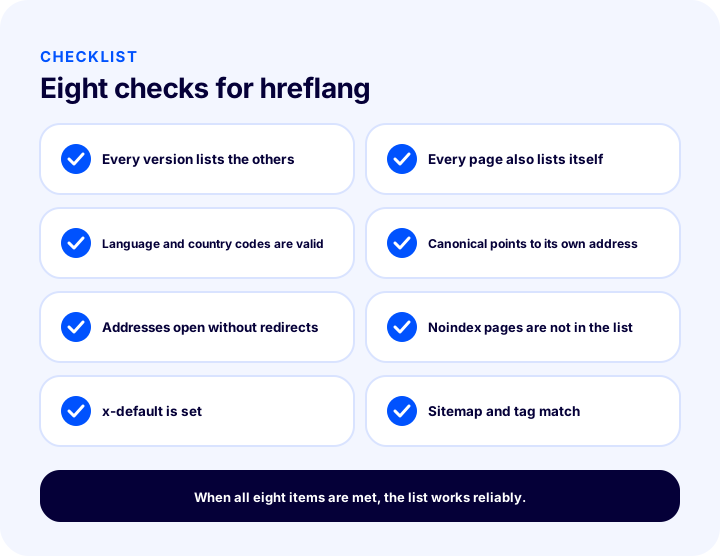
| # | Check | Why does it matter? |
|---|---|---|
| 1 | Every version lists the others (reciprocal) | A one-way link is ignored |
| 2 | Every page lists itself too | The list is complete |
| 3 | Language and country codes are valid | An invalid code is not understood |
| 4 | Canonical is its own address in every version | The translated page remains the main page |
| 5 | Written addresses open without redirects | No chains or errors |
| 6 | Noindex pages are not in the list | A page that will not be indexed is not listed |
| 7 | x-default selected | A safe page for out-of-scope visitors |
| 8 | Sitemap and tags give the same information | The methods do not conflict |
The most useful information in measurement is the country and language breakdown: look at which language pages searches and visitors from target countries land on. If most visitors from Germany land on the Turkish page, hreflang or the indexing of the language pages should be reviewed.
Multilingual and Multi-Country Selling with Faprika
As described on Faprika’s e-Export page, language-based SEO uses a separate title, description and address for each language, and pages are linked to each other with hreflang. This means that when you open a language version, giving search engines the right signals is handled by the infrastructure; still, it is a good habit to verify the results for each page in your store with the checklist above.
The e-Export group in the plan feature comparison contains rows such as “Unlimited Languages / Currencies”, “Country Price Multiplier System” (as a percentage or amount, by product and tax), “IP Country Detection Technology”, “Browser Country Detection Technology” and “Banner / Showcase Upload (with Language Options)”. These form the infrastructure for country-based pricing, country detection and language-based showcase management. Which plan includes these features may vary by plan; for the current scope, see the e-commerce plans page.
Showing visitors a page in their own language and currency completes inside the store what hreflang does on the search side: a visitor who arrives at the right page from a search result also sees the right price and showcase in the store. To look at the setup and launch of a multilingual site as a whole, our guide how to configure e-commerce SEO settings will also help. For choosing a target market and sales setup, see the article what is e-export.
Frequently Asked Questions
What is hreflang?
Hreflang is a signal that states which language and country a page is prepared for and tells the search engine about the other language versions of the same page. It is added to the page’s head section, the sitemap or the HTTP header, and helps show visitors the page in their own language.
What is hreflang used for?
On a multilingual or multi-country site, it helps show visitors the page that fits their language and country, prevents translated pages from being mistaken for copies of each other, and links language versions as siblings of a single page. It does not redirect; it only gives a hint.
How is the hreflang code written?
First the two-letter language code, optionally followed by a hyphen and a two-letter country code: for example tr, en, de, en-gb, de-at. Writing a country alone is not valid. For visitors who match no language, the x-default value is used.
Does hreflang have to be reciprocal?
Yes. If page A points to B as a language version, B must also point to A. Every page must also list its own address. One-way links may be considered unreliable and ignored.
Can hreflang and canonical be used together?
Yes, they complement each other. Each language version’s canonical tag should point to its own address, while hreflang links the versions to each other. Pointing the canonical of translated pages to the page in the main language is the most common mistake.
Does a language switcher replace hreflang?
No. The language switcher is for the visitor, hreflang is for the search engine. Every language version should have its own address, the links in the switcher should lead to those addresses, and the hreflang tags should point to the same addresses. Suggesting a language is safer than automatically sending the visitor to another one.