
Contents 17 sections
- What Is Product Review Management?
- Why Are Product Reviews Important?
- How Are Product Reviews Collected?
- How Are Reviews Moderated Before Publication?
- How to Reply to a Negative Review
- How Do Reviews Appear in Search Engines?
- How Do You Set Your Review Goal?
- How to Design the Review Area on the Product Page
- How to Set Up a Team and Process for Review Management
- Reviews on Your Own Site and Marketplace Reviews
- How Is Review Management Measured?
- What Can You Learn from Reviews?
- Review Management Audit
- Common Mistakes in Product Review Management
- Product Review Management Checklist
- Product Review Management with Faprika
- Frequently Asked Questions
A customer lands on a product page and likes the price and the photo, but before buying, they wonder the same thing: "What do people who bought this before think?" Without reviews, they have to build trust themselves, and often they do that at another store. The short answer to how to manage product reviews is this: collect customer reviews, check them before publishing, reply to them, and turn what you learn into product and service improvements.
In this guide we explain what product review management is, how to collect reviews, which ones to approve and which to reject, how to reply to a negative review and how to measure the result. Of the two tools in the article, one is for calculating your review goal, and the other is for auditing your review management.
What Is Product Review Management?
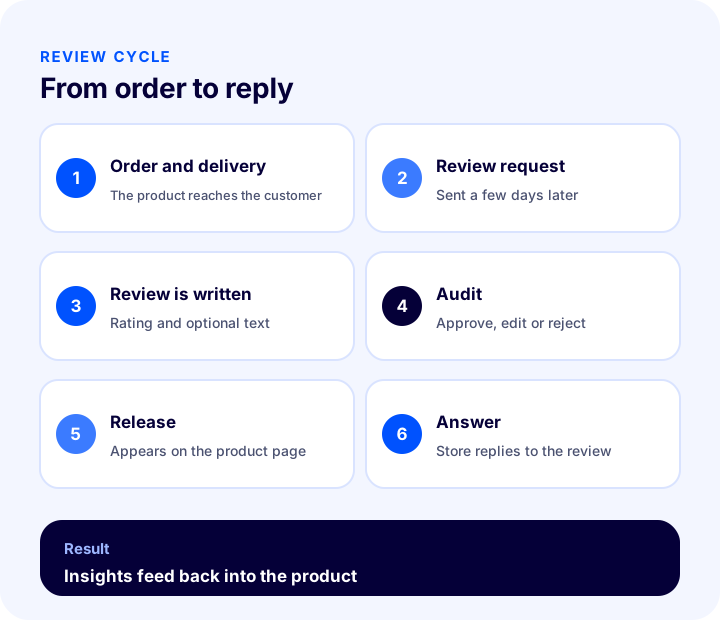
Product review management is keeping the whole process under control, from collecting and publishing the reviews and ratings customers leave on a product page to replying to and reporting on them. Management is not only displaying reviews; it is deciding which ones will be published, talking with the customer through the review and using the lesson that comes out of reviews.
Are Product Reviews, Product Questions and Store Reviews the Same Thing?
The three concepts are often mixed up, but they serve different functions. Knowing which to use where affects both page design and support load.
| Concept | What does it tell you? | Who writes it? |
|---|---|---|
| Product review | The experience and rating of the purchased product | The customer who uses the product |
| Product question | A question asked before buying, and its answer | A prospective customer; the store answers |
| Store review | Shipping, support and the overall shopping experience | The customer who placed the order |
Why Are Product Reviews Important?
The customer shops in an environment where they cannot hold the product. The photo and description come from the store; the review comes from another customer. That is why a review is one of the strongest trust signals in a purchase decision.
- Builds trust: Real user experience is more convincing than the store's own description.
- Eases the decision: Uncertainties such as size, dimensions and quality are cleared up by reviews.
- Reduces questions: If the answer is already in a review, the customer doesn't call the support line.
- Creates content: Reviews add unique, regular text to the product page, providing fresh content for search engines.
- Provides feedback: Recurring complaints show what is missing in the product or its description.
- Supports conversion: What moves a hesitant visitor closer to buying is the social proof effect.
How Are Product Reviews Collected?
Most customers don't write a review unless asked; even satisfied ones may skip it. Collecting reviews requires setting up a process.
1. Ask at the Right Time
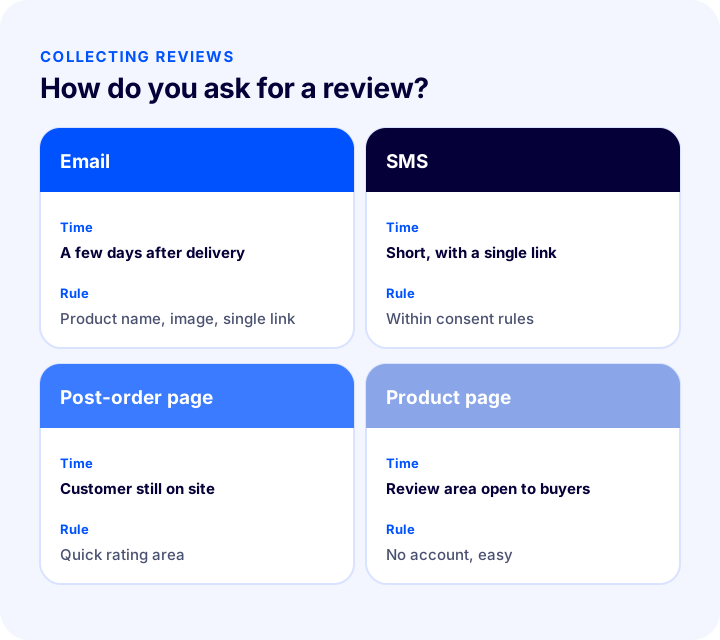
The review request should go out when the customer can use the product. A request sent right after the order goes unanswered because the product hasn't arrived yet. A request sent a few days after delivery, reaching a customer who has tried the product, gets a higher response. For products with a long usage period, this time is longer.
2. Make It Easy
If a customer has to create an account, fill in a long form or browse several pages to leave a review, they give up. The request should include the product's name, its image and a single link that goes straight to the review area. Giving a rating should be one tap, and writing text should be optional.
3. Choose the Right Channel
Email, SMS and a post-order page are three common channels. Your store's customers will determine which brings more responses; choosing one and tracking the result is better than using all three at once and overwhelming the customer. Pay attention to communication consent rules.
4. Encourage Reviews, Don't Steer Them
A small thank-you for a review (such as a coupon usable on the next purchase) is acceptable; but rewarding only those who leave positive reviews skews reviews and damages trust. The incentive should be independent of whether the review is positive or negative.
How Are Reviews Moderated Before Publication?
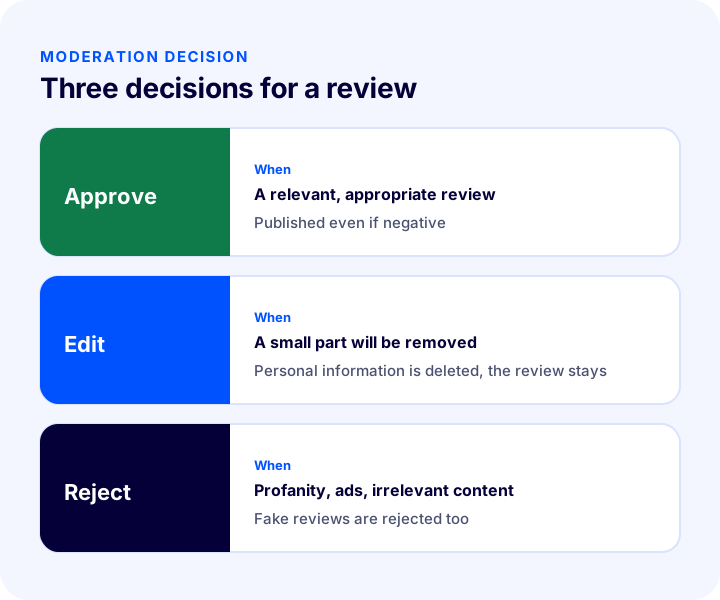
Publishing every review automatically works for some stores and is a risk for others. Being able to see reviews before publication prevents inappropriate content from staying on the page. Moderation involves three decisions: approve, edit or reject.
| Decision | When? | Example |
|---|---|---|
| Approve | If relevant and fitting, even if negative | "It ran small, order one size up." |
| Edit | If a small part of the review needs to be removed | Deleting a personal phone number |
| Reject | If it is profanity, an insult, content unrelated to the product, an ad or a fake review | An ad for another store |
Which Reviews Are Rejected?
- Profanity and insults: Expressions that target people, not the product.
- Personal data: A phone number, an address or another person's information; not published, for the sake of personal data protection.
- Ads and links: Content that promotes another store or site.
- Irrelevant content: Text with no connection to the product or the shopping experience.
- Shipping and support complaints: A logistics complaint written in a product review but unrelated to the product; handle it with the customer separately and don't carry it onto the product page.
How to Reply to a Negative Review
A reply to a negative review is addressed not only to that customer but to everyone who reads the page. Customers often look less at the review itself than at how the store behaves. A four-step reply template guides you here.
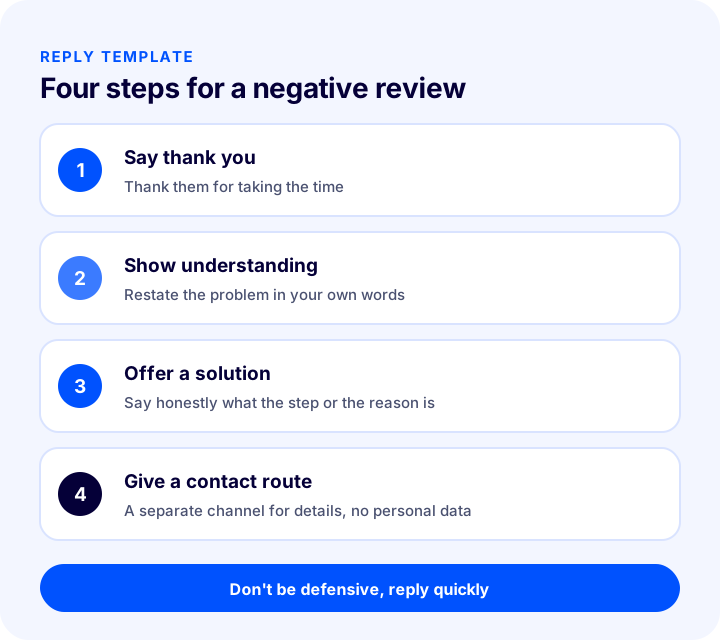
- Say thank you: Thank the customer who left the review for taking the time.
- Show you understand the situation: Briefly restate the problem in your own words; don't give the impression of a template reply.
- Offer a solution or step: Write how you will solve the problem or how you solved it; if that isn't possible, say honestly why.
- Give a contact route: Say where the detailed conversation will continue; don't ask for personal information in the review area.
What to Avoid When Replying
- Defensive language: Statements that blame the customer or show them to be wrong push everyone who reads them away from the store.
- The same template reply: Pasting the identical text under every review reads as indifference.
- A late reply: A reply given weeks later shows the problem wasn't taken seriously.
- Asking for personal data: Information such as order numbers and phone numbers should not be shared in the review area.
Writing a short thank-you to positive reviews as well strengthens the bond with the customer and shows the product page is alive.
We recommend readingWhat Is Customer Lifetime Value (CLV) and How Is It Calculated? (Calculator and Examples)How Do Reviews Appear in Search Engines?
Because reviews appear on the product page as unique, continually refreshed text, they contribute to search visibility. Phrases customers write in their own words can also include the forms in which the product is searched: "wide fit," "lightweight," "dishwasher safe."
- Reviews must be visible on the page: If reviews sit in a hidden window that opens only on click, their value decreases.
- Structured data: For the rating and review count to appear in search results, structured data markup is needed; it must be provided only with real reviews and consistent with the visible rating.
- No fake ratings: Writing a rating that isn't on the page into the markup violates the guidelines.
- Replies are content too: The store's replies carry additional information about the product.
How Do You Set Your Review Goal?
Once the review collection process is in place, the first question is "how many reviews will this bring?" If you know your monthly number of orders and your review rate, you can make the goal concrete. The tool below calculates the monthly number of reviews and the difference from your current rate and your target rate. The values are examples; enter your own store's figures.
What the tool shows is that even if the rate looks small, the number of reviews grows quickly as order volume rises. But the quality of reviews matters as much as their number; many reviews also bring a burden unless they are managed.
How to Design the Review Area on the Product Page
Even if reviews are collected, they are useless if presented badly on the page. If the customer is looking for the answer to their own question among hundreds of reviews, the area needs to make that easy.
- Rating summary at the top: The average rating and the number of reviews should appear near the product title.
- Rating distribution: A summary showing how many people gave how many stars is more reassuring than a single average.
- Sorting and filtering: Sorting options such as newest, highest rating and lowest rating, and filtering by rating, help the customer find what they are looking for.
- Photo reviews: A product photo added by the customer shows the real look of the product; however, uploaded images also need to be moderated.
- Showing replies: The store's reply should be readable right under the review.
- Readability on mobile: Review cards should fit on the phone, and long reviews should be shortened with "read more."
How to Set Up a Team and Process for Review Management
When review management is a job nobody owns, it gets done in the first weeks and then forgotten. Even a small store needs a process with a clear owner and written rules.
- Assign an owner: Make it clear who will moderate and answer reviews; have a backup for busy periods too.
- Write the rules: Put which reviews will be approved, edited and rejected into a short document so the team reaches the same decision.
- Set a reply-time target: Set a measurable target such as "respond to negative reviews quickly."
- Prepare reply templates: Write basic reply outlines for common complaint types; still personalize each reply to the review.
- Read the report regularly: Look at the review and rating report monthly and give feedback to the product and description teams.
Reviews on Your Own Site and Marketplace Reviews
If you sell on marketplaces, reviews are collected separately there and handled according to the marketplace's own rules. Reviews on your own site are entirely in your control: you set the publication rules, you write the reply, and the content lives on your page and contributes to your search visibility.
- Evaluate them separately: The reviews of the two channels are rated independently of each other; the rating on one does not automatically carry over to the other.
- Direct them to your own site: Draw customers who order from your own site to your own page for reviews.
- Share what you learn: Carry product information you learn from marketplace complaints into your own site's descriptions.
For communicating with customers on the marketplace side, see our post How to Manage Marketplace Customer Questions? A Guide to Quick Replies and Ready-Made Replies.
How Is Review Management Measured?
A few indicators describe the health of the review process. Tracking them regularly lets you catch problems before they grow.
| Indicator | What does it tell you? |
|---|---|
| Review rate | What share of orders result in a review |
| Average rating | The overall state of the product and its description |
| Number of reviews awaiting approval | How well the moderation process is keeping up |
| Reply time | How quickly the customer is responded to |
| Recurring complaint topics | Points to fix in the product or description |
What Can You Learn from Reviews?
Reviews are not just a shop window; they are free customer research. If hundreds of customers say the same thing, it needs to be solved on the product page or in the product itself.
- Size and measurement complaints: Show that a size chart or fit information should be added to the product page.
- Gap between expectation and reality: If the photo or description is misleading, reviews are the first to say so.
- Packaging and damage: Show where to fix the packaging or shipping process.
- Frequently asked questions: Questions that repeat in reviews are information to add to the product description.
- Liked features: The aspects customers praise are the messages to highlight in ads and the product title.
Review Management Audit
The tool below questions your review management with eight questions. Check the items that apply to you; the tool tells you how well established your process is.
Common Mistakes in Product Review Management
- Not asking for reviews: Waiting is not enough; most customers don't write a review unless asked.
- Asking at the wrong time: A request sent before the product arrives goes unanswered.
- Deleting negative reviews: Destroys credibility; the page looks unreal.
- Replying defensively: Everyone who reads the review looks at the reply.
- Leaving reviews unanswered: Gives the impression of indifference to the problem.
- Rewarding only positive reviews: Skews reviews and damages trust.
- Not learning from reviews: The same complaint repeats while the product or description never changes.
Product Review Management Checklist
| Title | To check |
|---|---|
| Field | Is there a review and rating area on the product page? |
| Request | Does the post-delivery review request go out automatically? |
| Ease | Is leaving a review one tap and accountless? |
| Audit | Are reviews moderated before publication? |
| Criterion | Is it written down what will be rejected? |
| Answer | Is there a reply template for negative reviews? |
| Period | Is reply time tracked? |
| SEO | Are reviews visible on the page and marked up? |
| Report | Is the rating and review report read regularly? |
| Improvement | Are recurring complaints reflected in the product and description? |
Product Review Management with Faprika
In Faprika, product reviews are managed from a single panel. Which feature is in which plan varies by plan; see the e-commerce plans page for details. There is also a Product Reviews Management training page for a step-by-step explanation.
- All reviews in one panel: In the Product Reviews area of the Catalog section, you list all reviewed products and reviews.
- Approve, reject, delete: You can approve, reject or delete reviews one by one or in bulk; a review that is not approved does not appear on the page.
- Approved and unapproved review management: You manage, according to your preference, whether reviews are moderated before publication or published directly.
- Editing review content: You can edit the title and review text; you can delete parts that need to be removed, such as personal information.
- Reply text: When you save your reply to a customer review, it appears under the review on the product page.
- Rating and user information: In the list you see the review, the rating, whether the reviewer is a member or a guest, the approval status and the date added.
- Search by date: You list the reviews made in a specific period by entering a start and end date.
- Rating and review report: You track your products' customer evaluations with the product rating and review report.
If you want to set up post-order communication to collect reviews, see our post How to Do SMS Marketing in E-commerce? A Guide to Consent, Message Writing, Timing and Measurement.
Frequently Asked Questions
How do you manage product reviews?
Product review management is collecting reviews, checking them before publication, approving or rejecting them, replying to them and reporting on them. Using the feedback from reviews to improve products and descriptions is also part of the process.
How do you encourage customers to write reviews?
The most effective way is to send a short request a few days after delivery that goes straight to the review area with the product name and image. Make leaving a review easy; if you need an incentive, offer it regardless of whether the review is positive or negative.
Should negative reviews be deleted?
No. As long as it relates to the product, a negative review should be published and answered. Only profanity, insults, personal data, ads and content unrelated to the product are rejected. A good reply to a negative review builds trust.
How do you reply to a negative review?
Say thank you, show that you understand the situation, offer a solution or next step, and give a contact route for a detailed conversation. Don't be defensive, don't paste the same template, and respond quickly.
Do product reviews help SEO?
Reviews add unique, continually refreshed text to the product page; customers' own words can also include the keywords people search for. Reviews need to be visible on the page, and structured data markup needs to match the actual rating.
How do you manage product reviews in Faprika?
All reviews are listed in the Product Reviews panel in the Catalog section; they can be approved, rejected or deleted one by one or in bulk. The reply text appears under the review on the product page, you can search by date, and the rating report is tracked. Which feature is in which plan varies by plan.
You May Also Like
- How Should an E-Commerce Product Page Look? 15 Elements of a Product Page That Sells
- How to Manage Marketplace Customer Questions? A Guide to Fast Replies and Ready-Made Answers
- What Is Customer Lifetime Value (CLV) and How Is It Calculated? (Calculator and Examples)
- What Is Cross-Selling? Cross-Sell vs Upsell, Matching Complementary Products, Checkout Offers and Cart Value, Revenue Calculator and Setup Audit