

Table of Contents 16 sections
- What Is an SSL Certificate?
- What Is the Difference Between SSL, TLS and HTTPS?
- What Is an SSL Certificate Used For?
- How Does an SSL Certificate Work?
- Why Is an SSL Certificate Essential for an E-Commerce Site?
- What Do Browsers Show on Sites Without SSL?
- What Are the SSL Certificate Types?
- Which Certificate Type Should I Choose?
- What Happens If an SSL Certificate Expires?
- What Is Mixed Content?
- What Should Be Done When Moving from HTTP to HTTPS?
- Does an SSL Certificate Make a Site Completely Secure?
- What Are Common SSL Certificate Mistakes?
- How Do I Know the SSL Certificate Is Working Correctly?
- Domain Name and SSL with Faprika
- Frequently Asked Questions
A customer enters your store, adds a product to the cart, moves to the payment page and sees a “Not secure” warning in the address bar. Most people close the page at that point. No matter how good the product or how fair the price, they do not want to type card details into a site that does not look secure. Behind this warning there is often a single missing piece: the SSL certificate.
In this guide we answer the question what is an SSL certificate in plain language: the difference between SSL, TLS and HTTPS, the encryption, authentication and integrity roles of the certificate, the logic of the handshake between browser and server, why it is indispensable for an e-commerce site, the domain-validated, organization-validated and extended-validation certificate types, the wildcard certificate, the consequences of an expired certificate, the mixed content problem and the checklist to follow when moving from HTTP to HTTPS. At the end you will find how domain names and SSL work with Faprika and a six-question FAQ.
What Is an SSL Certificate?
An SSL certificate is a digital document that verifies a website's identity and encrypts the connection between the visitor and the site. A site with a certificate has an address starting with https:// and shows a padlock icon in the browser address bar.
The certificate is a small data file installed on the server. It contains the site's domain name, information about the authority that issued the certificate, the validity dates and a public key used for encryption. The issuing authorities check that the domain really belongs to the applicant and confirm the certificate with their own signature. Browsers know in advance which authorities to trust; so a browser that sees an approved certificate accepts that the site is not fake.
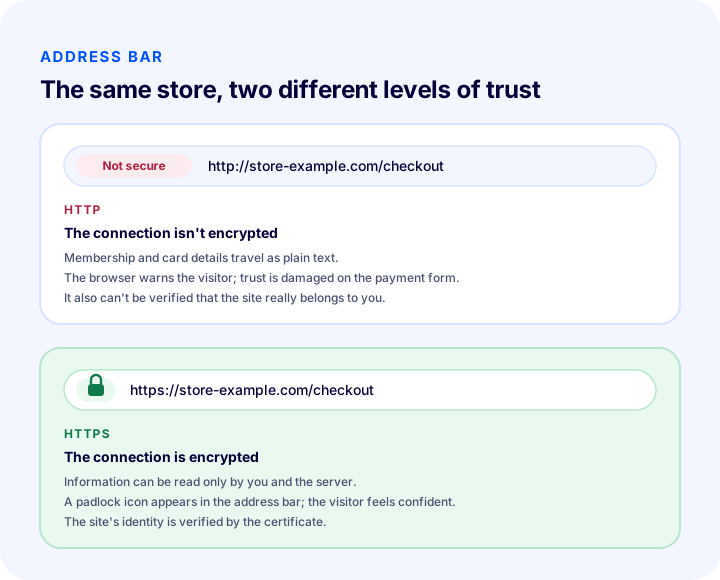
The illustration summarizes the difference visitors see. In the address at the top the connection is not encrypted and the browser says so; the address below has a padlock icon and the information is carried encrypted. Even if visitors do not know the word “SSL”, they notice this difference at a glance and decide accordingly.
What Is the Difference Between SSL, TLS and HTTPS?
SSL (Secure Sockets Layer) is the name of the first protocol developed for secure connections; TLS (Transport Layer Security) is its more secure successor in use today; HTTPS is the web address format that runs over this encrypted connection. The industry keeps saying “SSL” out of old habit, but the technology actually in use today is TLS.
| Concept | Full name | What does it mean? |
|---|---|---|
| SSL | Secure Sockets Layer | The first secure connection protocol; its name still lives on in “SSL certificate” |
| TLS | Transport Layer Security | The current protocol that replaced SSL; it is what actually does the encryption |
| HTTPS | HyperText Transfer Protocol Secure | The address format in which web pages are carried encrypted with TLS |
| HTTP | HyperText Transfer Protocol | The old address format that works in plain text, without encryption |
In practice, “getting an SSL certificate”, “getting a TLS certificate” and “moving the site to HTTPS” are different names for the same job. What you are looking for is a valid certificate installed for your domain and the site opening with https://.
What Is an SSL Certificate Used For?
An SSL certificate does three jobs: it encrypts the connection, verifies the site's identity and guarantees that the data carried has not changed along the way. These are the three pillars of a secure site.
1. Encryption
Encryption means making the information visitors send unreadable along the way. Name, email, address, password and card details are encrypted as they travel over the network; even if someone intercepts them, they cannot read anything meaningful. On an unencrypted connection the same information is carried as plain text.
2. Authentication
Authentication means proving that the site the visitor connects to really is the site it claims to be. The certificate is tied to the domain name and signed by an approved authority; a fake site cannot get a valid certificate for the same domain. This helps customers tell your own store from an imitation page.
3. Integrity
Integrity means guaranteeing that the data sent has not been altered along the way. On an encrypted connection, someone in the middle cannot inject ads or malicious code into the page or change the information in the order form; if a change is made, the connection breaks and the browser notices.
| Function | Question it answers | What it means in e-commerce |
|---|---|---|
| Encryption | Who can read the information on the way? | Membership, address and card details are protected |
| Identity verification | Is the site I'm connecting to real? | Customers don't confuse it with an imitation store |
| Integrity | Did the data change on the way? | Order and payment information arrives intact |
How Does an SSL Certificate Work?
An SSL certificate works by starting encrypted communication after a short verification and key agreement process between the browser and the server called a “handshake”. The process is invisible and completes in a fraction of a second.
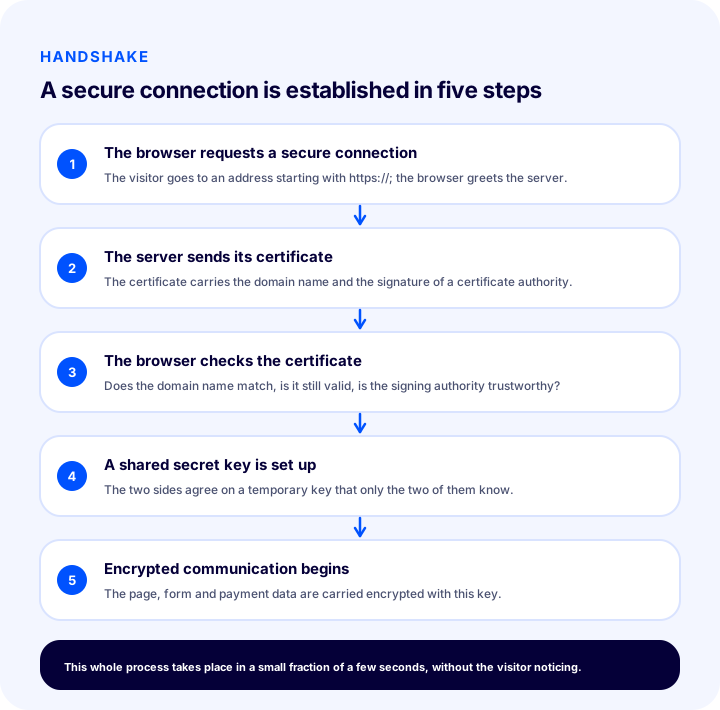
Think of the flow with an example. The visitor opens the store address with https://. The browser tells the server “I want to talk securely”. In response the server sends its certificate. The browser checks the certificate from three angles: is the domain name in the certificate the same as the address entered, is the validity period still running, and is the authority that signed it one the browser knows and trusts? If the check succeeds, the two sides agree on a temporary shared key that only they know. From then on, page content, forms and payment information are sent encrypted with this key.
| Step | Who does it? | What happens? |
|---|---|---|
| 1 | Browser | Requests a secure connection |
| 2 | Server | Sends its certificate |
| 3 | Browser | Checks the domain name, validity period and signature |
| 4 | The two sides | Set up a shared secret key |
| 5 | The two sides | Encrypted communication begins |
If any step of the check fails, the browser warns the visitor or does not open the page at all. A certificate that has expired, been issued for a different domain or been signed by an untrusted authority leads to a browser warning for this reason. Between this warning and the visitor there is usually a small button such as “continue anyway”; but a customer about to pay will not press that button.
Why Is an SSL Certificate Essential for an E-Commerce Site?
An SSL certificate is essential for an e-commerce site, because every page where you collect visitors' personal and payment information requires an encrypted connection. A store without a certificate loses both customer trust and search visibility.
- Protecting card and payment information. If the information typed on the payment page is carried without an encrypted connection, it can be read along the way. Payment infrastructures also expect a secure connection.
- Membership and password security. Login and registration forms carry name, email, phone and password. All of these require an encrypted connection.
- Visitor trust. The padlock icon shows visitors that the store is taken seriously. A visitor who sees a warning abandons the cart; the loss is reflected directly in sales.
- Search engine visibility. Search engines prefer secure sites; HTTPS is one of the ranking signals. If one of two sites with the same content has a certificate, the visibility advantage goes to that one.
- Avoiding browser warnings. Current browsers mark unencrypted pages as “not secure”; on pages containing forms this mark is more prominent.
- Legal and regulatory expectations. The obligation to protect personal data requires the data to be protected in transit as well; an encrypted connection is the foundation of this measure.
In short, the certificate in e-commerce is not an “add-on” but the first layer of the infrastructure. However strong a store's other security measures are, the first thing a visitor sees is the address bar.
We recommend readingHow Is Cybersecurity Ensured in E-Commerce?What Do Browsers Show on Sites Without SSL?
On a site with no certificate or a problematic one, browsers show a “Not secure” warning in the address bar; for serious certificate errors they show a full-screen warning page before opening the page. The wording and look of the warning vary by browser, but the meaning is the same: this connection is not trusted.
| Situation | What the visitor sees | Effect on sales |
|---|---|---|
| No certificate (http) | Not secure warning in the address bar | Abandonment rises on the payment page |
| Certificate valid (https) | Padlock icon, no warning | Full trust, the page opens normally |
| Certificate has expired | Full-screen connection not secure page | Visitors struggle to enter the site |
| Certificate belongs to a different domain | Domain name mismatch warning | Visitors may think the site is fake |
| Mixed content present | Padlock missing or shown with a warning | Trust is damaged, some elements may not load |
The last two rows of the table show two common causes of the complaint “I have a certificate but a warning appears”. Having a certificate is not enough; it must be for the right domain, have valid dates and work correctly on all pages.
What Are the SSL Certificate Types?
SSL certificates fall into three types by validation level: domain-validated, organization-validated and extended-validation. On a separate axis, there are single, multi-domain and wildcard certificates by the number of domain names they cover.
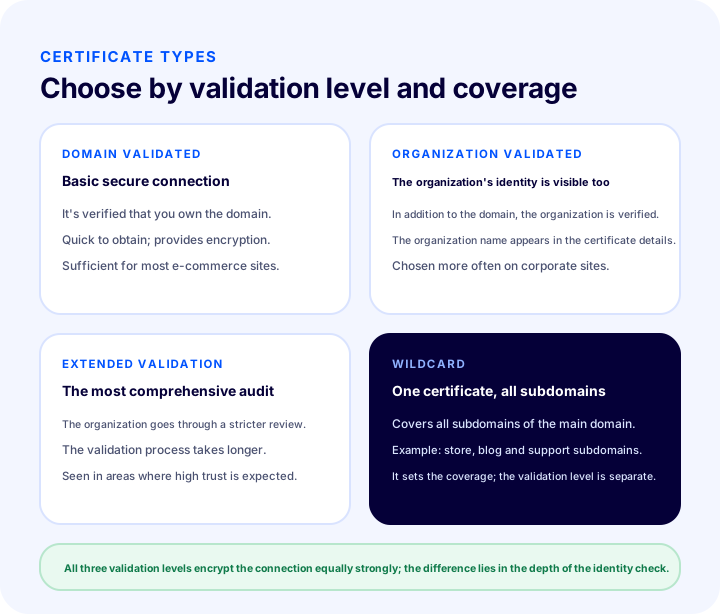
| Type | What does it verify? | Who is it suitable for? |
|---|---|---|
| Domain-validated | That the domain belongs to the applicant | Most e-commerce sites, blogs and corporate showcase sites |
| Organization-validated | The real existence of the organization, in addition to the domain | Companies that want their corporate identity to appear in the certificate |
| Extended-validation | The organization's verification under the strictest review | Financial and corporate areas where very high trust is expected |
| Wildcard | Covers the main domain and all subdomains | Sites that use multiple subdomains |
Domain-validated certificate
A domain-validated certificate only verifies that the domain is under the applicant's control. It encrypts the connection at full strength and shows the padlock icon. Validation is quick and sufficient for most stores.
Organization-validated certificate
An organization-validated certificate checks, in addition to the domain, that the applicant is a real, registered organization. The organization's name appears in the certificate details. When a visitor inspects the certificate, they can see the company behind the site.
Extended validation certificate
An extended validation certificate is the type that goes through the most thorough organization vetting. The validation process takes longer and requires more documents. It is preferred where very high trust is expected.
What is a wildcard certificate?
A wildcard certificate is a coverage type that protects all subdomains under the main domain with a single certificate. For example, instead of obtaining a separate certificate for each of the store, blog and support subdomains, one certificate that covers them all is used. Wildcard describes the scope; the validation level is a separate matter, and a wildcard certificate can also be domain-validated or organization-validated.
Which Certificate Type Should I Choose?
For most e-commerce sites, a domain-validated certificate is enough; if you want the organization's identity to appear in the certificate, choose an organization-validated one, and if you have many subdomains, consider a wildcard certificate. The decision depends on these three questions:
- How many domains and subdomains will you protect? If you only have a main domain, a single-domain certificate is enough; if you have several subdomains such as store, blog and support, a wildcard is easier.
- Should your organization's name appear in the certificate? If this matters, choose organization or extended validation.
- Who will install and renew the certificate? If your infrastructure sets up and manages the certificate for you, you don't have to deal with it. If you are on your own server, you need to keep track of the renewal schedule yourself.
The third question is usually the one given the least thought and the one that causes the most problems. The section below covers this topic.
What Happens If an SSL Certificate Expires?
If an SSL certificate expires, browsers no longer treat the site as secure and show visitors a full-screen warning; the store is effectively closed to customers. Certificates are not valid indefinitely; they are issued for a set period and must be renewed before it runs out.
When the term ends, the encryption is not technically broken, but identity verification becomes invalid. Because the browser cannot prove that the certificate is still valid, it treats the connection as insecure. Visitors see a full-screen warning and must take an extra step to continue to the site, and most customers do not take that step.
- Visitor loss: Visitors who see the warning page mostly turn back.
- Sales loss: If the expiry day coincides with a campaign or a busy period, the loss grows.
- Search visibility: If search engine crawlers meet a warning when accessing the site, crawling and ranking may be negatively affected.
- Loss of trust: Once a customer has seen the warning, they hesitate when coming back to the store.
What Is Mixed Content?
Mixed content is when some images, scripts or style files within a page opened over https are still loaded from an http address. Even though the page looks encrypted, these items arrive unencrypted, so the security chain is broken.
This is exactly why sites that have a certificate sometimes show a "missing padlock". When moving a site to HTTPS, the page itself moves to the new address, but the image or script links beginning with http:// written into old content stay where they are. The browser either blocks them or shows a warning; a blocked image looks broken, while a blocked script can break payment or cart functionality.
| Where does mixed content appear? | Symptom | Solution |
|---|---|---|
| Images in old product and blog texts | Broken image or missing padlock | Update image addresses to https |
| Scripts loaded from outside | Cart or form does not work | Use the https address of the script |
| Style files and fonts | Page layout breaks | Load all resources over https |
| Embedded videos and maps | The area appears empty | Renew the embed code with https |
| Internal links | Unnecessary redirect, slowdown | Make links directly https |
The easiest way to find mixed content is to open the site in the browser and look at the console section of the developer tools; every blocked resource is listed there. Then the problem addresses are replaced with https one by one.
Recommended readingWhy Does Site Speed Matter in E-Commerce?What Should Be Done When Moving from HTTP to HTTPS?
Moving from HTTP to HTTPS does not end with installing the certificate; old addresses must be redirected, canonical tags, the sitemap and internal links updated, and mixed content cleaned up. If these steps are skipped, the search engine sees the same page as two addresses and rankings get scattered.
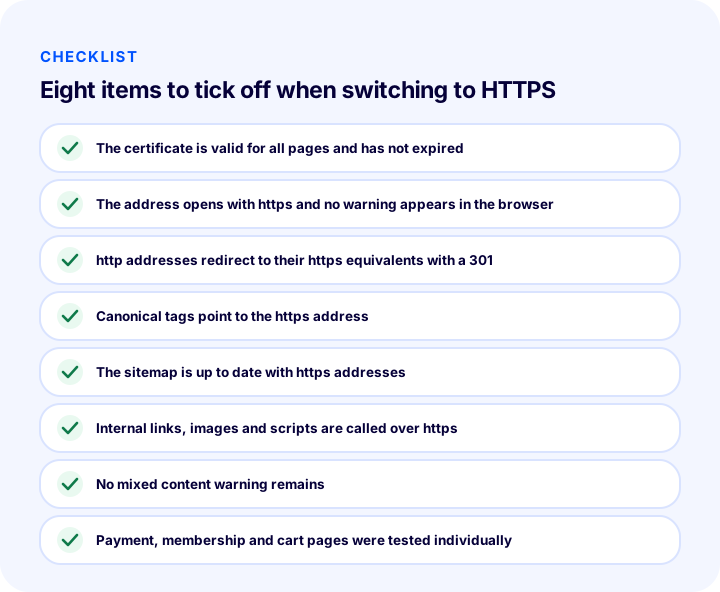
The eight items in the illustration are explained below in order.
1. Verify that the certificate is valid
The certificate must match your domain and subdomains, must not have expired, and must work without problems on all pages. Check the "www" version along with the main domain.
2. Check that the address opens over https
Open the home page and the category, product and checkout pages with https://; no warning should appear in the browser. If a page shows a warning, investigate the possibility of mixed content.
3. Redirect http addresses with 301
The old http:// address must be permanently (301) redirected to its https:// counterpart for the same page. That way both visitors and the search engine go to the secure address, and the value of the old address is passed on to the new one.
4. Update canonical tags
Each page's canonical tag must show the https address. If the tag points to the old http address, the search engine gets confused about which version is the main one.
5. Update the sitemap
All addresses in the sitemap must be in https form. Leaving old addresses in the sitemap makes the search engine crawl redirected addresses.
6. Update internal links, images and scripts
Call the links and resources in the menu, footer, product descriptions and blog posts directly over https. Relying on the redirect and leaving the old address creates unnecessary slowness.
7. Clean up mixed content
Using the table in the mixed content section, find and replace the remaining http calls. Keep checking until no blocked resource is left in the console.
8. Test the checkout, membership and cart pages separately
The most critical pages must be tested like a real customer: sign up, add a product to the cart, and go through to the payment step. These flows are what break most often after the move.
| Order | Check | What happens if it is skipped? |
|---|---|---|
| 1 | Certificate valid and not expired | Browser warning, visitor loss |
| 2 | Address opens over https | "Not secure" warning persists |
| 3 | http addresses redirect with 301 | The same page stays on two addresses |
| 4 | Canonical tags are https | The search engine gets confused about the main version |
| 5 | Sitemap is https | Old addresses keep being crawled |
| 6 | Internal links and resources are https | Unnecessary redirect and slowness |
| 7 | Mixed content is clean | Padlock missing, some items do not load |
| 8 | Checkout, membership and cart tested | The sales flow breaks without being noticed |
Does an SSL Certificate Make a Site Completely Secure?
No, an SSL certificate only protects the information in transit; it does not mean the site itself is secure. The certificate encrypts the connection, but it does not eliminate a server vulnerability, a weak password or malicious software.
This distinction matters, because the idea that "there is a padlock icon, so everything is fine" is widespread. A certificate is necessary for a secure store but not sufficient. Strong passwords, permission limits, regular backups, up-to-date software and checks against bots and fake memberships are the other layers to consider together with the certificate. The certificate protects the visitor on the way; other measures provide security inside the store.
| What does a certificate solve? | What does a certificate not solve? |
|---|---|
| Encrypting the connection | Weak or stolen passwords |
| Verifying the site's identity | Software vulnerabilities on the server |
| Preventing data from being altered in transit | Fake memberships and bot traffic |
| Removing the browser's "not secure" warning | Lack of backups |
What Are Common Mistakes with SSL Certificates?
Most SSL problems come not from the certificate itself but from details after installation. The most common ones are below, and all of them can be prevented in advance.
- Forgetting to renew. An expired certificate closes the store to visitors overnight. The renewal date should be in the calendar, or the infrastructure should handle it automatically.
- Skipping the "www" version. If the certificate covers only one address version, a warning appears on the other. Make sure both versions are covered.
- Not setting up the redirect. If the old http address does not redirect to https, the same page lives at two addresses and the search engine splits the value.
- Not updating canonical tags and the sitemap. The page may have moved to https, but the tags and the map may still point to the old address.
- Not noticing mixed content. While the home page looks clean, an image in an old product description can break the padlock. Test several different page types.
- Protecting only the checkout page. The certificate must cover the entire site; membership, cart and search forms also carry information.
- Getting a certificate for the wrong domain. A certificate obtained for a misspelled or different subdomain triggers a domain name mismatch warning.
- Ignoring the warning and saying "it works anyway". You may be able to continue to the site on your own device; a customer will not make the same decision.
The common remedy for these mistakes is a habit of regular checking: review the certificate date, the address versions, the redirect and a few different page types at set intervals through a visitor's eyes.
How Do I Know the SSL Certificate Is Working Correctly?
To tell that an SSL certificate is working correctly, it is enough to open the site over https and confirm that the padlock icon appears in the address bar without a warning, that your domain and the validity date are correct in the certificate details, and that the http address redirects to https.
- Open the address over https. No warning should appear and the padlock icon should be visible.
- Click the padlock icon. See that the connection is secure and that the certificate was issued to your domain.
- Check the validity date. Note whether the expiry date is getting close.
- Try the http address. Type the address with
http://; it should automatically go to the https version. - Try the www and non-www versions. Both should open without a warning.
- Browse different page types. The padlock should not go missing on product, category, blog, cart and checkout pages.
- Try on another device and network. Also open it from a phone over a mobile connection and see the same result.
If you have just made your domain records, run these checks after waiting for the DNS change to propagate; it is normal for some visitors to reach the old server until propagation finishes. You can find how domain records are managed in the What is DNS guide.
Domain and SSL with Faprika
In the Faprika e-commerce infrastructure, you connect your own domain to your store and the SSL certificate is set up automatically. So you do not need to run a separate technical process for certificate application, installation and renewal.
The feature comparison of the plans includes an "SSL Security Certificate" row; to see its scope by plan, you can look at the e-commerce plans page. For choosing a domain, the how to choose a domain name guide, and for redirecting old addresses after connecting, the 301 redirect guide will help. The certificate protects only the information in transit; for the store's other security layers, e-ticaret sitesi güvenlik sistemleri article.
Frequently Asked Questions
What is an SSL certificate?
An SSL certificate is a digital document that verifies a website's identity and encrypts the connection between the visitor and the site. A site with a certificate has an address starting with https and shows a padlock icon in the browser.
Are SSL and HTTPS the same thing?
No, but they are connected. SSL (today effectively TLS) is the encryption protocol, and the certificate is used for this protocol; HTTPS is the web address format that runs over this encrypted connection. Once the certificate is installed, the site opens with https.
Is an SSL certificate required on an e-commerce site?
In practice, yes. Every e-commerce site that collects membership, address and payment information needs an encrypted connection; on a site without a certificate the browser shows a "not secure" warning, visitors abandon the cart, and search engines prefer secure sites.
Which SSL certificate type should I choose?
For most e-commerce sites, a domain-validated certificate is enough. If you want the organization's name to appear in the certificate, consider an organization- or extended-validation certificate, and if you have many subdomains, a wildcard certificate. All three validation levels encrypt the connection with the same strength.
What happens if an SSL certificate expires?
Browsers no longer consider the site secure and show visitors a full-screen warning; the store is effectively closed to customers. That is why the certificate should be renewed before it expires, or renewal should be handled automatically by the infrastructure.
What should I watch out for when moving from HTTP to HTTPS?
Verify that the certificate is installed correctly, redirect http addresses to their https equivalents with a 301, update canonical tags and the sitemap with https addresses, switch internal links and resources to https, and clean up mixed content. Finally, test the payment, membership and cart flows like a real customer.