
Contents 10 sections
- What Is Crawl Budget?
- How Do Search Engine Bots Crawl a Site?
- Who Needs to Care About Crawl Budget?
- In E-Commerce, What Uses Up Crawl Budget?
- How to Detect a Crawl Budget Problem
- How to Optimize Crawl Budget
- What Are Common Mistakes in Crawl Budget Optimization?
- Crawl Budget Checklist
- Crawl Management with Faprika
- Frequently Asked Questions
Imagine you added a new collection to your store yesterday and published hundreds of products. Days go by, and most of these products still do not show up in search results. Most of the time the culprit is neither content quality nor competition; the search engine’s bot is spending its time on your site among filter combinations, sorting options and old URLs without ever reaching your products. This guide is about exactly that: what crawl budget is, when it becomes a real problem and how to manage it on an e-commerce site.
In this guide, we first explain how bots crawl a site, the two components of crawl budget and who it matters for. Then you will find the six sources that use up the budget in e-commerce, ways to detect them with server logs and crawl reports, the solution tools (robots.txt, canonical, redirects, sitemap, internal links, speed), common mistakes and a checklist. A balanced answer to the question “Does this matter for my small site?” is also included in the text.
What Is Crawl Budget?
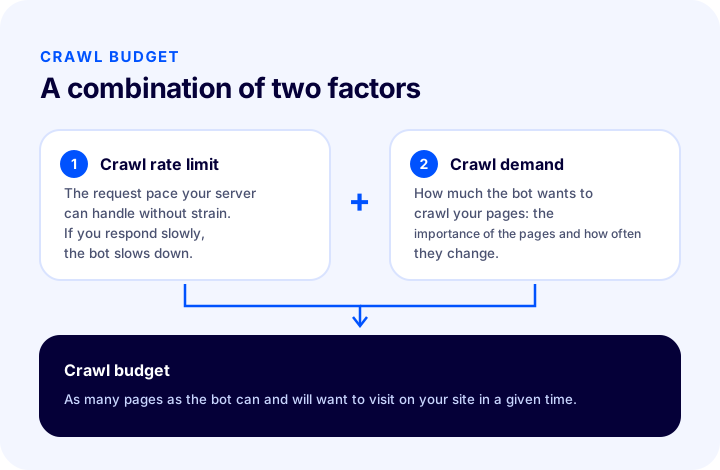
Crawl budget is the number of pages a search engine bot can and wants to crawl on a site within a given time. It consists of two components: the crawl pace your server can handle (crawl rate limit) and how much the bot wants to crawl your site (crawl demand).
For search engines to see pages, they must first find them, then download and examine them. The software that does this is called a crawler bot or spider. The bot starts from known URLs, discovers new URLs by following links on the page and lines up what it finds. Since it is impossible to crawl every site in the world at unlimited speed, each site gets a kind of “allotted time”. This allotted time is called crawl budget.
The budget is not presented as a fixed number and cannot be known precisely from the outside; it varies from site to site and over time. That is why we do not give numbers or thresholds in this article. What matters is understanding how it works and what uses it up.
Crawl rate limit
The crawl rate limit is the request pace the bot can maintain without overloading your server. If the server responds quickly and reliably, the bot can crawl more comfortably; if it sees slowdowns, timeouts or server errors, it lowers its pace. In other words, your site’s speed affects not only the visitor experience but also how many pages the bot can see. For the visitor side of speed, see the articles why site speed matters in e-commerce and what Core Web Vitals are.
Crawl demand
Crawl demand is how much the bot wants to crawl your site. Factors such as how important the pages seem, how often they change and how “stale” the known URLs have become determine this demand. Frequently updated pages that receive many links may be visited more often; pages that have not changed for years and that nobody links to may stay in the background. If the number of URLs on your site explodes, demand is spread across important pages.
We recommend readingWhat Is Robots.txt? Proper Use for an E-Commerce SiteHow Do Search Engine Bots Crawl a Site?
The bot first finds a URL, then requests the page, parses the content and adds the links on the page to the queue as new URLs. This cycle is fed by many sources, such as the sitemap, internal links and external links.
- Discovery. The bot learns URLs from the sitemap, internal links on pages and links coming from other sites.
- Permission check. Before visiting a page, it checks the rules in the robots.txt file; it does not enter a forbidden URL.
- Request. It requests the page from the server. The server answers with a status code such as 200, 301, 404 or 5xx.
- Analysis. It parses the page’s content, title, canonical tag, structured data and links.
- Queuing. It puts the new URLs it finds into a crawl queue; it decides which to return to and when according to its own priorities.
The point to note is this: crawling and indexing are not the same thing. The bot may crawl a page and not like it, or treat it as a copy of another URL and not index it. Crawling is a prerequisite for indexing, but not every crawled page appears in the index. It is worth recalling the topics we cover separately for indexing problems: the articles what is duplicate content and what is the canonical tag complete the picture of the relationship between these two concepts.
Who Needs to Care About Crawl Budget?
Crawl budget matters most for large sites that generate many URLs and for sites whose content changes constantly. On a small, well-organized site it is usually not a problem in itself.
Exaggeration should be avoided here. In a store with a few hundred pages and a clean URL structure, the bot crawling every page is usually not a problem; instead of doing “crawl budget optimization” on such a site, it is more efficient to spend time on content quality, product pages and internal links. On the other hand, the topic should be taken seriously in the following cases:
- Stores with a large number of products and categories,
- Sites that leave filter, sorting and search result pages open as URLs,
- Stores whose stock and prices change often or that constantly add and remove many products,
- Sites going through a migration, URL change or restructuring,
- Sites where newly published pages take a long time to be indexed.
| Situation | Is crawl budget a problem? | What should you do first? |
|---|---|---|
| Few pages, clean URLs | Usually not | Focus on content and internal links |
| Many products, filters generate URLs | Possible | Manage filter and sorting URLs |
| Many duplicate URLs | Possible | Organize canonical and redirects |
| New pages are indexed late | Possible; there may be other causes | First check page quality and links |
| After a migration or URL change | May intensify temporarily | Keep redirects and the sitemap clean |
In E-Commerce, What Uses Up Crawl Budget?
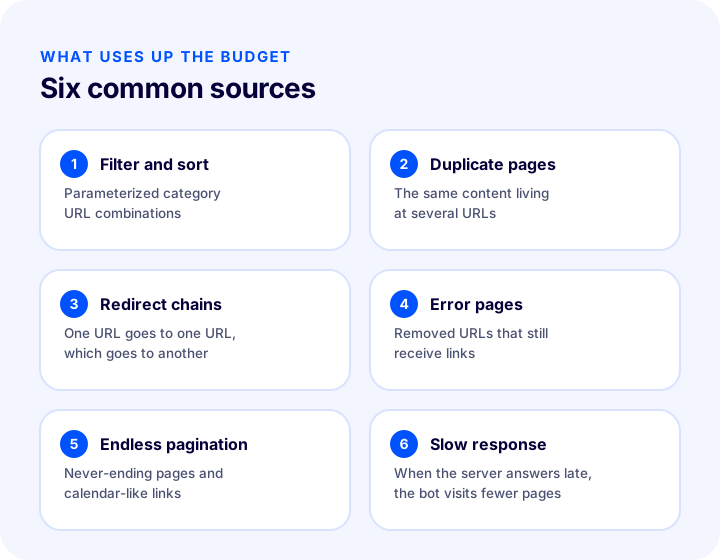
In e-commerce, the sources that use up the budget most are filter and sorting URLs, duplicate pages, redirect chains, error pages, infinite pagination and slow server responses. What they have in common is that they make the bot spend time on low-value URLs.
| Source | Why does it use up the budget? | General direction of the solution |
|---|---|---|
| Filter and sort addresses | Every combination is a new URL; the same products are crawled again and again in different orders | robots.txt, canonical, internal link control |
| Duplicate pages | The same content on several URLs forces the bot to read the same thing again | Canonical, 301, consolidation |
| Redirect chains | Each link in the chain is a separate request; the bot spends several requests before reaching the target | A single redirect straight to the target |
| Error pages | The bot keeps retrying 404 URLs that still receive links | Fix the links, use 301 where appropriate |
| Endless pagination | Endless pages or calendar-like links send the bot down an infinite path | Limit pagination, build a clear link chain |
| Slow response | When the server responds late, the bot lowers its pace | Speed and server improvement |
1. Filter and sorting URLs
On a category page, color, size, price range and sorting options are mostly added to the URL as parameters. Each combination becomes a separate URL, and the number of combinations multiplies quickly as options grow. For example, even a category with just a few filters and a few sorting options can generate many URLs when they are all used together. While the bot visits these URLs one by one, the time left for reaching the actual product pages shrinks.
The goal here is not to stop visitors from using filters but to stop the bot from exploring every combination. Filter pages that genuinely have search demand (for example, a color and product type people search for by name) can be treated as a page of their own; the rest can be marked with a canonical pointing to the main category or closed to crawling with robots.txt. The guide product filtering and search bar optimization in e-commerce can also help with the filter and search experience.
2. Duplicate pages
The www and non-www versions of the same page, versions with and without a trailing slash, links with tracking parameters or separate URLs for product variants each count as a separate page for the bot. The bot visits them all, sees that the content is the same and still comes back on the next visit. The more duplicate URLs there are, the more budget is wasted. We covered the causes and solution options in detail in the article what is duplicate content.
3. Redirect chains
If one URL redirects to another, which redirects to a third, this is a chain. Several migrations and URL changes on a site accumulate such chains over time: old URL A to B, B to C. The bot makes a separate request for each link until it reaches the target; moreover, in long chains it may give up at some point. The solution is to redirect every old URL directly to the final destination in a single step. The article what is a 301 redirect is a good starting point for the logic of redirects.
We recommend readingWhat Is a 301 Redirect? A Guide to Correct Use in E-Commerce4. Error pages (404) and soft 404s
If the URLs of removed products are still present in internal links, in the sitemap or in links from other sites, the bot keeps coming to these URLs and gets a 404 each time. A few 404s are normal; the problem is your own site continuing to link to 404 URLs. There is also a situation called a “soft 404”: the page returns 200 as its status code but says “product not found” in its content. The bot may mistake these pages for real pages and keep crawling them. To set up the error page correctly, see the guide what is a 404 page.
5. Infinite pagination and infinite link spaces
Pagination is a natural part of product lists; however, if the page number can increase without limit or even empty pages are opened as URLs, the bot moves down a road with no end. The same problem appears with calendar-like links that can be followed forward and back forever, and with search result pages that generate a new URL on every click. The details of setting up pagination correctly are explained in the article pagination SEO.
6. Slow server response
When the server responds slowly, the bot lowers its pace so as not to harm the server. Fewer pages are visited in the same amount of time. During busy campaign periods, a strained server or needlessly heavy page templates slow down both visitors and the bot.
How to Identify a Crawl Budget Problem
To see a crawl budget problem, you need to look at which URLs the bot actually visits on your site. There are two main sources: server logs and the crawl statistics provided by the search engine.
Server logs (log files)
Server logs are files that record every request to the site line by line. Each line usually contains the time, the client's name (including the bot name), the requested URL and the status code returned by the server. This is the most accurate data on how the bot distributes its visits, because it shows real requests, not estimates.
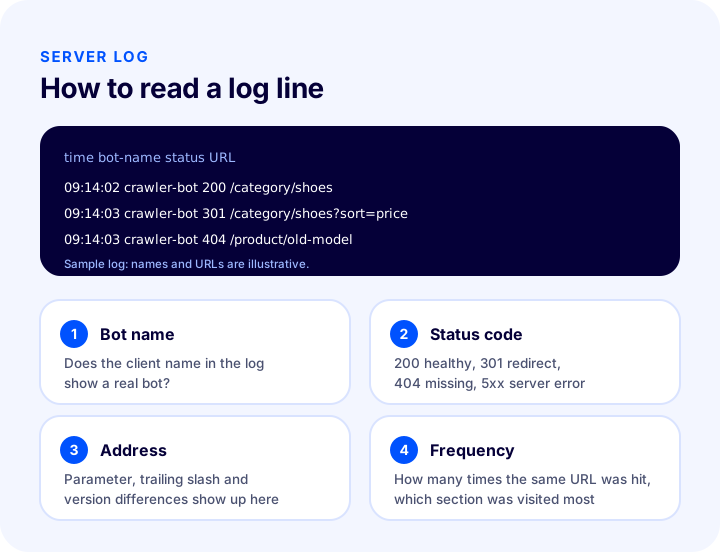
When reviewing the logs, look for answers to these questions:
- Which sections (category, product, filter, search, blog) does the bot visit most?
- How large is the share of parameterized URLs (sorting, filtering, tracking) compared with your real pages?
- Are many 301, 404 or 5xx responses being returned? On which URLs?
- Are your important new pages not visited at all, or only very late?
- Does the bot name belong to a genuine search engine bot, or to a client impersonating one?
Access to log files depends on the hosting setup; on a ready-made store platform you may not have direct access to them. In that case, you need to request them from your platform provider or your technical team.
The search engine's crawl statistics
The tools that search engines offer to site owners usually include a section called “crawl stats” or something similar. There you see summary information on how the bot's requests to your site change over time, which status codes are returned, which file types are crawled and how fast your server responds. It is less detailed than server logs, but it is an easy starting point for seeing the trend. A sudden drop in the number of requests, a deterioration in response speed or a rise in the error rate can be signs of a budget problem.
Quick manual checks
- Count the parameterized URLs. Select a filter and a sort order on your category page and look at the address bar; if the selections are added to the URL, every combination is a separate URL.
- Review the sitemap. If the sitemap contains redirecting, 404 or duplicate URLs, you are sending the bot to the wrong place. See the what is a sitemap guide for details.
- Review your internal links. Do the links in the menu, footer and product pages point to redirecting or duplicate URLs?
- Test redirect chains. Open an old URL and see how many steps it takes to reach the target.
- Repeat the speed measurement. Note the pages where the server response is slow.
How to Optimize Crawl Budget
The way to optimize crawl budget is to direct the bot's time to valuable pages and reduce worthless URLs. For this, robots.txt, canonical, redirects, sitemap, internal linking and server speed are used together.
| Tool | What does it do? | When is it chosen? |
|---|---|---|
| robots.txt | Prevents the bot from entering certain URL patterns | Filter and search URLs that should never be crawled |
| Canonical tag | Tells that a duplicate URL points to the main URL | URLs that should stay open to visitors but where the main page should appear in search results |
| 301 redirect | Permanently moves an old URL to a new one | URLs that are permanently removed or merged, URL versions |
| Sitemap | Tells the bots which URLs are important | Only the main URLs you want to be indexed |
| Internal link | Carries the bot and the visitor to important pages | Discovery of new and valuable pages |
| Speed improvement | Reduces server response time and page weight | Situations where the bot slows down because the server has slowed down |
Blocking unnecessary URLs with robots.txt
robots.txt is a file that tells bots which URL patterns they should not enter. It is useful for filter, sorting and internal search URLs that should not be crawled at all. An example rule looks like this (the URLs are examples and must be adapted to your own URL structure):
User-agent: *
Disallow: /*?sirala=
Disallow: /*?filtre=
Disallow: /arama
One warning is important here: the bot does not crawl a URL blocked by robots.txt, but this does not mean the URL will never appear in the index, because if it receives links from elsewhere, the URL can still be known. Moreover, because the bot cannot read the blocked page at all, it also cannot see any canonical or noindex tag on that page. For this reason, placing both a robots.txt block and a canonical on the same URL is often pointless. Which tool to choose in which situation is explained in detail in the what is robots.txt article.
Pointing to the main URL with canonical
If a filter or sorting page needs to stay open to visitors, the page points to the main category URL with the canonical tag:
<link rel="canonical" href="https://magazaadresiniz/kategori/ayakkabi">Canonical does not directly stop the bot from crawling; it is only a strong hint that says which URL is the main one. The bot still visits the page. So canonical is very useful for indexing and for consolidating signals, but it does not rescue crawl budget on its own; if the budget problem is large, it should be considered together with robots.txt and simplifying internal links. For details, see the what is a canonical tag article.
Simplifying redirects
Find the chains and redirect each old URL directly to the final target. Do not leave redirecting URLs in the site's internal links; update the link to point directly at the target URL. That way both the bot and the visitor spend one step less. For notes that will help with URL structure and restructuring, see the how should URL structure be article.
Keeping the sitemap clean
A sitemap is the list with which you tell bots “these are the important URLs”. If the sitemap contains pages that redirect, return 404, carry a noindex tag or have a canonical pointing to another URL, the bot is sent to the wrong place. A good sitemap contains only the main URLs that return a 200 response and that you want to be indexed. New pages should be added to the sitemap, and removed pages should drop out of it. The details of this topic are in the what is a sitemap guide.
We recommend readingWhat Is a Sitemap? Proper Setup for an E-Commerce SiteCarrying the bot to the right pages with internal links
The bot browses your site by following links. If you give a page many internal links, that page looks more important and the bot is more likely to return to it; a page that receives no links from anywhere, on the other hand, struggles to be found. Starting from the home page and the menu, make sure important category and product pages can be reached by a short path. Reduce internal links that go to duplicate or worthless URLs: for example, not all filter links need to be plain links the bot can follow. For details on building internal links, the what is an internal link and category page SEO articles will help.
Checking pagination and empty pages
Each pagination page should show its own URL, and there should be a clear chain of links between the pages. If URLs of empty pages open even though the products have run out, make sure they return 404 or are never created at all. Splitting the products in categories with a reasonable structure eases the load on both visitors and the bot.
Improving server speed and stability
When the bot gets slow responses, it lowers its pace; a fast and stable server allows more pages to be crawled in the same amount of time. Keeping images small, reducing unnecessary scripts and using caching help both the visitor experience and crawling. For speed improvements, see the site speed in e-commerce guide.
What Are Common Mistakes in Crawl Budget Optimization?
The most common mistake is trying to solve every duplicate URL with the same method and intervening unnecessarily on a site that has no budget problem. The mistakes below are examples frequently encountered in practice.
- Accidentally blocking important pages with robots.txt. A rule can work more broadly than expected and also block product or category pages. Test important URLs after every change.
- Assuming canonical alone will solve the budget. Canonical does not stop crawling; it only points to the main URL.
- Setting pages to noindex while keeping the links. Pages with noindex are still crawled; the bot visiting these pages spends budget.
- Leaving redirect chains in place. Adding a new link at each move instead of connecting the old URL to the final target lengthens the chain.
- Putting everything in the sitemap. If duplicate, redirecting and noindex URLs stay in the sitemap, it loses its credibility.
- Over-intervening on a site without a problem. Writing complex robots.txt rules on a small site increases the risk of accidentally blocking pages that work well.
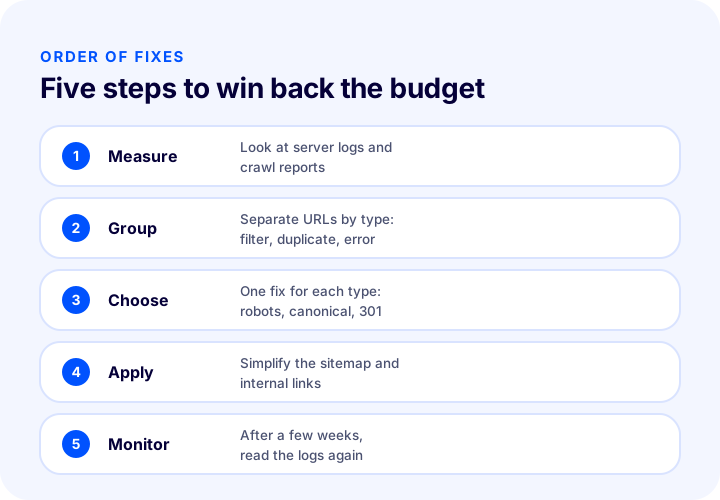
- Deciding without measuring. Saying “the budget is not enough” without looking at the logs can hide the real cause (content quality, missing links).
- Not monitoring after applying the fix. To see how the change is reflected in the bot's behavior, return to the same measurement a few weeks later.
Crawl Budget Checklist
The list below is the text version of the items in the diagram; you can review your store in this order.
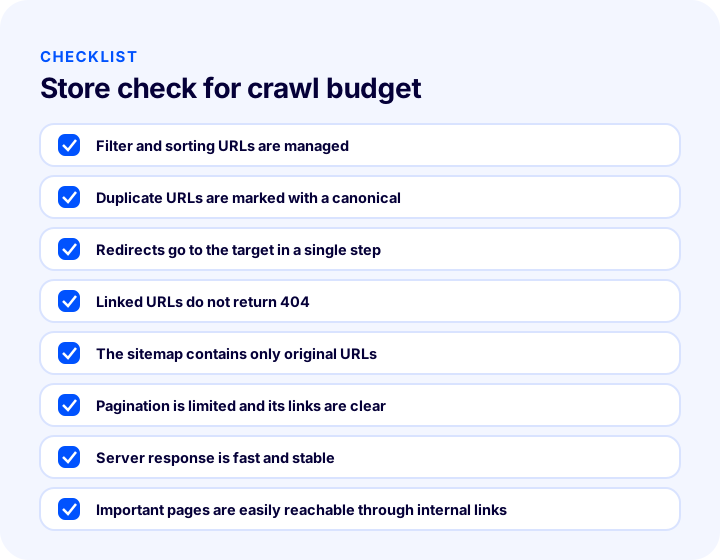
- Filter and sorting URLs are managed: unnecessary ones are closed to crawling or point to the main URL.
- Duplicate URLs are marked with canonical; URL versions (www, http, trailing slash) redirect to a single version.
- Redirects go directly to the target in a single step; internal links do not use redirecting URLs.
- URLs that receive links do not return 404; removed pages redirect to an appropriate place.
- The sitemap contains only main URLs that return a 200 response.
- Pagination is limited and its links are clear; empty pages do not open as URLs.
- Server response is fast and stable; it does not struggle in busy periods.
- Important category and product pages can be reached by a short path from the menu and internal links.
- Server logs or crawl statistics are reviewed at regular intervals.
Crawl Management with Faprika
In Faprika, several management tools that affect crawl budget are part of the SEO settings. According to the SEO settings training in the Help Center, the canonical URL option is found in the SEO section under Configuration, Settings, General Settings; this setting helps you specify individual page URLs. The same training covers domain control and consistent access to the www and non-www URL versions; consolidating URL versions into one reduces how often the bot visits the same page at several URLs.
In the plan feature comparison, the “Canonical / H Tag Management / Robots / Sitemap” row covers the management of canonical, heading tags, robots and the sitemap; the “301 / 302 / 410 Panel / Managing URL Records” row covers the management of redirects and URL records. The “Bulk Automatic SEO/Meta Information Update” and “SEO Reports” rows are also among the tools that make these jobs easier. Which plan includes which of these tools may vary by plan; for the current scope, you can look at the e-commerce plans page.
Editing product and category SEO information product by product is covered in the catalog management training. Keeping catalog and media settings tidy reduces the bot's encounters with unnecessary or broken URLs. To plan the tools together according to your store's structure rather than setting them up one by one, take a look at the e-commerce SEO settings guide; for explaining pages to the search engine, take a look at the what is structured data article. If you have a multilingual store, the what is a hreflang tag article is complementary for linking language versions to each other.
Frequently Asked Questions
What is crawl budget?
Crawl budget is the number of pages a search engine bot can and wants to crawl on a site within a given time. It is determined jointly by the crawl pace your server can handle (crawl rate limit) and how much the bot wants to crawl your site (crawl demand).
Does crawl budget become a problem for a small e-commerce site?
Usually not. On a site with few pages and a clean URL structure, the bot can crawl every page. The issue becomes serious for large stores that generate many product, filter and sorting URLs or constantly add and remove content.
What uses up the most crawl budget?
In e-commerce, the most common causes are filter and sorting URLs, duplicate pages, redirect chains, URLs returning errors, endless pagination and slow server responses. What they all have in common is that the bot spends time on low-value URLs.
How can you tell if you have a crawl budget problem?
The most reliable way is to check your server logs and see which URLs the bot visits. In addition, the crawl statistics provided by the search engine show the bot’s request trend, status codes and response speed. New pages being indexed late can be a sign, but it is not proof on its own.
Does the canonical tag protect crawl budget?
Not by itself. Canonical is a strong hint that points to the main URL and is very useful for indexing and consolidating signals, but the bot may still visit a page that has a canonical tag. For URLs that should never be crawled, robots.txt is more suitable; for URLs that have moved permanently, a 301 is.
If I block a page with robots.txt, will it be removed from the index?
Not always. robots.txt stops the bot from crawling the page, but if the URL receives links from elsewhere it can still be known. If you do not want a page to appear in the index, you may need to use a signal such as noindex together with crawl permission; choose the right tool according to the purpose of the page.