

Contents 12 sections
- Why Do Sold-Out Product Pages Matter for SEO?
- How Does This Guide Differ from the Out-of-Stock Product Article?
- What Are the Three Situations of a Sold-Out Product?
- When Should a Page Stay Open, Be Redirected or Be Removed?
- What Is the Difference Between 301, 302 and 410?
- What Should an Out-of-Stock Page Include?
- How Do You Report Stock Status Correctly with Structured Data?
- What Is the Risk of Duplicate and Orphan Pages?
- What Are Common Mistakes in Managing Sold-Out Products?
- How Do You Audit Sold-Out Product SEO?
- How Do You Manage Sold-Out Product Pages with Faprika?
- Frequently Asked Questions
When a product sells out in your store, what happens to its page is often decided without much thought: some stores delete the page, some redirect it to the home page, and some do nothing and leave it open for years with a “out of stock” note. Yet some of these pages appear in search results, receive links from other sites and may have brought sales in the past. A wrong decision wastes this accumulated value at once or increases the number of pages that look worthless to search engines.
In this guide we cover how to manage an out-of-stock product page for SEO through three separate situations: a temporary stockout, a product replaced by a new model and a product removed permanently. For each situation we show which method to choose with a decision table, comparing keeping the page open, a 301 to a similar product, a 301 to the category, 410 and 404. We explain what an out-of-stock page should contain, how to report stock status correctly with structured data (with a code example), the risk of duplicate and orphan pages, common mistakes and Faprika's redirect tools. At the end there is an audit checklist and a six-question FAQ.
Why Do Sold-Out Product Pages Matter for SEO?
A sold-out product page is a product page whose address stays alive even though the stock has run out. This page must give an answer to both the search engine and the visitor; if the answer is wrong or unclear, the page loses value and the visitor leaves the store.
The topic has four aspects that matter for SEO:
- Accumulated value. Over time a product page builds up visibility in search results, external links and internal links. When the page is deleted, this accumulation is lost unless a proper redirect is made. For the value of external links, see our what is a backlink article.
- Visitor experience. Someone arriving from a search result who cannot clearly see that the product is sold out, or cannot find a way out, leaves immediately. A page that offers a way out can carry that visitor to another product.
- Page count and crawl pattern. If hundreds of pages that will never be sold again stay open, search engine bots spend their time on them. In large stores this can cause important pages to be crawled later. For details, see our what is crawl budget article.
- Accurate information. If the page says “in stock” while the product is not available, or the data reports it wrongly, both the user and the search engine are misled; this damages trust.
How Does This Guide Differ from the Out-of-Stock Product Article?
This article looks at the sold-out product page from a technical SEO angle: choosing the status code, redirects, reporting stock status with structured data, the risk of duplicate and orphan pages and the monthly audit. Our guide that covers customer experience, message wording, pre-orders and waiting lists in detail is what to do with an out-of-stock product page; the two articles complement each other. To avoid repetition, we touch on those topics only briefly here.
If you like, you can first read that article to settle the messaging and experience side, then use this guide to make the technical decisions. The table below summarizes the difference between the two.
| Topic | Out-of-stock product article | This guide |
|---|---|---|
| Weight | Customer experience, messaging, notify-me, pre-order | Status code, redirect, structured data, audit |
| Main question | What should the customer see on a sold-out product? | How should the search engine interpret this page? |
| Output | Page copy and flow suggestions | Decision table, code example, audit checklist |
What Are the Three Situations of a Sold-Out Product?
Sold-out products fall into three groups: those whose stock will return, those replaced by a new model or successor, and those that will never be sold again. Each group is managed differently; treating all of them the same is the most common SEO mistake.
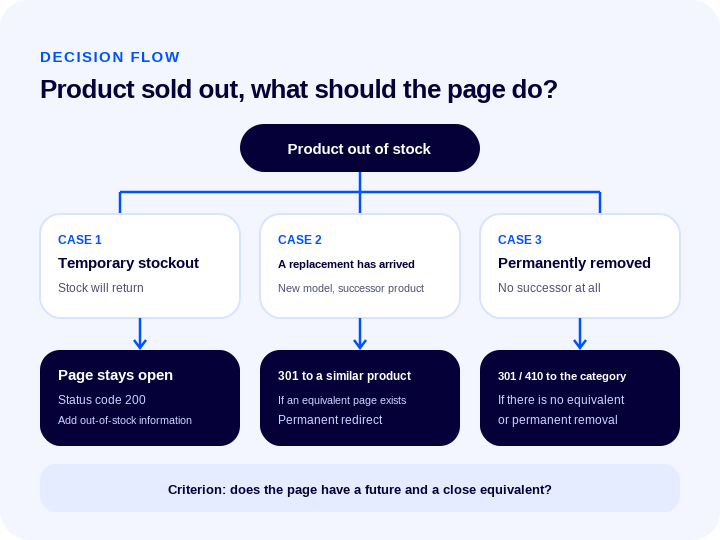
As the diagram shows, the decision depends on why the product sold out. The table below defines each situation and gives typical examples.
| Situation | Definition | Example | What happens to the page? |
|---|---|---|---|
| 1. Temporary stockout | The product will be back on sale | A product awaiting a new batch from the supplier, a product returning at the start of the season | Page stays open, status is shown |
| 2. Replaced by a new one | The product has a new model or a direct successor | Next-generation model, refreshed version, renamed product | Permanent redirect to the new product |
| 3. Permanent removal | The product will not be sold again and has no successor | A discontinued product, a brand whose agreement has ended | Redirect to a close category or permanent-removal code |
How do you tell which situation you are in?
Ask yourself three questions. Will this product go back on sale? If not, is there a product that takes its place and meets the same need? If neither, is there a close category you can send the visitor to? If the answer to the first is “yes”, do not touch the page; if the second is “yes”, redirect; if both are “no”, look at the category or permanent-removal option. When in doubt, keeping the page open is safer, because an open page can always be redirected later, whereas the history of a deleted page cannot be restored.
When Should a Page Stay Open, Be Redirected or Be Removed?
There are five options: keeping the page open, 301 to a similar product, 301 to the category, 410 and 404; which one to choose depends on the product's future and whether an equivalent exists. The decision table below simplifies this choice.
| Situation | Recommended action | Why? | Point to watch |
|---|---|---|---|
| Stock will return | Keep the page open (200) | The address and accumulated value are preserved, and sales start immediately on return | Include out-of-stock information, a similar product and a notify-me link |
| A new model or successor exists | 301 to the new product | Value moves to the new page and the visitor reaches the right product | The product must be truly equivalent |
| No successor, a close category exists | 301 to the category | The visitor finds related products | The category must be topically close to the product |
| Permanently removed, no equivalent | 410 (permanently removed) | Tells the search engine the page was deliberately and permanently removed | Also clean up internal links and the sitemap |
| The address was removed by mistake or never existed | 404 (not found) | The natural answer for a page that does not exist | Provide a helpful 404 page |
1. Keeping the page open
If stock will return, leaving the page open is the best route. The address does not change, the value the page has built up stays in place, and when the product comes back the page is automatically ready to sell again. In this case the page keeps returning status code 200; however, visitors and the search engine are told clearly that the product cannot be sold right now. We explain how in the sections below.
Keeping a page open has a limit: if it is not clear when stock will arrive and the page stays open for months marked “out of stock”, it gradually turns into a worthless page. For such products the decision should be revisited at regular intervals, and either the return should become clear or the status should move to situation 2 or 3.
2. 301 to a similar product
If a new model has replaced it, permanently redirecting the old page to the new one carries both the visitor and the page's value to the right place. 301 means “this page has moved permanently”; for a detailed explanation, see our what is a 301 redirect article.
The critical criterion here is equivalence. The product you redirect to must genuinely meet the need the old product met. Redirecting to an unrelated product can invalidate the redirect in the search engine's eyes and also misleads the visitor. You can set the rule like this: if a visitor who opens the old address can say “yes, this is what I was looking for” on seeing the new page, the redirect is right.
3. 301 to the category
For a product that has no successor but whose product group is still sold, redirecting to the closest category is a reasonable option. Even if the visitor cannot find the product, they reach relevant alternatives. Bulk redirects to a parent category or the home page that is only weakly related to the product are not recommended, because they do not meet the visitor's expectation. For how to build category pages, see the category page SEO article.
4. 410: permanently removed
The 410 status code states that the page was deliberately and permanently removed. If there is no suitable place to redirect and the product truly will not come back, this code tells the search engine plainly that the address is no longer valid. 404, on the other hand, says “not found” and leaves open the possibility that the page vanished temporarily or by mistake. In practice both eventually get the page removed from the index; 410 describes your intent more clearly.
5. When is 404 the right answer?
404 is the natural answer for addresses that never existed or were mistyped. Returning 404 for a product you deleted is not forbidden, but if your intent is “permanent removal”, 410 is clearer. Whichever answer you give, the page the visitor sees should not be a blank error screen; for how to design a helpful error page, see the what is a 404 page article.
We recommend readingWhat Is a 301 Redirect?What Is the Difference Between 301, 302 and 410?
301 is a permanent redirect, 302 is a temporary redirect, and 410 states that the page was permanently removed. The point most often confused in managing sold-out products is whether using 302 for a temporary stockout is correct.
| Code | Meaning | When for a sold-out product? |
|---|---|---|
| 200 | The page exists and works | For products whose stock will return, while the page stays open |
| 301 | Moved permanently | When a new model or close category exists and the old address will not return |
| 302 | Temporarily moved | Rarely: when a short-term redirect with a certain return is needed |
| 404 | Not found | For an address that does not exist or is mistyped |
| 410 | Removed permanently | For a product with no equivalent that will not return |
For a temporary stock-out, a redirect is usually unnecessary; the page stays open. Redirecting an out-of-stock product to another page with a 302 risks forgetting to reopen the address when the product returns, and it keeps visitors from seeing the product page they were looking for. For a permanent change, use 301 instead of 302. If you still prefer a short-term redirect, set a date and put it in your calendar.
What Should an Out-of-Stock Page Include?
A good out-of-stock page states clearly that the product is currently unavailable and gives visitors three ways forward: notify me, similar products and back to the category. If the page contains none of these, it is a dead end for the visitor.
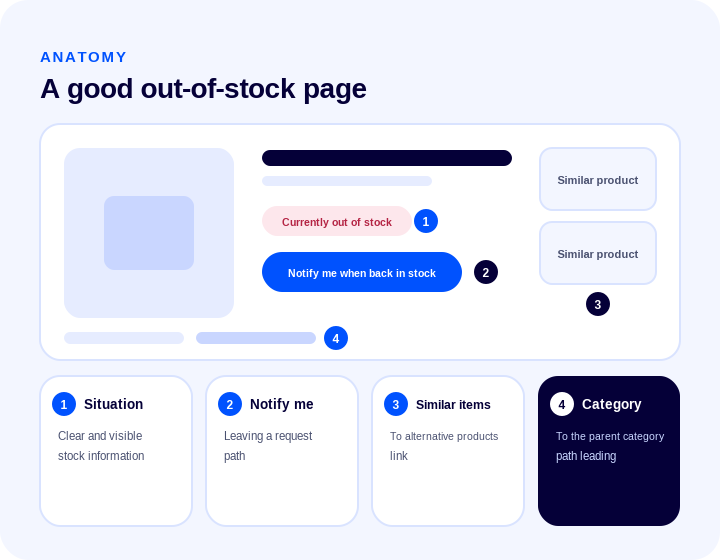
We also provide the four elements from the illustration in the table below, because they should be given on the page as text too.
| Element | What is it for? | How is it implemented? |
|---|---|---|
| 1. Status information | States clearly that the product is unavailable | A visible status label next to the price and image, in place of the add-to-cart button |
| 2. Notify me when back | Captures demand without losing interest | A way to leave an email or phone number; keep the field simple |
| 3. Similar products | Moves the visitor to another product | Products from the same category with similar features that are currently on sale |
| 4. Category link | Gives the visitor a way out | A breadcrumb trail at the top of the page and a link back to the category at the bottom |
How should you handle the buy button?
If a product is out of stock, the add-to-cart button should either be removed or be disabled with a clear reason. A button that throws an error when clicked is one of the fastest ways to damage trust. Replacing the button with an action such as “Notify me when back” both guides the user and lets you collect demand data. For details of the notify flow, see the article what is notify me when back in stock.
How are similar products selected?
The similar-products list should not be random. Choose products currently on sale from the same category, with a similar purpose and price level. Showing an out-of-stock product in the list disappoints the visitor a second time. Similar-product links are also internal links, and they explain the page’s context to search engines as well as visitors; the article what is an internal link is useful for this.
How Do You Report Stock Status Correctly with Structured Data?
Structured data means adding the information on a product page (such as name, price and stock status) to the page in a standard format that search engines understand. The rule for reporting stock status with this data is simple: the status shown on the page and the status written in the data must be the same.
For the general logic of structured data, see the article what is structured data. Here we focus only on stock status.
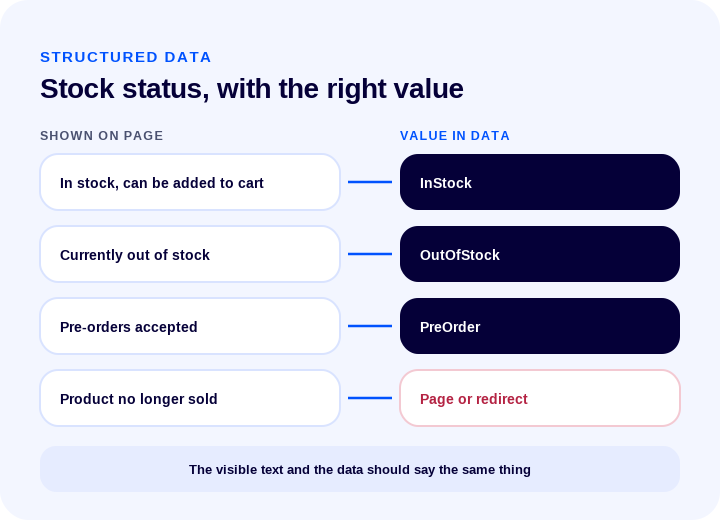
Which values are used?
The offer section of the product data has standard values for stock status. The table below shows the most commonly used ones and what they mean.
| Status on the page | Data value | Note |
|---|---|---|
| In stock, can be added to cart | InStock | Product available for purchase |
| Currently out of stock | OutOfStock | Temporary or uncertain stock-out; page open |
| Pre-orders accepted | PreOrder | Only if you genuinely accept pre-orders |
| Permanently no longer sold | The page is removed or redirected | Reported by status code, not by a data value |
Code example
The example below shows the data block of a temporarily out-of-stock product. The name, address and price fields are only examples; fill them with the real values from your store.
<script type="application/ld+json">
{
  "@context": "https://schema.org",
  "@type": "Product",
  "name": "Ürün adı",
  "url": "https://magazaadresiniz/urun-adi",
  "offers": {
    "@type": "Offer",
    "url": "https://magazaadresiniz/urun-adi",
    "price": "{fiyat}",
    "priceCurrency": "TRY",
    "availability": "https://schema.org/OutOfStock"
  }
}
</script>
When the product is back in stock, only the “availability” value changes to “https://schema.org/InStock”. This change must happen at the same time as the status label on the page and the add-to-cart button. Having the store software generate the data from live stock instead of managing it by hand removes the risk of inconsistency.
Common data mistakes
- Always writing “InStock”. If the data says in stock although the product is sold out, the page and the data contradict each other; this misleads the user and makes the data unreliable.
- Deleting the data of an out-of-stock product entirely. As long as the page stays open, the product information and status should continue to be reported; the absence of data is also a lack of information.
- Writing PreOrder for a product that is not a pre-order. If orders are not actually being accepted, this value is wrong.
- Mixing up variants. If only one size of a product is sold out, showing the whole product as sold out is wrong; each variant’s own status is reported separately.
What Is the Risk of Duplicate and Orphan Pages?
A duplicate page is one that offers the same or very similar content at a different address; an orphan page is one that has no internal links left on the site. Managing out-of-stock products can create both risks.
How does a duplicate page arise?
There are three typical ways. The first is adding a new model while leaving the old one open and keeping the text of both almost identical; the search engine cannot decide which to show. The second is offering colour or size variants of the same product at separate addresses without distinguishing them from each other. The third is the same product list appearing at different addresses through filter and sort parameters. In these cases, the canonical tag tells which address is the main page. For details, see the articles what is a canonical tag and what is duplicate content.
How does an orphan page arise?
When a product sells out, it is removed from category lists and menus, but if its address stays open, the page becomes an orphan. The search engine reaches such a page only through the sitemap or an external link, and over time the page loses value. A single orphan page may do no harm, but if hundreds accumulate, they blur the overall picture of your site’s quality. The solution is to place every out-of-stock product in one of the three situations above and manage the page accordingly.
| Risk | How does it arise? | How to prevent it? |
|---|---|---|
| Duplicate page | The old and new models stay open with the same text, variants multiply at separate addresses | Move the old one to the new one with a 301 and set the canonical address correctly |
| Orphan page | The product is removed from the list, the address stays open | Decide according to situation 1, 2 or 3; if you keep it open, leave a link |
| Dead address left in the sitemap | The removed product stays in the sitemap | Remove it from the sitemap; see the article what is a sitemap |
| Redirect chain | The old address goes to an old redirect, which goes to the new one | Redirect the old address directly to the final destination |
What should you update after a redirect?
Redirecting a product is not the end of the job. Change the links to the old address in category lists, menus, campaign pages and articles to the new address; if every click passes through a redirect, both speed and value are lost. Remove the old address from the sitemap and add the new one. To see in bulk which addresses your pages go to, you can use the crawl steps in the article how to do an SEO audit.
What Are Common Mistakes in Managing Out-of-Stock Products?
The most common mistakes are deleting pages in bulk without thinking, redirecting to an unrelated page and reporting the status incorrectly in the data. What they all have in common is not seeing that a stock-out is three different situations.
- Deleting every out-of-stock product. Deleting the page of a temporarily out-of-stock product means starting from scratch when it returns.
- Redirecting everything to the home page. The visitor cannot find what they were looking for, and the search engine may not find the redirect meaningful.
- Leaving redirect chains. A redirect of a redirect loses speed and value at every step.
- Creating a redirect loop. If the old address goes to the new one and the new one goes back to the old one, the page does not open.
- Leaving the out-of-stock page without a way out. Without a notify link, similar products and a category link, the page is a dead end.
- Leaving the data and the displayed status in conflict. If the page says “out of stock” while the data says “InStock”, an inconsistency arises.
- Writing a temporary “out of stock” in the title and description. The wording is forgotten when the product returns, and wrong information stays in search results.
- Not updating internal links after a redirect. Continuing to link to the old address adds an unnecessary redirect load.
How Do You Run an SEO Audit of Out-of-Stock Products?
An out-of-stock product audit is a short check you can do once a month: you list the out-of-stock products, place each in one of the three situations and check whether the decision has been carried out. An eight-step flow is enough.
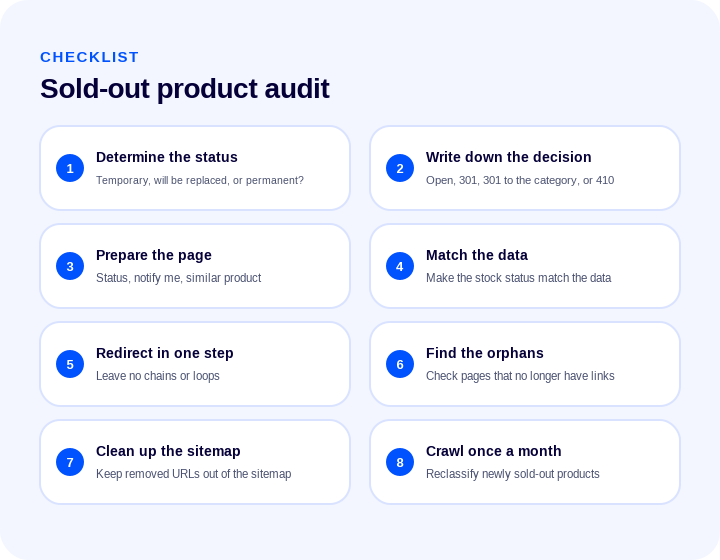
We also give the same items as a table below.
| Step | Question |
|---|---|
| 1. Determine the status | Is the product temporarily out of stock, has a new one replaced it, or has it been permanently discontinued? |
| 2. Write down the decision | Will the page stay open, get a 301, go to the category, or return a 410? |
| 3. Prepare the page | Are there status information, notify me and similar products? |
| 4. Match the data | Is the structured data the same as the status on the page? |
| 5. Redirect in one step | Are there no chains or loops left? |
| 6. Find the orphans | Are there open pages with no internal links left? |
| 7. Clean up the sitemap | Have the removed addresses left the sitemap? |
| 8. Crawl once a month | Have you reclassified the newly out-of-stock products? |
Which signals are checked?
In the audit, the stock list in the store admin panel, the status codes found by the crawl tool and page visibility in search results are evaluated side by side. You produce a list of addresses returning errors, pages with many redirect chains and products that have been out of stock for a long time. To learn how to read the reports, see how to read an SEO report; for indexing problems, see why is a page not indexed.
We recommend readingHow to Do an SEO Audit?How Do You Manage Out-of-Stock Product Pages with Faprika?
Faprika’s plan feature comparison includes the row “301 / 302 / 410 Panel / Managing URL Records”; with this tool you can redirect an old address to the appropriate destination or manage URL records. The same comparison also includes rows such as “Canonical / H Tag Management / Robots / Sitemap”, “Bulk Automatic SEO/Meta Information Update” and “SEO Reports”. The plan coverage of these tools may vary by plan; for the current coverage, see the e-commerce plans page.
According to the SEO settings training in the Help Center, the page title and meta description fields can be managed in the control panel and the canonical address setting can be enabled. The catalog management training explains the area where products, categories and brands are managed. Decisions such as keeping an out-of-stock product’s page open, redirecting or removing it can be carried out with these tools; however, the exact location and behaviour of each setting may differ depending on your plan and your store’s setup, so check the panel trainings and, if needed, the support team before applying.
Customer-side tools such as notify me when back and correct stock management are also part of this process. For the notify flow, see what is notify me when back in stock; for setting up the address structure correctly from the start, how should the URL structure be; for general settings, e-commerce how to configure SEO settings.
Frequently Asked Questions
Should an out-of-stock product page be deleted?
Generally no. If the product will come back, the page should stay open; if a new model replaces it, a 301 to the new product is right; only products with no equivalent that will not return should be removed permanently. The decision depends on the product's future.
Should a sold-out product redirect to the home page?
Not recommended. The home page is an unrelated target for the product; visitors will not find what they were looking for and search engines may not treat the redirect as meaningful. Redirecting to the closest similar product or the relevant category is more appropriate.
What is the difference between 410 and 404?
404 says a page was not found, while 410 says it was removed deliberately and permanently. If a product will never be sold again and there is no suitable place to redirect, 410 states your intent more clearly; in practice both eventually lead to the page being dropped from the index.
Which value is used in the data for an out-of-stock product?
If the page is open and the product is temporarily out of stock, use OutOfStock in the availability field. Use PreOrder if you accept pre-orders and InStock if there is stock. What matters is that the status shown on the page and the data say the same thing.
Should I use a 302 redirect for a temporary stockout?
Usually there is no need; the page stays open and the status is shown. A temporary redirect risks forgetting to reopen the address when the product returns. For a permanent change, use 301 instead of 302.
How often should I audit sold-out products?
A monthly check is a good starting point for most stores. List the sold-out products, place each in one of the three situations, and clean up redirect chains and dead URLs in the sitemap. An extra check after a big campaign or catalog change is useful.