

Contents 11 sections
- What Is On-Page SEO?
- What Is the Difference Between On-Page and Off-Page SEO?
- Why Is On-Page SEO Important?
- Which On-Page Elements Does an E-Commerce Page Have?
- Which Element Matters More by Page Type?
- How Should the Heading Hierarchy (H1, H2, H3) Be Built?
- How Do You Prepare an On-Page SEO Checklist?
- What Are the Most Common On-Page SEO Mistakes?
- Where Should You Start with On-Page SEO?
- On-Page SEO Settings with Faprika
- Frequently Asked Questions
Your store has hundreds of products, dozens of categories and a few guide posts, yet you are not where you expect to be in search results. Most of the time the problem is sought outside the site: you need to get links, you need to run ads, people say. But the first place to look is the pages themselves. Dozens of products with the same title, descriptions left blank, category pages using three different heading levels at once and file names that do not describe the image all keep you from explaining even your strongest content properly to the search engine.
In this guide we cover the question what is on-page SEO, the on-page versus off-page distinction, what each element does on an e-commerce page, how priorities change by page type, and an element-by-element checklist. There is also a code example for heading hierarchy, common mistakes, the relevant settings in the Faprika panel and a six-question FAQ. The goal is to leave you with a practical list before you publish your next page.
What Is On-Page SEO?
On-page SEO is the sum of all adjustments made within a web page itself so that it is clearer to search engines and users. The title tag, meta description, heading structure, text, images, internal links, URL and structured data are the main elements of these adjustments.
What these areas, called on-page SEO in English, have in common is that all of it is under your control. You write a product page’s title, description and image texts yourself; you decide which page gets which link. That is why on-page SEO is the fastest-to-pay-off and least externally dependent job in a store. Work on the site’s infrastructure (crawling, speed, mobile compatibility, URL management) is a separate topic; for details, see our post what is technical SEO.
What Is the Difference Between On-Page and Off-Page SEO?
On-page SEO is the adjustments made on the page itself, entirely in your hands; off-page SEO is the signals other sites say and give about you. The two complement each other, and neither replaces the other.
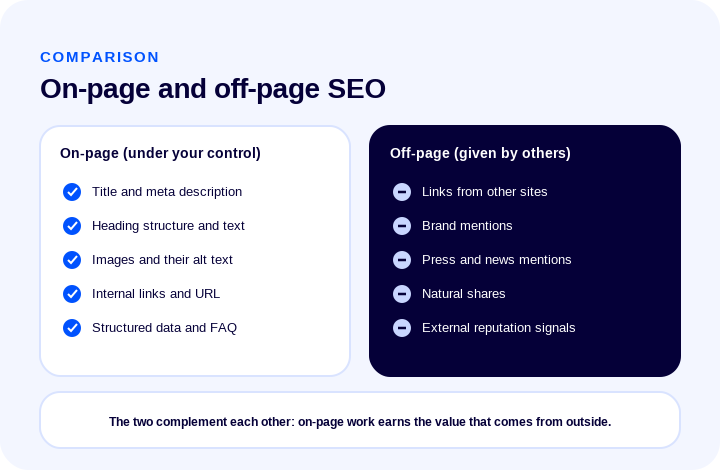
We also summarize the distinction in the illustration in the table below.
| Criterion | On-page SEO | Off-page SEO |
|---|---|---|
| Who controls it? | Store owner and team | Other sites, readers, press |
| Examples | Title, meta description, headings, text, alt text, internal links, structured data | Links from other sites, brand mentions, news coverage |
| When is the effect seen? | After the page is recrawled and evaluated | Over time, as reputation builds up |
| Risk | Low; a wrong adjustment can be reversed | Shortcuts can put the site at risk |
| First step | Reviewing the elements of the most valuable pages | Producing content worth linking to |
The best-known element of the off-page side is the backlink; how it is earned and what to watch out for is covered in the what is a backlink post. To receive value from outside, you first need pages worth linking to that are properly built; that is why the order often starts with the page itself.
Why Is On-Page SEO Important?
On-page SEO matters because a search engine first learns what a page is about from the page’s own signals. If these signals are missing or contradictory, the page cannot be matched to the right search in the right way.
- Matching the right search. If the title, main heading and first paragraph describe the same topic, it becomes clear which question the page answers. The post what is search intent helps you understand what kind of search intent you are answering.
- Clicks in search results. The title tag and meta description are your page’s shop window in search results. Of two pages at the same ranking, the one with the clearer description may get more attention.
- User experience. Orderly headings, short paragraphs and meaningful image descriptions serve not only the search engine but the reader; visitors using screen readers navigate the page through the heading structure and alt texts.
- Scalable gain. When you set up a product page template well, the same layout carries over to hundreds of products. As the catalog grows, the value of the on-page structure grows.
- Pages supporting each other. Internal links and content clusters strengthen pages not one by one but as a whole; for details, see the post what is content clustering.
Which On-Page Elements Does an E-Commerce Page Have?
The main on-page elements of an e-commerce page are the title tag, meta description, heading structure (H1, H2, H3), intro and description text, images and their alt text, internal links, page URL, structured data and frequently asked questions.
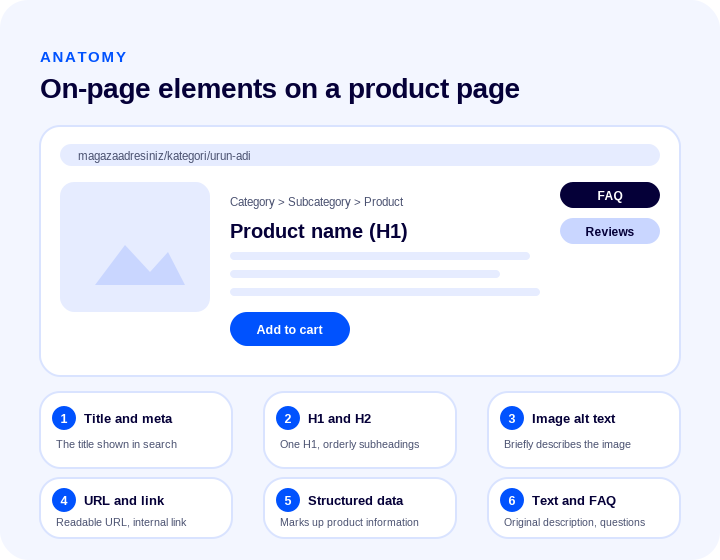
Let’s go through the six groups in the illustration in order.
1. Title tag
The title tag is the page’s title; it appears in the browser tab and as the blue headline in search results. It should be unique for each page, state the page’s main topic first and be kept short; long titles may be cut off in search results. The store name is usually placed at the end. For writing details, see the post how to write a title tag.
2. Meta description
The meta description is the short summary shown under the title in search results. Think of it not as a direct ranking factor but as shop-window text that increases the desire to click. It should be specific to the page and say what will be found and why it is worth clicking. Details are in the post how to write a meta description.
3. Heading structure: H1, H2, H3
Headings are like a page’s table of contents. A page has a single H1 (main heading); sections come with H2 and their subtopics with H3. Headings are used for meaning, not for looks: instead of choosing a heading tag to make text bigger, enlarge it with styling.
4. Intro and description text
The first paragraph of a page is where the topic is told quickly to both the reader and the search engine. On a product page, instead of pasting the manufacturer’s text as is, write an original description that explains the product to your customer; if many stores use the same text, your page cannot be told apart. On a category page, a short intro text gives context in addition to the product list. For the drawbacks of copied content, see the post what is duplicate content.
5. Images and alt text
Every image should have alt text that briefly describes what it shows. Alt text serves accessibility and helps search engines understand the image. Give files meaningful names too; since file size affects page speed, use images compressed and close to the size at which they are displayed. For how to write it, see how to write image alt text, and for product photos, see product image optimization.
6. Internal links
Internal links connect the pages on your site; they lead visitors to related content and show search engines how pages relate to each other. Link text should describe the destination page: “skin care products” instead of “click here”. For a detailed guide, see what is an internal link, and for the navigation trail that guides visitors, see what is a breadcrumb.
7. Page URL
The URL is the page’s permanent identity. Readable, short URLs without special characters that describe the topic are better for both visitors and search engines. Changing a published URL can cost you the links pointing to the old one; if a change is unavoidable, a permanent redirect from the old URL to the new one is needed. For details, see how should a URL structure be and what is a 301 redirect.
8. Structured data
Structured data means marking up information on the page (product, price, stock status, Q&A, breadcrumb trail) in a standard format machines can read. It helps the search engine understand the page more accurately and, where eligible, allows the search result to appear enriched. The marked-up information must match the information visible on the page exactly. Details are in what is structured data.
9. Frequently asked questions
Adding a short FAQ section made of questions people really ask at the end of the page answers both the visitor at the decision stage and searches phrased as questions. Choose questions from real ones that reach customer service, and make sure the answers are understandable when read on their own.
We recommend readingE-Commerce Product Page: What Should It Look Like?Which Element Takes More Priority by Page Type?
Priorities need to differ for each page type: on the home page, brand and general topic stand out; on a category page, search intent and internal links; on a product page, original description and product data; on a blog post, heading structure and question-and-answer format.
| Item | Home | Category page | Product page | Blog post |
|---|---|---|---|---|
| Title tag | High: brand and main business | High: category name and distinguishing phrase | High: product name and defining feature | High: main question or keyword |
| Meta description | Medium | High | Medium: product feature and benefit | High: the post’s promise |
| H1 | High: what the brand does | High: category name | High: product name | High: post title |
| Subheadings (H2/H3) | Medium | Medium: filter and subcategory names | Medium: features, delivery, returns | Very high: sections phrased as questions |
| Intro / description text | Medium | High: short context text | Very high: original product description | Very high: clear definition |
| Image alt text | Medium | Medium | Very high: every product image | Medium: infographics |
| Internal link | High: to main categories | Very high: to subcategories and related guides | High: to the category and related products | High: to product and category pages |
| Structured data | Medium: organization information | Medium: breadcrumb trail | Very high: product information | High: article and FAQ |
| FAQ | Low | Medium | High | High |
The rating in the table is general guidance; it may vary by your sector and the page’s role. For details specific to category pages, see category page SEO.
Home
The home page is the showcase of your brand and main business. The title tag should state both the brand name and what you sell, the H1 should make clear to visitors what the store is, and internal links to main categories should be provided. The home page should not try to explain everything; leave the detail to category and guide pages.
Category page
Category pages often answer “product type + shopping intent” searches. So the category name, title and H1 should be consistent; there should be a short context text above or below the product list, and links to subcategories and related guides. For multi-page lists, pagination needs separate handling: what is pagination SEO covers this topic.
Product page
On a product page, what wins is original and complete information: product name, distinguishing features, dimensions, material, delivery and return information, quality images and real customer questions. Using the same template text for all products makes pages indistinguishable from one another. When options of the same product, such as color and size, are repeated on different URLs, the canonical tag comes into play.
Blog post
For a blog post, on-page SEO means the post answers a single question. The heading is phrased as a question, followed right below by a short, clear definition, then step lists, tables and an FAQ. Linking the post to related product and category pages builds a bridge between information and sales pages. For interlinked posts on the same topic, keyword analysis in e-commerce explained is useful.
How Should the Heading Hierarchy (H1, H2, H3) Be Built?
A heading hierarchy is an orderly structure that begins with a single H1 on the page, goes down to H2 section headings, and under them to H3 subheadings. Levels are not skipped, and each heading summarizes the content under it.
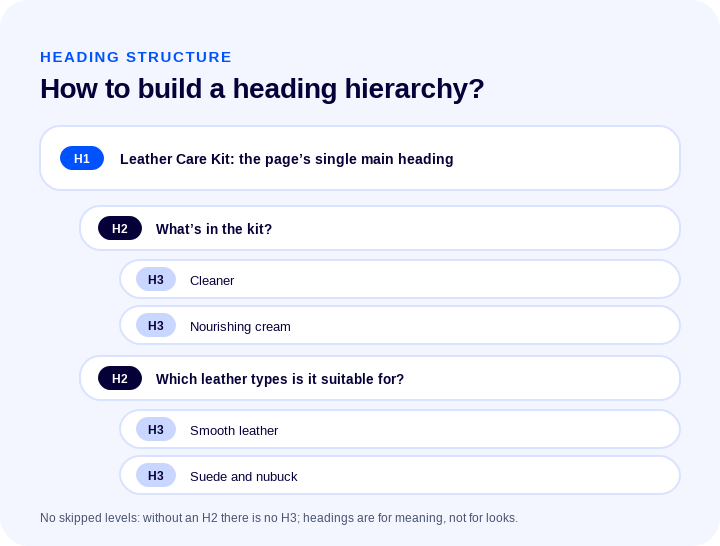
The same structure looks like this in the page source:
<h1>Deri Bakım Kiti</h1>

<h2>Kit içinde neler var?</h2>
  <h3>Temizleyici</h3>
  <h3>Besleyici krem</h3>

<h2>Hangi deri türlerine uygun?</h2>
  <h3>Düz deri</h3>
  <h3>Süet ve nubuk</h3>
The rules for correct use are:
- There is a single H1 on the page: the product name on a product page, the category name on a category page, the post title on a blog post.
- H2 headings are the main sections of the page; a visitor should be able to understand what the page covers by looking only at the H2s.
- H3 headings are used only for subtopics under an H2; an H3 is not opened without an H2.
- Heading tags are not chosen to enlarge or bold text; use styles for appearance.
- Text in the menu, footer and sidebar does not get heading tags.
Section names should, where possible, resemble questions customers ask: such as “Which skin types is it suitable for?”. This creates a structure suited both to question-style searches and to citations by AI assistants.
We recommend readingWhat Is Mobile SEO?How to Prepare an On-Page SEO Checklist
A checklist is ten short questions checked in the same order on every new or updated page. The shorter and more concrete the list, the more consistently the team applies it.
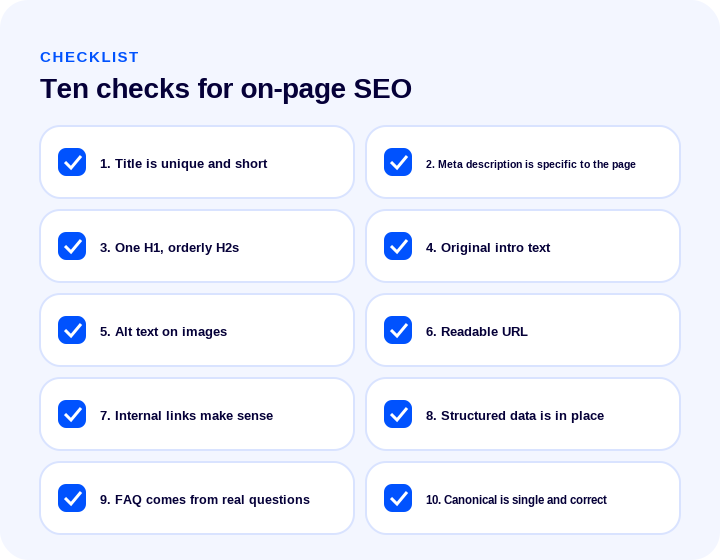
We give the same list as a table, with what to check for each item:
| Item | What to look at? |
|---|---|
| 1. Title | Is it unique to the page, is the main topic at the start, is it not excessively long? |
| 2. Meta description | Is it specific to the page, and does it say what will be found and the benefit? |
| 3. Headings | Is there a single H1, are H2 and H3 in order, are any levels skipped? |
| 4. Intro text | Does the first paragraph state the topic clearly, is it original? |
| 5. Image alt text | Does every meaningful image have short, descriptive alt text? |
| 6. URL | Is it readable, short, free of special characters and permanent? |
| 7. Internal links | Does it link to related categories, products and guides with meaningful text? |
| 8. Structured data | Is there markup suited to the page type, and does it match the visible information? |
| 9. FAQ | Does it answer real questions with answers that stand on their own? |
| 10. Canonical | Does the page have a single, correct canonical URL? |
Set up the list once and share it with your team; go through it in the same order when adding a new product or opening a campaign page. Don’t forget whether the page is indexed: if a very well-prepared page isn’t being indexed, the effort is wasted; for possible causes, see why isn’t my page indexed.
What Are the Most Common On-Page SEO Mistakes?
The most common mistakes are repeating the same title and description across many pages, using more than one H1, leaving images without alt text, copying manufacturer text as is, and forcing keyword repetition.
| Mistake | Consequence | Solution |
|---|---|---|
| Same title and meta description on all products | Pages are indistinguishable and look ordinary in search results | Set up a template based on the product name and defining feature, write important products by hand |
| More than one H1, or no H1 at all | The page’s main topic becomes unclear | Fix the template so it outputs a single H1 |
| Using a heading tag for font size | The hierarchy breaks and screen readers get confused | Set appearance with styles, use heading tags for meaning |
| Pasting manufacturer text as is | The page doesn’t stand out from other stores using the same text | Write an original description that presents the product to your own customer |
| Forcing keyword repetition | The text sounds unnatural and the reader loses trust | Explain the topic naturally, use synonymous expressions |
| Images without alt text, or alt text left like a file name | The image is not understood, accessibility suffers | Briefly describe what the image shows |
| Link text such as “click here” | The link gives no information about its target | Use link text that describes the destination page |
| Changing the URL frequently | Old links and ranking value are lost | Set the URL correctly from the start, provide a permanent redirect when changing |
| Publishing very similar pages separately | Pages compete with each other | Merge them, or indicate the main page with canonical |
Most of these mistakes are made not on individual pages but in the template; so fixing it once carries over to hundreds of pages. Finding problem pages requires reading your reports regularly: how to read an SEO report helps with this.
We recommend readingWhat Are Core Web Vitals?Where Should On-Page SEO Work Start?
The right place to start is with the pages that carry the most value: the home page, best-selling categories, best-selling products and the most-visited blog posts. Instead of trying to fix the whole site at once, work in small, measurable rounds.
- Classify the pages. Make separate lists for the home page, categories, products, guides and campaign pages.
- Prioritize. Put pages that bring revenue and have search demand first. For choosing keywords, see keyword analysis in e-commerce.
- Fix the templates. Set up title, heading structure, alt text and structured data behavior at the template level.
- Improve priority pages by hand. Add an original intro text, a page-specific description and internal links.
- Measure. After a change, watch the change in search visibility and clicks; results may take time to appear.
- Repeat. Let new pages go through the same checklist too.
The direction of on-page work is that each page answers a single search intent. Mixing several intents on one page, or splitting the same intent across two pages, can cause pages to weaken each other.
On-Page SEO Settings with Faprika
The Faprika control panel has fields related to on-page SEO. According to the SEO settings tutorial in the Help Center, under the SEO heading in the control panel at Configuration, Settings, General Settings, you can edit fields such as default page title, page title template, title separator, default meta description and canonical URL setting. The same tutorial explains that in product and category management, SEO information (page title, meta description, meta keywords and URL) can be entered for each record; labels such as product name can be used in product and category SEO fields. For a step-by-step walkthrough, see the SEO settings tutorial page.
On images, the Media Settings tutorial explains that an image uploaded to the panel is saved in different sizes and that small, medium and large image sizes can be adjusted; for details, see the media settings management page. On the catalog side, product, category and brand records are managed from the Catalog section of the control panel: catalog management tutorial.
The plan feature comparison includes rows such as “Canonical / H Tag Management / Robots / Sitemap”, “301 / 302 / 410 Panel / Managing URL Records”, “Bulk Automatic SEO/Meta Information Update” and “SEO Reports”. Which of these features are available in which plans, and to what extent, may vary by plan; for current coverage, see the e-commerce plans page. The panel makes it easier for you to manage settings; but writing the original description, the right heading and meaningful links is the store team’s job. For robots and the sitemap, what is robots.txt and what is a sitemap, and for language variants on multilingual sites, what is the hreflang tag are complementary reads. For how a page will look when shared, also see what is an Open Graph tag.
Frequently Asked Questions
What is on-page SEO?
On-page SEO is the set of adjustments made within a page itself so that it is clearer to search engines and users: the title tag, meta description, heading structure, text, images, internal links, URL and structured data. All of it is under the store team’s control.
What is the difference between on-page and off-page SEO?
On-page SEO is the adjustments made on the page itself; off-page SEO is the external signals such as links from other sites and brand mentions. The on-page side is in your hands, while the off-page side is earned over time through content and reputation.
How many H1s should a page have?
A page should have a single H1: the product name on a product page, the category name on a category page, the post title on a blog post. Sections use H2, their subtopics use H3, and levels are not skipped.
Is it necessary to write a separate title and meta description for every product?
For important products, yes; writing page-specific ones is better. In stores with many products, an efficient approach is to set up a template based on the product name and a distinguishing feature, then improve best sellers by hand; no page’s title and description should stay exactly identical to another’s.
What is image alt text for?
Alt text briefly describes what an image shows. It provides accessibility for visitors who cannot see the image, helps search engines understand it, and appears in its place when the image fails to load.
Which pages should you start with in on-page SEO?
With pages that bring revenue and have search demand: the home page, best-selling categories and products, and the guide posts that get the most visits. Fix the templates first, then improve the priority pages by hand and track the results.