
Contents 13 sections
- What Is a Product Description?
- Why Is a Product Description Important?
- What Blocks Does a Good Product Description Consist Of?
- What Should You Prepare Before Writing a Product Description?
- How Is a Keyword Used in a Product Description?
- When Is a Bullet List Used in a Product Description?
- What Is Duplicate Content and How Is It Prevented in Product Descriptions?
- What Are Product Description Examples by Category?
- How Are Descriptions Managed in a Store with Thousands of Products?
- What Are the Most Common Mistakes in Product Descriptions?
- Product Description Checklist Before Publishing
- Product Description Management with Faprika
- Frequently Asked Questions
A person arriving at a product page first looks at the photo, the price and the title; but everything they need in order to decide is in the description. What is the fabric, will the measurements fit me, what is this product good for, how do shipping and returns work? If the answers are not on the page, the visitor either goes back or takes the question to customer service. If the answers are supplier text sitting unchanged on dozens of sites, the problem then starts not with the visitor but with the search engine: nothing is left that sets your page apart from the others.
In this guide we answer the question how to write a product description step by step: the five blocks of a good description, what to prepare before writing, the right place for the keyword, when a bullet list helps, how to avoid duplicate content, before-and-after examples by category, how to manage texts in a store with thousands of products, common mistakes and a checklist. At the end there is information about Faprika and a six-question FAQ.
What Is a Product Description?
A product description is the text on a product page that explains what the product is, who it is for, how it is used and the information that needs to be known before buying. It says everything that the title and the photo do not say.
The description is separate from the product title, the short feature list and the meta description. The product title names the product and appears in the search result; product attributes hold comparable data such as size, color and material; the meta description is the two-line invitation in the search result. The product description is the body that ties these parts together and answers the question “why this product, why now?”
There are two more articles on our site close to this topic: the article How to Write a Product Description for E-Commerce? is a short introduction that gathers seven basic tips; the article How Do Product Descriptions in E-Commerce Affect Sales? deals with purchase psychology and storytelling. This guide does a different job from both: it ties the description to a repeatable structure (five blocks), a preparation process and a quality check; it answers practical questions such as duplicate content, bullet lists and management in a store with many products. Reading the three in a row gives the widest view of the subject.
Why Is a Product Description Important?
A product description does three jobs: it supports the visitor’s decision, tells the search engine what the page is about, and reduces returns and customer questions. Each of these three effects is a separate area of gain, and all of them come from the same text.
For the visitor: gets the answer without asking
In an online store, text answers everything you could ask a sales assistant in a shop. When questions such as “will this shoe suit a wide foot?”, “which accessories does this device work with?” or “can I assemble this furniture myself?” find their answer in the description, the visitor gains confidence. When they do not, the easiest move is to close the tab.
For the search engine: understands why the page exists
A search engine reads what a product page is about from the body text as well as the title. The more original, product-specific and question-answering the content is, the more clearly the page is positioned. A description that is thin, copied or only two lines long does not let the page answer the question “how is it different from other pages?” The effect on ranking cannot be guaranteed, but an understandable and original page is always a stronger candidate. For all on-page signals, see the article what is on-page SEO.
For the business: fewer returns and questions
Returns start when a product turns out different from what the customer expected. Stating details such as size, fit, compatibility, installation and care clearly corrects wrong expectations before the purchase. If customer service writes the same information one message at a time every day, moving that answer into the description saves time.
| Who benefits? | What does a good description deliver? | Result |
|---|---|---|
| Visitor | Finds the answers to questions on the page | Decides with more confidence |
| Search engine | Understands the page’s topic and originality | The page is positioned clearly |
| Customer service | Repeated questions decrease | Saves time and effort |
| Returns process | Expectations are clear from the start | Unnecessary returns decrease |
What Blocks Does a Good Product Description Consist Of?
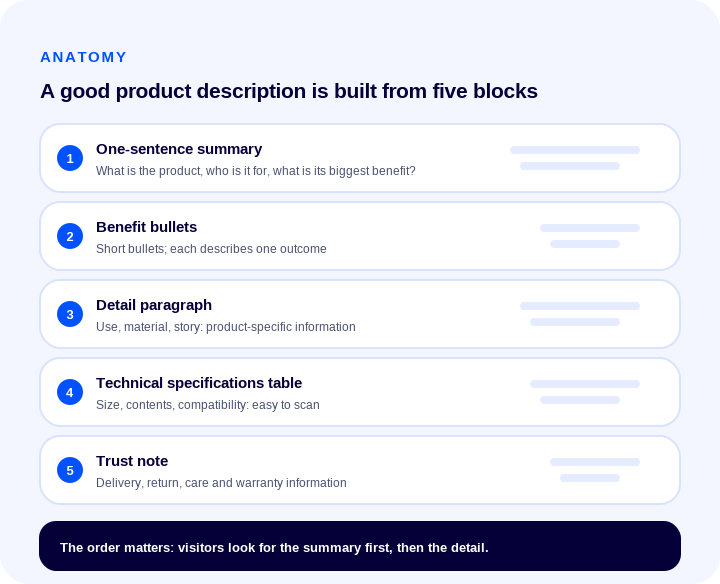
A good product description is built from five blocks: a one-sentence summary, benefit bullets, a detail paragraph, a specifications table and a trust note. This order follows the sequence in which visitors look for information: first “what is this?”, then “what does it do for me?”, then “what are the details?”, and finally “is there any risk?”.
1. One-sentence summary
The first sentence of the description says what the product is, who it is for and its biggest benefit. A sentence such as “A lightweight, water-repellent women’s raincoat suited to everyday use” does not repeat the title; it adds the context of use on top of it. It is the most valuable sentence on the page for both the visitor and the search engine; the keyword appears here naturally.
2. Benefit bullets
Right below the summary come short bullets, each describing a single outcome. A feature and a benefit are not the same thing: “water-repellent fabric” is a feature, “you can walk in the rain without looking for an umbrella” is a benefit. When writing a bullet, it helps to name the feature first and then continue with “what does this change in the customer’s life?”. Bullets stay short; each one should try not to exceed a single line.
3. Detail paragraph
This is where the information that sets the product apart from other products is written: how it is used, what material it is made of, how it was produced, in which situation it is preferred. This block keeps the description original; everything that is not in the supplier’s text but that you know from having the product in your hands goes here. Two or three short paragraphs are enough for most products.
4. Specifications table
Data such as size, weight, composition, compatibility and care is not buried in a paragraph; it is written in a table or a short list. A table can be scanned quickly and makes comparison between products easier. Using the same rows for products in the same category ensures consistency.
5. Trust note
Delivery time, return terms, care instructions and warranty information are the last block of the description. In most stores this information sits on separate site-wide pages; briefly stating on the product page the points that are specific to the product (for example, that it cannot be returned because it is made to order, or a special washing condition for care) prevents wrong expectations.
| Block | Question it answers | Format |
|---|---|---|
| One-sentence summary | What is this product and who is it for? | One sentence, keyword appears naturally |
| Benefit bullets | What do I gain? | Short bullet list |
| Detail paragraph | How, with what, and why is it different? | Two or three short paragraphs |
| Technical specifications table | What are the size and composition? | Table or short list |
| Trust note | Is there any risk in buying? | Short notes |
What Should You Prepare Before Writing a Product Description?
Before writing a product description, you need to get to know the product, collect customer questions and turn every feature into a benefit. This preparation should not take longer than writing, but it has to be done before writing.
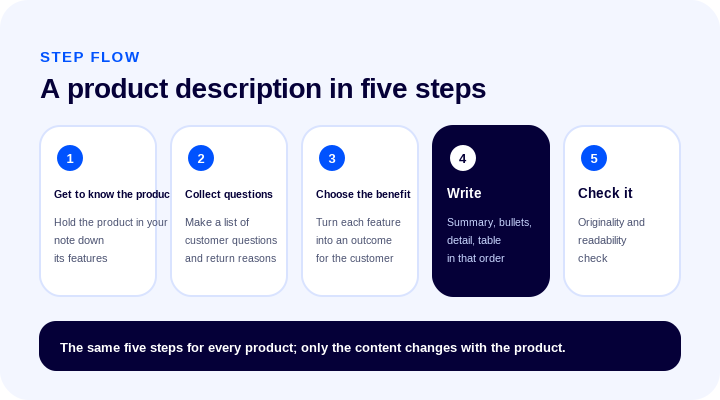
- Get to know the product. If possible, hold the product in your hands; try the fabric, the packaging, the weight, the smell or the way it works yourself. The supplier’s text is only a starting point, because others read it too.
- Collect the questions. The questions that reach customer service, the reasons for returns and the complaints in product reviews give you the list of topics the description has to answer. For managing reviews, see the article how to manage product reviews.
- Choose the benefit. Next to each feature, write the note “what does this change for this customer?”. The three strongest benefits become the backbone of the description.
- Write. Fill in the five blocks in order. First the summary sentence, then the benefit bullets, then the detail, the table and the trust note.
- Check. Before publishing, review the text for originality, keyword use, readability and consistency. The checklist at the end of this guide is meant for this.
Why does writing from customer questions work?
When a product description is thought of as “describing the product”, the writer lists what they themselves know. When the starting point is the question “what is the customer wondering about?”, the description serves the visitor’s real need. Moreover, a customer question is often a search query: “shoes for wide feet”, “does the wireless headphone pair with a phone”. Answering these questions on the page both satisfies the visitor and makes the page suitable for searches on the topic.
How Do You Use Keywords in a Product Description?
In a product description, the keyword appears in the natural phrase visitors use when searching for the product, in the summary sentence and in a few places in the text, without forcing it. The aim is not to repeat the word often but to make the page’s topic clear.
When choosing the keyword, first look at how the product is searched for: by product name, by purpose of use, or by feature? “Raincoat” is a short and competitive search; “women’s water-repellent raincoat” or “lightweight foldable raincoat” are more specific, product-specific searches. For the logic of using these long and specific searches, see what is a long-tail keyword, and for the general method, what is keyword research in e-commerce. Understanding what the visitor expects from a search is the subject of what is search intent.
| Where | How does the keyword appear? | Watch out |
|---|---|---|
| Summary sentence | Naturally, as part of the sentence | Do not repeat the title word for word |
| Benefit bullets | With synonyms and related phrases | Do not put the same word in every bullet |
| Detail paragraph | Together with the context of use | The flow of the sentence must not break |
| Technical specifications table | Natural terms in row names | The table must stay short and clear |
| Image alt text | Appears naturally when describing the image | Do not write a keyword list |
There is no such target as keyword density; if repetition grates on your ear when you read the text aloud, it is too much. For the description of the image, see how to write image alt text, and for the image itself, product image optimization.
Recommended readingWhat Is Search Intent?When Should You Use a Bullet List in a Product Description?
A bullet list is used to make independent, short pieces of information (benefits, composition, package contents, compatibility) quick to scan; the story, the context of use and the reasoning are told in a paragraph. Used together, side by side, the two give the best result.
A list serves the visitor who scans the screen quickly. Especially on a phone, three or four short bullets are far more readable than a long paragraph. But turning everything into a list is also a mistake: a description made up entirely of bullets cannot convey the product’s story and distinctiveness and reads like a supplier catalogue. The rule is simple: if the information is of the “yes/no” or “this much” kind, use a list; if it contains a “why”, use a paragraph.
| Type of information | Best format | Example |
|---|---|---|
| Benefits | Short bullet list | Stays dry in the rain, fits in a bag |
| Size and composition | Table | Height, weight, material |
| Package contents | Bulleted list | Product, case, user manual |
| Context of use and story | Paragraph | Why the product was designed |
| Care instructions | Short steps | Washing and storage conditions |
In the description added to the product page, the bullet list is written with the plain HTML list tag; this way search engines and screen readers recognise the list as a list. A simple example is below:
<p>Günlük kullanıma uygun, hafif ve su itici kumaşlı kadın yağmurluk.</p>
<ul>
  <li>Yağmurda şemsiye aramadan yürürsünüz</li>
  <li>Katlanıp küçük bir çantaya sığar</li>
  <li>Kapüşonu çıkarılabilir</li>
</ul>
If you add the list through the editor in the product management screen, you do not need to write the code by hand; still, check that the output appears as a list. Writing every bullet in the same form (the same pattern, the same length) improves readability.
What Is Duplicate Content and How Do You Avoid It in Product Descriptions?
Duplicate content is the same or a very similar text appearing at more than one address. In product descriptions, its most common source is the text that comes from the supplier and is used verbatim by many sites.
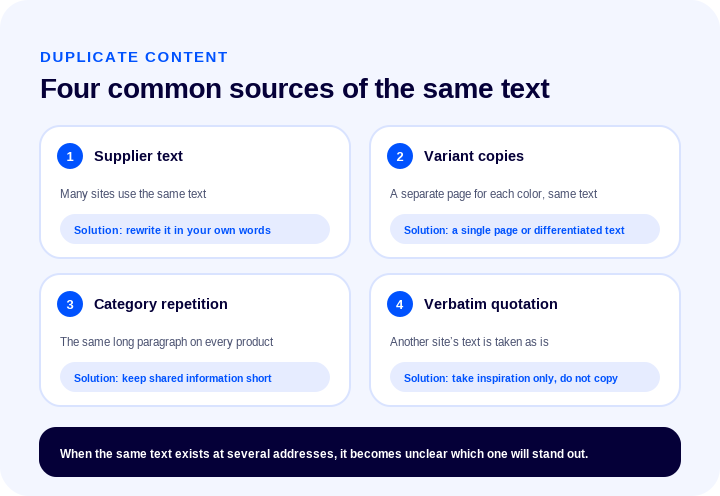
The search engine has to decide which one to show among pages with the same text; this makes your page’s chance of standing out uncertain. We explain the general consequences of duplicate content in detail in the article what is duplicate content; here let us look at the four sources specific to product descriptions.
1. Supplier text
The product text the supplier sends saves time, but dozens of sellers use the same text. The solution is to rewrite the text in your own sentences: use the supplier text as an information source, hold the product in your hands and add your own observations, and rebuild it according to the five-block structure. Copying it word for word and changing only a few words is not sufficient originalisation.
2. Variant copies
If separate pages have been opened for the colours and sizes of the same product and all of them carry the same text, these pages are copies of one another. The right approach is to offer the variants as options on a single product page; if separate pages are necessary, it is to bring forward the information that differs on each (the colour name, a usage suggestion specific to the colour) and to mark the main page with the canonical tag. For the details of the subject, see what is a canonical tag.
3. Category repetition
Putting the same long paragraph (brand story, shipping information, care warning) into the description of every product in a category makes a significant part of each page common. Keeping the shared information short and linking to separate site-specific pages (shipping and returns, about the brand) keeps the product description specific to the product.
4. Verbatim quotation
Taking another site’s text as it is is both a duplicate content and a copyright problem. Good descriptions on other sites can be a source of inspiration; but the text must be written in your own sentences, with your own product knowledge.
| Source | Why is it a problem? | Solution |
|---|---|---|
| Supplier text | Many sites use the same text | Use it as an information source and rewrite |
| Variant copies | The same text for every colour and size | A single page or differentiated text, canonical if needed |
| Category repetition | The same long paragraph on every page | Keep shared information short and link to a separate page |
| Verbatim quotation | Duplicate content and copyright risk | Take only inspiration, write your own sentences |
What Are Examples of Product Descriptions by Category?
The five blocks of the product description are the same in every category, but the information that stands out changes: in clothing, size and fit; in skin care, use and composition; in electronics, compatibility; in furniture, dimensions and installation; in food, ingredients and storage conditions. The examples below show a weak and a strong description of the same product side by side; they are unbranded and representative.
| Category | Weak description | Strong description |
|---|---|---|
| Clothing | “Stylish and comfortable women’s trousers. Quality fabric.” | “High-waisted, wide-leg trousers suited to everyday and office wear. The stretch fabric does not feel tight when sitting down and standing up; the cut is true to size, and the model’s height and the size she is wearing are noted alongside.” |
| Skin care | “Adds radiance to your skin. The perfect moisturiser.” | “A light-textured moisturising cream applied to clean skin morning and evening. The ingredients and usage steps are below; for sensitive skin, test on a small area first.” |
| Electronics | “High-performance wireless headphones.” | “Wireless headphones that pair with phones and tablets. The box contains the headphones, a charging case and replacement tips; charging and connection details are in the table.” |
| Furniture | “Bookcase with a modern design.” | “A vertical bookcase suited to narrow walls. The width, height and depth are in the table; the tools required for assembly and the estimated installation time are noted.” |
| Food | “Natural and delicious nuts.” | “Roasted, unsalted mixed nuts. The ingredients and allergen information are written as on the packaging; after opening, store in a cool, dry place.” |
The common problem of the weak examples is vague adjectives (“stylish”, “quality”, “perfect”, “high-performance”). Because these words can be written about any product, they describe none. The strong examples, on the other hand, contain verifiable information: cut, size, composition, compatibility, storage conditions. To tell whether a sentence is strong, use a simple test: could I put this sentence on another product’s page? If I can, the sentence is not specific to the product.
Category-specific points to watch
- Clothing and shoes: size chart, fit (slim, regular, loose), model measurements, fabric composition and washing instructions. Most return reasons come from uncertainty about size and fit.
- Skin care and cosmetics: the ingredient list, usage steps and who it is suitable for. Avoid promising treatment or a guaranteed result; every claim you write must be verifiable and compliant with regulations.
- Electronics: compatible devices, package contents, connection type and warranty information. Technical details stay in the table, the usage scenario in the paragraph.
- Home and furniture: dimensions, material, weight-bearing capacity and assembly information. Saying which space it fits answers the most frequently asked question.
- Food: ingredients, allergen information, storage conditions and shelf-life information. Writing the mandatory label information correctly and completely is the seller’s responsibility.
How Do You Manage Descriptions in a Store with Thousands of Products?
In a store with many products, rewriting all the descriptions at once is not realistic; the right way is to prioritise, to turn the common structure into templates and to track what is missing with reports. First the products that receive the most traffic and sell the most are handled, then the products with missing descriptions.
1. Set the priority
Start with the products that sell and get visited the most; improvements on these deliver the fastest results. Next, list the products whose description is empty or only two lines long; these pages give both visitors and search engines the least information. For newly added products, the description should be ready together with the product; saying “we’ll write it later” leads to a pile of incomplete pages.
2. Template the structure, not the text
The five-block structure can be templated by category: which rows go in the table, which questions are answered in the trust note, and so on. But the summary sentence and the detail paragraph must be written specifically for each product. Templating the text itself (writing it by only swapping the product name) leads to duplicate content.
3. Use bulk operations correctly
Bulk-updating fields such as price, stock and images saves time; writing description text in bulk, however, requires care. Use bulk operations for the shared parts that don’t change (trust note, care instructions); prepare the summary and detail sections product by product. For the general method of bulk updating, see the how to bulk update products article.
4. Don’t forget sold-out and discontinued products
The description of an out-of-stock product stays on the page; this page needs to guide the visitor to another product. For details on the topic, see the out-of-stock product page SEO article.
5. Think together with the category page
The product description and the text on the category page should not repeat each other; they should complement each other. The category page helps with choosing, the product page helps with deciding. To keep the roles of the two separate, you can look at the category page SEO article. Linking to related products between product pages also strengthens the description; for the principle, see the what is internal linking article.
| Product group | What is done? | Priority |
|---|---|---|
| Best-selling and most-visited products | Rewritten following the five blocks | First priority |
| Products with an empty or very short description | Summary and detail are added | Second priority |
| Products using supplier text | Rewritten originally | In turn |
| Newly added products | Ready together with the product | Ongoing |
| Sold-out products | Alternative redirect is added | As needed |
What Are the Most Common Mistakes in Product Descriptions?
The most common mistakes are using the supplier’s text verbatim, writing with vague adjectives, piling all the information into one paragraph, and not answering the product’s questions. Most stem from not preparing before writing.
| Mistake | Why is it a problem? | The right approach |
|---|---|---|
| Using the supplier’s text verbatim | Duplicate content, no differentiation | Rewrite in your own sentences |
| Vague adjectives (“quality”, “stylish”) | Describes no product at all | Back every adjective with proof |
| One long paragraph | Unreadable on a phone | Summary, bullets, short paragraphs, table |
| Forcing the keyword repeatedly | Hurts readability | Place it naturally, use synonyms |
| Not stating size and compatibility | Unnecessary questions and returns | Add them to the table |
| Same text on every product | Pages become copies of each other | Keep the shared part short |
| Writing claims that can’t be verified | Damages trust and compliance | Write only verifiable information |
| Writing the description once and leaving it | Products and questions change | Update based on reviews and questions |
Forgetting mobile reading
Most product pages are opened on a phone. A long, unbroken paragraph looks like a wall on a phone; short paragraphs, bullet lists and meaningful subheadings make scanning easier. For how mobile experience relates to SEO, see the what is mobile SEO article.
Contradicting structured data
The structured data added to the product page (price, stock, product name) and the visible description must give the same information. A feature stated on the page but different in the code, or a price on the page that differs in the code, damages trust. For details on the topic, see the what is structured data article.
Product Description Checklist Before Publishing
Before publishing a product description, you should be able to answer yes to eight questions: is the summary sentence at the top, are the benefits listed point by point, is the text specific to the product, is the keyword natural, is the technical information in a table, is there delivery and return information, does it read comfortably on a phone, does the image alt text add something.
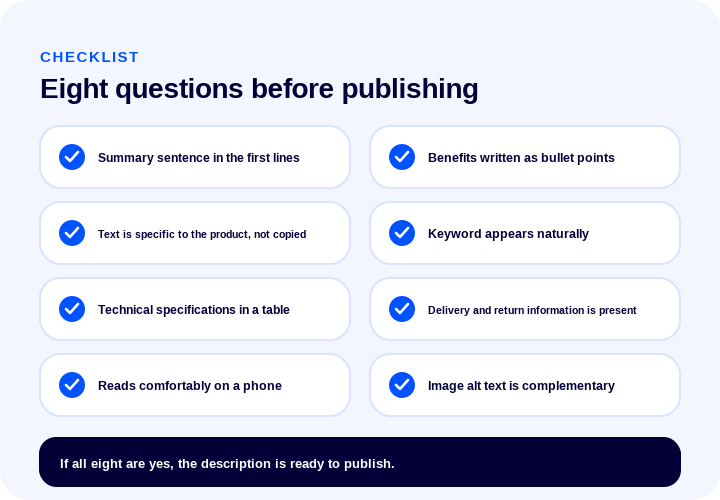
| # | Check | What happens if it’s wrong? |
|---|---|---|
| 1 | Summary sentence in the first lines | The visitor can’t grasp the product quickly |
| 2 | Benefits are written point by point | The text can’t be scanned, benefits get lost |
| 3 | Text is specific to the product, not copied | The page doesn’t stand out from others |
| 4 | Keyword appears naturally | The topic stays unclear or the text looks forced |
| 5 | Technical specifications in a table | Comparison gets harder |
| 6 | Delivery and return information is present | Lack of trust, unnecessary questions |
| 7 | Reads comfortably on a phone | The visitor abandons the text |
| 8 | Image alt text is complementary | Image information doesn’t reach the search engine |
If you’d like to review the rest of the page too, the what a e-commerce product page should look like guide, which covers the title, images, reviews and related products together, is the natural continuation of this checklist. For store-wide settings, see the how to configure e-commerce SEO settings article.
Managing Product Descriptions with Faprika
In Faprika, the product description is edited from product management in the control panel. As explained in Faprika’s training pages, you can select the product in Product Management under the “Catalog” section and enter its description and SEO information; the catalog management training covers this area in detail.
On the SEO side, the fields described in the SEO settings training will be useful: a per-product SEO information field, auto-fill tags such as product name and stock code, and a setting that generates product meta descriptions automatically. An automatically generated meta description is a starting point; for best-selling products, a hand-written description is always more original. Among the same settings is enabling the canonical address; when managing variant copies, make sure this setting is on.
Faprika’s plan feature comparison contains a few rows related to the topic: “Bulk Automatic SEO/Meta Information Update”, “Canonical / H Tag Management / Robots / Sitemap”, “301 / 302 / 410 Panel / Managing URL Records” and, in the Reports section, “SEO Reports” and “Products Without Images/Descriptions”. The second report row is directly useful for finding products with missing descriptions. Which plan includes which scope of these features may vary by plan; for the current scope, see the e-commerce plans page.
Product images are also part of the description. As explained in Faprika’s training, an image uploaded to the panel is saved in multiple sizes; you can manage the sizes from the panel’s media settings. For details, see the media settings management training.
Frequently Asked Questions
How do you write a product description?
A product description is built from five blocks: a one-sentence summary saying what the product is and who it is for, short benefit bullets, a product-specific detail paragraph, a technical specifications table, and a trust note such as delivery and returns. Getting to know the product and collecting customer questions before writing makes the text more original and useful.
How many words should a product description be?
There is no exact word count; the description gets longer or shorter depending on the complexity of the product. For a simple product, a short summary, a few bullets and a table may be enough; for a complex product, the detail paragraph is longer. The yardstick is not length but whether it answers the visitor’s questions.
Can I use the supplier’s text as the product description?
You can use it as a source of information, but you should not publish it as is. Because many sites use the same text, your page does not stand out from the others and a duplicate content risk arises. Take the supplier’s text as a base and rewrite the product from your own observation and in your own sentences.
How do you use a keyword in a product description?
The natural phrase visitors use to search for the product should appear without force in the summary sentence and in a few places in the text. Instead of repeating the same word often, use synonyms and close expressions; if the repetition grates when you read the text aloud, it is excessive.
Should a product description use a bullet list or a paragraph?
Both should be used together. Benefits, package contents and short pieces of information are scanned quickly as a bullet list; the product’s story, usage context and reasoning are told in a paragraph. A description made entirely of lists reads like a catalog, and one made entirely of paragraphs cannot be scanned on a phone.
Should I write a separate description for the colors and sizes of the same product?
Generally no; variants should be offered as options on a single product page. If separate pages are needed, highlight the information specific to the color or size on each one and indicate the main page with the canonical tag. Repeating the same text across many pages leads to duplicate content.