

Contents 13 sections
- What Is Filtered Navigation (Facet)?
- Why Do Filter URLs Cause an SEO Problem?
- Which Filter Pages Should Be Indexed?
- What Are the Ways to Manage Filter URLs?
- How Should Filter URLs Be Designed?
- How Do You Strengthen an Indexed Filter Page?
- How Does the Decision Flow for Filter Pages Work?
- What Are Common Mistakes in Filtered Navigation?
- Why Does Filtered Navigation Matter on Mobile and for Speed?
- How Is the SEO Impact of Filtered Navigation Measured?
- Filtered Navigation SEO Checklist
- Preparing for Filtered Navigation Management with Faprika
- Frequently Asked Questions
A customer enters the women's jackets category, selects black, picks size M, sorts by price from low to high and moves to the second page. For the store, this is a flawless shopping flow. For a search engine bot, the same flow is the birth of hundreds of pages, each with its own URL, most very similar to one another and most of which nobody will ever search for. As the number of filters grows, the number of URLs does not add up but multiplies; while the bot wanders through filter combinations without reaching product pages, crawl resources run out, and dozens of variants of the same product list pile up in the index.
In this guide we cover filtered navigation SEO, that is, the effect of filter and sort URLs (also known as facets) on search visibility. We explain how the problem arises, the crawl budget and duplicate content risk, which filter pages deserve to be indexed, how to manage them with canonical, noindex, robots.txt and link structure, fine points such as empty results and pagination, and how to measure the outcome. Topics such as how to set up product attributes and filters, or how to improve the filter interface for customers, are the subject of other articles; this one focuses only on the search engine side.
What Is Filtered Navigation (Facet)?
Filtered navigation is the interface that lets a visitor narrow a product list by attributes such as color, size, brand, price range or stock status. In most stores, each selection adds a parameter to the list's URL or generates a new path segment; as a result, the same category appears at countless different URLs.
The word facet describes one aspect of a product, that is, an attribute: color is one facet, size is another, brand is yet another. The options within a facet (black, white, navy) are filter values. Sorting (by price, by newness) and the number of products per page do not narrow the products, they only change the order; but since they also change the URL, they are in the same risk class.
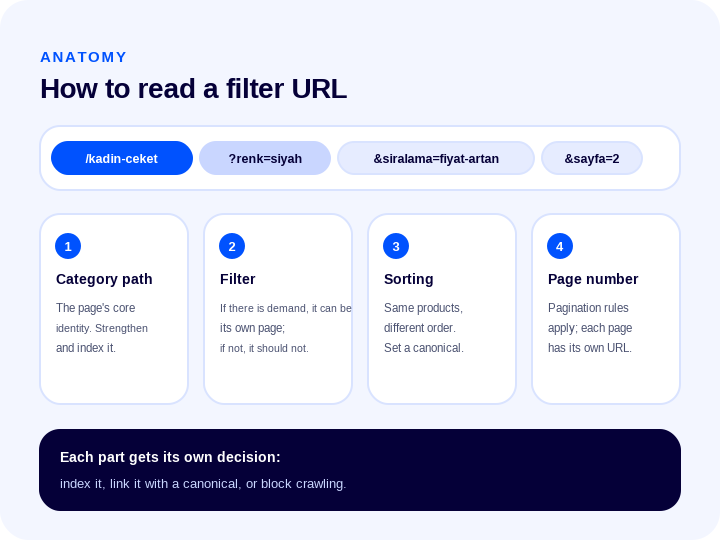
The example URL in the illustration has four parts: the category path, the color filter, the sort order and the page number. The category path is the page's core identity. The color filter, if there is enough search demand, can be a candidate to be a page in its own right. The sort order and page number, on the other hand, are often not a new page but another view of the same page. The first step of SEO management is to tell which type each part of the URL belongs to.
The example URLs you will see in this article are for illustration; the URL structure of your own store may be different. For general URL principles, see our article on how a URL structure should be.
Why Do Filter URLs Cause an SEO Problem?
Filter URLs cause three problems: they waste crawl resources, they produce duplicate or very similar content, and they scatter ranking signals. Each can be managed on its own, but when ignored together they lower index quality in large stores.
1. Combination explosion
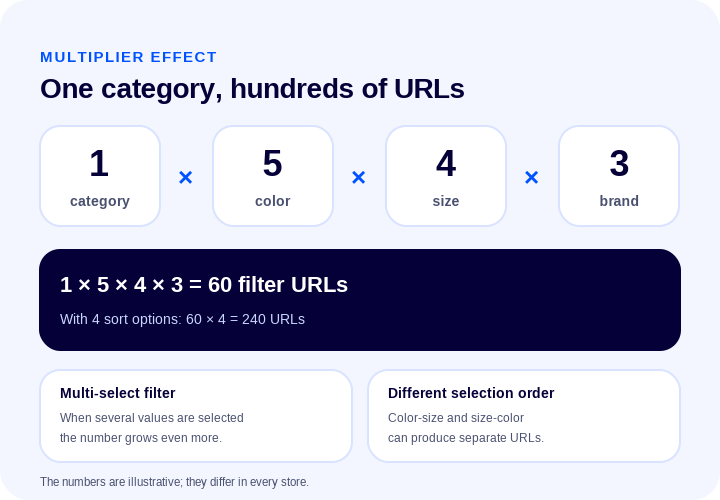
Think of three filter groups: five colors, four sizes, three brands. When five colors, four sizes and three brands are selected together, a category yields 60 filter URLs; adding four sort options brings the number to 240. In multi-select filters and in URLs that give the same result in a different order (color then size versus size then color), the number grows even more. These figures are illustrative; in real stores the number of filters can be far higher. If you consider that a store has hundreds of categories, it is no surprise that thousands of URLs come out of a single product list.
2. Crawl budget
The crawl resources that search engine bots allocate to a site are not unlimited. Because the bot moves forward by following links, every filter link on your pages takes it to a new URL. While thousands of low-value filter URLs are being crawled, the products you have just added or the categories you have updated may be discovered late. We covered the basics in our article on what crawl budget is; filtered navigation is one of the areas where this budget is used up most often.
3. Duplicate and thin content
A category page with the “black” filter applied is often a subset of the products of the main category; its title, description and text are the same. The search engine finds these pages very similar to each other and decides for itself which one to show; the page you want may not be chosen. If the result is a list of four products, the page may also be considered “thin content”. For details, see the article what duplicate content is.
4. Diluted signals
If internal links and links from outside are spread across dozens of URLs of the same list, your main category page cannot grow stronger. Having link value gathered at a single, clear URL is an advantage in rankings.
Recommended readingWhat Is Crawl Budget?Which Filter Pages Should Be Indexed?
A filter page deserves to be indexed when people genuinely search for that combination, the results contain enough distinctive products, and the page differs meaningfully from the parent category. If any one of these three conditions is missing, the page should serve only customer navigation, not search results.
When deciding, ask these questions in order:
- Is there search demand? If people search with phrases such as “black leather jacket” or “men’s white sneakers,” that combination can be a landing page. To understand demand, the articles keyword analysis in e-commerce: what is it and what is search intent will help you.
- Are there enough products? Lists with one or two products are weak pages. If the number of results keeps changing, that also shows the page is not stable.
- Is the page distinctive? If the title, heading and short text can differ by combination, the page becomes valuable. Pages that copy the same template are duplicate content.
- Does it have a stable address? The address of a page to be indexed must not depend on order; it should always be generated in the same format.
Based on these questions, we can divide filter types into three broad groups. The table is a starting point; it should be adapted to your own product groups and search data.
| Filter type | Generally recommended behavior | Reason |
|---|---|---|
| Brand | If there is demand, it is indexed and gets its own address and title | People search for the brand together with the category |
| Color, material, model | Combinations with search demand are indexed, the others are not | Some colors are a natural part of product searches, others are not |
| Size, shoe size | Mostly not indexed | Rarely appears in searches, product stock changes constantly |
| Price range | Not indexed | Produces unlimited values, no content difference |
| Stock status, discounted products | Not indexed | A temporary state, the page changes often |
| Sorting, display, products per page | Not indexed | Only the order of the same products changes |
| Session and tracking parameters | Not indexed, and if possible not added to the address | Unrelated to the content, only creates copies of the address |
The point to note here is that there are no absolute rules such as “index the brand, don’t index the color.” In a shoe store, color is a feature that appears often in searches; in a stationery store it may never appear. The decision is made per category. For this reason, reviewing the structure in the what are product attributes article before you start designing filters and product attributes reduces the burden of fixing things later.
What Are the Ways to Manage Filter URLs?
There are four basic tools for managing filter URLs: the canonical tag, the noindex tag, robots.txt and link structure. Each solves a different problem; one does not replace another, and a wrong combination gives unexpected results.
Canonical tag: declare your preferred address
The canonical tag tells the search engine which of several similar pages is the main one. For addresses that only change the order, such as sorting and products per page, the canonical should point to the main list address. This is a hint, not a directive: the search engine may ignore your preference if it deems necessary. Even so, it is the most natural and least risky solution for such addresses. For how to write the tag and common mistakes, see the what is the canonical tag article.
<!-- https://magazaadresiniz/kadin-ceket?siralama=fiyat-artan -->
<link rel="canonical" href="https://magazaadresiniz/kadin-ceket">
The canonical tag does not prevent the page from being crawled; the bot still visits the address, it just learns which one is the main one. For this reason, it does not solve the crawl budget problem on its own; it solves the duplicate content problem.
Noindex tag: let the page be crawled but not enter the index
Noindex is a meta tag that asks for the page not to be shown in search results. If a useful filter page serves the customer but you do not want it in search results (for example, combinations with three filters applied at once), noindex is the right tool. For noindex to work, the bot must crawl the page and see the tag; that is, this method does not reduce crawling either, it keeps the index clean. After a while, search engines tend to visit noindex pages less often, but this should not be assumed to be certain behavior.
<meta name="robots" content="noindex, follow">robots.txt: block crawling from the start
The robots.txt file tells bots which paths they should not crawl. For parameterized addresses with zero value (session, tracking, sorting), it is the most direct way to cut crawling and the tool that truly solves the crawl budget problem. However, it has two serious limits. First, if a page blocked from crawling receives links from outside or inside, its address can still appear in the index. Second, a noindex or canonical tag on a page blocked by robots.txt is never read by the bot. For detailed writing rules, see the what is robots.txt article.
User-agent: *
Disallow: /*?siralama=
Disallow: /*?sayfabasi=
The lines in the example are for illustration only; they should be written according to your own parameter names, and before going live you should make sure you are not accidentally blocking important pages.
Link structure: guide the bot from the very start
The bot finds addresses through links. If filter options appear on the page as ordinary links, the bot discovers all of them. For filters you do not want indexed, you can apply them with a script and update the list without changing the address, or you can mark these links with nofollow. Nofollow on internal links is a hint, not a hard block; therefore it should not be left alone and should be used together with other methods. Conversely, give ordinary links to the filter pages you want indexed from the category page, the menu and related content. For how to build internal links, see the what is an internal link article.
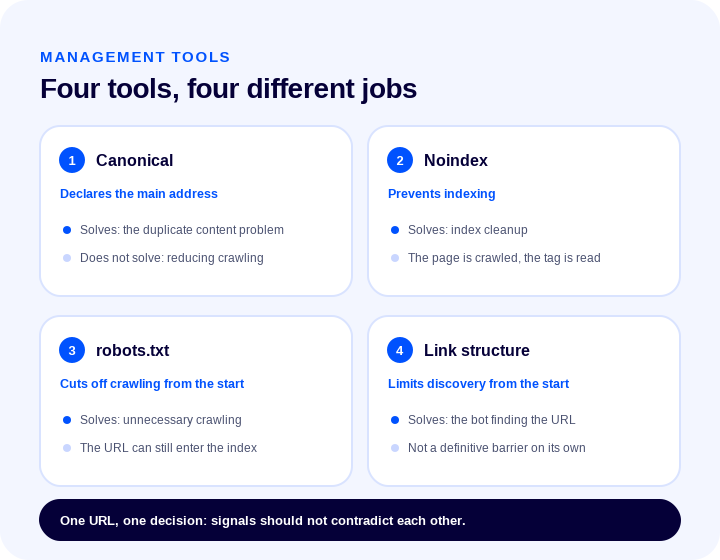
Let us also gather the properties of the methods in the table below, because choosing the right tool depends on which problem you want to solve.
| Method | Does it reduce crawling? | Does it clean the index? | Best used for |
|---|---|---|---|
| Canonical | No, the bot still crawls | Helps as a hint | Variants of the same list, such as sorting and display |
| Noindex | Not directly, perhaps over time | Yes, the tag is read when the page is crawled | Filter pages useful to the customer but unnecessary in search |
| robots.txt | Yes, the address is not crawled at all | No, the address can enter the index | Valueless parameters, session and tracking addresses |
| Link structure | Yes, the bot never finds the address | Indirectly | Limiting the discovery of combinations from the start |
How Should Filter URLs Be Designed?
A well-designed filter address is predictable, stable and simple. Filter pages to be indexed get a clean path address, while those not to be indexed can remain as parameters; this way the address format and the decision you give the search engine support each other.
Give a clean address to the filter to be indexed
For lasting values such as a brand or a color with search demand, use a readable path address (for example, the category name followed by the color name). Such an address is shareable, memorable and naturally carries the keyword in the title. For filters that will not be indexed, you can keep the parameter format: a clean path signals “this page is a real page,” a parameter signals “this is a view,” and robots.txt rules are also easy to write.
Fix the parameter order
Selecting the same filters in a different order should not create a different address. If color then size gives the same result as size then color, the store should always build the address in the same order (for example, alphabetical or a fixed facet order). For multi-value selections, values should also be written in order. Otherwise unnecessary duplicate addresses are produced for the same list.
Do not carry tracking and session parameters in the address
Parameters such as campaign source or session information are signals that do not change the content but multiply the address. Where possible, carry this information in a cookie or another mechanism rather than in the address; if it must be carried, point to the main address with a canonical.
Do not write default values in the address
The default sorting or the default number of products per page should never appear in the address. If the same list can be opened both without a parameter and with “sort=recommended,” there are two addresses and one is unnecessary.
Give the right response when the result is empty
If a customer selects a combination that yields no products, the page can say “no products found,” but the page’s response code must match that. Returning a success code with empty content creates a “soft 404” problem. Either do not create empty combinations at all (show options that give no results as disabled or hide them) or return the appropriate response code on these addresses. The what is a 404 page article is more detailed on this. For a similar decision on sold-out products, you can also see the sold-out product page SEO article.
Do not forget pagination
A filtered list can still spread across multiple pages. Pagination rules also apply to an indexed filter page: each page must have its own address and its own canonical, and the canonical of the first page must point to itself, not to the second page. For details, see the what is pagination SEO article.
We recommend readingWhat Is Pagination SEO?How to Strengthen an Indexed Filter Page?
To strengthen a filter page you have decided to index, give it a unique title, description, heading, short text and internal links at category-page level. If the page consists only of a product grid, the search engine cannot find a reason to assign it separate value.
- Unique title. Let the category and the filter value appear naturally in the title (for example, “Women’s Black Jacket Models”). For writing, see the how to write a title tag article.
- Unique description. Instead of repeating the same pattern on every page, write a short sentence that describes the combination. The how to write a meta description article explains the pattern.
- Heading. Let the page’s single H1 state the combination clearly and be consistent with the title.
- Short descriptive text. One or two sentences specific to the combination, above or below the product grid: what kind of products there are, how to choose, which related category to look at.
- Breadcrumb. Let the page’s place in the category hierarchy be visible. For details, see the what is a breadcrumb article.
- Internal links. Link to this page from the main category, related categories and guide content; the page should not be a place reached only through the filter interface.
- Sitemap. List only the filter pages you have decided to index; those not indexed should not appear in the sitemap.
Being consistent in this area may require building a rule-based structure instead of managing a large number of filter pages by hand. Writing rules that determine in advance which combinations will be indexed (for example, “only brand and color, single selection, at least a certain number of products”) makes both the team’s work and index quality easier.
How Does the Decision Flow for Filter Pages Work?
The same decision flow can be followed for every new filter or filter combination: a page with value and demand is indexed, a variant of the same list is tied to the main address with a canonical, and a parameter with no value is closed to crawling. The flow ensures everyone on the team speaks the same language.
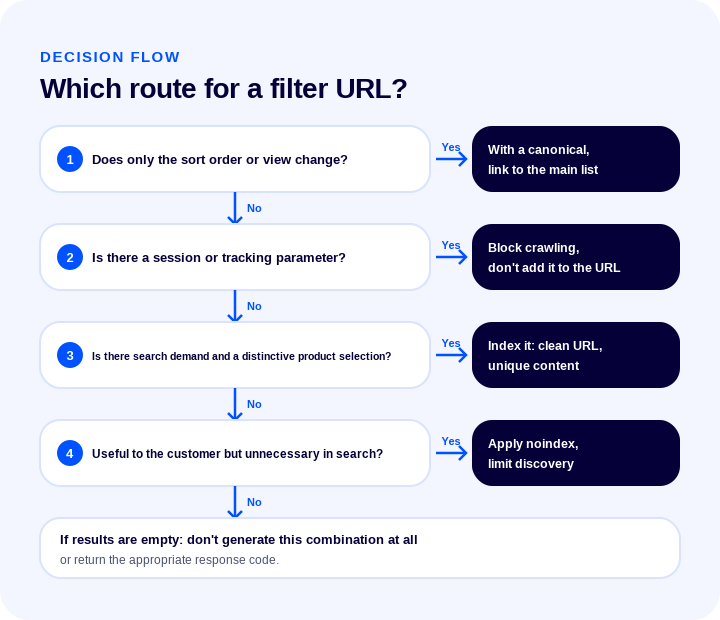
Let us summarize the flow step by step:
- Does the address only change the sorting, display or number of products per page? If yes, tie it to the main list address with a canonical.
- Does the address carry a session or tracking parameter? If yes, close it to crawling and, if possible, never add it to the address.
- Does the combination have search demand and enough distinctive products? If yes, index it with a clean address, a unique title and content, and add it to the sitemap.
- Is the combination useful to the customer but unnecessary in search? If yes, apply noindex and limit its discovery with link structure.
- Is the result empty? If yes, do not create this combination at all or give the appropriate response code.
What Are Common Mistakes in Filtered Navigation?
The most common mistakes in filtered navigation are indexing everything, blocking everything with robots.txt, and giving conflicting signals. The list below gathers the problems most often encountered in stores and their solutions.
| Mistake | Result | The right approach |
|---|---|---|
| Opening all filter combinations to indexing | Duplicate and thin pages pile up in the index, crawl resources are wasted | Open only combinations that are in demand and carry original content |
| Blocking all filter addresses with robots.txt | Valuable brand and color pages are also closed to search | Block only the valueless parameters |
| Applying noindex and also blocking the same address with robots.txt | The bot cannot see the noindex, the address can remain in the index | Choose one of the two; allow crawling in order to remove from the index |
| Putting the same title and description on every filter page | Pages look like copies of each other | Write a unique title and description for each combination |
| Always giving the canonical to the main category, yet wanting to index that filter | The page you want never comes to the fore | The page to be indexed should be self-canonical |
| Returning a success response code on an empty result page | A soft 404 problem arises | Do not produce the empty combination or give the appropriate response |
| Listing non-indexed filter pages in the sitemap | The search engine receives conflicting signals | Only pages to be indexed should be in the sitemap |
| Not fixing the parameter order | Multiple addresses arise for the same list | Fix the parameter and value order |
Why Does Faceted Navigation Matter for Mobile and Speed?
Filters are an interface most customers use on their phones, and every time a filter changes, the page being redrawn or new content being loaded affects speed and experience. Because search engines use the mobile version as the basis, the filter interface must show links and content on the phone as well.
In stores that refresh filter results with scripts, there are two risks: the bot being unable to see the content, and pages being locked into a single URL because the address does not change. Filter pages you want indexed should have their own addresses that show the content even without the script running. For filters that will not be indexed, a script update that does not change the address is a method that naturally solves the crawling problem. For mobile compatibility, see what is mobile SEO; for page experience metrics, see what are Core Web Vitals.
Improving the filter interface for the customer, designing it together with the search box, and usability matters such as filter order are a separate job; we covered them in product filtering and search bar optimization in e-commerce. This article complements that one: there we focus on how the customer uses the filter, here on how the search engine sees filter URLs. The article how to sort products within a category is also useful for ordering decisions within a category.
Recommended readingProduct Filtering and Search Bar Optimization in E-CommerceHow Do You Measure the SEO Impact of Faceted Navigation?
The effect of a faceted navigation setup is tracked in four places: the search engine's coverage report, server logs, crawl statistics, and the search performance of filter pages. Looking at the same indicators before and after the change shows what worked.
- Coverage report. Review the number of indexed pages, pages crawled but not indexed, and blocked pages, along with URL examples. The share of parameterized URLs should decline over time, and the filter pages you want to index should appear in the list.
- Server logs. Look at which URLs the bot visits often. If most visits go to parameterized URLs, the problem persists. If visits shift to product and category pages, the setup is working.
- Crawl statistics. Track the number of pages crawled per day and changes in response times.
- Performance of filter pages. Track the impressions, clicks, and average position of the combinations you index as a separate group. Seeing which filter types bring results informs decisions about new combinations.
- Reading reports. The article how to read an SEO report guides you in interpreting the data correctly.
Be patient when evaluating results: search engines do not apply new signals immediately, and changes in the index can take weeks. Rather than changing many rules at once, proceed step by step; that way it becomes clear which change created which effect.
Faceted Navigation SEO Checklist
The list below gathers items you can use when reviewing your faceted navigation setup; the graphic and the text give the same information.
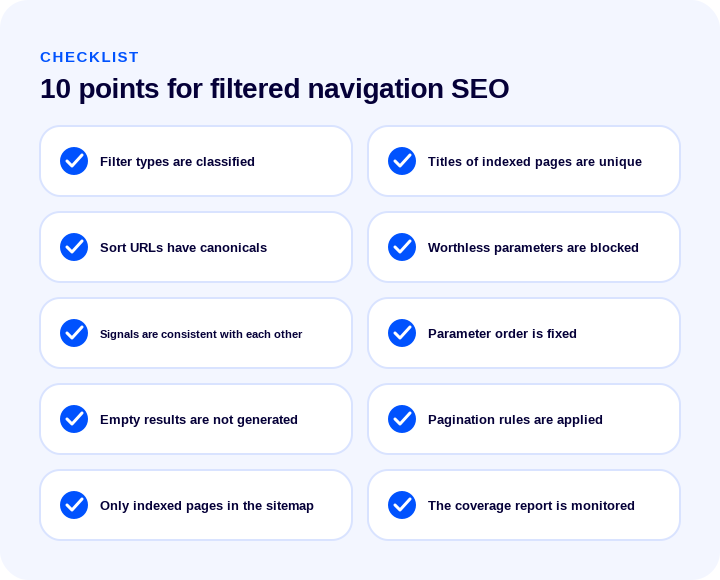
- Filter types are classified as “to be indexed,” “linked with canonical,” and “closed to crawling.”
- Filter pages to be indexed have a clean URL, unique title, description, main heading, and short text.
- Sorting and display URLs are linked to the main listing with canonical.
- Parameters with no value are closed to crawling with robots.txt, but pages to be indexed were not blocked by mistake.
- There is no conflicting signal on the same URL: robots.txt, noindex, canonical, and sitemap are consistent.
- Parameter and value order is fixed; default values are not written into the URL.
- Combinations that return empty results are not generated or return the correct response code.
- Pagination rules are also applied on indexed filter pages.
- The sitemap contains only filter pages to be indexed.
- The coverage report and server logs are monitored regularly.
Getting Ready for Faceted Navigation Management with Faprika
Managing filter URLs depends on how much control you have over your store's SEO infrastructure. In the Faprika plan feature comparison, there is a “Canonical / H Tag Management / Robots / Sitemap” row, a “301 / 302 / 410 Panel / Managing URL Records” row, a “Bulk Automatic SEO/Meta Information Update” row, and an “SEO Reports” row. In the same comparison, product filtering is also listed as a feature. Which management tools each plan includes may vary by plan; for the current scope, see the e-commerce plans page.
According to the SEO settings tutorial in the Help Center, in the control panel under Configuration, Settings, and General Settings, in the SEO section, fields such as the default page title, title template, default meta description, and product meta descriptions can be edited. Templated title and description fields can help you set up unique titles consistently for the pages you decide to index. Which filter combination is served with which tags depends on your store's theme and settings; that is why we recommend checking canonical and robots tags on sample URLs before making a change. For definitive information on how to use features in the panel, rely on the Help Center or our team.
Setting up your catalog and category structure soundly is also a prerequisite for filter management; the topics of catalog management are covered in the catalog tutorial in the Help Center. For broader SEO settings, see how to configure e-commerce SEO settings; for the technical foundation, what is technical SEO; for on-page changes, what is on-page SEO; and for the searches filter pages can target, what is a long-tail keyword. When a URL change is needed, the article what is a 301 redirect guides you in redirecting old URLs.
We recommend readingWhat Is a Long-Tail Keyword?Frequently Asked Questions
What is filtered navigation SEO?
Filtered navigation SEO is the work of managing how the URLs generated by filters that narrow product lists by attributes such as color, size or brand affect search visibility. The goal is to open valuable filter pages to search results while keeping worthless URLs out of crawling and the index.
Should filter pages be indexed?
Not all of them. Combinations that have search demand and offer a sufficient, distinctive product selection (for example a brand or a frequently searched color) can be indexed. URLs with price ranges, sorting, stock status and tracking parameters should not be indexed. The decision depends on the category and on search data.
Should I use canonical or noindex for filter URLs?
If only the order of the same list changes (sorting, view), link it to the main URL with a canonical. If the page is useful to the customer but unnecessary in search, use noindex. The two serve different purposes and should not be used in conflict on the same URL.
Is it right to block filter URLs with robots.txt?
It is right for parameters with no value (session, tracking, sorting) and it protects crawl resources. However, noindex and canonical tags on blocked URLs are not read, and a blocked URL can still appear in the index if it receives links. Make sure you are not accidentally blocking valuable filter pages.
How does filtered navigation affect crawl budget?
Every filter combination produces a new URL; if the bot follows them, thousands of low-value URLs are crawled while new products and updated categories may be discovered late. Blocking worthless URLs from crawling and simplifying the link structure reduces this load.
What should I do about filter combinations that return no products?
Do not generate these combinations at all: show options that return no results as inactive or hide them. If they are generated, the page must return the appropriate response code; presenting an empty page with a success response leads to a soft 404 problem.