

Contents 10 sections
- What Is Technical SEO?
- Why Does Technical SEO Matter?
- What Are the Areas of Technical SEO?
- How Does a Page Get into Search Results?
- Where Should You Start with Technical SEO?
- What Are Common Mistakes in Technical SEO?
- Technical SEO Checklist
- Why Is Technical SEO an Ongoing Job?
- Technical SEO with Faprika
- Frequently Asked Questions
On your e-commerce site, your products may be great, your descriptions careful and your photos beautiful; you may still not show up in search results. Most of the time the cause is not the content. The search engine’s bot may not be able to reach your pages, may not be able to tell which of the pages it reaches is the original version, or your pages may load so slowly that visitors give up before they even see the content. All of these are matters for technical SEO.
In this guide we answer the question what is technical SEO from an e-commerce perspective: its definition, why it matters, its eight main areas (crawling, indexing, URL structure, speed and page experience, mobile friendliness, structured data, redirects and error pages, multilingual setup), the priority order for a new store, a large catalog and a multilingual site, common mistakes and a checklist. This article is the main piece of a series of guides; for the details of each area you will find a link to the related article. At the end there is information about Faprika and a six-question FAQ.
What Is Technical SEO?
Technical SEO is the entirety of infrastructure measures that allow a site to be easily crawled, understood and indexed by search engines. It is concerned not with what the content says but with how the site presents that content.
We can compare a store to a physical shop. Content SEO is the products and labels in the window; link building is the shop being known in the neighborhood; technical SEO is the door being open, the sign being readable, the order of the shelves and the electricity working. If the door is locked, the most beautiful window reaches no one.
Search engines process sites in three stages: they find and read a page (crawling), they add what they read to their records (indexing), and when a query arrives they rank the pages in their records. Technical SEO aims to make the first two stages run smoothly and to lay a solid foundation for the third. Most of the ranking is determined by content and links, which is why the three are considered together.
| SEO type | Main question | Example tasks |
|---|---|---|
| Technical SEO | Can the site be crawled, recorded and is it fast? | Robots rules, sitemap, canonical, speed, redirects |
| Content SEO | Does the page answer the searched question well? | Keyword, title, description, product and category text |
| Link building | Do other sites talk about you? | Backlinks, publicity, partnerships |
Why Does Technical SEO Matter?
Technical SEO matters because it is the prerequisite for all other SEO work: a page that isn’t crawled isn’t indexed, and a page that isn’t indexed appears in no query. It is the foundation that lets the effort put into content pay off.
In e-commerce this topic is even more critical, because e-commerce sites are technically difficult sites. The same product is listed in several categories, color and size filters generate a new URL for every combination, pages of out-of-stock products are left in limbo, campaigns come and go, and the catalog changes every day. A mistake that would go unnoticed for months on a small blog spreads across thousands of pages at once in a store with thousands of products.
A page that can’t be crawled can’t be found
The time search engine bots can spend on your site is limited. If the bot wastes time on useless URLs, endless filter combinations or broken links, it reaches the truly important product and category pages late. We covered this topic in detail in the article what is crawl budget.
Duplicate pages split strength
If the same content can be reached from several URLs, the search engine decides for itself which one to show, and that decision may not be the page you want. Marking the right version is one of the most basic jobs of technical SEO.
A slow, broken experience drives visitors away
If a page opens late, buttons shift while the page loads, or content overflows on a phone, both the visitor and the search engine notice. Speed and experience directly affect conversion; it is not only a ranking matter.
| Technical issue | Effect on the visitor | Effect on the search engine |
|---|---|---|
| Wrong blocking via robots | Invisible; the problem goes unnoticed | Important pages aren’t crawled |
| Duplicate addresses | The same product circulates at different URLs | It becomes unclear which version is the right one |
| Slow page | Bounce rate increases | Page experience looks weak |
| Broken link | Lands on an error page | Crawl time is wasted |
| Broken layout on a phone | Shopping is left unfinished | The mobile version is taken as the basis |
What Are the Areas of Technical SEO?
Technical SEO covers eight main areas: crawling, indexing, URL structure, speed and page experience, mobile compatibility, structured data, redirects and error pages, and multilingual setup. Below you will find the definition of each area and the related detailed article.
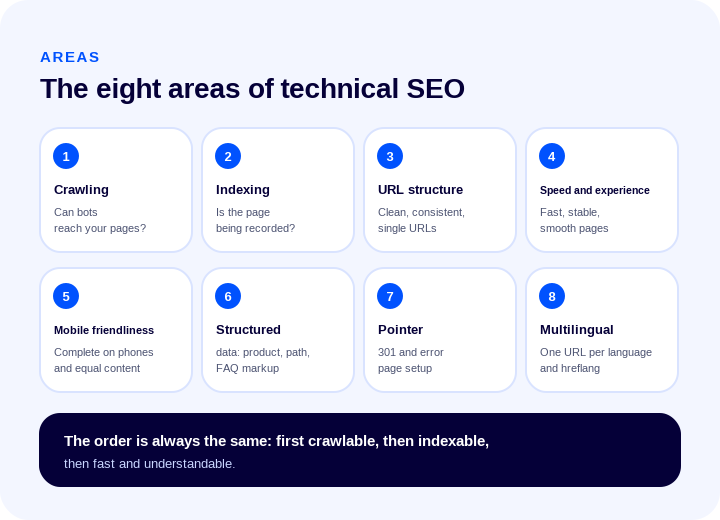
1. Crawling: can bots reach your pages?
Crawling is the search engine bot discovering the pages on your site and reading their content. Three tools determine which pages you direct the bot to and which you keep it away from: the robots.txt file, the sitemap, and internal links.
Robots.txt is a small text file in your site’s root directory that tells bots which sections they should not enter. Sections that do not need to appear in search results, such as the admin panel, cart, checkout and search result pages, are blocked here. The most common and costly mistake is accidentally blocking the entire site during a change. A simple example looks like this:
User-agent: *
Disallow: /sepet
Disallow: /odeme
Sitemap: https://magazaadresiniz/sitemap.xml
The sitemap does the opposite: it tells bots “these pages are important, start here.” An up-to-date sitemap containing only the URLs you want indexed speeds up crawling. For details, see the articles what is robots.txt and what is a sitemap. Managing the bot’s time on large catalogs is a separate topic; the crawl budget article covers it.
Recommended readingWhat Is robots.txt?2. Indexing: is the page being recorded?
Indexing is a crawled page entering the search engine’s records. Not every crawled page is indexed; the search engine may skip duplicate, low-value or blocked pages.
There are two basic tools for managing indexing. The first is the canonical tag: it marks the original version among pages with the same or very similar content. The second is the “noindex” directive: it explicitly tells search engines that a page should not appear in results. The two should not be confused; canonical says “the original version of this page is that one,” while noindex says “do not record this page.” A page accidentally left with noindex is one of the typical reasons products stay out of search for months.
<link rel="canonical" href="https://magazaadresiniz/kadin/ayakkabi/spor-ayakkabi">Because duplicate content is unavoidable in e-commerce, this area takes up a lot of space: the articles what is a canonical tag and what is duplicate content cover common situations such as product variants, filters and supplier descriptions. The guide why isn’t my page indexed offers a step-by-step path for diagnosing why a page is not recorded.
3. URL structure: are addresses clean and consistent?
URL structure is how page addresses are built. A good URL is short, readable, lowercase, hyphen-separated and describes what the content is.
Building the structure consistently is far cheaper than fixing it later, because changing a URL means redirects, internal link updates and temporary fluctuations. Think through the logic of category and product URLs from the start: if you put the category path in the product URL, the URL changes when you move the product to another category. That is why many stores keep the product on its own short URL. For details, see the article how should URL structure be.
Pagination also belongs to this area. When a category with hundreds of products is split into several pages, how the pages link to each other and which one is taken as the basis for indexing become important; the article pagination SEO explains this. Page-level settings such as the title and description are considered alongside this area: the articles how to write a title tag and how to write a meta description cover them.
4. Speed and page experience: are pages fast and stable?
Speed and page experience means how quickly the page opens, when the main content appears, how quickly it responds to a click, and whether elements shift while loading. These three dimensions are measured under the heading of Core Web Vitals.
The things that slow down e-commerce pages the most are well known: oversized images, unnecessarily loaded scripts, third-party add-ons and banners that shift while the page loads. Loading the main image on the first screen with priority, lazy-loading off-screen images and giving every image its dimensions are the three most effective steps. The meaning of the metrics is explained in the article what are Core Web Vitals, the effect of store speed on business results in why e-commerce site speed matters, and image preparation in product image optimization.
5. Mobile compatibility: is everything there on the phone?
Mobile compatibility means the site works completely and comfortably on a phone screen as well. Search engines evaluate the site mainly through its mobile version; content missing on the phone may also count as missing in the evaluation.
A product description hidden on the phone but present on desktop, a shortened category text or a missing image are frequent mistakes. In addition, touch targets must be large enough and separated from each other, text must be readable without zooming, and there must be no horizontal overflow. Details are in the article what is mobile SEO. For stores where most shopping happens on the phone, this area is as decisive as speed.
6. Structured data: describe your page to the search engine with labels
Structured data means marking up the information on the page (product name, price, stock status, breadcrumb path, frequently asked questions) in a standard format that search engines can read directly. It is usually added to the page as JSON-LD.
Correctly implemented data can lay the groundwork for rich displays such as price, stock or stars in search results; the search engine decides on the display itself and it is not guaranteed. The important rule is this: the information you mark up must be exactly the same as the information visible on the page. Marking up a price or rating that does not appear on the page invalidates the data. There are separate data types for products, categories and breadcrumbs; you can find the basics in the article what is structured data and, for breadcrumbs, in what is a breadcrumb. How the page looks in social shares is determined by the Open Graph tag. Image alt text is a close relative of this section: see how to write image alt text.
We recommend readingWhat Is Structured Data?7. Redirects and error pages: where does a removed page go?
A redirect sends a visitor or bot who opens an old URL to the new one; an error page is the response shown to those who reach a URL that does not exist. Together, the two manage the “moved and lost” content of the site.
A 301 redirect is used for every permanently moved URL; it passes most of the old URL’s strength to the new one. Redirect chains (A to B, B to C) waste crawl time and slow things down; every old URL should go directly to the final destination. When a product is permanently discontinued, redirecting to the closest replacement page is better than leaving the visitor on an error page. Details are in the article what is a 301 redirect.
For a URL that truly does not exist, the page must respond with the correct error code (404). If the error page looks like it says “page not found” but a success code is returned behind the scenes, the search engine takes it for a real page and tries to record it. Putting a search box and popular categories on the error page to rescue the visitor is good practice; details are in the article what is a 404 page.
| Situation | Correct behavior | Incorrect behavior |
|---|---|---|
| The URL changed permanently | Send to the new URL with a 301 | Silently deleting the old URL |
| The product was permanently discontinued | Redirect to the closest category or return a 404 | Redirecting everything to the home page |
| A non-existent URL was opened | A 404 code and a helpful page | Showing “not found” with a success code |
| There is a redirect chain | A single step directly to the final destination | Leaving a chain of three or four steps |
8. Multilingual setup: the right URL and signal for every language
Multilingual setup means correctly introducing each language version to the search engine when the site is offered in more than one language or region. Its basic tool is the hreflang tag: it declares which page is the equivalent of which language.
Three rules stand out. Each language version must have its own URL (switching the language with a cookie on the same URL means a single page to the search engine). Language versions must point to each other reciprocally, and each version must also list itself. Each language page must carry its own canonical, not all point to a single language. Translation quality and links going to the right language are as important as technical SEO. Setting up the tag is explained in the article what is the hreflang tag, and a complete multilingual store setup in how to set up a multilingual e-commerce site.
How Does a Page Get into Search Results?
A page gets into search results in three steps: first it is crawled, then indexed, and finally matched to a query and ranked. Technical SEO keeps the first two links of this chain solid and prepares the ground for the third.
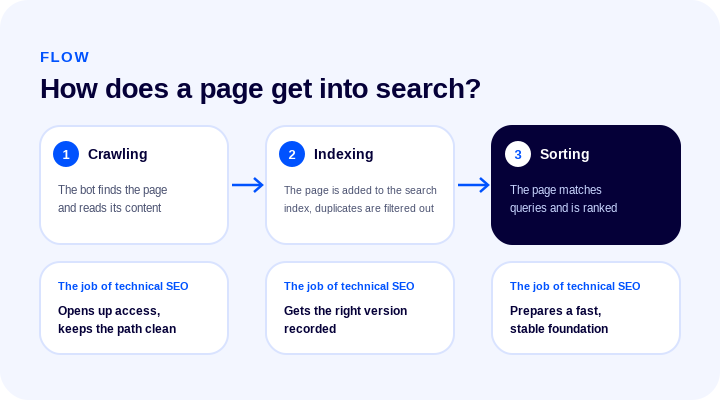
Knowing this chain is very useful for diagnosis. If a product does not show up in search, at which link is the problem? If the bot cannot reach the page at all, there is a crawling problem. If it reaches it but does not record it, there is an indexing problem; the cause may be duplication, noindex or low-value content. If both are fine, what remains is content, intent match and link strength. The article what is search intent helps you understand what the searched query wants, and the article keyword analysis helps with query selection.
| Symptom | Likely link | First place to look |
|---|---|---|
| The page is not found at all | Crawling | Robots rules, sitemap, internal links |
| The page is crawled but not in the index | Indexing | Noindex, canonical, duplicate content |
| It is in the index but does not rank | Sorting | Content, search intent, links, page experience |
| The wrong page shows up | Indexing | Canonical and duplicate pages |
Where Should You Start with Technical SEO?
The starting point depends on the state of your store: a new store should prioritize crawlability and a clean URL structure, a large catalog should prioritize crawl budget and duplicate pages, and a multilingual site should prioritize the URL and signal setup of its language versions. In every case, access and indexing problems come before speed and enrichment.
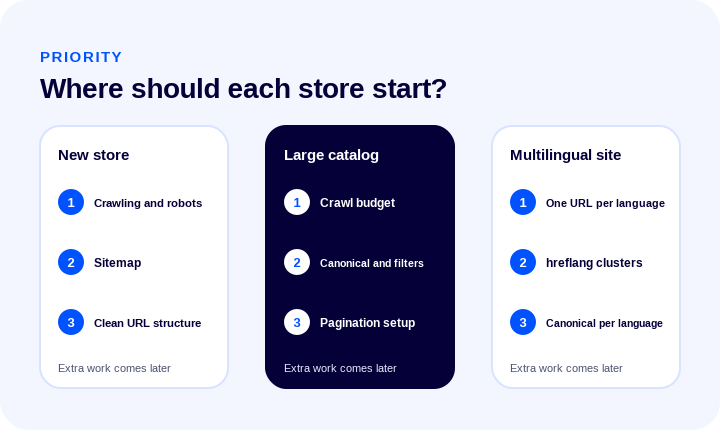
| Store type | 1st priority | 2nd priority | 3rd priority |
|---|---|---|---|
| New store | Crawlability and robots rules | Sitemap | Clean URL structure |
| Large catalog | Crawl budget | Canonical and filter URLs | Pagination setup |
| Multilingual site | One URL per language | hreflang clusters | Canonical per language |
For a new store
In a new store, the goal is for the bot to be able to find the site completely. Verify that the robots file does not block important sections, prepare the sitemap, build the URL structure cleanly from the start and write a unique title and description for every page. Because the store is new, there is little duplication or history to deal with; this is the best opportunity to start in an orderly way. You can use the panel’s SEO settings to manage titles and descriptions in bulk.
For a large catalog
In a catalog with thousands of products, the real problem is scale. Filter and sort URLs multiply the number of pages, the bot spends time on unimportant URLs, and the same product multiplies through variants. Decide which filter combinations are valuable for search; link the worthless ones to the main page with canonical or block them from crawling. Keep pagination consistent, redirect permanently discontinued products, and decide from the start what happens to out-of-stock product pages: the page stays during temporary stock-outs, and a redirect is used when a product is permanently discontinued.
For a multilingual site
Each language version must stand on its own URL with its own canonical, and the versions must point to each other reciprocally with hreflang. It is important to keep language versions together in the sitemap, not to copy untranslated pages into the language folder and leave them, and to offer the language selector as a link (not only through a script). Writing the language into the URL is much safer than switching language on the same URL.
What Are Common Mistakes in Technical SEO?
The most common mistakes are accidentally blocking important pages, pointing the canonical to the wrong page, leaving redirect chains, showing incomplete content on the phone, and publishing changes without checking. Most arise as a side effect of a change.
- Not removing blocks added during testing. A rule that closes the site to crawling before launch staying in place after going live is one of the costliest mistakes. After major changes, check the robots file and page directives.
- Pointing every page’s canonical to the home page. A template error can cause thousands of pages to be tied to a single page. The canonical on each page should point to itself or to the real original version.
- Redirect chains and loops. Redirects added over time pile up. Simplify the chains periodically.
- Blind redirects for discontinued products. Redirecting every discontinued product to the home page can be treated as a soft error in the eyes of the search engine. Redirect to the relevant category.
- An error page returned with a success code. Even if the page says “not found,” if the code is successful it tries to get recorded.
- Unlimited multiplication of filter URLs. If color, size, price and sort combinations are not controlled, crawl budget is dispersed.
- Missing content on the phone version. The description and images visible on desktop must be present on the phone as well.
- Changing without measuring. To see the effect of a change, first record the current state; read the search console reports regularly.
Technical SEO Checklist
The eight-item list below quickly summarizes the technical SEO health of a store. The goal is for every item to get a “yes”; any item that gets a “no” can be resolved by consulting the article for that area.
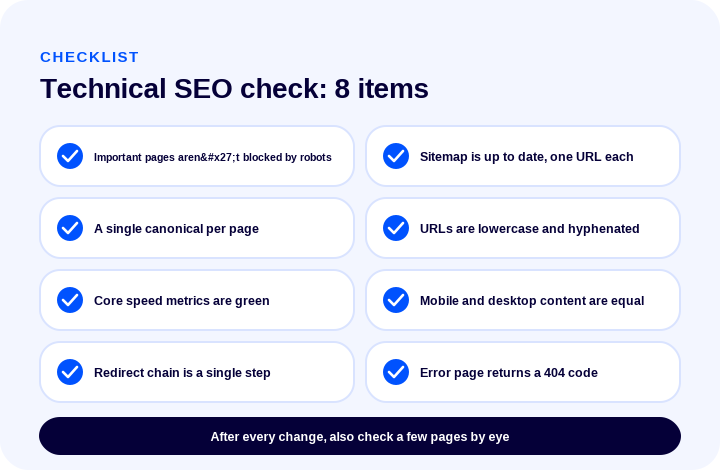
| Check | If yes | If not |
|---|---|---|
| Important pages are not blocked by robots rules | Bot access is open | Review the robots file |
| Sitemap is up to date and at a single address | Discovery is fast | Refresh the sitemap, remove deleted pages |
| There is a single canonical on every page | The preferred version is clear | Check the template and variants |
| URLs are lowercase and hyphenated | Consistent structure | Set a URL rule, set up redirects |
| Core speed metrics are good | The experience is healthy | Reduce image and script load |
| Mobile and desktop content are equal | Mobile compatibility is complete | Open hidden sections on mobile |
| Redirect chain is a single step | Crawl budget is protected | Link chains directly to the target |
| Error page returns a 404 code | Clean records | Fix the error code |
Repeat this list every three months and after major changes (theme update, migration, new language, new category structure). A separate guide has been prepared for a comprehensive audit; you can see how the list is reflected in reports in the How to Read an SEO Report article.
Why Is Technical SEO an Ongoing Job?
Technical SEO is not a one-time setup but ongoing maintenance, because an e-commerce site is constantly changing. Every new product, new category, new campaign, new add-on and new language can affect the technical structure.
A practical routine could look like this: check crawl and indexing errors in the search console weekly; check sample pages after every major change; review the checklist from start to finish every three months; and reassess the URL structure, category logic and speed budget once a year. This routine ensures that small problems are caught before they grow. When you notice a problem, rather than making panicked bulk changes, it is best to first find out which link in the chain it sits in (crawling, indexing or ranking).
Articles, products and campaigns all rise on top of this structure. A solid technical foundation makes it easier for every investment in content and links to pay off; that is why technical SEO is not a job to be “done first and then forgotten” but a habit to be “maintained at all times.”
Technical SEO with Faprika
Faprika’s plan feature comparison includes a few rows that directly concern technical SEO: “Canonical / H Tag Management / Robots / Sitemap”, “301 / 302 / 410 Panel / Managing URL Records”, “Bulk Automatic SEO/Meta Information Update” and “SEO Reports”. What each plan covers for these features may vary by plan; for the current scope, see the e-commerce plans page.
As explained in the Faprika training pages, SEO fields used across your entire site, such as the default page title, title template and separator, and default description, are edited from the general settings in the control panel; details are in the SEO settings tutorial. The small, medium and large sizes of images and the content delivery network (CDN) address are defined in the panel’s media settings; this helps serve images at the right size for speed. Details are in the media settings tutorial. Organizing the category structure and the product catalog is covered in the catalog management tutorial.
Faprika’s own site is published with this same approach: each page is served with its own canonical, language versions of multilingual pages are linked to each other with hreflang, and blog posts include a breadcrumb trail and structured data. You can review with the Faprika team which technical SEO settings you can manage from the panel and which are included in your plan.
Frequently Asked Questions
What is technical SEO?
Technical SEO is the sum of infrastructure measures that let search engines easily crawl, understand and index a site. Robots rules, sitemap, canonical, URL structure, speed, mobile friendliness, structured data, redirects and multilingual setup are its main areas.
What is the difference between technical SEO and content SEO?
Content SEO is about how well a page answers the question being searched, while technical SEO is about how accessible and understandable the site makes that content. Neither replaces the other: good content can stay invisible because of a technical barrier, and a technically flawless site will not rank with weak content.
Where should I start with technical SEO?
Start with access and indexing problems: robots rules, sitemap, canonical and noindex settings. Then come URL structure, speed and mobile friendliness. For a new store, crawlability is the priority; for a large catalog, crawl budget and duplicate pages; for a multilingual site, the URL structure of the language versions.
Can I do technical SEO myself?
The store manager can handle the basics (title and description, sitemap, image sizes, redirects) from the panel. More advanced topics (crawl budget, multilingual setup, scale issues) may require developer or expert support. Which settings are available in the panel varies by your plan.
Does technical SEO alone improve rankings?
No. Technical SEO removes the obstacles in front of ranking and prepares the ground; content quality, search intent match and links also determine ranking. Visibility can increase once technical problems are solved, but this is not guaranteed.
How often should technical SEO be checked?
A common and sufficient routine is to look at crawl and index errors in the search console weekly, check sample pages after major changes (theme, migration, new language, new category structure) and repeat the full checklist every three months.