Tools/Equipment
How can I change a domain's NS?
What is a nameserver, what does it do, and how is a domain name pointed? In this guide, you can learn step by step how domain redirection is done using the Faprika e-commerce infrastructure. Discover how easy-to-remember domain names are matched to IP addresses and how this process is part of your internet experience.
What Is a Nameserver and What Does It Do?
The internet world holds far more than meets the eye, and accessing a website is actually made possible by a series of technical operations coming together. One of the critical points of this process is "Nameservers", that is, name servers. So, what is a nameserver and what does it do? How can you point your domain and integrate it into the Faprika e-commerce infrastructure? In this guide, we explain everything you need to know about nameservers and the domain redirection process step by step.
A nameserver is a server that holds records specifying which IP addresses domain names on the internet correspond to. For example, many users can easily remember a domain name like www.google.com. But in fact, every website is hosted on an IP address, and these IP addresses form the basis of communication between computers. Nameservers direct the domain name entered by the user to the relevant IP address, making websites easily accessible.
Nameservers are the key point in determining the IP address related to the domain name entered by the user; they therefore act as a kind of bridge. For example, when a user wants to visit the address "www.google.com", this request is first sent to the nameservers. The nameservers determine which IP address this domain name corresponds to and pass this information to the computer. In this way, the computer connects directly to the relevant server and access to the website is provided.
Nameservers are indispensable components for the internet to function smoothly. Accessing websites using domain names is possible only thanks to nameservers.
How Can I Change the Domain Nameserver (Name Servers)?
Changing the nameservers (name servers) is an important step in the process of pointing your website. To make this change, you need to follow certain steps. So, how is a domain nameserver change made?
To start the nameserver change process, you first need to log in to the management panel of the company where you purchased your domain. In this example, we will use the management panel of the company İHS.
When you reach your management screen, find the "Change Nameserver" section and enter this area.
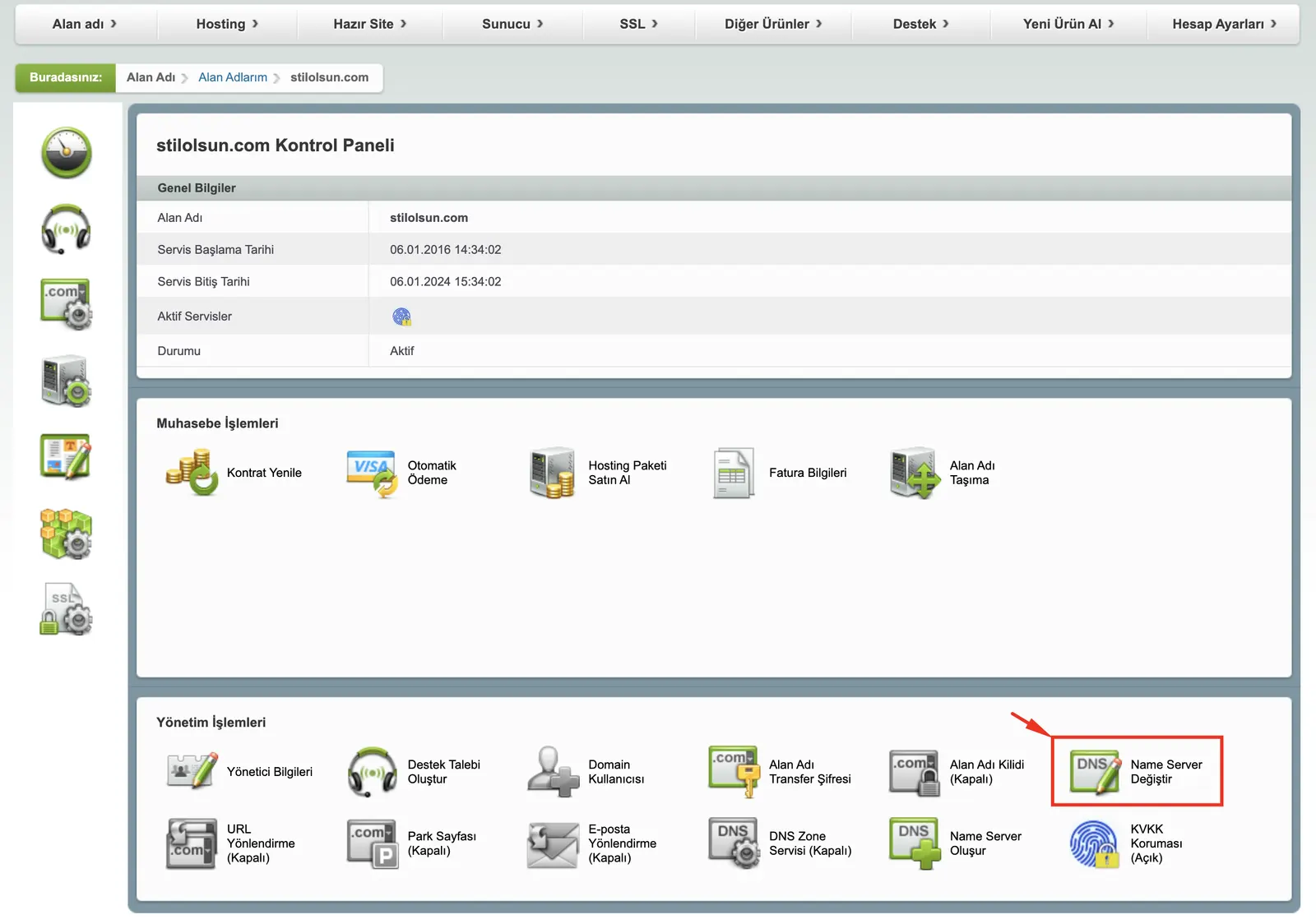
In the relevant field in the "Change Nameserver" area, you need to enter the Nameserver information we have specified below.
To use the Faprika E-Commerce infrastructure, you need to point your domain to the following addresses:
- ns1.faprika.net
- ns2.faprika.net
- ns3.faprika.net
- ns4.faprika.net
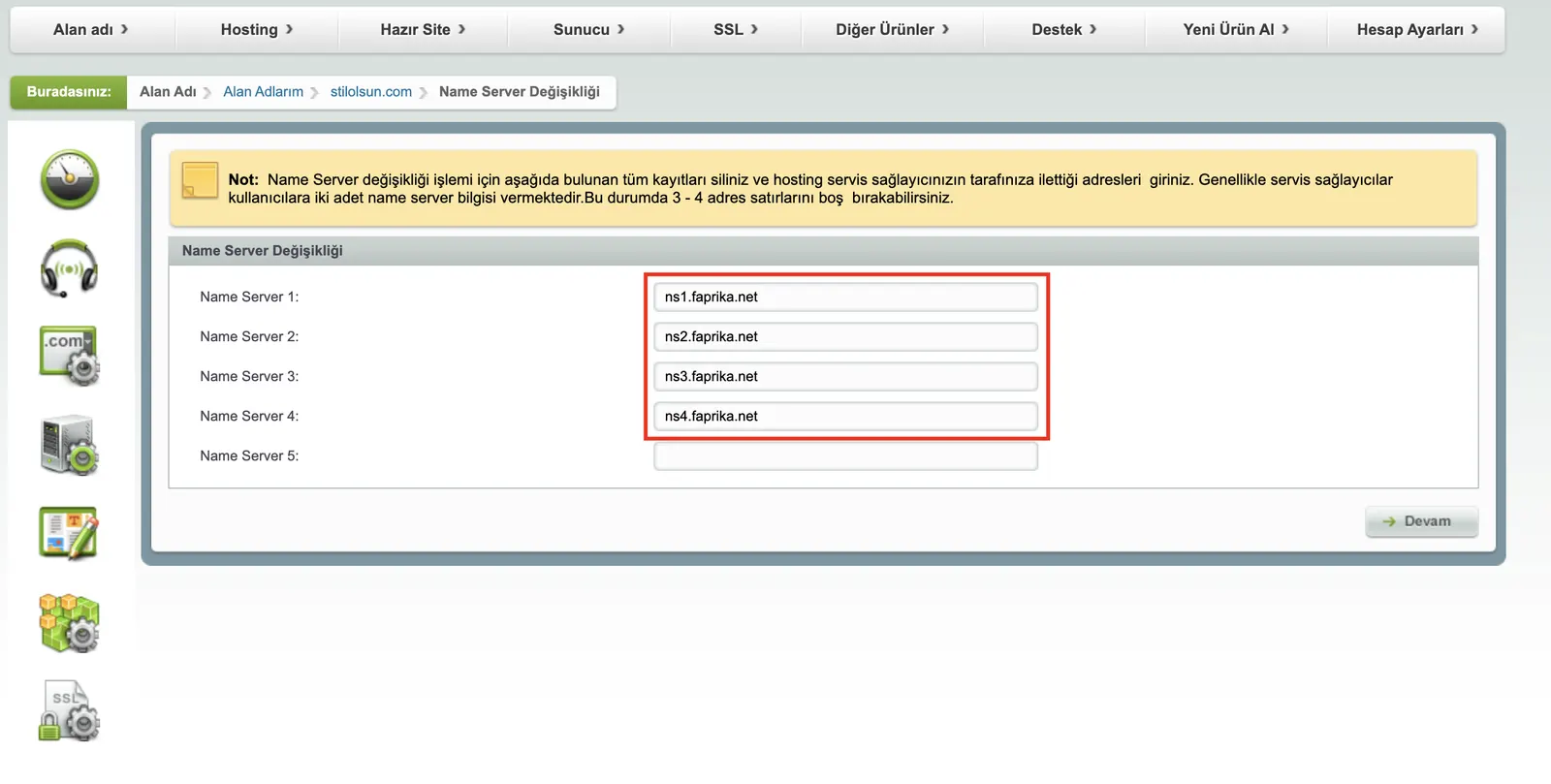
By updating your nameserver information, you will have pointed your domain to Faprika servers. It may take approximately 24 hours for this change to propagate to all global servers. During this process, you can check the status from time to time at https://intodns.com.
In this guide, we covered in detail what a nameserver is, what it does, and how to change a domain's nameservers. While setting up your own online store using the Faprika e-commerce infrastructure, you can complete your tasks successfully by following these steps in full. Remember, Faprika support is by your side for any issue. We wish you success!