Catalog
Panel Management
Our Faprika Panel Management training page explains core functions such as products, categories, brands, and cart variations step by step so you can manage your e-commerce business with ease. Everything you need for successful online trade is here.
E-commerce is where Faprika stands as a supportive partner for entrepreneurs who want to succeed quickly: Faprika e-commerce lets you add your products to the system easily and start selling without wasting time. When you log in to the Faprika e-commerce admin panel, you will see the screen below.
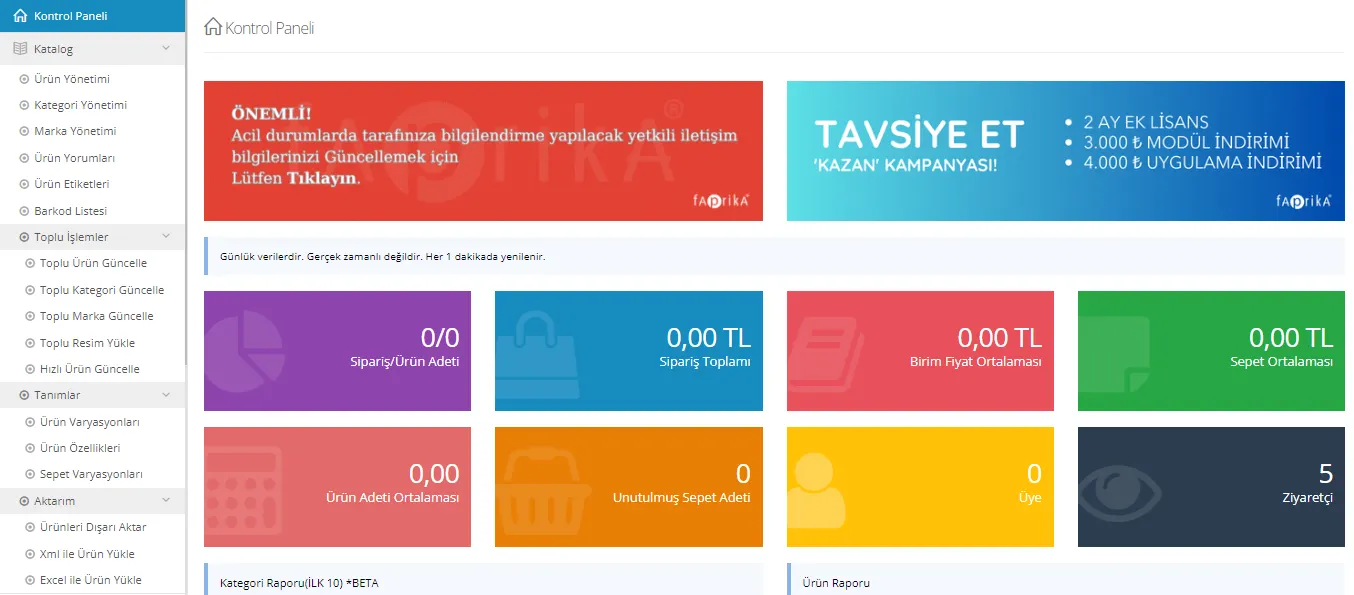
The Faprika e-commerce panel has listed categories so that you can carry out your tasks. These categories are as follows:
- Catalog
- Product Management
- Add New Product
- Add Standard Product
- Add Grouped Product
- Add Serialized Product
- Category Management
- Brand Management
- Product Tags
- Bulk Operations
- Bulk Product Update
- Bulk Category Update
- Bulk Brand Update
- Bulk Image Upload
- Definitions
- Product Variations
- Product Attributes
- Cart Variations
- Transfers
- Orders
- Cart List
- Wishlist
- Transfer
- Users
- User Groups
- Online Users
- Suppliers
- Sales Partnership
- API Users
- Activity Log
- Discounts
- Push Notifications
- Content Management
- Pages
- Frequently Asked Questions
- Menu Management
- Slider Management
- Showcase Management
- Script Management
- Message Templates
- Print Templates
- Announcements
- Blog
- Settings
- Store Management
- Countries
- Language
- Currency
- Email Accounts
- Tax
- Shipping
- Permissions
- External Verification Methods
- Modules
- Email Queue
- Maintenance
- Scheduled Tasks
- System Information
- URL Redirect Records
- Templates
- Reports
- Order Reports
- Add-ons
- Aras Kargo
- Criteo
- Facebook Pixel
- Google Ads (Adwords)
- Google Analytics
- DHL Kargo
- Nebim
- Sürat Kargo
- Telsam
- UPS Kargo
- Yurtiçi Kargo
- Trendyol Integration
- Product Management
- Category Management
- Brand Management
- Order Management
You can find details about the categories by clicking the headings.
These categories have very practical integrations for adding products faster, tracking shipments, updating stock, and organizing campaigns. This allows you to move forward with practical solutions in every area an e-commerce site may need and to offer your customers the highest quality service. Of course, to get the most benefit from Faprika’s software that makes e-commerce easier, the panel must be used correctly.
You can find all the details about the Management Panel in our training content.