Configuration
Slider Settings Management
What Are Slider Settings? This is the area where we can edit the slider settings, such as the slider's transition effects, how long it stays on screen, its dimensions, and so on.
What Are Slider Settings?
This is the area where we can edit the slider settings, such as the slider's transition effects, how long it stays on screen, its dimensions, and so on.
How Can I Access Slider Settings?
You can access this area by following the steps “Configuration >> Settings >> Slider Settings”. Now let's look at what we can do on this screen.
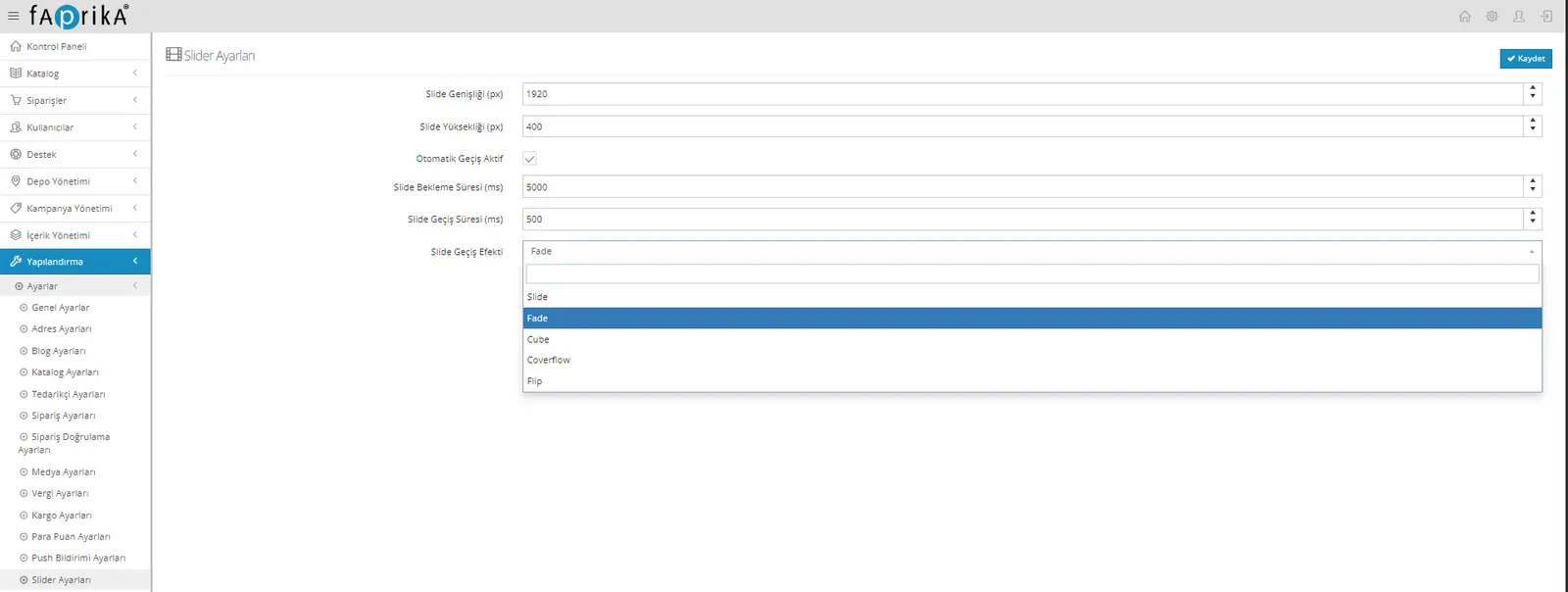
Slide Width (px): The field where we can set the width in pixels.
Slide Height (px): The field where we can set the height in pixels.
Auto Transition Active: If we want the images we upload to change automatically in sequence, we can activate this field.
Slide Wait Time (ms): In this field we can set how many milliseconds each image should stay on screen while the images change in sequence.
Slide Transition Duration (ms): We can set the speed of the transition, manual or automatic, in milliseconds.
Slide Transition Effect: From this field we can choose the effects used when images change, such as Fade, Cube and Coverflow.