Configuration
Tax Settings Management
What Are Tax Settings?
This is the area where we can configure settings such as the tax rates for products, shipping fees and payment type service fees.
How Can I Access Tax Settings?
We can access this area by following the steps “Configuration >> Settings >> Tax Settings”. Now let's look at what we can do on this screen.
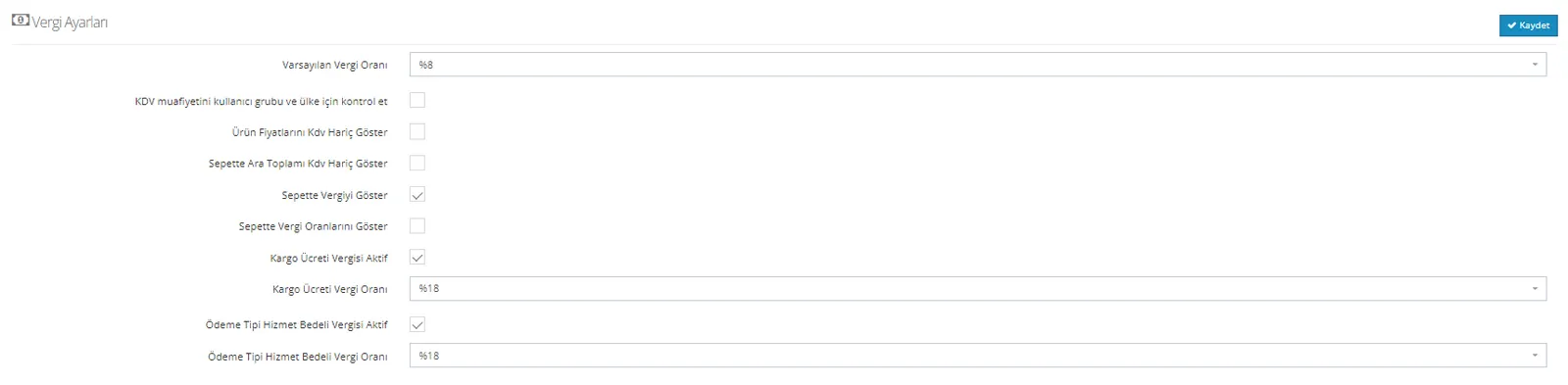
Default Tax Rate: This is where we determine the rate at which newly added products will be created.
Note: This setting does not change the tax rates of existing products. It applies to newly added products.
Check VAT Exemption for User Group and Country: If there is a country we want to exempt from VAT, we must activate this field.
Note: In addition, we must go into the relevant country on the “Configuration >> Countries” screen and activate “VAT Exemption” as well.
Show Product Prices Excluding VAT: Lists product prices without VAT.
Show Cart Subtotal Excluding VAT: Shows the total price of the products excluding tax.
Show Tax in Cart: Shows the tax applied to the products in the cart.
Show Tax Rates in Cart: Shows in the cart the tax rate you apply to products, shipping and payment types.
Shipping Fee Tax Active: We need to activate this field in order to apply a tax rate to the shipping fee.
Shipping Fee Tax Rate: We determine the rate at which we want to apply tax to the shipping fee in this field.
Payment Type Service Fee Tax Active: We need to activate this field in order to apply a tax rate to the payment type.
Payment Type Service Fee Tax Rate: We determine the tax rate we want to apply to the payment type service fee in this field.